
Java使用ftl模板文件生成Word
一、写在前面
最近在项目中使用打印功能,发现这个功能我已经写过多次了,下面这个文章的发步日期在2020年,不得不感慨时间之快啊。
https://blog.csdn.net/weixin_/article/details/?spm=1001.2014.3001.5501
下面介绍一下应用场景:这次项目依旧是springboot项目,使用ftl模版生成的word文件。比上一版相比更加灵活而且实用性更高,还可插入base64图片进行展示
关于ftl模板我会简单介绍一下使用的心得,其实也是一些标签而已,熟悉以后操作起来也比较快
二、word转ftl模板,ftl标签简单介绍
1.找到使用的word模板(如图是我自己编写的一个word模板,后续会以此进行操作)
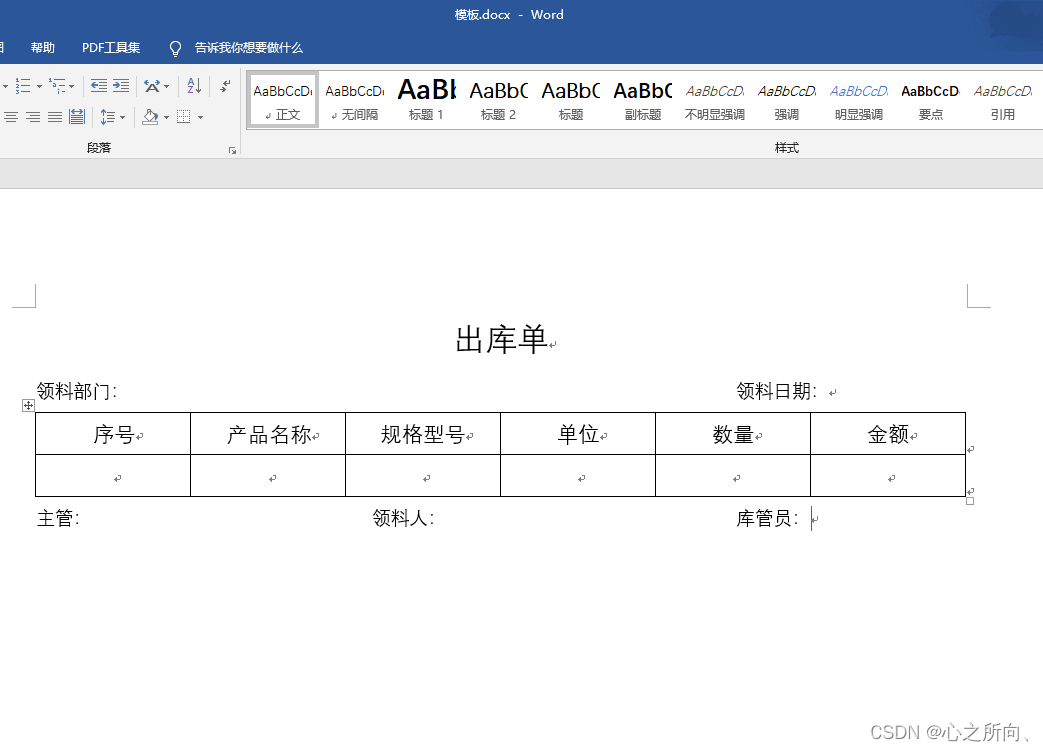
2.左上角点击另存为xml文件

3.直接将保存的xml文件改后缀名为 ftl 然后放到项目 resources/static 目录下。进去之后idea会自动格式化,如果没有,建议按ctrl+f搜索对应的汉字进行定位(注:模板必须在static目录下,改个英文名防止乱码)
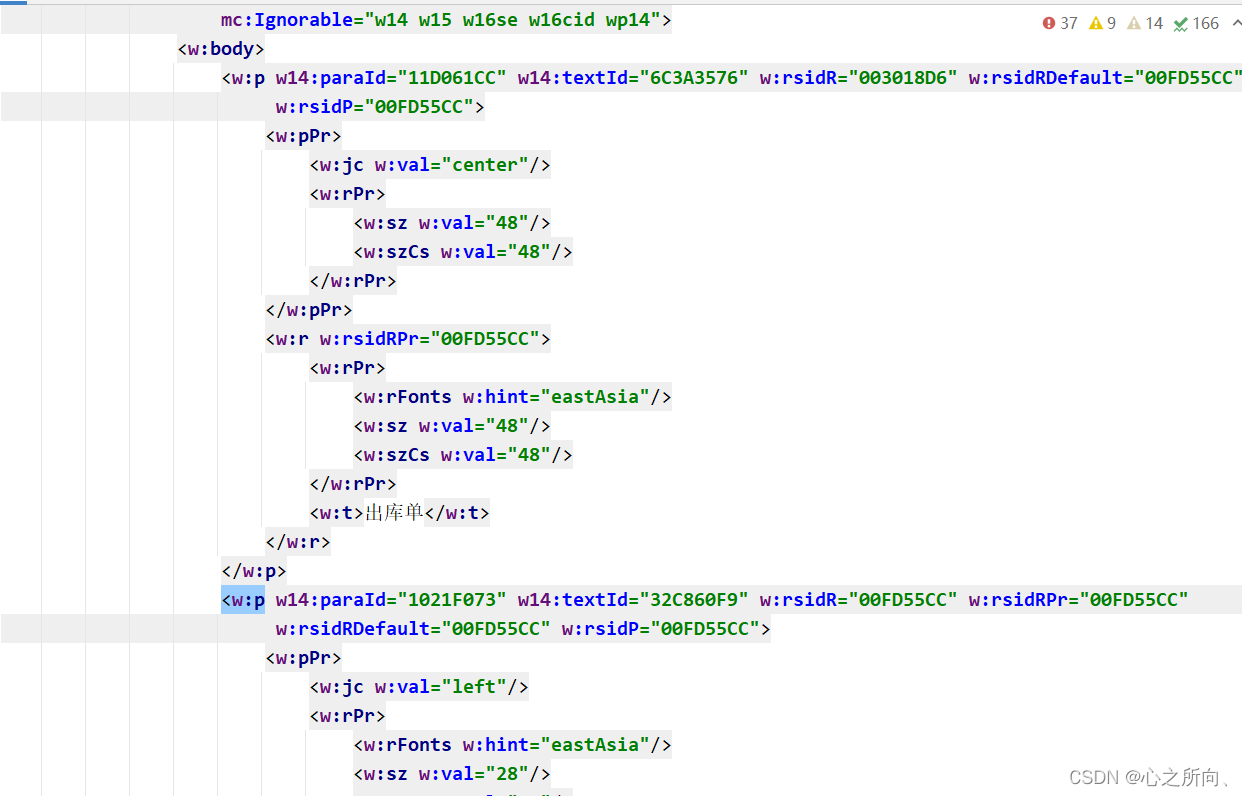
4.标签及语法
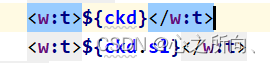
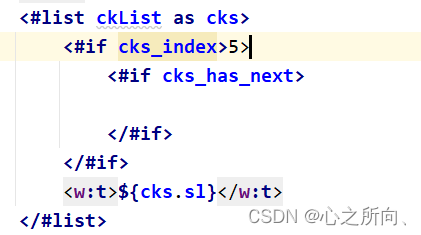
(1)替换标签可以是对象点属性也可以是单个变量
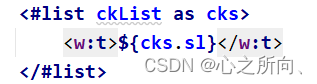
(2) 循环标签,如图会根据list的大小进行循环赋值

(3)判断标签如图,第一个为判断cks遍历下标是否大于5,第二层为判断cks是否拥有下一个数据
5.代码编写
1.导入maven依赖,freemarker和word工具类依赖aspose-words,后者可点击下载,下载jar包后自行打入maven仓库,我是直接导入的依赖坐标
<dependency> <groupId>org.freemarker</groupId> <artifactId>freemarker</artifactId> </dependency> <dependency> <groupId>com.luhuiguo</groupId> <artifactId>aspose-words</artifactId> <version>22.10</version> </dependency> 讯享网
2.模板替换工具类
讯享网 import freemarker.template.Configuration; import freemarker.template.Template; import freemarker.template.Version; / * * @param dataMap 存储数据的map集合 * @param savePath 生成word保存路径 */ public static void ftl2Word(Map<String, Object> dataMap, String savePath) {
    try {
    Configuration configuration = new Configuration(new Version("2.3.0")); configuration.setDefaultEncoding("utf-8"); //.ftl配置文件所在路径 Template template = configuration.getTemplate("demo.ftl", "utf-8"); /*File file = new File("resources/static"); String absolutePath = file.getAbsolutePath();*/ //上面获取路径有bug,absolutePath 既存demo.ftl的路径,不包含demo.ftl // 如:D:\IdeaProjectsTwo\beauty-master\beauty-main\src\main\resources\static configuration.setDirectoryForTemplateLoading(new File(absolutePath)); //输出文档路径及名称 File outFile = new File(savePath); Writer out = new BufferedWriter(new OutputStreamWriter(new FileOutputStream(outFile), "utf-8"), 10240); template.process(dataMap, out); out.close(); } catch (Exception e) {
    e.printStackTrace(); } }
3.word工具类
/ * @Author: SongTiankai * @Description: word工具类 * @Date: 2022/12/9 19:34 * @Version: 1.0 */ public class WordUtil {
    / * @Description: 验证aspose.word组件是否授权:无授权的文件有水印标记 */ public static boolean isWordLicense() {
    boolean result = false; try {
    String s = "<License><Data><Products><Product>Aspose.Total for Java</Product><Product>Aspose.Words for Java</Product></Products><EditionType>Enterprise</EditionType><SubscriptionExpiry></SubscriptionExpiry><LicenseExpiry></LicenseExpiry><SerialNumber>8bfe198c-7f0c-4ef8-8ff0-acc3237bf0d7</SerialNumber></Data><Signature>sNLLKGMUdF0r8O1kKilWAGdgfs2BvJb/2Xp8p5iuDVfZXmhppo+d0Ran1P9TKdjV4ABwAgKXxJ3jcQTqE/2IRfqwnPf8itN8aFZlV3TJPYeD3yWE7IT55Gz6EijUpC7aKeoohTb4w2fpox58wWoF3SNp6sK6jDfiAUGEHYJ9pjU=</Signature></License>"; ByteArrayInputStream inputStream = new ByteArrayInputStream(s.getBytes()); com.aspose.words.License license = new com.aspose.words.License(); license.setLicense(inputStream); result = true; } catch (Exception e) {
    e.printStackTrace(); } return result; } public static void word2pdf(String docPath, String savePath) {
    try {
    String s = "<License><Data><Products><Product>Aspose.Total for Java</Product><Product>Aspose.Words for Java</Product></Products><EditionType>Enterprise</EditionType><SubscriptionExpiry></SubscriptionExpiry><LicenseExpiry></LicenseExpiry><SerialNumber>8bfe198c-7f0c-4ef8-8ff0-acc3237bf0d7</SerialNumber></Data><Signature>sNLLKGMUdF0r8O1kKilWAGdgfs2BvJb/2Xp8p5iuDVfZXmhppo+d0Ran1P9TKdjV4ABwAgKXxJ3jcQTqE/2IRfqwnPf8itN8aFZlV3TJPYeD3yWE7IT55Gz6EijUpC7aKeoohTb4w2fpox58wWoF3SNp6sK6jDfiAUGEHYJ9pjU=</Signature></License>"; ByteArrayInputStream is = new ByteArrayInputStream(s.getBytes()); License license = new License(); license.setLicense(is); com.aspose.words.Document document = new com.aspose.words.Document(docPath); document.save(new FileOutputStream(new File(savePath)), SaveFormat.PDF); } catch (Exception e) {
    e.printStackTrace(); } } public static void word2Image(String docPath, String savePath) {
    try {
    String s = "<License><Data><Products><Product>Aspose.Total for Java</Product><Product>Aspose.Words for Java</Product></Products><EditionType>Enterprise</EditionType><SubscriptionExpiry></SubscriptionExpiry><LicenseExpiry></LicenseExpiry><SerialNumber>8bfe198c-7f0c-4ef8-8ff0-acc3237bf0d7</SerialNumber></Data><Signature>sNLLKGMUdF0r8O1kKilWAGdgfs2BvJb/2Xp8p5iuDVfZXmhppo+d0Ran1P9TKdjV4ABwAgKXxJ3jcQTqE/2IRfqwnPf8itN8aFZlV3TJPYeD3yWE7IT55Gz6EijUpC7aKeoohTb4w2fpox58wWoF3SNp6sK6jDfiAUGEHYJ9pjU=</Signature></License>"; ByteArrayInputStream is = new ByteArrayInputStream(s.getBytes()); License license = new License(); license.setLicense(is); com.aspose.words.Document document = new com.aspose.words.Document(docPath); document.save(new FileOutputStream(new File(savePath)), SaveFormat.PNG); } catch (Exception e) {
    e.printStackTrace(); } } }
6.工具测试
1.测试代码
讯享网@ApiOperation("word测试接口") @PostMapping("/testCreat") public ResultData testCreat() {
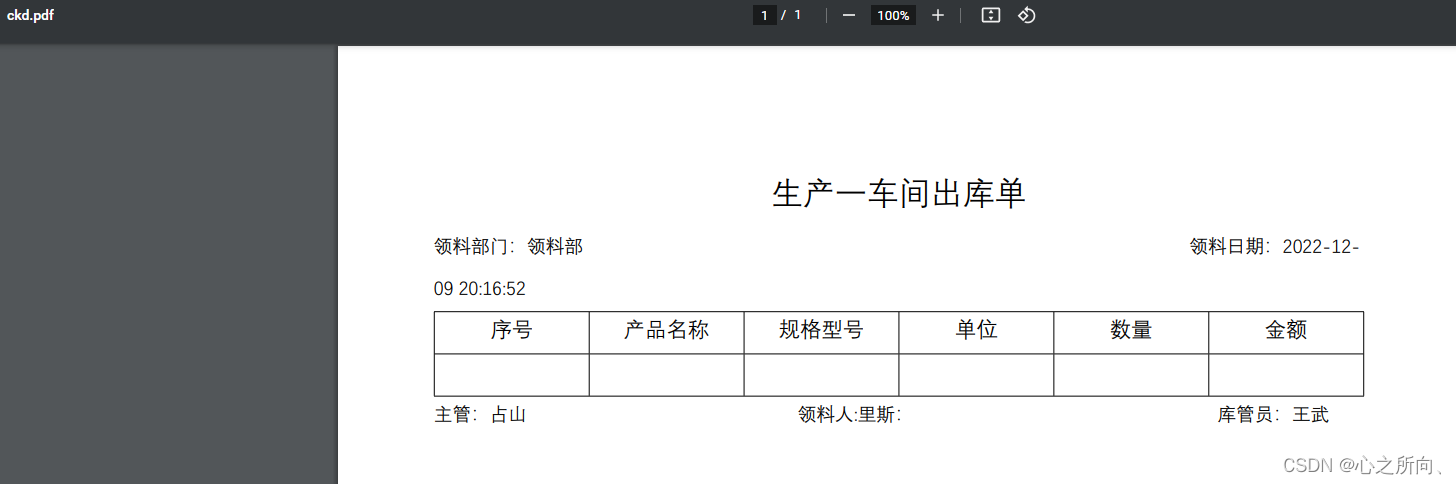
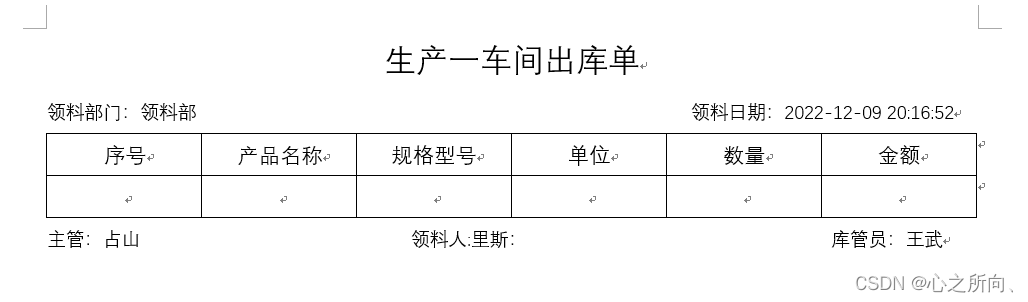
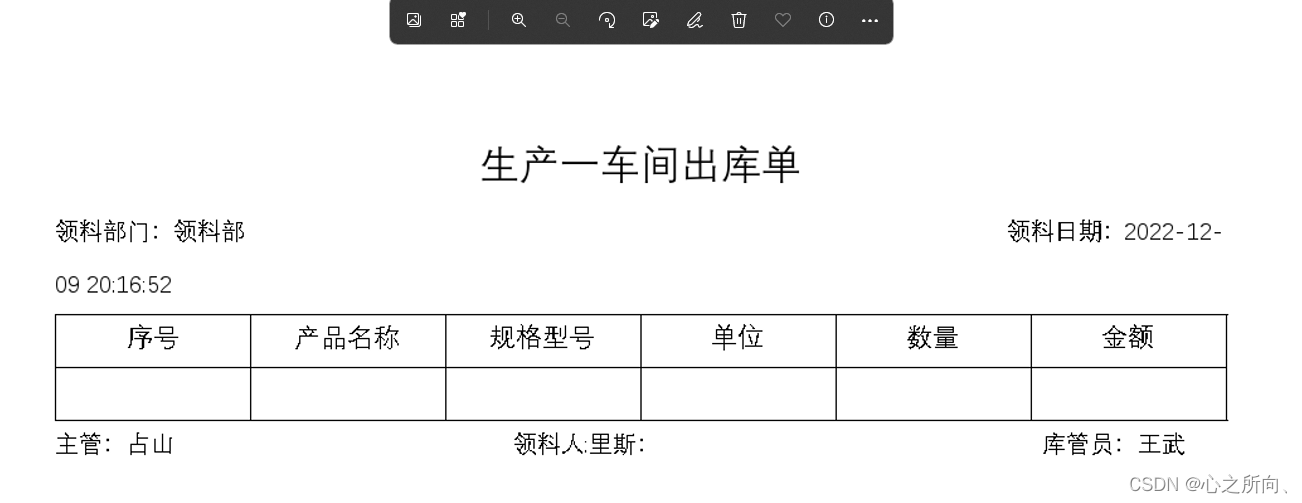
    Map<String, Object> dataMap = new HashMap<>(); dataMap.put("ckd", "生产一车间"); dataMap.put("llrq", DateUtil.format(new Date(), "yyyy-MM-dd HH:mm:ss")); dataMap.put("llbm", "领料部"); dataMap.put("kgy", "王武"); dataMap.put("zg", "占山"); dataMap.put("llr", "里斯"); WordUtil.ftl2Word(dataMap, "D:\\home\\word\\ckd.doc"); WordUtil.word2Image("D:\\home\\word\\ckd.doc", "D:\\home\\word\\ckd.png"); WordUtil.word2pdf("D:\\home\\word\\ckd.doc", "D:\\home\\word\\ckd.pdf"); return new SuccessResultData(); }
2.pdf
3.word
4.png
7.小结
至此功能实现,今天太晚了,明天研究一下路径获取,更新后给大家贴代码!
如果对你有帮助,希望可以一键三连!
感谢!
版权声明:本文内容由互联网用户自发贡献,该文观点仅代表作者本人。本站仅提供信息存储空间服务,不拥有所有权,不承担相关法律责任。如发现本站有涉嫌侵权/违法违规的内容,请联系我们,一经查实,本站将立刻删除。
如需转载请保留出处:https://51itzy.com/kjqy/14092.html