
1.Vuex是做什么的
把需要多个组件共享的变量全部存储在一个对象里
将这个对象放在顶层的vue实例中,让其他组件可以使用
这样,多个组件就可以共享这个对象中的所有变量属性
2.Vuex使用
npm install vuex -- save // src>store>index.js import Vue from 'vue' import Vuex from 'vuex' Vue.use(Vuex) export default new Vuex.Store({ state: { }, getters: { }, mutations: { }, actions: { }, modules: { } }) // main.js import store from './store' new Vue({ router, store, render: h => h(App) }).$mount('#app') 讯享网

讯享网
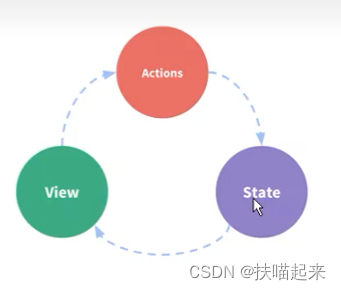
state状态:展示在view视图
view视图:发生action行为
action行为:行为改变state状态
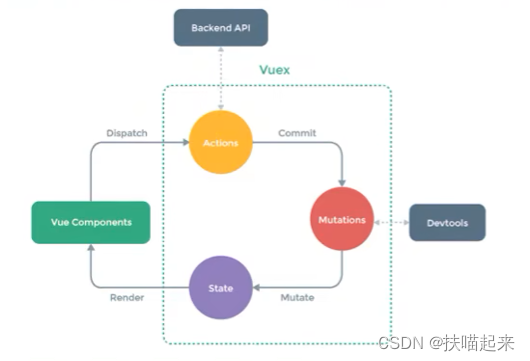
3.vuex-devtools和mutations
- vuex-devtools一个浏览器插件
- mutations(事件及传参)
讯享网// src>store>index.js export default new Vuex.Store({ state: { counter:1000 }, mutations: { increment(state){ state.counter++ }, incrementCount(state,count){ state.counter += count } } })
<!-- page.vue --> <p>{


{$store.state.counter}}</p> <button type="button" @click="add">+</button> <button type="button" @click="addCount(5)">+5</button> <script> add(){ this.$store.commit('increment') }, addCount(count){ this.$store.commit('incrementCount',count) } </script>- getters(对state数据进行计算,传参)
讯享网state: { counter:1000, people:[ {name:'张三',age:90}, {name:'李四',age:40}, {name:'王五',age:10} ] }, getters: { powerCounter(state){ return state.counter * state.counter }, peoplein(state){ return function (inputage) { return state.people.filter(function(item){ return item.age > inputage }) // return state.people.filter(item => item.age >40) } } }, <p>{


  {$store.getters.powerCounter}}</p> <p>getter传参:{


  {$store.getters.peoplein(10)}}</p>
4.state单一状态树
整个项目只有一个store,便于数据维护和管理
5.commit的提交风格

6.motation响应规则
- 使用Vue.set(obj,'newProp',123) 例:Vue.set(state.peo,'address',‘洛杉矶’)
- 用新对象给旧对象重新赋值 例:state.peo.name = ‘zyn’
如果motation里的方法直接修改state的值,虽然修改成功了,但不会响应在页面上,
7.action
因为motation里的方法必须是同步的,devtool可以帮助我们捕捉motation的快照
当motation出现异步方法,state的值已经发生改变,但是devtool捕捉不到,就发生错误
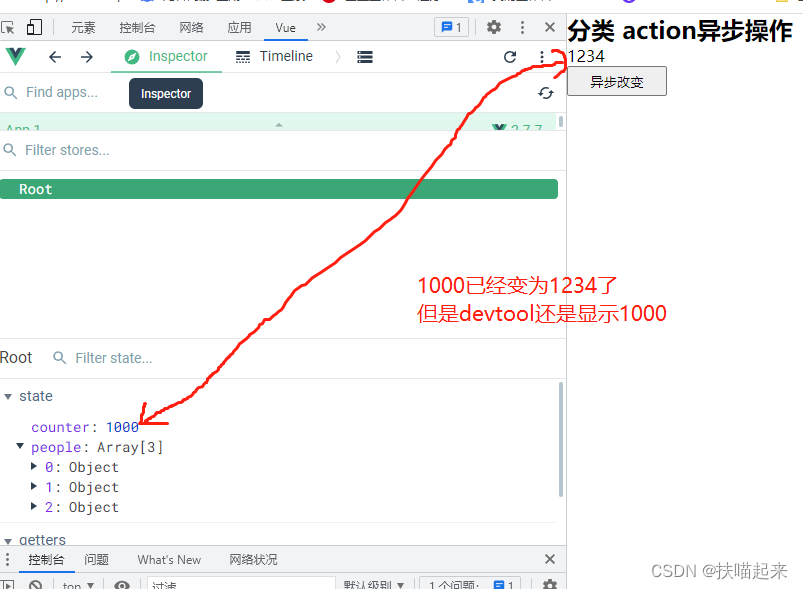
解决办法: 使用action
<button type="button" @click="changeyes">异步改变(devtools捕获到)</button> changeyes(){ console.log(this.$store) this.$store.dispatch('asynChangeYse') } //src>store>index.js mutations: { asynChange2(state){ state.counter = 5678 } }, actions: { asynChangeYse(context){ setTimeout(()=>{ context.commit('asynChange2') },1000) } },dispatch可以返回一个promise
讯享网//src>store>index.js actions: { asynChangeYse(context,payload){ return new Promise((resolve,reject)=>{ setTimeout(()=>{ context.commit('asynChange2') resolve('actions执行完后返回的参数') },1000) }) } }, //页面 changeyes(){ this.$store.dispatch('asynChangeYse') .then(res=>{ console.log(res) }) }
8. module
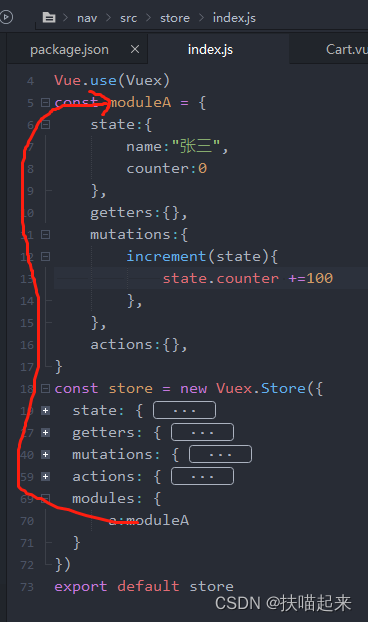
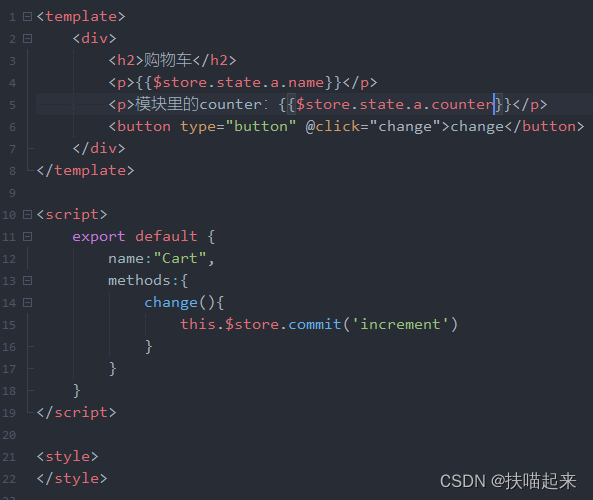
当vuex里的数据过于臃肿,vuex允许将store分格成模块,每个模块有自己的state,mutation,action,getters。
版权声明:本文内容由互联网用户自发贡献,该文观点仅代表作者本人。本站仅提供信息存储空间服务,不拥有所有权,不承担相关法律责任。如发现本站有涉嫌侵权/违法违规的内容,请联系我们,一经查实,本站将立刻删除。
如需转载请保留出处:https://51itzy.com/kjqy/135688.html