
前言:
该demo使用springboot框架通过fop使用xslt模板将xml数据转换成pdf文件,解决了 生成的 pdf 文件内容中文变成 # 或是 繁体乱码 问题;
底层原理小编也没有去研究了,因为公司项目用到该功能,匆匆忙学了咋使用,特意记录一下方便下次使用,希望对大家也有所帮助。
目录
前言:
1.准备:
1.1下载需要的fop配置文件:fop-2.7-bin
1.2准备字体文件
1.3添加依赖
2.编写xml数据文件
3.编写xslt模板文件
4.修改fop配置文件

5.main方法
1.准备:
1.1下载需要的fop配置文件:fop-2.7-bin

1.2准备字体文件
simkai.ttf 和 simkai.xml
simkai.ttf文件系统自带:C:\\Windows\\Fonts\\simkai.ttf
simkai.xml文件可以通过 simkai.ttf生成: 对应的xml最好是通过ttf自己去生成,下载的可能会有问题。
public static void main(String args[]){ String[] parameters = { "-ttcname", "simkai", "C:\\Windows\\Fonts\\simkai.ttf", "E:\\test\\simkai.xml", }; TTFReader.main(parameters); } //E:\\test\\simkai.xml 目标文件生成路径 1.3添加依赖
讯享网<dependency> <groupId>org.apache.xmlgraphics</groupId> <artifactId>fop</artifactId> <version>2.7</version> </dependency>
2.编写xml数据文件
<?xml version="1.0" encoding="UTF-8"?> <xmxxs> <mdw>XXXXXXX有限公司</mdw> <fprq>2022-06-01</fprq> <xmxx> <mgh></mgh> <mrq>2022-05-20</mrq> <mzy>产品名称1</mzy> <mdw>袋</mdw> <msl>3200.00</msl> <mdj>2.5</mdj> <mxsje>8000.00</mxsje> </xmxx> <xmxx> <mgh></mgh> <mrq>2022-05-20</mrq> <mzy>产品名称2</mzy> <mdw>袋</mdw> <msl>2200.00</msl> <mdj>2.2</mdj> <mxsje>9000.00</mxsje> </xmxx> <kpy>王XX</kpy> <ywy>何XX</ywy> </xmxxs> 3.编写xslt模板文件
讯享网<?xml version="1.0" encoding="utf-8"?> <xsl:stylesheet version="1.0" xmlns:xsl="http://www.w3.org/1999/XSL/Transform" xmlns:fo="http://www.w3.org/1999/XSL/Format"> <xsl:output method="xml" indent="yes"/> <!--根模板--> <xsl:template match="/"> <fo:root> <fo:layout-master-set> <fo:simple-page-master master-name="A4-portrait" page-height="29.7cm" page-width="21.0cm" margin="2cm"> <fo:region-body/> </fo:simple-page-master> </fo:layout-master-set> <fo:page-sequence master-reference="A4-portrait" font-family="simkai"> <fo:flow flow-name="xsl-region-body"> <fo:table> <fo:table-body> <fo:table-row> <fo:table-cell> <fo:block ><xsl:value-of select="xmxxs/mdw"/></fo:block> </fo:table-cell> <fo:table-cell> <fo:block ><xsl:value-of select="xmxxs/fprq"/></fo:block> </fo:table-cell> </fo:table-row> </fo:table-body> </fo:table> <br></br> <fo:table> <fo:table-body border-style="solid"> <xsl:for-each select="xmxxs/xmxx"> <fo:table-row border-style="solid"> <fo:table-cell border-style="solid" width="70px"> <fo:block><xsl:value-of select="mgh"/></fo:block> <br></br> <fo:block><xsl:value-of select="mrq"/></fo:block> </fo:table-cell> <fo:table-cell border-style="solid" width="220px"> <fo:block><xsl:value-of select="mzy"/></fo:block> </fo:table-cell> <fo:table-cell border-style="solid" width="110px"> <fo:block><xsl:value-of select="mdw"/></fo:block> <br></br> <fo:block><xsl:value-of select="msl"/></fo:block> </fo:table-cell> <fo:table-cell border-style="solid" width="50px"> <fo:block><xsl:value-of select="mdj"/></fo:block> </fo:table-cell> <fo:table-cell border-style="solid" width="50px"> <fo:block><xsl:value-of select="mxsje"/></fo:block> </fo:table-cell> </fo:table-row> </xsl:for-each> </fo:table-body> </fo:table> <br></br> <fo:table> <fo:table-body> <fo:table-row> <fo:table-cell> <fo:block ><xsl:value-of select="xmxxs/kpy"/></fo:block> </fo:table-cell> <fo:table-cell> <fo:block ><xsl:value-of select="xmxxs/ywy"/></fo:block> </fo:table-cell> </fo:table-row> </fo:table-body> </fo:table> </fo:flow> </fo:page-sequence> </fo:root> </xsl:template> </xsl:stylesheet>
4.修改fop配置文件
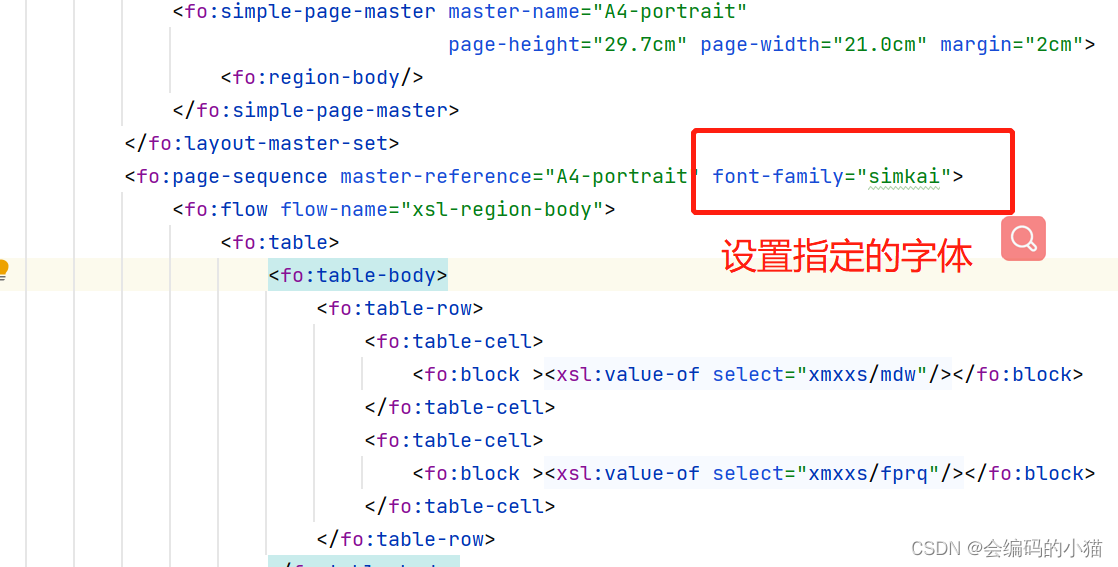
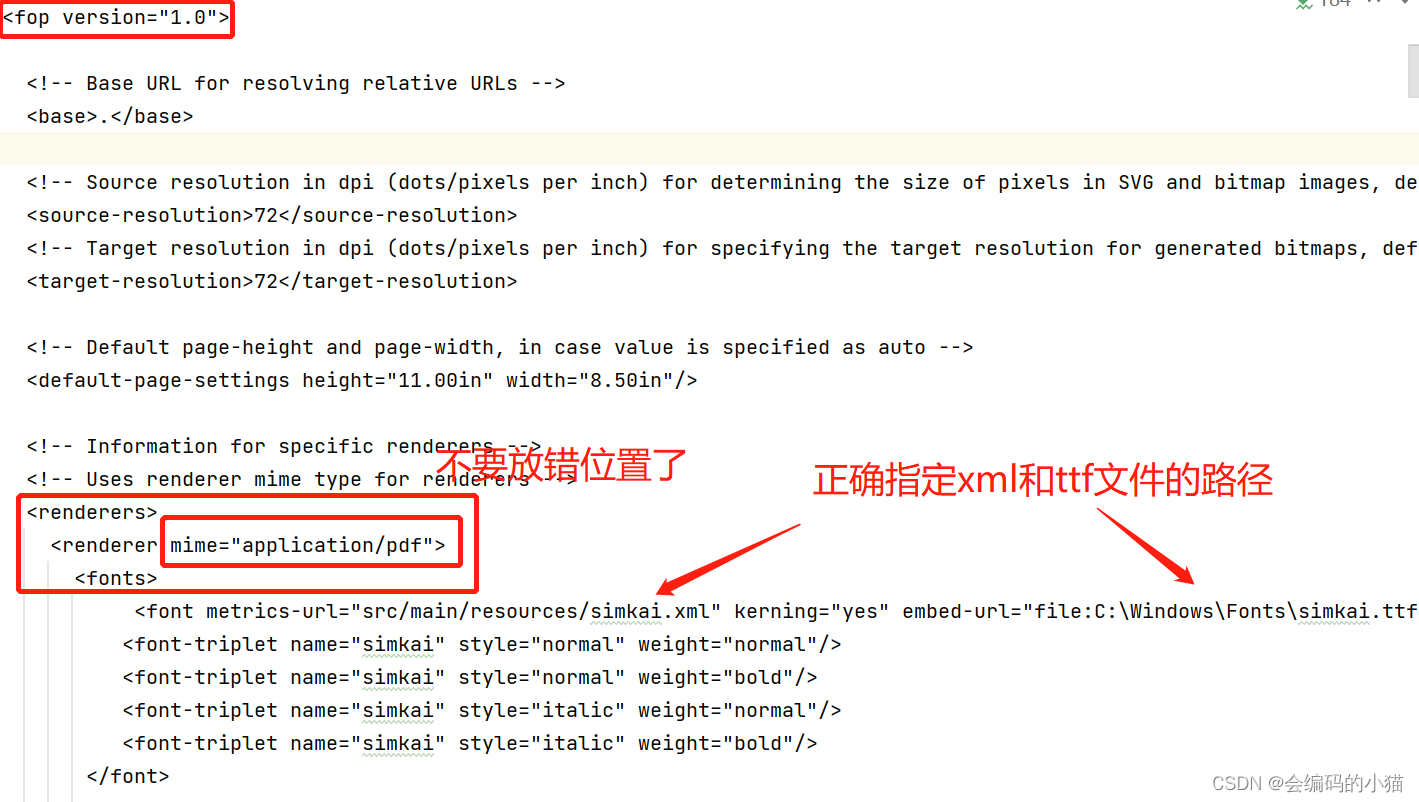
根据指定的字体(小编在使用simhei的字体出现了繁体乱码,后面改用simkai就可以了),在fop.xconf中添加以下内容:
<fonts> <font metrics-url="src/main/resources/simkai.xml" kerning="yes" embed-url="file:C:\Windows\Fonts\simkai.ttf"> <font-triplet name="simkai" style="normal" weight="normal"/> <font-triplet name="simkai" style="normal" weight="bold"/> <font-triplet name="simkai" style="italic" weight="normal"/> <font-triplet name="simkai" style="italic" weight="bold"/> </font>5.main方法
public static void main(String[] args) { Charset utf8 = Charset.forName("UTF-8"); try { // Setup directories File baseDir = new File("src/main/resources"); File outDir = new File(baseDir, "out"); outDir.mkdirs(); // Setup input and output files File xmlfile = new File(baseDir, "fp.xml"); File xsltfile = new File(baseDir, "fp.xslt"); File pdffile = new File(outDir, "fp.pdf"); DefaultConfigurationBuilder cfgBuilder = new DefaultConfigurationBuilder(); //指定fop配置文件 Configuration cfg = cfgBuilder.buildFromFile(new File("src/main/resources/fop-2.7-bin/fop-2.7/fop/conf/fop.xconf")); FopFactoryBuilder fopFactoryBuilder = new FopFactoryBuilder(new File(".").toURI()).setConfiguration(cfg); // configure fopFactory as desired final FopFactory fopFactory = fopFactoryBuilder.build(); FOUserAgent foUserAgent = fopFactory.newFOUserAgent(); // configure foUserAgent as desired // Setup output OutputStream out = new FileOutputStream(pdffile); out = new BufferedOutputStream(out); try { // Construct fop with desired output format Fop fop = fopFactory.newFop(MimeConstants.MIME_PDF, foUserAgent, out); // Setup XSLT TransformerFactory factory = TransformerFactory.newInstance(); FileInputStream fis=new FileInputStream(xsltfile); Transformer transformer = factory.newTransformer(new StreamSource(new InputStreamReader(new FileInputStream(xsltfile),utf8 ))); // Set the value of a <param> in the stylesheet transformer.setParameter("versionParam", "2.0"); // Setup input for XSLT transformation Source src = new StreamSource(new InputStreamReader(new FileInputStream(xmlfile),utf8 )); // Resulting SAX events (the generated FO) must be piped through to FOP Result res = new SAXResult(fop.getDefaultHandler()); // Start XSLT transformation and FOP processing transformer.transform(src, res); } finally { out.close(); } System.out.println("生成PDF------Success!"); } catch (Exception e) { System.out.println("生成PDF------Fail!"); e.printStackTrace(System.err); System.exit(-1); } }
版权声明:本文内容由互联网用户自发贡献,该文观点仅代表作者本人。本站仅提供信息存储空间服务,不拥有所有权,不承担相关法律责任。如发现本站有涉嫌侵权/违法违规的内容,请联系我们,一经查实,本站将立刻删除。
如需转载请保留出处:https://51itzy.com/kjqy/135251.html