
一、2015年的NOIP普及组初赛有一道代码补全的题目,很有意思,功能是实现一个当年任意月的月历显示。
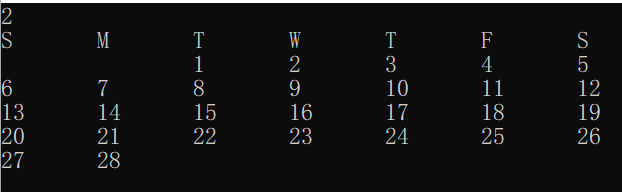
为了让代码更有趣,我这里把它改为针对2022年的任意月的月历的显示。代码如下:
// 2022年,任一月份的月历 #include<iostream> using namespace std; const int dayNum[]={-1,31,28,31,30,31,30,31,31,30,31,30,31}; int main(){ int m; cin >> m; cout << "S\tM\tT\tW\tT\tF\tS" << endl; int offset=6; for (int i=1; i<m; i++) { offset= (offset+ dayNum[i])%7; } for (int i=0; i<offset; i++){ cout << "\t"; } for (int i=1; i<= dayNum[m]; i++){ cout << i ; if (i==dayNum[m] || (i+offset)%7==0) { cout << endl; } else { cout << "\t"; } } return 0; }讯享网
我们学习软件的一个非常好的方式就是给现有的代码增加新的功能。从这个最基础的功能开始,我们逐步增加新的功能进来。
二、首先,这里是周日起点,我们想把它改为更符合中国人习惯的周一起点,并且使用中文。
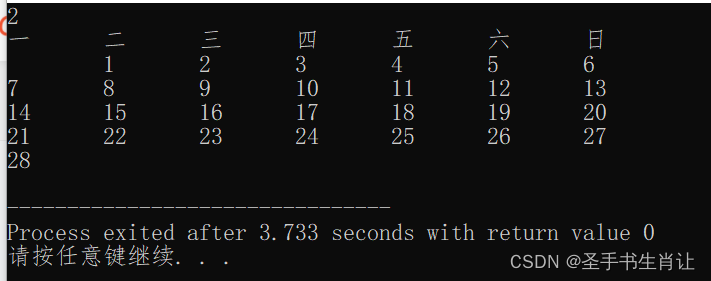
代码只须修改一点点:
讯享网#include<iostream> using namespace std; const int dayNum[]={-1,31,28,31,30,31,30,31,31,30,31,30,31}; int main(){ int m; cin >> m; cout << "一\t二\t三\t四\t五\t六\t日" << endl; int offset=6; for (int i=1; i<m; i++) { offset= (offset+ dayNum[i])%7; } offset= (offset+6)%7; for (int i=0; i<offset; i++){ cout << "\t"; } for (int i=1; i<= dayNum[m]; i++){ cout << i ; if (i==dayNum[m] || (i+offset)%7==0) { cout << endl; } else { cout << "\t"; } } return 0; }
三、常见的月历中,周六周日用红色显示,我们可以使用windows的库实现这个功能。
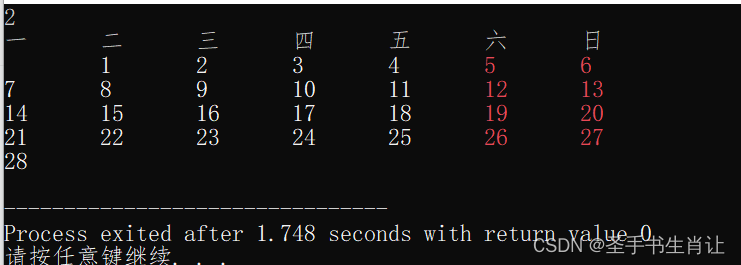
注意设置演示的代码setColor的实现:

#include<iostream> #include"windows.h" using namespace std; const int dayNum[]={-1,31,28,31,30,31,30,31,31,30,31,30,31}; void setColor(int ftColor, int bkColor=0){ int aColor= bkColor*16+ ftColor; SetConsoleTextAttribute(GetStdHandle(STD_OUTPUT_HANDLE), aColor); } int main(){ int m; cin >> m; cout << "一\t二\t三\t四\t五\t六\t日" << endl; int offset=6; for (int i=1; i<m; i++) { offset= (offset+ dayNum[i])%7; } offset= (offset+6)%7; for (int i=0; i<offset; i++){ cout << "\t"; } for (int i=1; i<= dayNum[m]; i++){ int a= (i+offset)%7; if (a==0 || a==6) { setColor(12); } else { setColor(15); } cout << i ; if (i==dayNum[m] || a==0) { cout << endl; } else { cout << "\t"; } } return 0; } 四、下一步,本月的月历中经常会把上个月和下个月的结尾和开头部分带上,怎样实现这个功能呢?
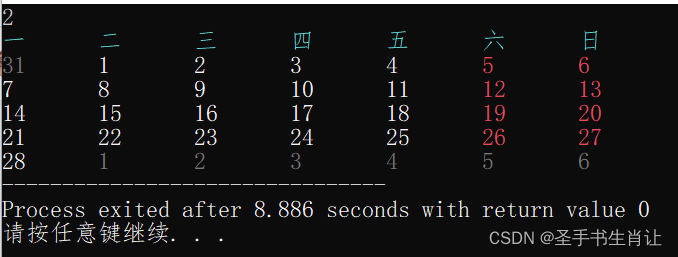
代码如下:
讯享网#include<iostream> #include"windows.h" using namespace std; const int dayNum[]={-1,31,28,31,30,31,30,31,31,30,31,30,31}; void setColor(int ftColor, int bkColor=0){ int aColor= bkColor*16+ ftColor; SetConsoleTextAttribute(GetStdHandle(STD_OUTPUT_HANDLE), aColor); } int main(){ int m; cin >> m; setColor(11); cout << "一\t二\t三\t四\t五\t六\t日" << endl; int offset=6; for (int i=1; i<m; i++) { offset= (offset+ dayNum[i])%7; } offset= (offset+6)%7; // 前面补 setColor(8); for (int i=0; i<offset; i++){ cout << (dayNum[m-1]-offset+1)+i << "\t"; } int a; setColor(15); for (int i=1; i<= dayNum[m]; i++){ a= (i+offset)%7; if (a==0 || a==6) { setColor(12); } else { setColor(15); } cout << i ; if (a==0) { cout << endl; } else { cout << "\t"; } } /* 后面补空 0 0 6 1 5 2 4 3 */ if (true){ setColor(8); for (int i=1; i<= 7-a; i++){ cout << i << "\t"; } } setColor(15); return 0; }
五、既然月历功能已经实现得比较完整了,我们的目标向年历进发
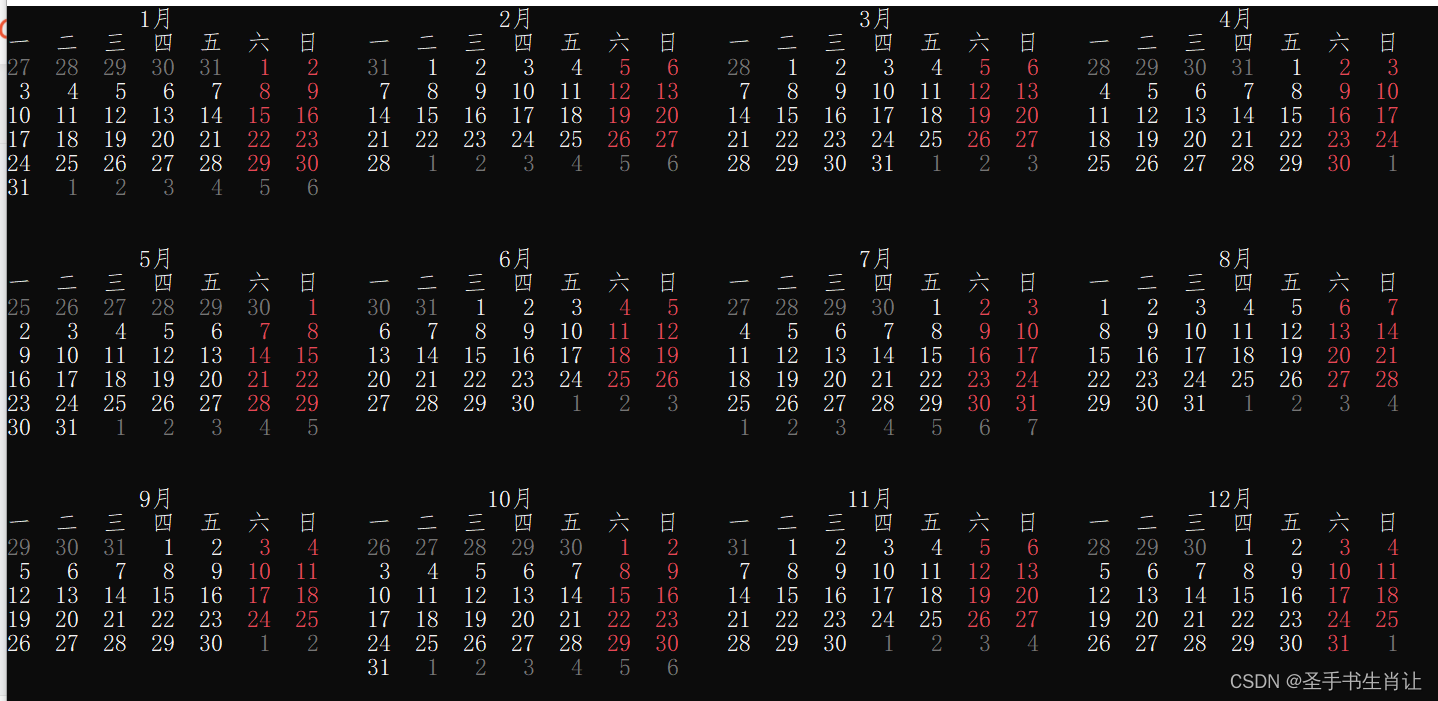
为了实现年历,应对支持在任意位置打印的功能,注意这里的gotoxy函数。另外,由于月历功能已经完善,我们把它移入函数中。
#include<iostream> #include"windows.h" #include<iomanip> using namespace std; const int dayNum[]={31,31,28,31,30,31,30,31,31,30,31,30,31}; void setColor(int ftColor, int bkColor=0){ int aColor= bkColor*16+ ftColor; SetConsoleTextAttribute(GetStdHandle(STD_OUTPUT_HANDLE), aColor); } void gotoxy(unsigned char x,unsigned char y){ COORD cor; HANDLE hout; cor.X = x; cor.Y = y; hout = GetStdHandle(STD_OUTPUT_HANDLE); SetConsoleCursorPosition(hout, cor); } void showMonth(int m, int x, int y){ setColor(15); gotoxy(x,y); y++; cout << " " << setw(2)<< m << "月"; gotoxy(x,y); y++; cout << "一 二 三 四 五 六 日" << endl; int offset=6; for (int i=1; i<m; i++) { offset= (offset+ dayNum[i])%7; } offset= (offset+6)%7; setColor(8); gotoxy(x,y); for (int i=0; i<offset; i++){ cout << setw(2)<< (dayNum[m-1]-offset+1)+i << " "; } int a; setColor(15); for (int i=1; i<= dayNum[m]; i++){ a= (i+offset)%7; if (a==0 || a==6) { setColor(12); } else { setColor(15); } cout << setw(2)<< i ; if (a==0) { cout << endl; y++; gotoxy(x,y); } else { cout << " "; } } /* 后面补空 0 0 6 1 5 2 4 3 */ if (true){ setColor(8); for (int i=1; i<= 7-a; i++){ cout << setw(2)<< i << " "; } } setColor(15); } int main(){ for (int i=0; i<12; i++){ showMonth(i+1, i%4* 30, i/4* 10); } gotoxy(0, 30); return 0; } 六、我们希望将年份信息以较大的字体显示出来,让年历效果更美观。这里简单使用了点阵字库。并且对代码进行扩展,支持任意年的年历。
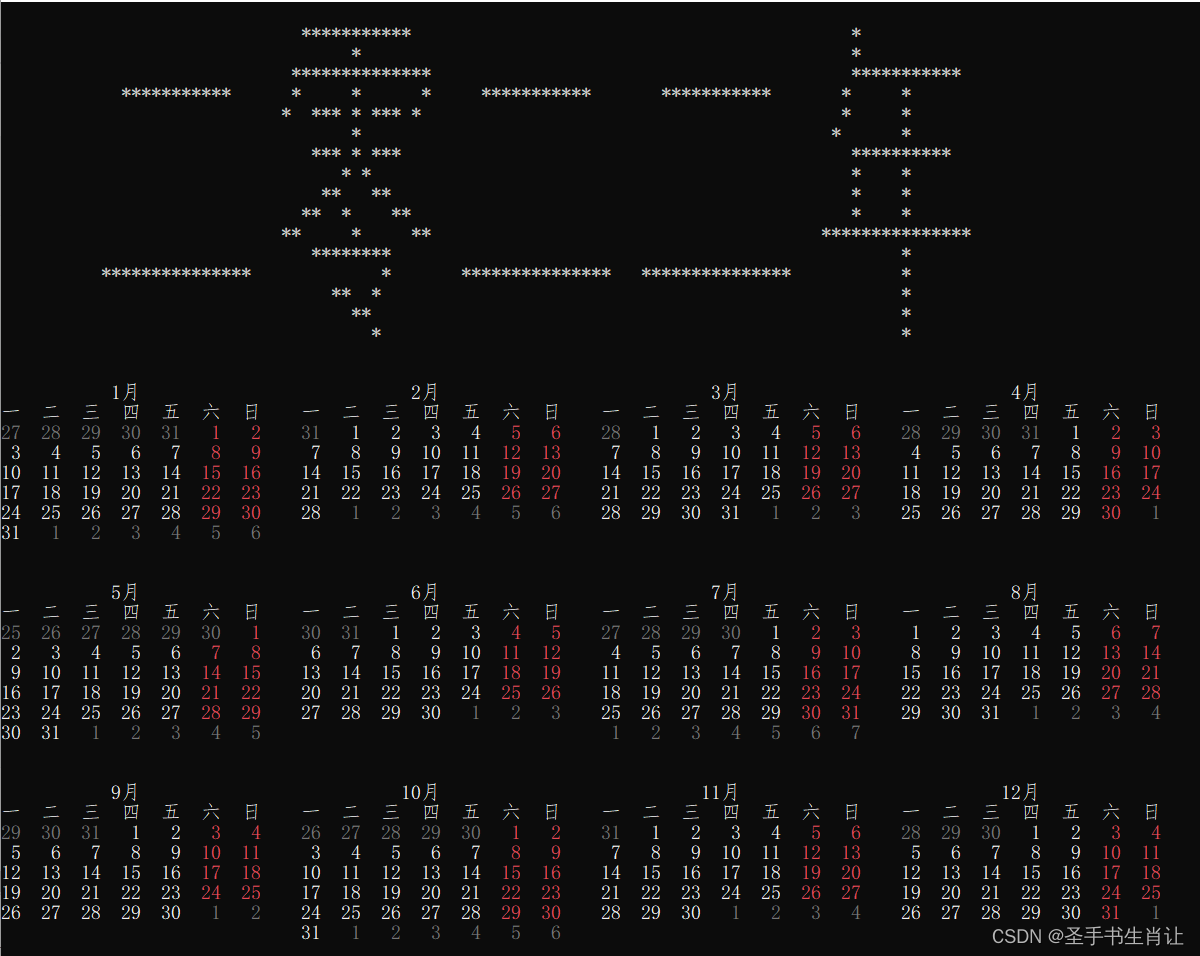
字库的使用,详见代码,字库文件的下载,参加文章末尾的下载链接。
讯享网#include<iostream> #include"windows.h" #include<iomanip> #include<fstream> using namespace std; int dayNum[]={31,31,28,31,30,31,30,31,31,30,31,30,31}; void setColor(int ftColor, int bkColor=0){ int aColor= bkColor*16+ ftColor; SetConsoleTextAttribute(GetStdHandle(STD_OUTPUT_HANDLE), aColor); } void gotoxy(unsigned char x,unsigned char y){ COORD cor; HANDLE hout; cor.X = x; cor.Y = y; hout = GetStdHandle(STD_OUTPUT_HANDLE); SetConsoleCursorPosition(hout, cor); } struct Han{ // 汉字本身 string han; // 用16个整数代表它的点阵表示 int arr[16]; }zi[7000]; int maxZi; // 载入字库,用了fstream的方式 void loadHan(){ ifstream fin("点阵字库.txt"); string s1; while (fin >> s1){ zi[maxZi].han= s1; for (int i=0; i<16; i++){ fin >> zi[maxZi].arr[i]; } maxZi++; } fin.close(); } string int2bit(int a){ string ret=""; for (int i=0; i<16; i++){ ret= (a%2==0?" ":"*") + ret; a/=2; } return ret; } // 显示一个点阵汉字,参数为点阵数组 void showHan(int dot[], int x, int y){ for (int i=0; i<16; i++){ gotoxy(x, y+i); cout << int2bit(dot[i]); } } // 查找一个汉字,返回它的数组编号,如果没有则返回-1 int findHan(string s1){ s1= s1.substr(0,2); for (int i=0; i<maxZi; i++){ if (zi[i].han==s1){ return i; } } return -1; } void showZi(string s1, int x, int y){ int a= findHan(s1); if (a>=0){ showHan(zi[a].arr, x, y); } } bool isLeapYear(int y){ return (y%400==0 || y%4==0 && y%100!=0); } int calcFirstDay(int y){ // 1900年1月1日,周一 int offset=1; for (int i=1900; i<y; i++){ offset= (offset+ (isLeapYear(i)?366:365))%7; } return offset; } void showMonth(int year, int m, int x, int y){ setColor(15); gotoxy(x,y); y++; cout << " " << setw(2)<< m << "月"; gotoxy(x,y); y++; cout << "一 二 三 四 五 六 日" << endl; int offset= calcFirstDay(year); if (isLeapYear(year)){ dayNum[2]=29; } else { dayNum[2]=28; } for (int i=1; i<m; i++) { offset= (offset+ dayNum[i])%7; } offset= (offset+6)%7; setColor(8); gotoxy(x,y); for (int i=0; i<offset; i++){ cout << setw(2)<< (dayNum[m-1]-offset+1)+i << " "; } int a; setColor(15); for (int i=1; i<= dayNum[m]; i++){ a= (i+offset)%7; if (a==0 || a==6) { setColor(12); } else { setColor(15); } cout << setw(2)<< i ; if (a==0) { cout << endl; y++; gotoxy(x,y); } else { cout << " "; } } /* 后面补空 0 0 6 1 5 2 4 3 */ if (true){ setColor(8); for (int i=1; i<= 7-a; i++){ cout << setw(2)<< i << " "; } } setColor(15); } void showYear(int y){ int year=y; string cn[10]={"零","一","二","三","四","五","六","七","八","九"}; for (int i=0; i<4; i++){ int a= y%10; showZi(cn[a], 10+18*(3-i), 2); y/=10; } showZi("年", 82, 2); for (int i=0; i<12; i++){ showMonth(year, i+1, i%4* 30, i/4* 10+20); } } int main(){ loadHan(); int y; cin >> y; //cout << calcFirstDay(y); //return 0; showYear(y); gotoxy(0, 50); return 0; }
相关各个版本的源代码和字库文件的下载地址:
c++入门代码完整的改进过程趣味年历制作-C++文档类资源-CSDN下载
版权声明:本文内容由互联网用户自发贡献,该文观点仅代表作者本人。本站仅提供信息存储空间服务,不拥有所有权,不承担相关法律责任。如发现本站有涉嫌侵权/违法违规的内容,请联系我们,一经查实,本站将立刻删除。
如需转载请保留出处:https://51itzy.com/kjqy/132627.html