
上一章节讲述了LiveData的基本使用和源码
LiveData详解(上)
LiveData详解(上)_jianning-wu的博客-CSDN博客
本章节继续讲解LiveData。
一.自定义LiveData类
上一章节使用LiveData时,创建LiveData对象使用的是MutableLiveData类
mLiveData = new MutableLiveData<>();讯享网
那么是否可以自己定义实现LiveData类来创建LiveData对象呢。答案是可以的。
代码
Activity
讯享网package com.example.rxjava20.livedata; import android.os.Bundle; import android.util.Log; import android.view.View; import androidx.appcompat.app.AppCompatActivity; import androidx.lifecycle.Observer; import com.example.rxjava20.R; public class LiveDataActivity extends AppCompatActivity { private MyLiveData mMyLiveData; @Override protected void onCreate(Bundle savedInstanceState) { super.onCreate(savedInstanceState); setContentView(R.layout.activity_livedata); initLiveData(); //模拟子线程发送消息 findViewById(R.id.activity_livedata_textview1).setOnClickListener(new View.OnClickListener() { @Override public void onClick(View v) { new Thread(new Runnable() { @Override public void run() { mMyLiveData.postValue("自定义LiveData 模拟子线程发送消息..."); } }).start(); } }); //模拟主线程发送消息 findViewById(R.id.activity_livedata_textview2).setOnClickListener(new View.OnClickListener() { @Override public void onClick(View v) { mMyLiveData.setValue("自定义LiveData 模拟主线程发送消息..."); } }); } / * 初始化LiveData */ private void initLiveData() { mMyLiveData = new MyLiveData(); mMyLiveData.observe(this, new Observer<String>() { @Override public void onChanged(String s) { Log.d("LiveDataActivity", "自定义LiveData观察者 感知变化 s----: " + s); } }); } }
自定义LiveData类
package com.example.rxjava20.livedata; import android.util.Log; import androidx.lifecycle.LiveData; public class MyLiveData extends LiveData<String> { / * 重写postValue方法 用于子线程发送消息 */ @Override protected void postValue(String value) { super.postValue(value); } / * 重写setValue方法 用于主线程发送消息 */ @Override protected void setValue(String value) { super.setValue(value); } / * 重写onActive方法 用于判断被观察者(LifecycleOwner的拥有者Activity/Fragment)的活跃状态 活跃状态调用 */ @Override protected void onActive() { super.onActive(); Log.d("LiveDataActivity", "自定义LiveData观察者 onActive方法执行 活跃状态..."); } / * 重写onActive方法 用于判断被观察者(LifecycleOwner的拥有者Activity/Fragment)的活跃状态 非活跃状态调用 */ @Override protected void onInactive() { super.onInactive(); Log.d("LiveDataActivity", "自定义LiveData观察者 onInactive方法执行 非活跃状态..."); } } 结果
进入页面
讯享网D/LiveDataActivity: 自定义LiveData观察者 onActive方法执行 活跃状态...
模拟子线程发送消息
D/LiveDataActivity: 自定义LiveData观察者 感知变化 s----: 自定义LiveData 模拟子线程发送消息...模拟主线程发送消息
讯享网D/LiveDataActivity: 自定义LiveData观察者 感知变化 s----: 自定义LiveData 模拟主线程发送消息...
退出页面
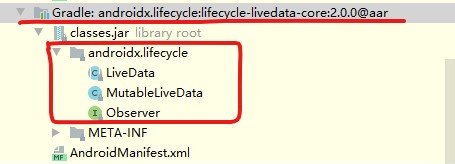
D/LiveDataActivity: 自定义LiveData观察者 onInactive方法执行 非活跃状态...上述使用LiveData。常用两个类和一个接口
类:LiveData
讯享网public abstract class LiveData<T> { ... }
类:MutableLiveData
public class MutableLiveData<T> extends LiveData<T> { @Override public void postValue(T value) { super.postValue(value); } @Override public void setValue(T value) { super.setValue(value); } }接口:Observer
讯享网public interface Observer<T> { / * Called when the data is changed. * @param t The new data */ void onChanged(T t); }
两个类和一个接口 所在的包
其实LiveData的依赖还有一个包 里面有三个类 也是很用的 下面继续讲解
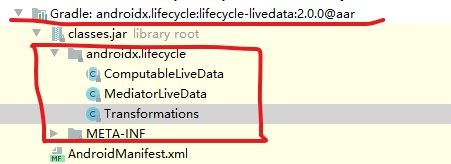
二.Transformations类 变换 LiveData对象
Transformations类源码
public class Transformations { private Transformations() { } / * Returns a {@code LiveData} mapped from the input {@code source} {@code LiveData} by applying * {@code mapFunction} to each value set on {@code source}. * <p> * This method is analogous to {@link io.reactivex.Observable#map}. * <p> * {@code transform} will be executed on the main thread. * <p> * Here is an example mapping a simple {@code User} struct in a {@code LiveData} to a * {@code LiveData} containing their full name as a {@code String}. * * <pre> * LiveData<User> userLiveData = ...; * LiveData<String> userFullNameLiveData = * Transformations.map( * userLiveData, * user -> user.firstName + user.lastName); * }); * </pre> * * @param source the {@code LiveData} to map from * @param mapFunction a function to apply to each value set on {@code source} in order to set * it * on the output {@code LiveData} * @param <X> the generic type parameter of {@code source} * @param <Y> the generic type parameter of the returned {@code LiveData} * @return a LiveData mapped from {@code source} to type {@code <Y>} by applying * {@code mapFunction} to each value set. */ @MainThread public static <X, Y> LiveData<Y> map( @NonNull LiveData<X> source, @NonNull final Function<X, Y> mapFunction) { final MediatorLiveData<Y> result = new MediatorLiveData<>(); result.addSource(source, new Observer<X>() { @Override public void onChanged(@Nullable X x) { result.setValue(mapFunction.apply(x)); } }); return result; } / * Returns a {@code LiveData} mapped from the input {@code source} {@code LiveData} by applying * {@code switchMapFunction} to each value set on {@code source}. * <p> * The returned {@code LiveData} delegates to the most recent {@code LiveData} created by * calling {@code switchMapFunction} with the most recent value set to {@code source}, without * changing the reference. In this way, {@code switchMapFunction} can change the 'backing' * {@code LiveData} transparently to any observer registered to the {@code LiveData} returned * by {@code switchMap()}. * <p> * Note that when the backing {@code LiveData} is switched, no further values from the older * {@code LiveData} will be set to the output {@code LiveData}. In this way, the method is * analogous to {@link io.reactivex.Observable#switchMap}. * <p> * {@code switchMapFunction} will be executed on the main thread. * <p> * Here is an example class that holds a typed-in name of a user * {@code String} (such as from an {@code EditText}) in a {@link MutableLiveData} and * returns a {@code LiveData} containing a List of {@code User} objects for users that have * that name. It populates that {@code LiveData} by requerying a repository-pattern object * each time the typed name changes. * <p> * This {@code ViewModel} would permit the observing UI to update "live" as the user ID text * changes. * * <pre> * class UserViewModel extends AndroidViewModel { * MutableLiveData<String> nameQueryLiveData = ... * * LiveData<List<String>> getUsersWithNameLiveData() { * return Transformations.switchMap( * nameQueryLiveData, * name -> myDataSource.getUsersWithNameLiveData(name)); * } * * void setNameQuery(String name) { * this.nameQueryLiveData.setValue(name); * } * } * </pre> * * @param source the {@code LiveData} to map from * @param switchMapFunction a function to apply to each value set on {@code source} to create a * new delegate {@code LiveData} for the returned one * @param <X> the generic type parameter of {@code source} * @param <Y> the generic type parameter of the returned {@code LiveData} * @return a LiveData mapped from {@code source} to type {@code <Y>} by delegating * to the LiveData returned by applying {@code switchMapFunction} to each * value set */ @MainThread public static <X, Y> LiveData<Y> switchMap( @NonNull LiveData<X> source, @NonNull final Function<X, LiveData<Y>> switchMapFunction) { final MediatorLiveData<Y> result = new MediatorLiveData<>(); result.addSource(source, new Observer<X>() { LiveData<Y> mSource; @Override public void onChanged(@Nullable X x) { LiveData<Y> newLiveData = switchMapFunction.apply(x); if (mSource == newLiveData) { return; } if (mSource != null) { result.removeSource(mSource); } mSource = newLiveData; if (mSource != null) { result.addSource(mSource, new Observer<Y>() { @Override public void onChanged(@Nullable Y y) { result.setValue(y); } }); } } }); return result; } } 源码可见 类中有两个方法map()方法和switchMap方法。源码可以看出两个方法都是运行在主线程 用来对LiveData对象进行操作。
1.Transformations.map方法 修改LiveData
<1> 需求
有时候可能,LiveData发送了一条数据。接收的时候需要将刚刚发送的数据修改一下,然后再发送新的数据。那么就可以用到Transformations类的map方法。

<2> 代码
讯享网package com.example.rxjava20.livedata; import android.os.Bundle; import android.util.Log; import android.view.View; import androidx.appcompat.app.AppCompatActivity; import androidx.arch.core.util.Function; import androidx.lifecycle.LiveData; import androidx.lifecycle.MutableLiveData; import androidx.lifecycle.Observer; import androidx.lifecycle.Transformations; import com.example.rxjava20.R; public class LiveDataActivity extends AppCompatActivity { private MutableLiveData<String> mOldLiveData;//原始LiveData对象 变化前 private LiveData<String> mNewLiveData;//新LiveData对象 变化后 @Override protected void onCreate(Bundle savedInstanceState) { super.onCreate(savedInstanceState); setContentView(R.layout.activity_livedata); initLiveData(); //模拟主线程发送消息 findViewById(R.id.activity_livedata_textview2).setOnClickListener(new View.OnClickListener() { @Override public void onClick(View v) { mOldLiveData.setValue("123"); } }); } / * 初始化LiveData */ private void initLiveData() { mOldLiveData = new MutableLiveData<String>(); mNewLiveData = Transformations.map(mOldLiveData, new Function<String, String>() { @Override public String apply(String input) { Log.d("LiveDataActivity", "变化前数据:" + input); return "变化后的数据:" + input; } }); mNewLiveData.observe(this, new Observer<String>() { @Override public void onChanged(String s) { Log.d("LiveDataActivity", "onChanged:" + s); } }); } }
<3> 结果
D/LiveDataActivity: 变化前数据:123 D/LiveDataActivity: onChanged:变化后的数据:123<4>结论
原本oldLiveData发送的是“123”。但是通过Transformations.map将“123”修改成“变化后的数据:123”。最后接收到的就是“变化后的数据:123”。
2.Transformations.switchMap方法 切换LiveData
<1> 需求
有的时候可能,有几个LiveData对象发送不同的内容,但是接收那个LiveData对象发送的数据不固定。也就是说有的时候需要接收A对象的LiveData,有的时候需要接收B对象的LiveData。那么就可以用到Transformations类的switchMap方法。
<2> 代码
讯享网package com.example.rxjava20.livedata; import android.os.Bundle; import android.util.Log; import android.view.View; import androidx.appcompat.app.AppCompatActivity; import androidx.arch.core.util.Function; import androidx.lifecycle.LiveData; import androidx.lifecycle.MutableLiveData; import androidx.lifecycle.Observer; import androidx.lifecycle.Transformations; import com.example.rxjava20.R; public class LiveDataActivity extends AppCompatActivity { private MutableLiveData<String> mLiveData1;//发送AAA的LiveData对象 private MutableLiveData<String> mLiveData2;//发送BBB的LiveData对象 private MutableLiveData<Boolean> mLiveData;//决定接收AAA还是BBB的LiveData对象 private LiveData<String> mNewLiveData;//新LiveData对象 变化后 @Override protected void onCreate(Bundle savedInstanceState) { super.onCreate(savedInstanceState); setContentView(R.layout.activity_livedata); initLiveData(); //接收AAA findViewById(R.id.activity_livedata_textview1).setOnClickListener(new View.OnClickListener() { @Override public void onClick(View v) { mLiveData1.setValue("AAA"); mLiveData.setValue(true); } }); //接收BBB findViewById(R.id.activity_livedata_textview2).setOnClickListener(new View.OnClickListener() { @Override public void onClick(View v) { mLiveData2.setValue("BBB"); mLiveData.setValue(false); } }); } / * 初始化LiveData */ private void initLiveData() { //发送AAA的LiveData对象 mLiveData1 = new MutableLiveData<>(); //发送BBB的LiveData对象 mLiveData2 = new MutableLiveData<>(); //决定接收AAA还是BBB的LiveData对象 mLiveData = new MutableLiveData<>(); //切换 mNewLiveData = Transformations.switchMap(mLiveData, new Function<Boolean, LiveData<String>>() { @Override public LiveData<String> apply(Boolean input) { if (input) {//切换条件 true 发送AAA的LiveData对象 return mLiveData1; } return mLiveData2;//发送BBB的LiveData对象 } }); mNewLiveData.observe(this, new Observer<String>() { @Override public void onChanged(String s) { Log.d("LiveDataActivity", "onChanged:" + s); } }); } }
<3> 结果
点击接收AAA
D/LiveDataActivity: onChanged:AAA点击接收BBB
讯享网D/LiveDataActivity: onChanged:BBB
<4> 结论
如果,有多个LiveData对象时,需要动态切换接收那个LiveData对象。可以使用Transformations类的switchMap方法。
三.MediatorLiveData类 合并 LiveData对象
MediatorLiveData类源码
/* * Copyright (C) 2017 The Android Open Source Project * * Licensed under the Apache License, Version 2.0 (the "License"); * you may not use this file except in compliance with the License. * You may obtain a copy of the License at * * http://www.apache.org/licenses/LICENSE-2.0 * * Unless required by applicable law or agreed to in writing, software * distributed under the License is distributed on an "AS IS" BASIS, * WITHOUT WARRANTIES OR CONDITIONS OF ANY KIND, either express or implied. * See the License for the specific language governing permissions and * limitations under the License. */ package androidx.lifecycle; import androidx.annotation.CallSuper; import androidx.annotation.MainThread; import androidx.annotation.NonNull; import androidx.annotation.Nullable; import androidx.arch.core.internal.SafeIterableMap; import java.util.Map; / * {@link LiveData} subclass which may observe other {@code LiveData} objects and react on * {@code OnChanged} events from them. * <p> * This class correctly propagates its active/inactive states down to source {@code LiveData} * objects. * <p> * Consider the following scenario: we have 2 instances of {@code LiveData}, let's name them * {@code liveData1} and {@code liveData2}, and we want to merge their emissions in one object: * {@code liveDataMerger}. Then, {@code liveData1} and {@code liveData2} will become sources for * the {@code MediatorLiveData liveDataMerger} and every time {@code onChanged} callback * is called for either of them, we set a new value in {@code liveDataMerger}. * * <pre> * LiveData<Integer> liveData1 = ...; * LiveData<Integer> liveData2 = ...; * * MediatorLiveData<Integer> liveDataMerger = new MediatorLiveData<>(); * liveDataMerger.addSource(liveData1, value -> liveDataMerger.setValue(value)); * liveDataMerger.addSource(liveData2, value -> liveDataMerger.setValue(value)); * </pre> * <p> * Let's consider that we only want 10 values emitted by {@code liveData1}, to be * merged in the {@code liveDataMerger}. Then, after 10 values, we can stop listening to {@code * liveData1} and remove it as a source. * <pre> * liveDataMerger.addSource(liveData1, new Observer<Integer>() { * private int count = 1; * * {@literal @}Override public void onChanged(@Nullable Integer s) { * count++; * liveDataMerger.setValue(s); * if (count > 10) { * liveDataMerger.removeSource(liveData1); * } * } * }); * </pre> * * @param <T> The type of data hold by this instance */ @SuppressWarnings("WeakerAccess") public class MediatorLiveData<T> extends MutableLiveData<T> { private SafeIterableMap<LiveData<?>, Source<?>> mSources = new SafeIterableMap<>(); / * Starts to listen the given {@code source} LiveData, {@code onChanged} observer will be called * when {@code source} value was changed. * <p> * {@code onChanged} callback will be called only when this {@code MediatorLiveData} is active. * <p> If the given LiveData is already added as a source but with a different Observer, * {@link IllegalArgumentException} will be thrown. * * @param source the {@code LiveData} to listen to * @param onChanged The observer that will receive the events * @param <S> The type of data hold by {@code source} LiveData */ @MainThread public <S> void addSource(@NonNull LiveData<S> source, @NonNull Observer<? super S> onChanged) { Source<S> e = new Source<>(source, onChanged); Source<?> existing = mSources.putIfAbsent(source, e); if (existing != null && existing.mObserver != onChanged) { throw new IllegalArgumentException( "This source was already added with the different observer"); } if (existing != null) { return; } if (hasActiveObservers()) { e.plug(); } } / * Stops to listen the given {@code LiveData}. * * @param toRemote {@code LiveData} to stop to listen * @param <S> the type of data hold by {@code source} LiveData */ @MainThread public <S> void removeSource(@NonNull LiveData<S> toRemote) { Source<?> source = mSources.remove(toRemote); if (source != null) { source.unplug(); } } @CallSuper @Override protected void onActive() { for (Map.Entry<LiveData<?>, Source<?>> source : mSources) { source.getValue().plug(); } } @CallSuper @Override protected void onInactive() { for (Map.Entry<LiveData<?>, Source<?>> source : mSources) { source.getValue().unplug(); } } private static class Source<V> implements Observer<V> { final LiveData<V> mLiveData; final Observer<? super V> mObserver; int mVersion = START_VERSION; Source(LiveData<V> liveData, final Observer<? super V> observer) { mLiveData = liveData; mObserver = observer; } void plug() { mLiveData.observeForever(this); } void unplug() { mLiveData.removeObserver(this); } @Override public void onChanged(@Nullable V v) { if (mVersion != mLiveData.getVersion()) { mVersion = mLiveData.getVersion(); mObserver.onChanged(v); } } } } 源码可见 该类继承MutableLiveData类 而MutableLiveData类继承LiveData类。
类中 addSource()方法可以合并LiveData对象。 而重写LiveData抽象类的onActive方法和onInactive方法,又可以在适当的时机添加删除观察者。不需开发者手动删除。
1.MediatorLiveData.addSource()方法 合并多个LiveData
<1> 需求
假定,有两个LiveData对象,可能一个是从服务器获取数据,一个是从本地获取数据。两个LiveData对象来源不同,或者响应速度也不一样。但是数据Json报文一样。这个时候可能需要两个LiveData对象,公用一个观察者,即在一个onChanged方法中返回。这样就没必要监听两个onChanged方法了。
<2> 代码
讯享网package com.example.rxjava20.livedata; import android.os.Bundle; import android.util.Log; import android.view.View; import androidx.appcompat.app.AppCompatActivity; import androidx.lifecycle.MediatorLiveData; import androidx.lifecycle.MutableLiveData; import androidx.lifecycle.Observer; import com.example.rxjava20.R; public class LiveDataActivity extends AppCompatActivity { private MutableLiveData<String> mLocalLiveData;//本地数据的LiveData对象 private MutableLiveData<String> mNetWorkLiveData;//网络数据的LiveData对象 private MediatorLiveData<String> mResultLiveData;//合并后的LiveData对象 @Override protected void onCreate(Bundle savedInstanceState) { super.onCreate(savedInstanceState); setContentView(R.layout.activity_livedata); initLiveData(); //本地数据的LiveData对象 发送数据 findViewById(R.id.activity_livedata_textview1).setOnClickListener(new View.OnClickListener() { @Override public void onClick(View v) { mLocalLiveData.setValue("本地数据的LiveData对象:发送数据:这是Json报文"); } }); //网络数据的LiveData对象 发送数据 findViewById(R.id.activity_livedata_textview2).setOnClickListener(new View.OnClickListener() { @Override public void onClick(View v) { mNetWorkLiveData.setValue("网络数据的LiveData对象:发送数据:这是Json报文"); } }); } / * 初始化LiveData */ private void initLiveData() { //本地数据的LiveData对象 mLocalLiveData = new MutableLiveData<>(); //网络数据的LiveData对象 mNetWorkLiveData = new MutableLiveData<>(); //合并后的LiveData对象 mResultLiveData = new MediatorLiveData<>(); //添加本地数据的LiveData对象 mResultLiveData.addSource(mLocalLiveData, new Observer<String>() { @Override public void onChanged(String s) { mResultLiveData.setValue(s);//将 本地数据的LiveData对象发送的数据 添加到 合并后的LiveData对象 } }); //添加网络数据的LiveData对象 mResultLiveData.addSource(mNetWorkLiveData, new Observer<String>() { @Override public void onChanged(String s) { mResultLiveData.setValue(s);//将 网络数据的LiveData对象发送的数据 添加到 合并后的LiveData对象 } }); //监听合并后的LiveData对象的变化 mResultLiveData.observe(this, new Observer<String>() { @Override public void onChanged(String s) { Log.d("LiveDataActivity", "监听合并后的LiveData对象的变化 onChanged方法 s----:" + s); } }); } }
<3> 结果
发送本地数据
D/LiveDataActivity: 监听合并后的LiveData对象的变化 onChanged方法 s----:本地数据的LiveData对象:发送数据:这是Json报文发送网络数据
讯享网D/LiveDataActivity: 监听合并后的LiveData对象的变化 onChanged方法 s----:网络数据的LiveData对象:发送数据:这是Json报文
<4> 结论
MediatorLiveData类的addSource方法,可以合并多个相关的LiveData对象。然后使用一个监听onChanged方法即可。
版权声明:本文内容由互联网用户自发贡献,该文观点仅代表作者本人。本站仅提供信息存储空间服务,不拥有所有权,不承担相关法律责任。如发现本站有涉嫌侵权/违法违规的内容,请联系我们,一经查实,本站将立刻删除。
如需转载请保留出处:https://51itzy.com/kjqy/132465.html