
一、目前异步返回多个值方案
如果存在异步返回多个值的需求,我们探索以下解决方案
1.1、集合
集合返回了多个值,但是一个一个返回的,不是异步
fun simpleList(): List<Int> = listOf<Int>(1, 2, 3) @Test fun `test multiple values`() {
    simpleList().forEach {
    value -> println(value) } } //一次性返回: //1 //2 //3
讯享网
1.2、序列
下面示例中:Sequence返回了多个值,是同步,为什么Sequence返回值会是同步?
由于是阻塞了协程,一段时间只能卡在这儿,因此Sequence序列也是同步。
讯享网fun simpleSequence(): Sequence<Int> = sequence {
    for (i in 1..3) {
    Thread.sleep(1000) //阻塞,假装在计算 // delay(1000) //yield:这里的yield是Sequence允许的挂起函数,作用是将数据加入到Sequence序列中 yield(i) } } @Test fun `test multiple values`() {
    simpleSequence().forEach {
    value -> println(value) } } //一个个返回: //1 //2 //3
sleep会阻塞协程,肯定delay挂起会好点,但是实际上这里delay编译会报错,那这是为什么?
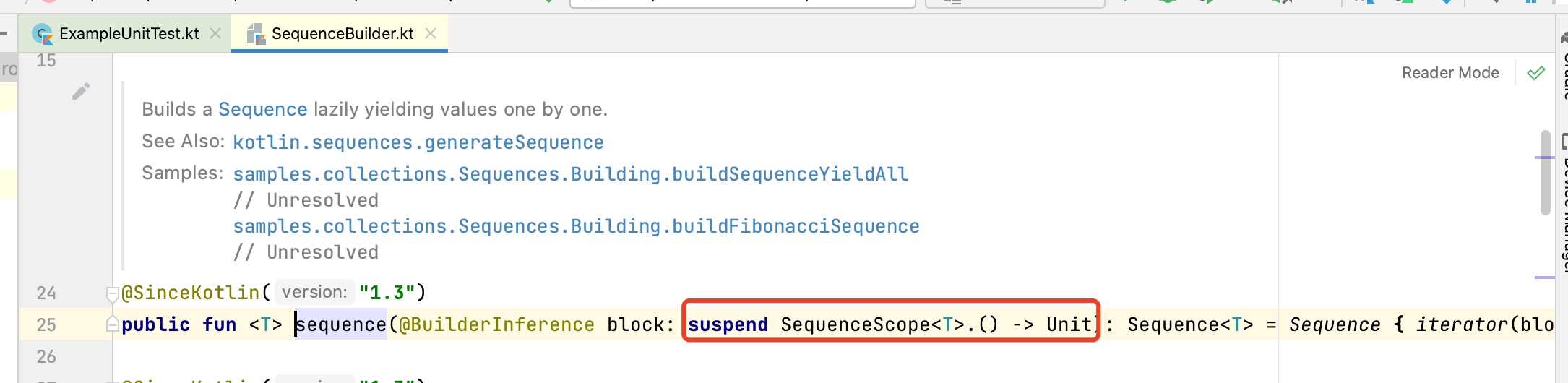
下面我们从sequence源码进行分析:
讯享网
sequence源码中,入参block是SequenceScope类型的扩展函数。
然后接着看SequenceScope源码:
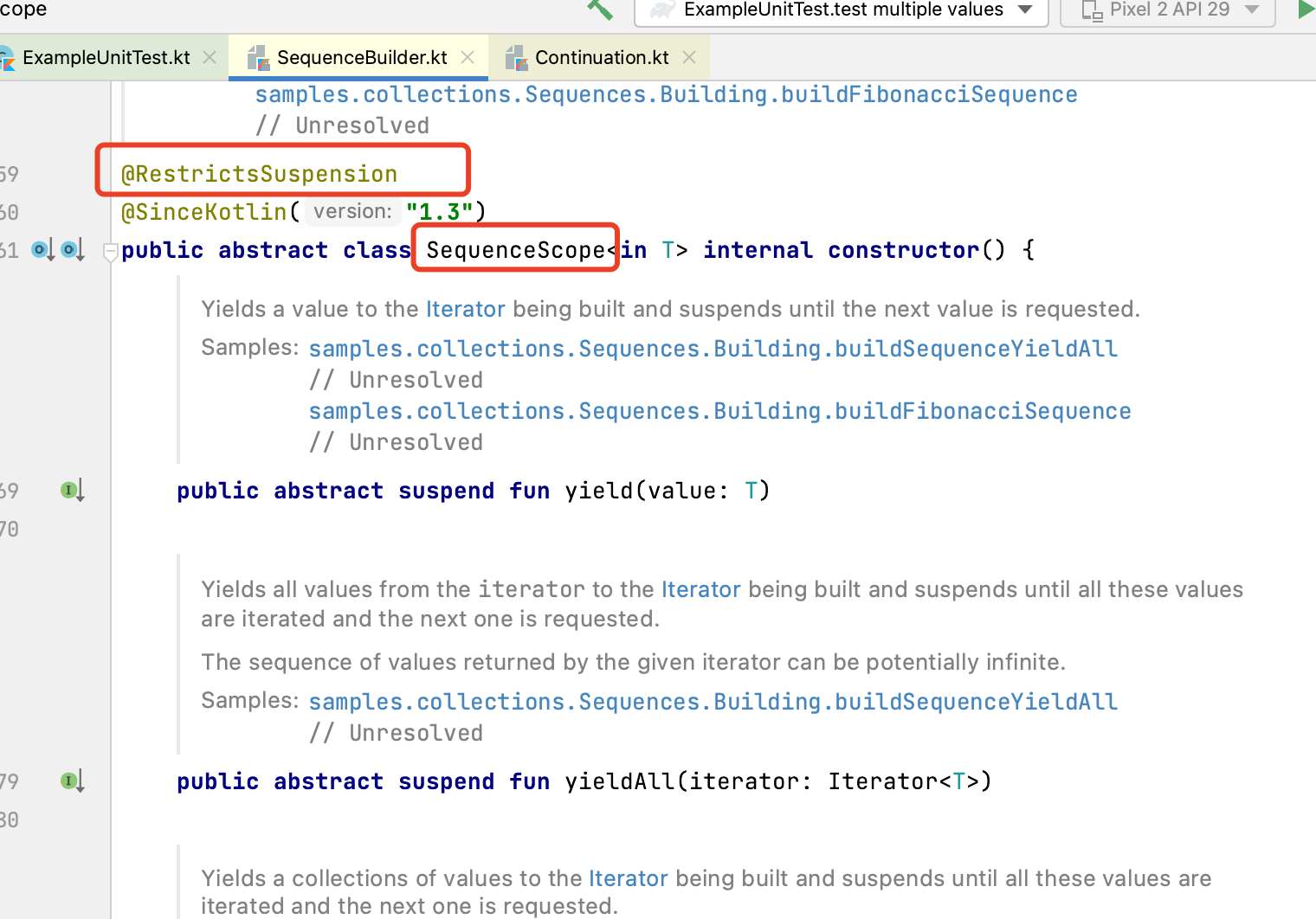
SequenceScope注解是@RestrictsSuspension,意思是限制挂起,只能调用已经提供的挂起函数(如源码下面的yidld、yieldAll等)
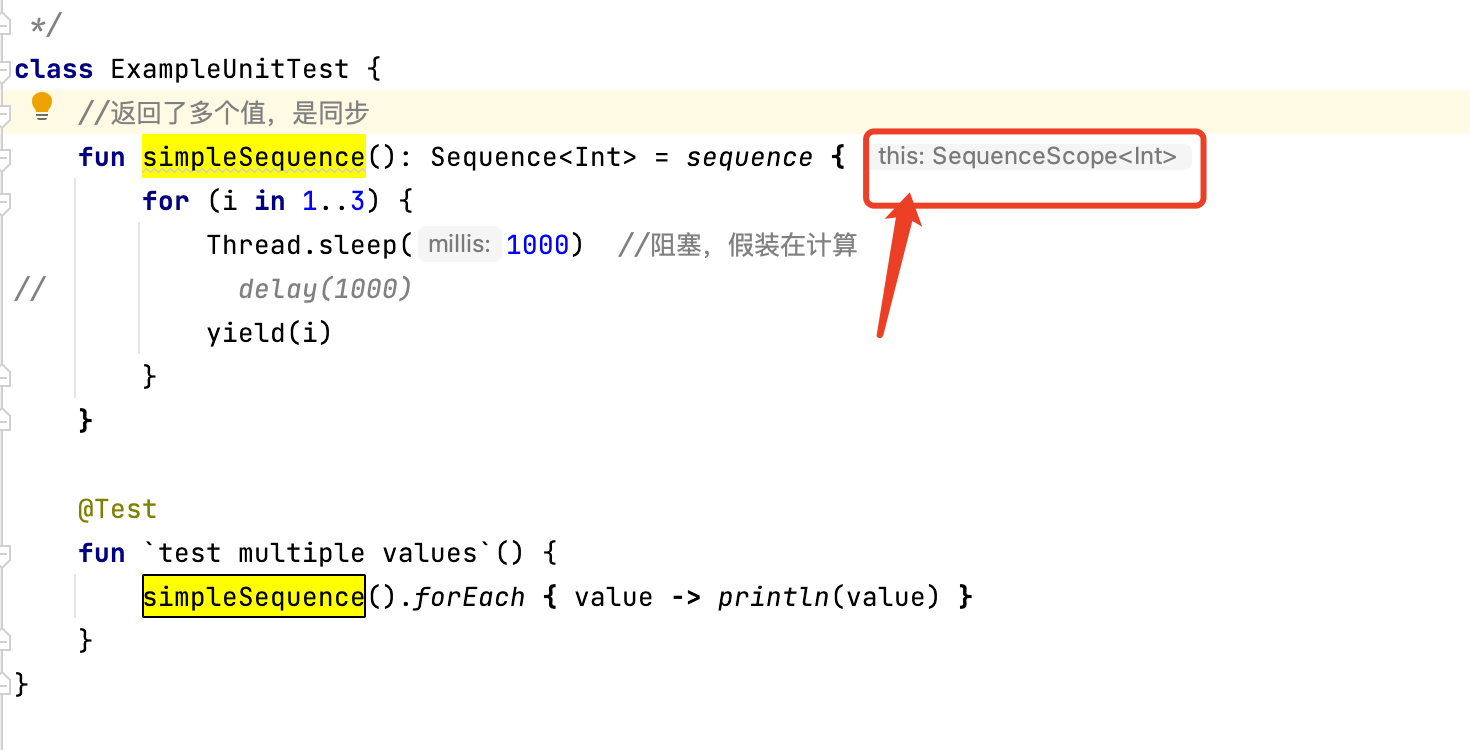
然后代码里面的this,指的就是SequenceScope类型,也就在编译器层面起到了限制delay挂起函数的作用
1.3、挂起函数
返回了多个值,是异步,一次性返回了多个值。
实际我们需要的是异步一个个的返回多个值
suspend fun simpleList2(): List<Int> {
    delay(1000) return listOf<Int>(1, 2, 3) } @Test fun `test multiple values`() = {
    //报错:挂起函数调用者只能是挂起函数、协程 // simpleList2().forEach { value -> println(value) } } //这里使用runBlocking将调用者包成主协程 @Test fun `test multiple values2`() = runBlocking<Unit> {
    simpleList2().forEach {
    value -> println(value) } }
1.4、flow
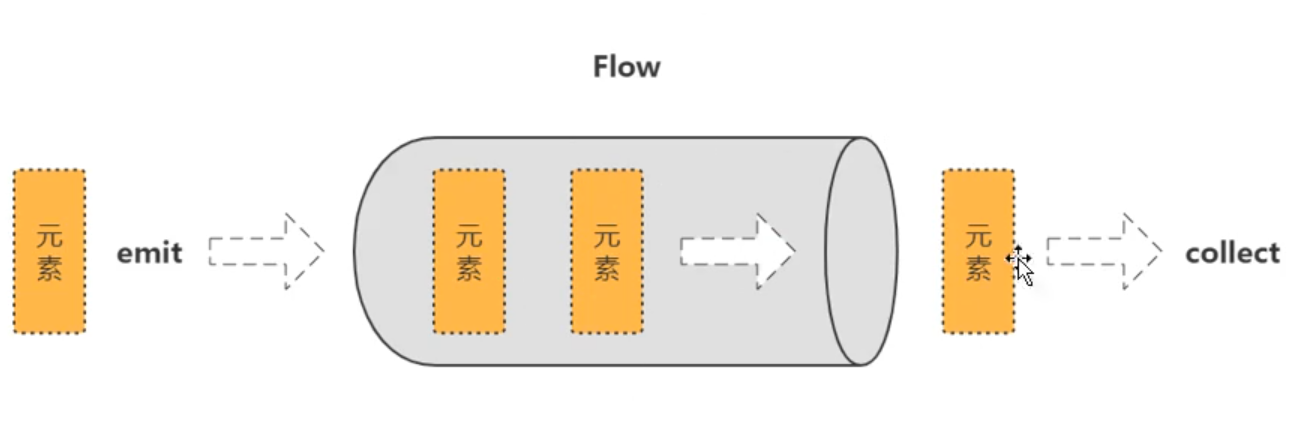
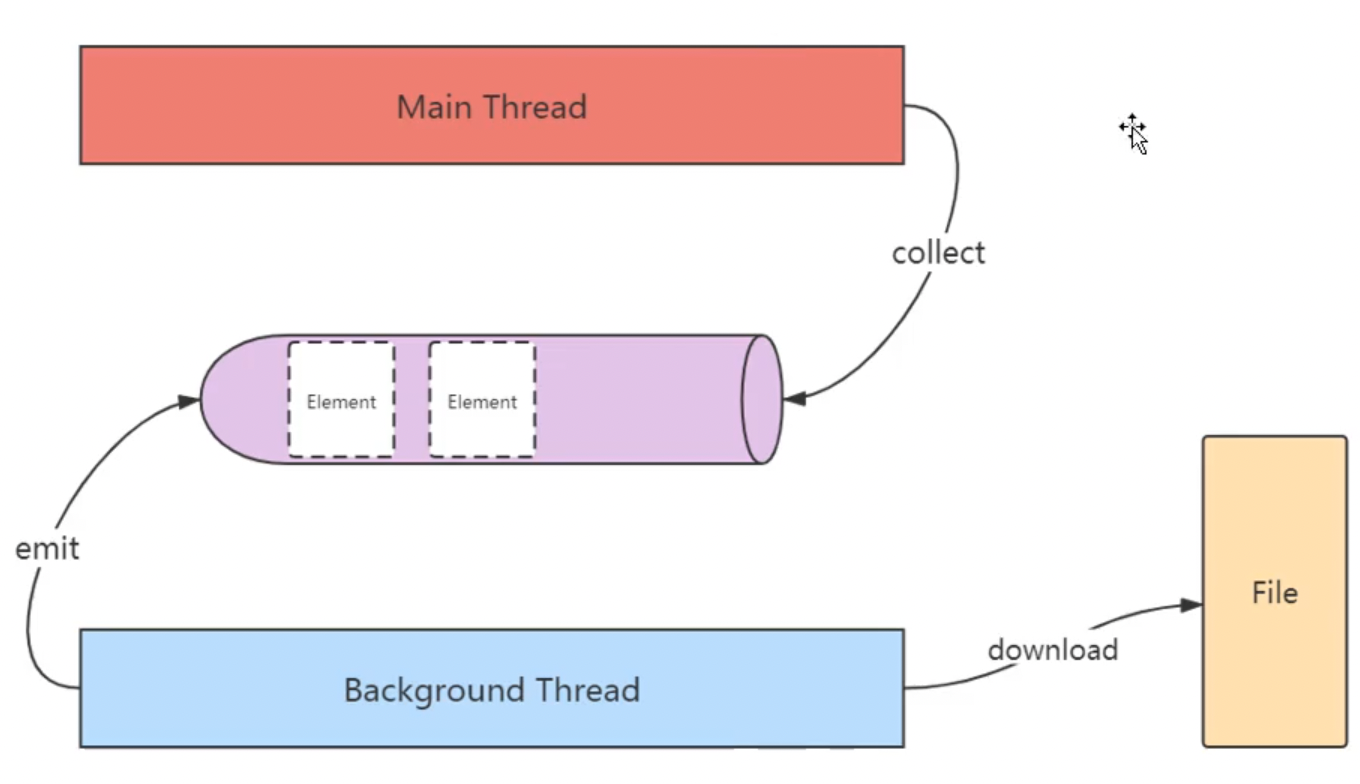
做到了挨个儿返回多个值,并且是异步的
collect:是末端操作符,作用把emit发射的数据收集起来
讯享网//通过flow构建器构建flow。flow的suspend可以去掉 suspend fun simpleFlow() = flow<Int> {
    for (i in 1..3) {
    delay(1000) //假装在一些重要的事情 emit(i) //发射,产生一个元素 } } @Test fun `test multiple values3`() = runBlocking<Unit> {
    //证明flow没有阻塞线程 launch {
    for (k in 1..3) {
    println("I'm not blocked $k") delay(1500) } } simpleFlow().collect {
    value -> println(value) } }
fow与其他方式的区别
- 名为flow的FIow类型构建器函数。
- fow{…}构建块中的代码可以挂起。
- 函数simpleFlow.不再标有suspend修饰符
- 流使用emit函数发射值。
- 流使用collect函数收集值。
应用场景:在Android当中,文件下载是Flow的一个非常典型的应用。
二、冷流
Flow是一种类似于序列的冷流,flow构建器中的代码直到流被收集的时候才运行。
fun simpleFlow2() = flow<Int> {
    println("Flow started") for (i in 1..3) {
    delay(1000) emit(i) } } @Test fun `test flow is cold`() = runBlocking<Unit> {
    val flow = simpleFlow2() println("Calling collect...") flow.collect {
    value -> println(value) } println("Calling collect again...") flow.collect {
    value -> println(value) } } //Calling collect... //Flow started //1 //2 //3 //Calling collect again... //Flow started //1 //2 //3
冷流是在collect收集的时候才开始执行业务代码,再次收集会再次执行
三、流的连续性
下面示例中:asFlow是IntRange提供的流的快速构建器
讯享网@Test fun `test flow continuation`() = runBlocking<Unit> {
    (1..5).asFlow().filter {
    it % 2 == 0 }.map {
    "string $it" }.collect {
    println("Collect $it") } } //Collect string 2 //Collect string 4
四、流构建器
流的构建器有3种:flow、flowOf、asFlow()
1、flow构建器
fun simpleFlow2() = flow<Int> {
    println("Flow started") for (i in 1..3) {
    delay(1000) emit(i) } } @Test fun `test flow is cold`() = runBlocking<Unit> {
    val flow = simpleFlow2() println("Calling collect...") flow.collect {
    value -> println(value) } } //Calling collect... //Flow started //1 //2 //3
2、flowOf构建器
flowOf构建器定义了一个发射固定值集的流。
讯享网@Test fun `test flow builder`() = runBlocking<Unit> {
    flowOf("one", "two", "three") .onEach {
    delay(1000) } .collect {
    value -> println(value) } } //one //two //three
3、asFlow()构建器
使用.asFlow()扩展函数,可以将各种集合与序列转换为流。
@Test fun `test flow builder`() = runBlocking<Unit> {
    (1..3).asFlow().collect {
    value -> println(value) } } //1 //2 //3
五、流上下文切换
- 流的收集总是在调用协程的上下文中发生,流的该属性称为上下文保存。
- fow{…}构建器中的代码必须遵循上下文保存属性,并且不允许从其他上下文中发射(emit)。
- flowOn操作符,该函数用于更改流发射的上下文。
下面示例:构建流、收集流都在主线程,这叫做上下文保存。但是不符合实际情况,比如在下载文件就需要开辟非主线程
讯享网fun simpleFlow3() = flow<Int> {
    println("Flow started ${
     Thread.currentThread().name}") for (i in 1..3) {
    delay(1000) emit(i) } } @Test fun `test flow context`() = runBlocking<Unit> {
    simpleFlow3() .collect {
    value -> println("Collected $value ${
     Thread.currentThread().name}") } } //Flow started Test worker @coroutine#1 //Collected 1 Test worker @coroutine#1 //Collected 2 Test worker @coroutine#1 //Collected 3 Test worker @coroutine#1
如果想耗时操作放到IO线程,使用withContext切换线程,结果会报错
fun simpleFlow4() = flow<Int> {
    withContext(Dispatchers.IO) {
    println("Flow started ${
     Thread.currentThread().name}") for (i in 1..3) {
    delay(1000) emit(i) } } } @Test fun `test flow context`() = runBlocking<Unit> {
    simpleFlow4() .collect {
    value -> println("Collected $value ${
     Thread.currentThread().name}") } } //报错java.lang.IllegalStateException: Flow invariant is violated:
这里我们使用flowOn来切换线程
讯享网fun simpleFlow5() = flow<Int> {
    println("Flow started ${
     Thread.currentThread().name}") for (i in 1..3) {
    delay(1000) emit(i) } }.flowOn(Dispatchers.Default) @Test fun `test flow on`() = runBlocking<Unit> {
    simpleFlow5() .collect {
    value -> println("Collected $value ${
     Thread.currentThread().name}") } } //Flow started DefaultDispatcher-worker-1 @coroutine#2 //Collected 1 Test worker @coroutine#1 //Collected 2 Test worker @coroutine#1 //Collected 3 Test worker @coroutine#1
六、在指定协程中收集流
使用launchIn替换collect我们可以在单独的协程中启动流的收集。
下面示例中:指定在IO线程收集流信息,因此要加上join让主线程等待
fun events() = (1..3) .asFlow() .onEach {
    delay(100) } .flowOn(Dispatchers.Default) @Test fun `test flow launch`() = runBlocking<Unit> {
    val job = events() .onEach {
    event -> println("Event: $event ${
     Thread.currentThread().name}") } .launchIn(CoroutineScope(Dispatchers.IO)) .join() } // Event: 1 DefaultDispatcher-worker-3 @coroutine#2 // Event: 2 DefaultDispatcher-worker-3 @coroutine#2 // Event: 3 DefaultDispatcher-worker-2 @coroutine#2
如果想要在主线程收集流信息
- 这里launchIn改为this,为runBlocking所在的主线程,因此join可以去掉
- launchIn返回的是一个Job,因此我们可以取消该任务
讯享网fun events() = (1..3) .asFlow() .onEach {
    delay(100) } .flowOn(Dispatchers.Default) @Test fun `test flow launch`() = runBlocking<Unit> {
    val job = events() .onEach {
    event -> println("Event: $event ${
     Thread.currentThread().name}") } .launchIn(this) // delay(200) // job.cancelAndJoin() }
七、流的取消
流采用与协程同样的协作取消。像往常一样,流的收集可以是当流在一个可取消的挂起函数(例如delay)中挂起的时候取消。
下面示例中:withTimeoutOrNull超时取消了子协程,也就取消了流
fun simpleFlow6() = flow<Int> {
    for (i in 1..3) {
    delay(1000) emit(i) println("Emitting $i") } } @Test fun `test cancel flow`() = runBlocking<Unit> {
    withTimeoutOrNull(2500) {
    simpleFlow6().collect {
    value -> println(value) } } println("Done") }
八、流的取消检测
- 为方便起见,流构建器对每个发射值执行附加的ensureActive检测以进行取消,
这意味着从flow{…}发出的繁忙循环是可以取消的。
协程可取消示例
讯享网fun simpleFlow7() = flow<Int> {
    for (i in 1..5) {
    emit(i) println("Emitting $i") } } @Test fun `test cancel flow check`() = runBlocking<Unit> {
    simpleFlow7().collect {
    value -> println(value) if (value == 3) cancel() } } // 1 // Emitting 1 // 2 // Emitting 2 // 3 // Emitting 3
- 出于性能原因,大多数其他流操作不会自行执行其他取消检测,在协程处于繁忙循环的情况下,必须明确检测是否取消。
这里繁忙情况下(1…5).asFlow()取消失败了,本来应该只打印到3
fun simpleFlow7() = flow<Int> {
    for (i in 1..5) {
    emit(i) println("Emitting $i") } } @Test fun `test cancel flow check`() = runBlocking<Unit> {
    (1..5).asFlow().collect {
value -> println(value) if (value == 3) cancel() } } // 1 // 2 // 3 // 4 // 5 - 通过cancellable操作符来执行此操作。
上面示例中加个.cancellable()即可取消
讯享网(1..5).asFlow().cancellable().collect {
    value -> println(value) if (value == 3) cancel() } // 1 // 2 // 3
九、背压
9.1、名词解释
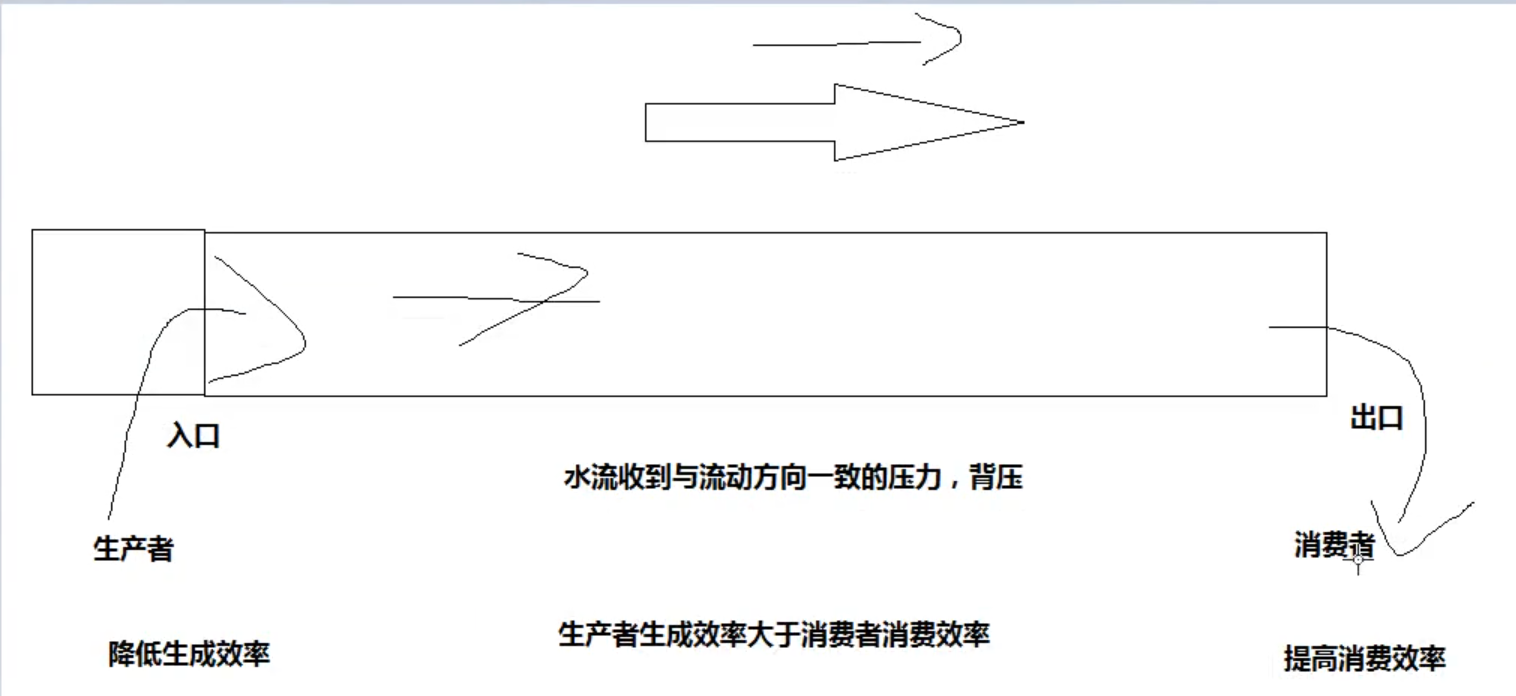
背压:水流受到与流动方向一直的压力。
在这里,只要生产者生产的效率大于消费者消费效率,就产生背压。
9.2、背压产生的问题
下面示例中:生产者100ms后并发生产,消费者每300毫秒消费一个measureTimeMillis:统计协程总时长
结果1234 ms:约等于(100+300)*3。时间相当于所有的生产者消费者加起来,效率最低,那么如何优化?

fun simpleFlow8() = flow<Int> {
    for (i in 1..3) {
    delay(100) emit(i) println("Emitting $i ${
     Thread.currentThread().name}") } } @Test fun `test flow back pressure`() = runBlocking<Unit> {
    val time = measureTimeMillis {
    simpleFlow8() .collect {
    value -> delay(300) //处理这个元素消耗300ms println("Collected $value ${
     Thread.currentThread().name}") } } println("Collected in $time ms") } // Collected 1 Test worker @coroutine#1 // Emitting 1 Test worker @coroutine#1 // Collected 2 Test worker @coroutine#1 // Emitting 2 Test worker @coroutine#1 // Collected 3 Test worker @coroutine#1 // Emitting 3 Test worker @coroutine#1 // Collected in 1234 ms
9.3、measureTimeMillis测量时长
可以measureTimeMillis用测量程序执行时长
讯享网val time1 = measureTimeMillis {
    } println("Collected in $time1 ms")
9.4、解决方案
通常解决办法:
- 做大管子,增加容积 (buffer、flowOn方式)
- 降低生产者生产效率
- 提高消费者消费效率 (conflate、collectLatest方式)
1、buffer缓冲方式处理背压
我们加上一个buffer,结果1061 ms:约等于100+300*3
fun simpleFlow8() = flow<Int> {
    for (i in 1..3) {
    delay(100) emit(i) println("Emitting $i ${
     Thread.currentThread().name}") } } @Test fun `test flow back pressure`() = runBlocking<Unit> {
    val time = measureTimeMillis {
    simpleFlow8() .buffer(50) .collect {
    value -> delay(300) //处理这个元素消耗300ms println("Collected $value ${
     Thread.currentThread().name}") } } println("Collected in $time ms") } // Emitting 1 Test worker @coroutine#2 // Emitting 2 Test worker @coroutine#2 // Emitting 3 Test worker @coroutine#2 // Collected 1 Test worker @coroutine#1 // Collected 2 Test worker @coroutine#1 // Collected 3 Test worker @coroutine#1 // Collected in 1061 ms
2、flowOn处理背压
下面示例:将生产者使用flowOn放到后台协程,这种更改了协程上下文,结果同样是1061 ms,原理是协程对不同线程默认实现了缓冲
讯享网fun simpleFlow8() = flow<Int> {
    for (i in 1..3) {
    delay(100) emit(i) println("Emitting $i ${
     Thread.currentThread().name}") } } @Test fun `test flow back pressure`() = runBlocking<Unit> {
    val time = measureTimeMillis {
    simpleFlow8() .flowOn(Dispatchers.Default) .collect {
    value -> delay(300) //处理这个元素消耗300ms println("Collected $value ${
     Thread.currentThread().name}") } } println("Collected in $time ms") } // Emitting 1 DefaultDispatcher-worker-1 @coroutine#2 // Emitting 2 DefaultDispatcher-worker-1 @coroutine#2 // Emitting 3 DefaultDispatcher-worker-1 @coroutine#2 // Collected 1 Test worker @coroutine#1 // Collected 2 Test worker @coroutine#1 // Collected 3 Test worker @coroutine#1 // Collected in 1061 ms
3、conflate()
合并发射项,不对每个值进行处理。
缺点:每次取最新值,可能跳过中间的值
@Test fun `test flow back pressure`() = runBlocking<Unit> {
    val time = measureTimeMillis {
    simpleFlow8() .conflate() .collect {
    value -> delay(300) //处理这个元素消耗300ms println("Collected $value ${
     Thread.currentThread().name}") } } println("Collected in $time ms") } // Emitting 1 Test worker @coroutine#2 // Emitting 2 Test worker @coroutine#2 // Emitting 3 Test worker @coroutine#2 // Collected 1 Test worker @coroutine#1 // Collected 3 Test worker @coroutine#1 // Collected in 756 ms
4、collectLatest
取消并重新发射最后一个值。
这里只收集了最后一个值
讯享网@Test fun `test flow back pressure`() = runBlocking<Unit> {
    val time = measureTimeMillis {
    simpleFlow8() .collectLatest {
    value -> delay(300) //处理这个元素消耗300ms println("Collected $value ${
     Thread.currentThread().name}") } } println("Collected in $time ms") } // Emitting 1 Test worker @coroutine#2 // Emitting 2 Test worker @coroutine#2 // Emitting 3 Test worker @coroutine#2 // Collected 3 Test worker @coroutine#5 // Collected in 710 ms
十、转换操作符transform
- 可以使用操作符转换流,就像使用集合与序列一样。
- 过渡操作符应用于上游流,并返回下游流。
- 这些操作符也是冷操作符,就像流一样。这类操作符本身不是挂起函数。
- 它运行的速度很快,返回新的转换流的定义。
如果不使用转换操作符,我们对流字符串处理可以使用map遍历
suspend fun performRequest(request: Int): String {
    delay(1000) return "response $request" } @Test fun `test transform flow operator`() = runBlocking<Unit> {
    (1..3).asFlow() .map {
    request -> performRequest(request) } .map {
    request1 -> "Making request $request1" } .collect {
    value -> println(value) } } // Making request response 1 // Making request response 2 // Making request response 3
使用了transform,我们对流的处理可以更灵活。
这里接受到的数据与emit互不影响
讯享网@Test fun `test transform flow operator`() = runBlocking<Unit> {
    (1..3).asFlow() .transform {
    request -> emit("Making request $request") emit(performRequest(request)) }.collect {
    value -> println(value) } } // Making request 1 // response 1 // Making request 2 // response 2 // Making request 3 // response 3
10.1、限长操作符take
这里take限制取2,则从第二个emit就不再执行,也就是这里的println
fun numbers() = flow<Int> {
    try {
    emit(1) emit(2) println("This line will not execute") emit(3) } finally {
    println("Finally in numbers") } } @Test fun `test limit length operator`() = runBlocking<Unit> {
    numbers().take(2).collect {
    value -> println(value) } } // 1 // 2 // Finally in numbers
10.2、末端操作符
末端操作符是在流上用于启动流收集的挂起函数。collect是最基础的末端操作符,但是还有另外一些更方便使用的末端操作符:
- 转化为各种集合,例如toList与toSet。
- 获取第一个(first)值与确保流发射单个(single)值的操作符。
- 使用reduce与fold将流规约到单个值。
reduce示例,取1到5的平方累加,reduce为末端操作符产生结果
讯享网@Test fun `test terminal operator`() = runBlocking<Unit> {
    val sum = (1..5).asFlow() .map {
    it * it } .reduce {
    a, b -> a + b } println(sum) } // 55
10.3、组合操作符
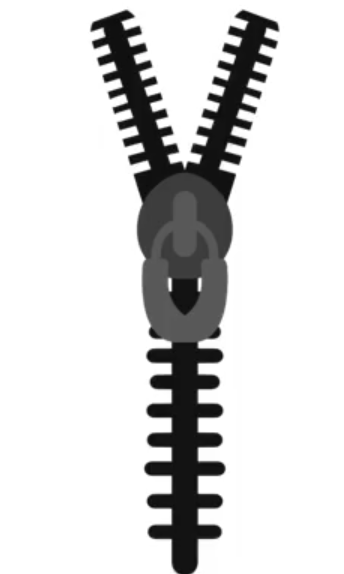
就像Kotlin标准库中的Sequence.zip扩展函数一样,流拥有一个zip操作符用于组合两个流中的相关值。
类似于拉链
@Test fun `test zip`() = runBlocking<Unit> {
    val numbs = (1..3).asFlow() val strs = flowOf("One", "Two", "Three") numbs.zip(strs) {
    a, b -> "$a -> $b" }.collect {
    println(it) } } // 1 -> One // 2 -> Two // 3 -> Three
如果两个是异步的且时间间隔不一致,可以看到是以较长时间为间隔,也就是一遍取300ms的一遍等400ms的
讯享网@Test fun `test zip2`() = runBlocking<Unit> {
    val numbs = (1..3).asFlow().onEach {
    delay(300) } val strs = flowOf("One", "Two", "Three").onEach {
    delay(400) } val startTime = System.currentTimeMillis() numbs.zip(strs) {
    a, b -> "$a -> $b" }.collect {
    println("$it at ${
     System.currentTimeMillis() - startTime} ms from start") } } // 1 -> One at 429 ms from start // 2 -> Two at 832 ms from start // 3 -> Three at 1241 ms from start
10.4、展平操作符
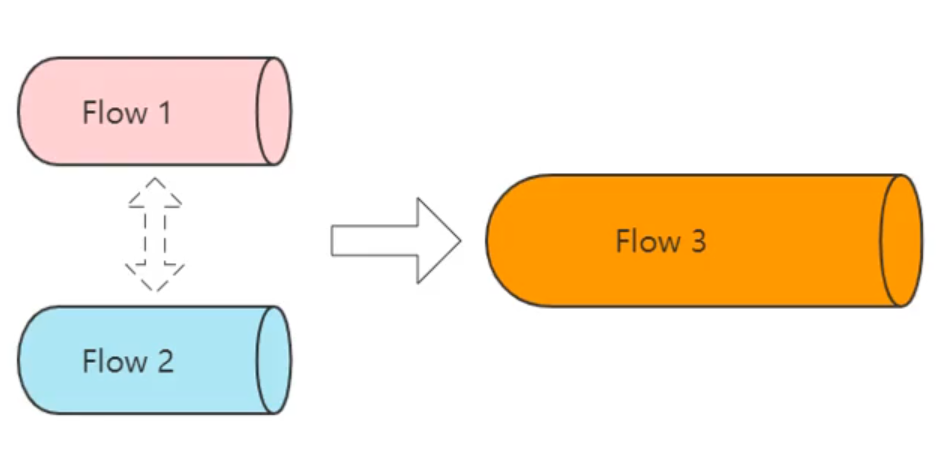
流表示异步接收的值序列,所以很容易遇到这样的情况:每个值都会触发对另一个值序列的请求,然而,由于流具有异步的性质,因此需要不同的展平模式,为此,存在一系列的流展平操作符:
- flatMapConcat连接模式,
- flatMapMerge合并模式
- flatMapLatest最新展平模式
1、flatMapConcat连接模式
示例:将两个异步流合并
如果使用Map,则就是双层流Flow<Flow>,这里使用flatMapConcat展平连接
fun requestFlow(i: Int) = flow<String> {
    emit("$i: First") delay(500) emit("$i: Second") } @Test fun `test flatMapConcat`() = runBlocking<Unit> {
    val startTime = System.currentTimeMillis() (1..3).asFlow() .onEach {
    delay(100) } //.map { requestFlow(it) } //Flow<Flow<String>> .flatMapConcat {
    requestFlow(it) } .collect {
    println("$it at ${
     System.currentTimeMillis() - startTime} ms from start") } } // 1: First at 127 ms from start // 1: Second at 631 ms from start // 2: First at 735 ms from start // 2: Second at 1239 ms from start // 3: First at 1342 ms from start // 3: Second at 1846 ms from start
2、flatMapMerge合并模式
讯享网fun requestFlow(i: Int) = flow<String> {
    emit("$i: First") delay(500) emit("$i: Second") } @Test fun `test flatMapMerge`() = runBlocking<Unit> {
    val startTime = System.currentTimeMillis() (1..3).asFlow() .onEach {
    delay(100) } .flatMapMerge {
    requestFlow(it) } .collect {
    println("$it at ${
     System.currentTimeMillis() - startTime} ms from start") } } // 1: First at 153 ms from start // 2: First at 251 ms from start // 3: First at 355 ms from start // 1: Second at 654 ms from start // 2: Second at 752 ms from start // 3: Second at 858 ms from start
3、flatMapLatest最新展平模式
fun requestFlow(i: Int) = flow<String> {
    emit("$i: First") delay(500) emit("$i: Second") } @Test fun `test flatMapLatest`() = runBlocking<Unit> {
    val startTime = System.currentTimeMillis() (1..3).asFlow() .onEach {
    delay(100) } .flatMapLatest {
    requestFlow(it) } .collect {
    println("$it at ${
     System.currentTimeMillis() - startTime} ms from start") } } // 1: First at 142 ms from start // 2: First at 285 ms from start // 3: First at 388 ms from start // 3: Second at 889 ms from start
10.5、流的异常处理
当运算符中的发射器或代码抛出异常时,有几种处理异常的方法:
- try/catch块
- catch函数
1、接收流
对于流的接收方来说,可以try/catch硬编码来捕获异常
讯享网fun simpleFlow() = flow<Int> {
    for (i in 1..3) {
    println("Emitting $i") emit(i) } } @Test fun `test flow exception`() = runBlocking<Unit> {
    try {
    simpleFlow().collect {
    value -> println(value) // Throws an IllegalStateExceptio check(value <= 1) {
    "Collected $value" } } } catch (e: Throwable) {
    println("Caught $e") } } // Emitting 1 // 1 // Emitting 2 // 2 // Caught java.lang.IllegalStateException: Collected 2
2、发送流
但是对于流的发送方来说,try/catch块会打破flow的设计原则,因此不建议使用。
建议使用flow提供的catch函数:
@Test fun `test flow exception2`() = runBlocking<Unit> {
    flow {
    emit(1) throw ArithmeticException("Div 0") }.catch {
    e: Throwable -> println("Caught $e") } .flowOn(Dispatchers.IO) .collect {
    println(it) } } // Caught java.lang.ArithmeticException: Div 0 // 1
3、异常恢复
可以通过在catch中再次emit来达到恢复异常的效果
讯享网@Test fun `test flow exception2`() = runBlocking<Unit> {
    flow {
    throw ArithmeticException("Div 0") emit(1) }.catch {
    e: Throwable -> println("Caught $e") emit(10) }.flowOn(Dispatchers.IO).collect {
    println(it) } }
10.6、流的完成
当流收集完成时(普通情况或异常情况),它可能需要执行一个动作。
- 命令式finally块
- onCompletion声明式处理
fun simpleFlow2() = (1..3).asFlow() @Test fun `test flow complete in finally`() = runBlocking<Unit> {
    // 命令式finally块【示例】 try {
    simpleFlow2().collect {
    println(it) } } finally {
    println("Done") } } @Test fun `test flow complete in onCompletion`() = runBlocking<Unit> {
    // onCompletion声明式处理【示例】 simpleFlow2() .onCompletion {
    println("Done") } .collect {
    println(it) } }
onCompletion只能获取异常信息,不能捕获异常,如果需要程序不崩溃,需要catch异常
讯享网fun simpleFlow3() = flow<Int> {
    emit(1) throw RuntimeException() } @Test fun `test flow complete in onCompletion`() = runBlocking<Unit> {
    simpleFlow3() .onCompletion {
    exception -> if (exception != null) println("Flow completed exceptionally") } .catch {
    exception -> println("Caught $exception") } .collect {
    println(it) } } // 1 // Flow completed exceptionally // Caught java.lang.RuntimeException
onCompletion不仅可以捕获发送流的异常,亦可以捕获collect阶段的异常
fun simpleFlow2() = (1..3).asFlow() @Test fun `test flow complete in onCompletion`() = runBlocking<Unit> {
    simpleFlow2() .onCompletion {
    exception -> if (exception != null) println("Flow completed exceptionally") } .collect {
    value -> println(value) check(value <= 1) {
    "Collected $value" } } } // 1 // 2 // Flow completed exceptionally
版权声明:本文内容由互联网用户自发贡献,该文观点仅代表作者本人。本站仅提供信息存储空间服务,不拥有所有权,不承担相关法律责任。如发现本站有涉嫌侵权/违法违规的内容,请联系我们,一经查实,本站将立刻删除。
如需转载请保留出处:https://51itzy.com/kjqy/132265.html