
目录
一、认识定时器
1、什么是定时器
2、标准库的定时器
二、模拟实现定时器
1、描述定时器中的任务
2、管理多个任务
3、扫描线程
4、优化
5、最终代码
一、认识定时器
1、什么是定时器
定时器是实际开发中常用的一个重要组件,类似于我们生活中的“闹钟”,达到设定的时间后,就执行某个指定的代码。
举个例子:
在服务器开发中,客户端向服务器发送请求后,就需要等待服务器的响应,但是服务器不一定会立刻作出相应,而客户端也不能一直死等下去,那么就可以通过定时器来给客户端设置一个“等待时间” 。
2、标准库的定时器
标准库中的java.util.Timer包中提供了一个Timer类,即标准库的定时器:
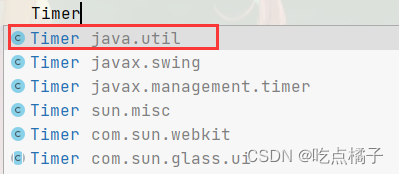
我们可以创建一个Timer类的对象,通过该对象调用schedule方法来使用定时器:
public class Test { public static void main(String[] args) { Timer timer = new Timer(); timer.schedule(new TimerTask() { @Override public void run() { System.out.println("时间到,执行任务1"); } },1000); } }讯享网
schedule方法中有两个参数:
(1) 第一个参数是一个TimerTask对象,TimerTask是一个继承了Runnable接口的类,我们只需要new一个TimerTask对象,重写里面的run方法即可。
(2) 第二个参数表示指定的时间,单位是毫秒,即多长时间之后执行任务代码。
一个Timer对象可以安排多个任务:

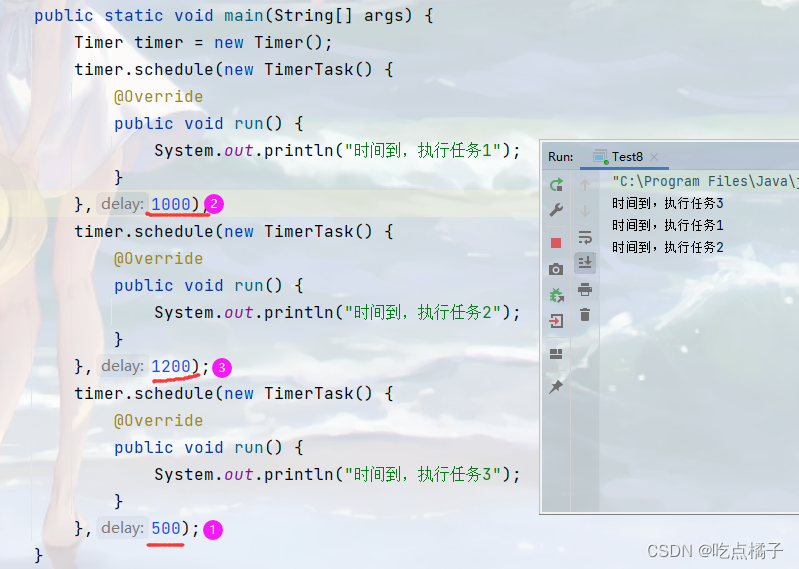
可以看到,执行完三个任务之后,进程并没有结束,因为Timer类底层有一个阻塞队列~
二、模拟实现定时器
1、描述定时器中的任务
我们需要实现一个类,用来描述定时器中的任务,该任务包含两个信息:要执行的任务是什么,以及什么时候执行:
讯享网class MyTask{ private Runnable runnable;//描述要执行的任务 private long time;//什么时间执行,用时间戳来表示 public MyTask(Runnable task,long delay){ this.runnable = task; this.time = System.currentTimeMillis() + delay; } public Runnable getRunnable() { return runnable; } public long getTime() { return time; } }
2、管理多个任务
标准库中的定时器可以管理多个任务,我们在实现时也需要达到这样的效果~
如果同时有多个任务在等待执行时,那么肯定要首先执行等待时间最短的任务,所以我们考虑使用优先级队列,但优先级队列不是线程安全的,所以我们使用带有优先级功能的阻塞队列:
public class MyTimer { private BlockingQueue<MyTask> queue = new PriorityBlockingQueue<>(); public void schedule(Runnable task,long delay) throws InterruptedException { MyTask myTask = new MyTask(task, delay); //把任务放入队列中 queue.put(myTask); } }3、扫描线程
现在队列中已经可以存放任务了,但是没有人取这些任务~
所以我们还需要有一个扫描线程,来不停地对队列进行扫描,查看并执行队列中的任务~
这个扫描线程可以直接写在MyTimer的构造方法中,只要创建了对象,扫描线程就会开始工作~
讯享网 public MyTimer(){ Thread t = new Thread(() -> { while (true){ try { MyTask task = queue.take();//获取队首元素 long curTime = System.currentTimeMillis();//获取当前时间 //比较当前时间和队首元素的执行时间 if(curTime >= task.getTime()){ //时间到,执行任务 task.getRunnable().run(); }else { //时间没到,把元素再放回到队列中 queue.put(task); } } catch (InterruptedException e) { e.printStackTrace(); } } }); t.start(); }
4、优化
(1) 实现Comparable接口,重写Comapare方法
当前的MyTask类还没有实现Comparable接口,所以当前类无法进行比较大小,从而在创建优先级阻塞队列时无法构建堆,此时运行代码就会抛出异常:
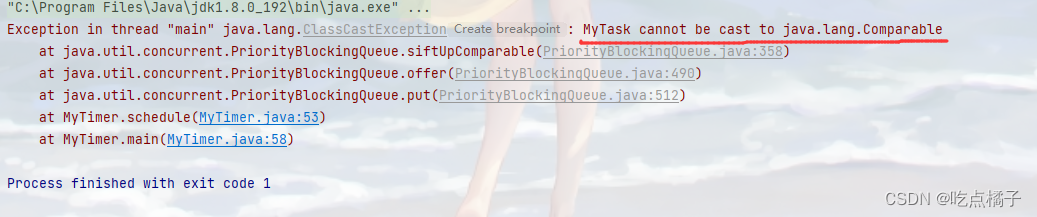
优化MyTask类:
class MyTask implements Comparable<MyTask>{ private Runnable runnable;//描述要执行的任务 private long time;//什么时间执行,用时间戳来表示 public MyTask(Runnable task,long delay){ this.runnable = task; this.time = System.currentTimeMillis() + delay; } public Runnable getRunnable() { return runnable; } public long getTime() { return time; } @Override public int compareTo(MyTask o) { return (int) (this.getTime()-o.getTime()); } }(2) 优化扫描线程
当前的扫描线程会频繁地取出/放入元素,但是如果离执行任务的时间还很远,那么这样频繁地操作,就会造成资源的浪费,并且这样频繁地取出/放入元素的操作也是毫无意义的~
举个栗子:
假设现在是1点钟,我要在2点钟去上课,那么我只需要看一次时间,就可以知道还要过一个小时才会到上课时间,在上课之前我还可以做一些其他的事情;
但是如果我每过一秒钟就看一下时间,每过一秒钟就看一下时间,这样做就会毫无意义,等待上课的过程中,我只能看时间,干不了别的事情。
讯享网 public MyTimer(){ Thread t = new Thread(() -> { while (true){ try { MyTask task = queue.take();//获取队首元素 long curTime = System.currentTimeMillis();//获取当前时间 //比较当前时间和队首元素的执行时间 if(curTime >= task.getTime()){ //时间到,执行任务 task.getRunnable().run(); }else { //时间没到,把元素再放回到队列中 queue.put(task); synchronized (locker){ locker.wait(task.getTime() - curTime); } } } catch (InterruptedException e) { e.printStackTrace(); } } }); t.start(); } public void schedule(Runnable task,long delay) throws InterruptedException { MyTask myTask = new MyTask(task, delay); //把任务放入队列中 queue.put(myTask); synchronized (locker){ //如果在线程等待期间,有新任务进入队列,则提前唤醒线程 locker.notify(); } }
(3) 最终优化
当前代码中扫描线程会进行读操作,而schedule方法会进行写操作,那么在多线程环境下,同时进行这两种操作,必然会出现线程不安全的问题,所以我们需要把扫描线程中的读操作打包成一个原子操作:
public MyTimer(){ Thread t = new Thread(() -> { while (true){ synchronized (locker) { try { MyTask task = queue.take();//获取队首元素 long curTime = System.currentTimeMillis();//获取当前时间 //比较当前时间和队首元素的执行时间 if(curTime >= task.getTime()){ //时间到,执行任务 task.getRunnable().run(); }else { //时间没到,把元素再放回到队列中 queue.put(task); locker.wait(task.getTime() - curTime); } } catch (InterruptedException e) { e.printStackTrace(); } } } }); t.start(); }5、最终代码
讯享网//描述任务的类 class MyTask implements Comparable<MyTask>{ private Runnable runnable;//描述要执行的任务 private long time;//什么时间执行,用时间戳来表示 public MyTask(Runnable task,long delay){ this.runnable = task; this.time = System.currentTimeMillis() + delay; } public Runnable getRunnable() { return runnable; } public long getTime() { return time; } @Override public int compareTo(MyTask o) { return (int) (this.getTime()-o.getTime()); } } //定时器 public class MyTimer { private BlockingQueue<MyTask> queue = new PriorityBlockingQueue<>(); Object locker = new Object(); public MyTimer(){ Thread t = new Thread(() -> { while (true){ synchronized (locker) { try { MyTask task = queue.take();//获取队首元素 long curTime = System.currentTimeMillis();//获取当前时间 //比较当前时间和队首元素的执行时间 if(curTime >= task.getTime()){ //时间到,执行任务 task.getRunnable().run(); }else { //时间没到,把元素再放回到队列中 queue.put(task); locker.wait(task.getTime() - curTime); } } catch (InterruptedException e) { e.printStackTrace(); } } } }); t.start(); } public void schedule(Runnable task,long delay) throws InterruptedException { MyTask myTask = new MyTask(task, delay); //把任务放入队列中 queue.put(myTask); synchronized (locker){ locker.notify(); } } }
版权声明:本文内容由互联网用户自发贡献,该文观点仅代表作者本人。本站仅提供信息存储空间服务,不拥有所有权,不承担相关法律责任。如发现本站有涉嫌侵权/违法违规的内容,请联系我们,一经查实,本站将立刻删除。
如需转载请保留出处:https://51itzy.com/kjqy/129921.html