
扫雷小游戏(原生js)
实验介绍
- 实验简介
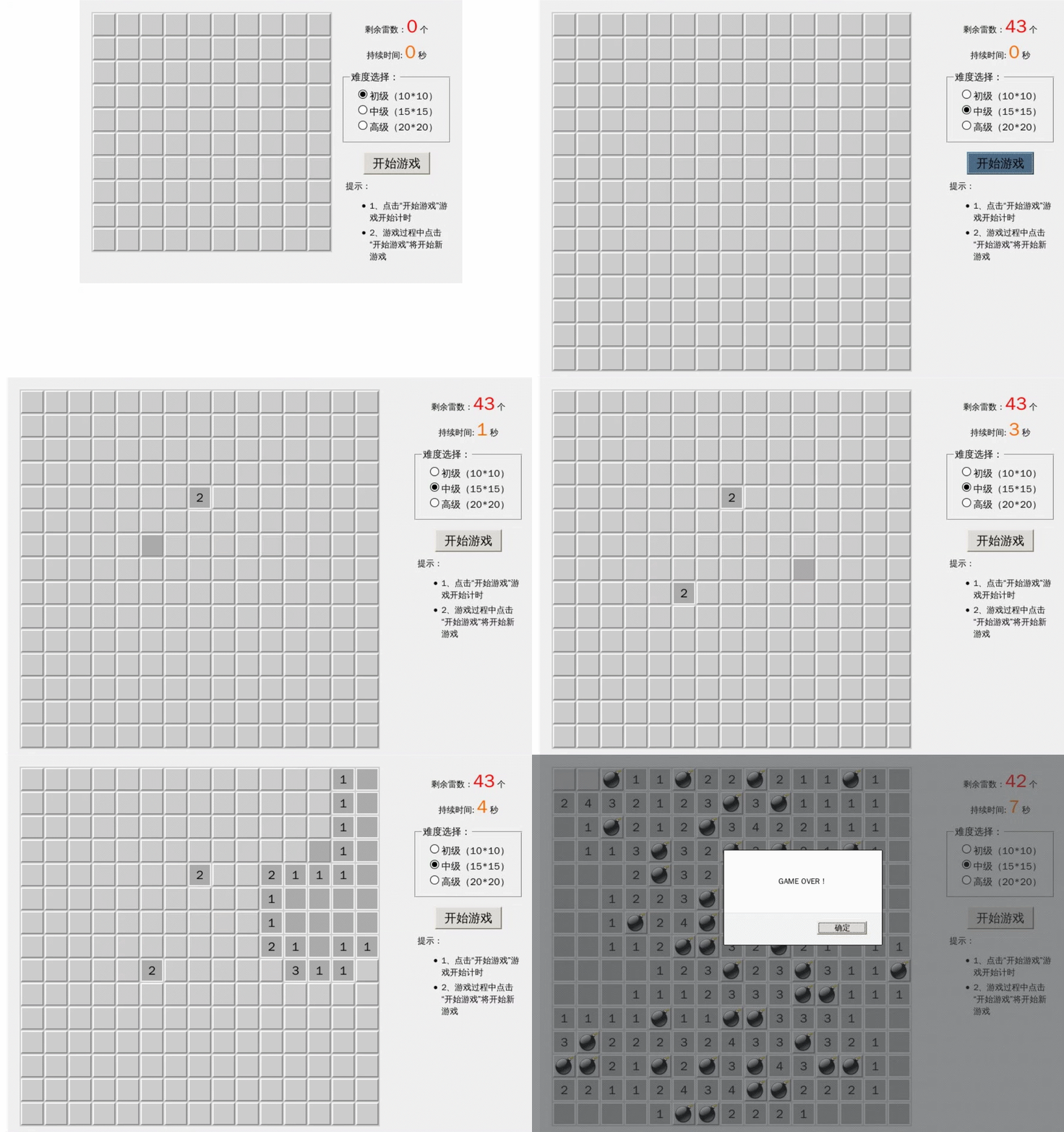
先上一张效果图

讯享网 - 源代码获取(非本文章中代码)
$ git clone https://github.com/shiyanlou/js-minesweeper 讯享网
- 学习网页
实验楼-网页版扫雷
实现原理
扫雷游戏的规则:
游戏面板上有一些格子,每个格子中有一个数字(空白表示数字为 0)或是地雷,格子中的数字表示格子周围格子中地雷的数量。玩家要做的就是把数字格子找出来,时间花的越少越好。
根据用户选择的难易程度(有初、中、高三个级别,级别越高地雷和格子数量越多),随机产生一定个数的地雷并随机放在格子中。然后遍历格子,计算每个格子中的数字,标记在格子上。玩家左键点击格子时显示格子内容(如果遇到地雷则挑战失败,游戏结束),右键点击格子时标记格子为地雷,真到正确标记所有地雷并打开所有非地雷格子,挑战成功,游戏结束。

目录结构:

实验步骤
-
页面布局
讯享网<body> <div id="box"> <table id="game"></table> <div id="control"> <div id="restMine">剩余雷数: <span id="restMineCount" style="font-size: 18px;color: red;"> 0 </span>个</div> <div id="useTime">持续时间: <span id="useTimeSecond" style="font-size: 18px;color: red;"> 0 </span>秒</div> <form> <fieldset> <legend>难度选择:</legend> <input type="radio" name="difficultLevel" id="hard1" checked/><label for="hard1"> 初级(10*10)</label><br> <input type="radio" name="difficultLevel" id="hard2"/><label for="hard2"> 中级(15*15)</label><br> <input type="radio" name="difficultLevel" id="hard3"/><label for="hard3"> 高级(20*20)</label><br> </fieldset> </form> <button id="startGame">开始新游戏</button> <div id="info"> <h5>提示:</h5> <ul> <li>点击“开始新游戏”开始计时</li> <li>游戏过程中点击“开始新游戏”则重新开始</li> </ul> </div> </div> </div>
-
css布局
*{ padding:0px; margin: 0px; } #box{ width: auto; height: auto; float: left; border: 1px solid indianred; margin: 100px auto; } #game{ float: left; background:#CCC; } #game td{ width: 32px; height:32px; border:2px outset #EEE; text-align:center; cursor:pointer; font-size: 25px; line-height: 32px; } #game td:hover{ background-color:#AAA; } /* 为雷区 */ .landMine{ background-image:url('http://labfile.oss.aliyuncs.com/courses/144/mine.png'); background-position:center; background-repeat:no-repeat; } /* 鼠标右键点击标志 */ .flag{ background-image:url('http://labfile.oss.aliyuncs.com/courses/144/flag.png'); background-position:center; background-repeat:no-repeat; } /* 不是雷区,普通区 */ #game td.normal{ border:2px solid #EEE; background-color:#AAA; } #control{ display: inline; float: left; margin-left: 30px; width: 200px; height: auto; text-align: center; } #restMine{ margin-top: 10%; font-size: 16px; } #control form{ margin-top:10%; } #control fieldset{ height: 100px; } #control form legend{ text-align:left; margin-left: 10px; } #control label{ font-size: 14px; padding: 10px; } #useTime{ margin-top: 10%; font-size:16px; } #startGame { margin-top: 20px; padding: 0.5em; width: 100px; } #info{ text-align: left; margin-top: 20px; } #info ul{ text-indent: 10px; font-size: 13px; } -
创建表格
讯享网function $(id) { return typeof id==="string"?document.getElementById(id):null; } //作为全局的函数
传入行数,列数来创建表格
//创建表格函数 function createTable(rowCount,colCount){ var table=$('game'); empty(table); //每次创建都要先清空表格 for(var i=0;i<rowCount;i++){ var tr=document.createElement('tr'); for(var j=0;j<colCount;j++) { var td = document.createElement('td'); td.id = 'm_' + i + '_' + j; //绑定一个id tr.appendChild(td); } table.appendChild(tr); } }; //清空子节点 function empty(node){ while(node.hasChildNodes()) { node.removeChild(node.firstChild); } }; -
扫雷.js
讯享网//初始化表格并监听难度点击事件 var jms=new JMS('game'); function initTable() { var hardList=document.getElementsByName("difficultLevel"); var tdCountArr=[10,15,20];//难度的数组 var flag=true; //监听难度点击事件 for(var i=0;i<hardList.length;i++){ (function(j){ hardList[j].addEventListener('click',function(){ if(jms!=null&&jms.rowCount!=tdCountArr[j]) { if(jms.mineCount!==0){ //确认改变 if(window.confirm("确认改变难度等级吗?")) { flag=true; //更新数据 jms.colCount = tdCountArr[j]; jms.rowCount = tdCountArr[j]; jms.end();//之前的游戏结束 clearInterval(timer);//清除计时器 jms. initGame();//初始化游戏数据 //重建表 createTable(jms.rowCount,jms.colCount); } else{ flag=false; } } } if(!flag){ return false; } }) })(i); } } //标记时的回调函数,更新雷数 jms.markCallback=function (count) { return $('restMineCount').innerHTML=count; } //结束的回调函数,计时,雷数显示清零 jms.endCallback=function () { $('restMineCount').innerHTML=0; $('useTimeSecond').innerHTML=0; } //全局计时 var timer=null; //开始游戏 initTable(); //监听点击改变难度事件 function startGame() { createTable(10,10); //初始创建一个10*10表 //点击开始新游戏 $('startGame').addEventListener('click',function () { jms.play(); //游戏开始接口 jms.begin(); //游戏正式开始 $('restMineCount').innerHTML=jms.mineCount-jms.remarkedMine; //显示雷的数目 //计时开始 timer=setInterval(function (){ $('useTimeSecond').innerHTML=parseInt((new Date()-jms.startTime)/1000); //更新显示的时间 if(!jms.status){//表示已经停止 clearInterval(timer); $('useTimeSecond').innerHTML=parseInt((jms.endTime-jms.startTime)/1000); //不能让alert阻止进程,导致计时不停止 } },1000); }); } startGame();
- jms.js代码
(function(){ function $(id) { return typeof id==="string"?document.getElementById(id):null; } var JMS=function (id,rowCount,colCount) { if(!(this instanceof JMS)) { return new JMS(); } this.startTime=null;//开始时间 this.endTime=null;//结束时间 this.rowCount=rowCount||10;//行数,默认为10 this.colCount=colCount||10;//列数 this.table=$(id);//表格区 this.tdArr=this.table.getElementsByTagName('td');//一个个的小块 this.status=false;//游戏的状态,true为开始,false为结束 this.arr=[];//td对应的数值数组 this.remarkedMine=0;//标记的雷数 this.mineCount=10;//雷数 this.currentStepCount=0;//步数,包括自动打开的空白区域和点击的非0区域 this.markCallback=null;//标记的回调函数,用于实时更新雷数 this.endCallback=null;//结束的回调函数 this.doc=document;//当前文档的引用 this.doc.oncontextmenu=function () { //右键禁止默认行为 return false; } } JMS.prototype={ //初始化数组,全部为0 initGame:function () { //td对应的数值数组,全为0 for(var i=0;i<this.rowCount;i++){ this.arr[i]=[]; for(var j=0;j<this.colCount;j++){ this.arr[i][j]=0; } } //产生随机雷数 this.mineCount=parseInt(Math.random()*5)+this.rowCount*4; //可以根据自己选择调试 this.startTime=new Date(); this.endTime=null; this.currentStepCount=0; this.remarkedMine=0; this.status=true; }, //数组更新为雷区,用 9 表示 landMine:function(){ var tempArr=[],allCount=this.colCount*this.rowCount-1; for(var i=0;i<this.mineCount;i++){ var randomNum=this.getRandom(0,allCount); var colsRows=this.getColRow(randomNum); if(colsRows in tempArr){//在数组中,跳走 i--;、 continue; } tempArr[tempArr.length]=randomNum; this.arr[colsRows.rows][colsRows.cols]=9; } }, //产生一个随机数 getRandom:function(begin,end){ return parseInt(Math.random()*(end-begin))+begin; }, //得到行列,用% / 得到 getColRow:function(allCount){ return { cols:allCount%this.colCount, rows:parseInt(allCount/this.rowCount) } }, //遍历表格,得到数组 calculateNoLandMineCount:function () { for(var i=0;i<this.rowCount;i++) { for (var j = 0; j < this.colCount; j++) { if (this.arr[i][j] == 9) { continue; } if (i > 0 && j > 0) { if (this.arr[i - 1][j - 1] == 9) { this.arr[i][j]++; } } if (i > 0) { if (this.arr[i - 1][j] == 9) { this.arr[i][j]++; } } if (i > 0 && j < this.colCount - 1) { if (this.arr[i - 1][j + 1] == 9) this.arr[i][j]++; } if (j > 0) { if (this.arr[i][j - 1] == 9) { this.arr[i][j]++; } } if (j < this.rowCount - 1) { if (this.arr[i][j + 1] == 9) { this.arr[i][j]++; } } if (i < this.rowCount - 1 && j > 0) { if (this.arr[i + 1][j - 1] == 9) this.arr[i][j]++; } if (i < this.rowCount - 1) { if (this.arr[i + 1][j] == 9) this.arr[i][j]++; } if (i < this.rowCount - 1 && j < this.colCount - 1) { if (this.arr[i + 1][j + 1] == 9) this.arr[i][j]++; } } } }, //绑定事件 bindCells:function(){ //保留全局的this,到绑定事件时this会更改 var self=this; for(var i=0;i<this.rowCount;i++) { for (var j = 0; j < this.colCount; j++) { //闭包绑定事件 (function (i, j) { $('m_' + i + '_' + j).onmousedown=function (event) { var btn = event.button; var className = this.className; if (btn == 2) { // 标记,前面阻止右键默认行为,btn为2表示点击鼠标右键,为1表示左键 if (className !== 'flag') { this.className = 'flag'; self.remarkedMine++; } else { this.className = ''; self.remarkedMine--; } //调用标记回调函数,在扫雷.js中定义的回调函数 if(self.markCallback){ self.markCallback(self.mineCount-self.remarkedMine); } } else { // 打开 self.OpenItem.call(self, this, i, j); } } })(i, j); } } }, //打开, OpenItem:function (obj,row,col) { if(this.arr[row][col]!==9){ this.currentStepCount++; if(this.arr[row][col]!==0){ obj.innerHTML=this.arr[row][col]; } obj.className='normal'; if(this.currentStepCount+this.remarkedMine==this.colCount*this.rowCount-1){ //成功 this.success(); } obj.onmousedown=null; if (this.arr[row][col] == 0) { this.showNoLandMine.call(this, row, col); } } else{ this.fail(); } }, //显示无雷区 showNoLandMine:function (x,y){ for(var i=x-1;i<x+2;i++){ for(var j=y-1;j<y+2;j++){ if(!(i==x&&y==j)){ var ele=$('m_'+i+'_'+j); if(ele&&ele.className==''){ this.OpenItem.call(this, ele, i, j); } } } } }, //显示雷区方块 showLandMine:function () { for(var i=0;i<this.rowCount;i++){ for(var j=0;j<this.colCount;j++){ //为雷区 if(this.arr[i][j]==9){ $('m_'+i+"_"+j).className='landMine'; } } } }, //显示所有的方块 showAll:function () { for(var i=0;i<this.rowCount;i++){ for(var j=0;j<this.colCount;j++){ if(this.arr[i][j]==9){ $('m_'+i+"_"+j).className='landMine'; } else{ if(this.arr[i][j]!=0){ $('m_'+i+"_"+j).innerHTML=this.arr[i][j]; } $('m_'+i+"_"+j).className='normal'; } } } }, //清除信息, clearIfo:function () { for(var i=0;i<this.rowCount;i++){ for(var j=0;j<this.colCount;j++){ $('m_'+i+'_'+j).innerHTML=''; $('m_'+i+'_'+j).className=''; } } }, //清除绑定 clearBind:function(){ for(var i=0;i<this.rowCount;i++){ for(var j=0;j<this.colCount;j++){ $('m_'+i+'_'+j).onmousedown=null; } } }, //游戏成功 success:function () { this.end(); this.clearBind(); this.showAll(); setTimeout(function (){alert("Congratulation!")},100); this.clearIfo(); }, //游戏失败,结束->显示所有->清除绑定->显示结束(js单线程,有一定的时间延迟,设置一个定时器) fail:function () { this.end(); this.showAll(); this.clearBind(); setTimeout(function (){alert("GAME OVER")},100); }, //开始游戏接口 ,初始化游戏->生成雷区数组->计算非雷数 play:function () { this.initGame(); this.landMine(); this.calculateNoLandMineCount(); }, //游戏开始 ,步数、标记雷数为0-> begin:function () { this.currentStepCount=0; this.remarkedMine=0; this.clearIfo(); this.bindCells(); }, //游戏结束,结束时间->状态更改->结束回调函数 end:function () { this.endTime=new Date(); this.status=false; if(this.endCallback){ this.endCallback(); } } } window.JMS=JMS; //对象全局化 })(); 总结
主要使用 JavaScript 实现了网页版的经典小游戏扫雷,代码有一些冗余,根据网上提供的思路自己写的,代码有一些小BUG,是单选点击BUG。仅保存,具体学习案例和代码开头已经给出。读者可以根据自己的需要选择。本文只作为学习笔记
版权声明:本文内容由互联网用户自发贡献,该文观点仅代表作者本人。本站仅提供信息存储空间服务,不拥有所有权,不承担相关法律责任。如发现本站有涉嫌侵权/违法违规的内容,请联系我们,一经查实,本站将立刻删除。
如需转载请保留出处:https://51itzy.com/kjqy/129319.html