
网站流量指标统计
对于网站流量指标统计,一般可以分为如下维度:
1.统计每一天的页面访问量。
2.统计每一天的独立访客数(按人头数统计)
3.统计每一天的独立会话数(Session)
收集到如上指标之后,可以按时段来分析网站整体的流量情况




4.按访客地域统计
5.按统计访客ip地址
6.按来路页面分析
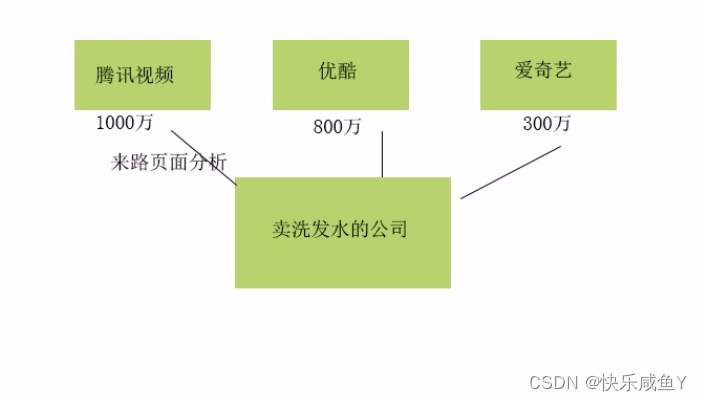
综上,本项目统计的指标总结如下:
1.PV,页面访问量。用户点击一次页面,就算做一个PV,刷新操作也算。我们会统计一天内总的PV
3.VV,独立会话(Session)数。统计一天之内有多少不同的会话。产生新会话的条件:
①关闭浏览器,再次打开,会产生一个新会话
②过了会话的操作超时时间(半小时)后,会产生一个新会话
实现思路:
当产生一个新会话时,后台会为此会话生成一个会话id(ssid),然后存到cookie里。
所以统计VV,实际上就是统计一天之内有多少不同的ssid。
5.NewCust,新增用户数。今天的某个用户在历史数据中从未出现过,则此用户算作一个新增用户。
统计今天的uvid在历史数据中没出现过的数量。
假设今天:2019-09-19
历史数据:<2019-09-19
6.NewIp,新增Ip数。统计今天的ip在历史数据中未出现过的个数。
8.AvgTime,平均的会话访问时长。AvgTime=总的会话访问时长/总的会话数(VV)其中,总的会话时长=每个会话时长的求和。
如何求出每个会话的访问时长。
比如:
会话1:
A.jsp时间戳1
B.jsp时间戳2
C.jsp时间戳3
会话2:
A.jsp时间戳1
B.jsp时间戳2
C.jsp时间戳3
================================
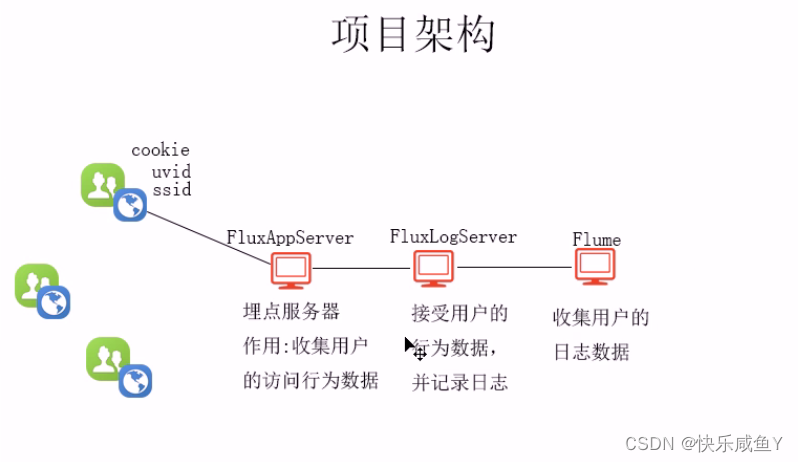

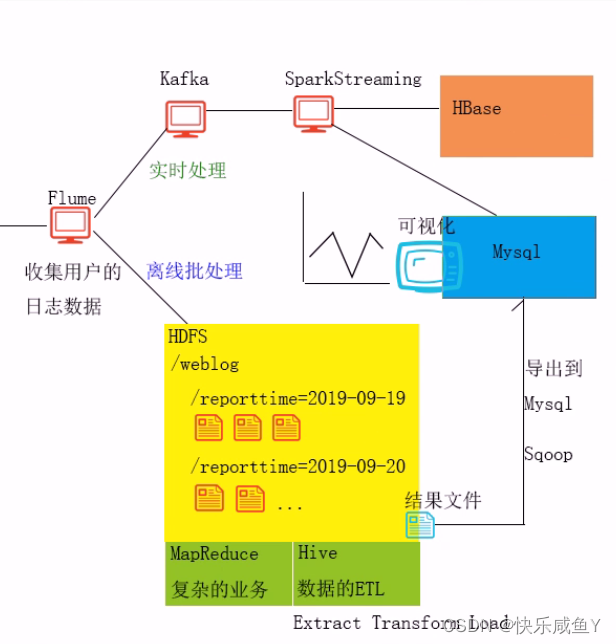
以上架构服务搭建于zookeeper集群
tomcat配置
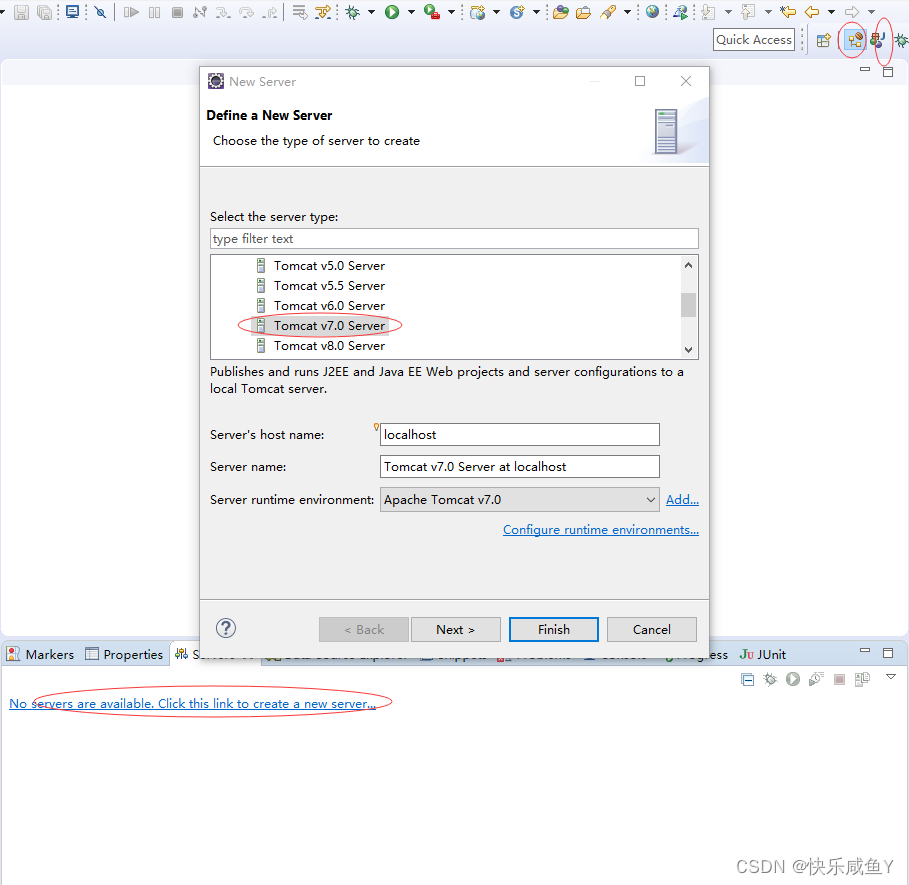
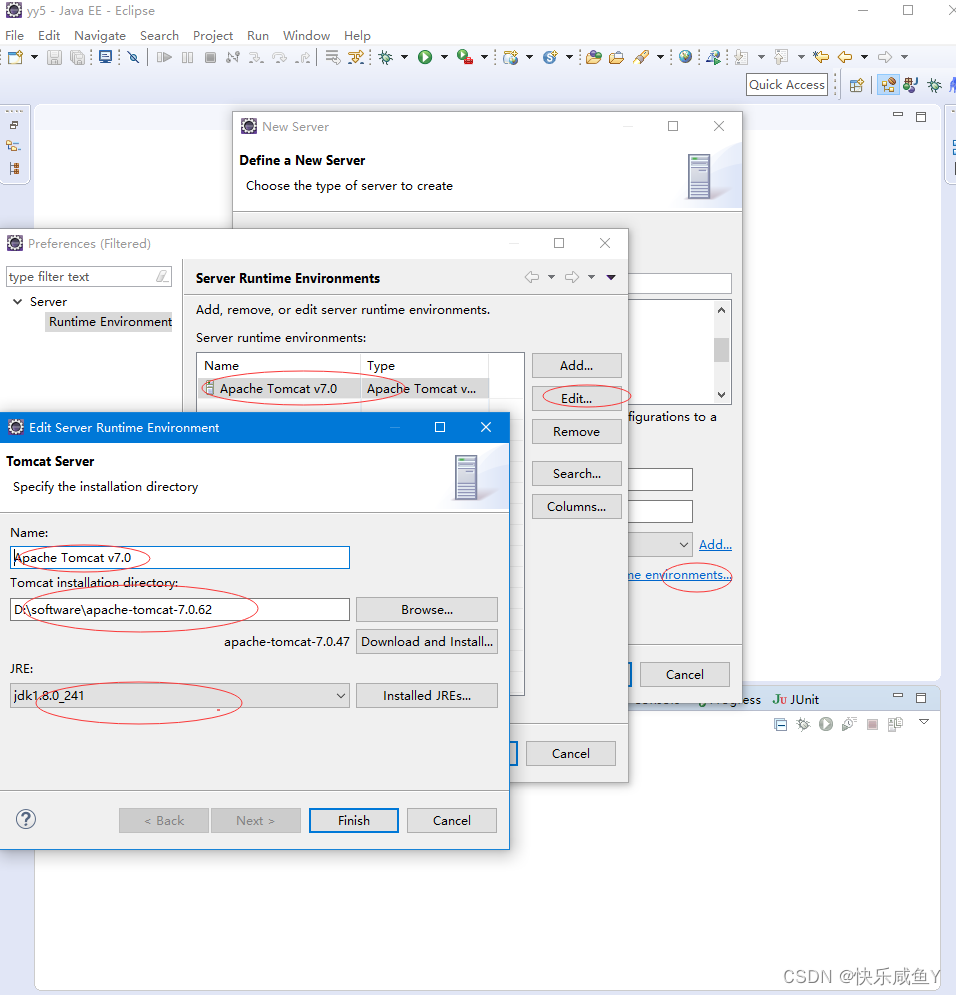
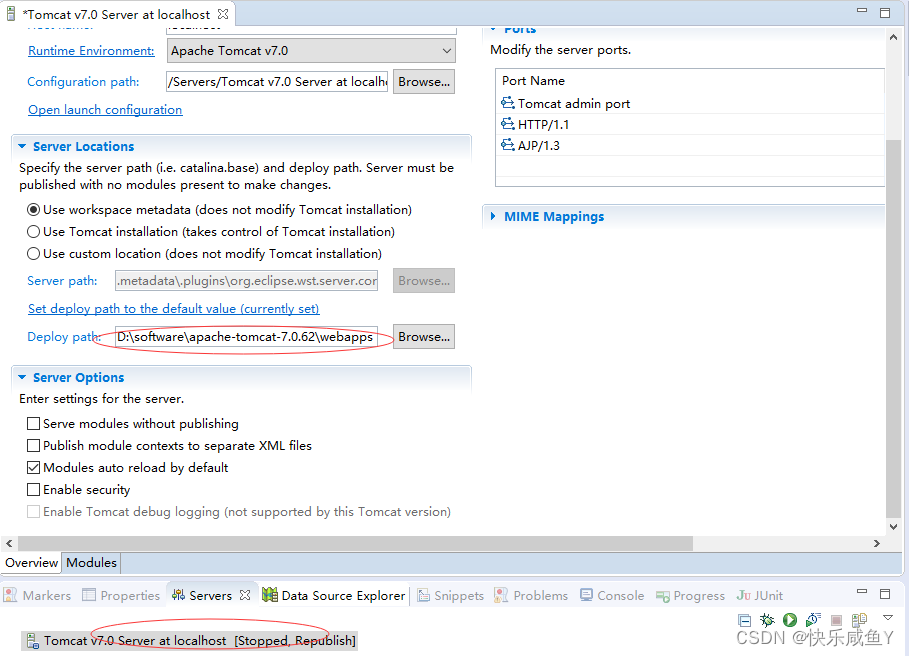
CTRL+s保存配置
新建工程
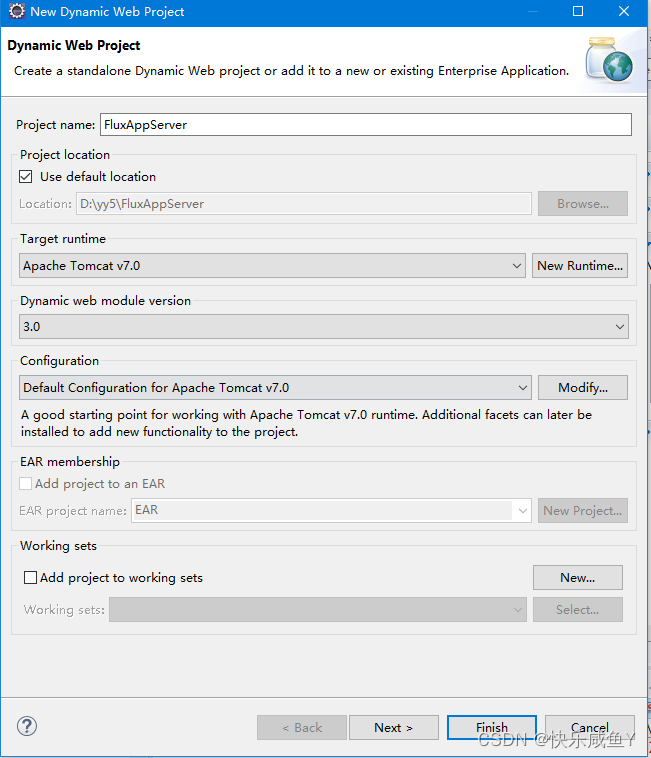
访问地址
http://localhost:8080/FluxAppServer/a.jsp 讯享网
修改js
讯享网 var dest_path = "http://localhost:8080/FluxLogServer/servlet/LogServlet?";
前端代码
flume配置
[root@hadoop01 data]# pwd /home/presoftware/apache-flume-1.6.0-bin/data [root@hadoop01 data]# cp hdfssink.conf web.conf [root@hadoop01 data]# vim web.conf a1.sources=s1 a1.channels=c1 a1.sinks=k1 a1.sources.s1.type=avro a1.sources.s1.bind=0.0.0.0 a1.sources.s1.port=44444 a1.source.s1.interceptors=i1 a1.source.s1.interceptors.i1.type=timestamp a1.channels.c1.type=memory #配置flume的通道容量,表示最多可以缓存 #1000个Events事件。在生产环境,建议在5万~10万 a1.channels.c1.capacity=1000 #批处理大小,生产环境建议在1000以上 a1.channels.c1.transactionCapacity=100 a1.sinks.k1.type=hdfs a1.sinks.k1.hdfs.path=hdfs://hadoop01:9000/weblog/reporttime=%Y-%m-%d #按时间周期滚动生成一个新文件。建议在一小时及以上。避免生成大量的小文件 a1.sinks.k1.hdfs.rollInterval=30 #flume在HDFS生成文件时的格式。①默认格式,是二进制格式②DataStream,普通文本格式 a1.sinks.k1.hdfs.fileType=DataStream #按文件大小滚动生成新文件。默认是1kb。如果是0,表示不按此条件滚动 a1.sinks.k1.hdfs.rollSize=0 #按文件中行数滚动。默认是10行。 a1.sinks.k1.hdfs.rollCount=0 a1.sinks.k1.hdfs.useLocalTimeStamp = true a1.sources.s1.channels=c1 a1.sinks.k1.channel=c1 启动(flume要比前端服务先启动)
讯享网[root@hadoop01 data]# ../bin/flume-ng agent -n a1 -c ./ -f ./web.conf -Dflum.root.logger=INFO,console
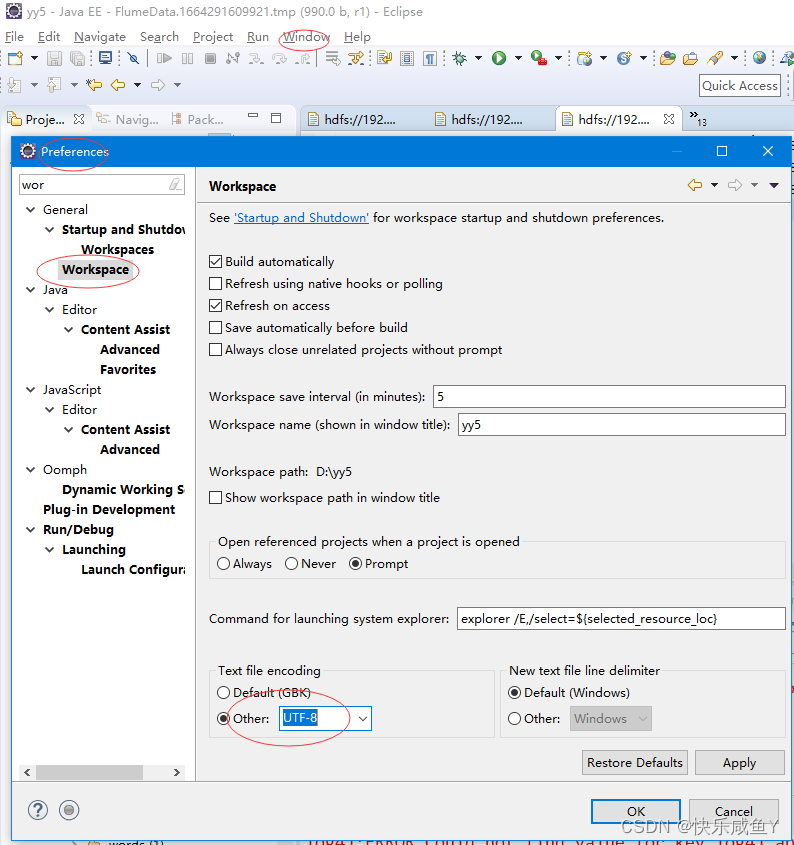
eclipse中hadoop文件乱码解决

==============================
[root@hadoop01 ~]# cd /home/presoftware/apache-hive-1.2.0-bin/bin [root@hadoop01 bin]# sh hive hive> create database weblog; OK Time taken: 1.983 seconds hive> use weblog; 讯享网#hdfs [root@hadoop01 ~]# hadoop fs -ls /weblog Found 1 items drwxr-xr-x - root supergroup 0 2022-09-27 23:19 /weblog/reporttime=2022-09-27
1.建立总表(外部表+分区表),加载和管理所有的字段数据,比如url, urlname,color…等。
2.为总表添加分区信息。
3.建立清洗表(内部表),清洗出有用的业务字段。
4.从总表中将清洗后的字段数据插入到清洗表
5.建立业务表,用于存储统计后的各个指标,本项目的pv, uv, vv… .
#建表(总表) create external table flux (url string,urlname string,title string,chset string,src string,col string,lg string, je string,ec string,fv string,cn string,ref string,uagent string,stat_uv string,stat_ss string,cip string) partitioned by (reportTime string) row format delimited fields terminated by '|' location '/weblog'; 讯享网msck repair table flux;
alter table flux drop partition(reporttime='2022-09-27'); alter table flux add partition(reporttime='2022-09-27') location '/weblog/reporttime=2022-09-27'; 查询数据验证
讯享网hive> select * from flux tablesample(1 ROWS); OK http://localhost:8080/FluxAppServer/b.jsp b.jsp 页面B UTF-8 1920x1080 24-bit en 0 1 0.66953 http://localhost:8080/FluxAppServer/a.jsp Mozilla/5.0 (Windows NT 10.0; Win64; x64) AppleWebKit/537.36 (KHTML, like Gecko) Chrome/92.0.4515.107 Safari/537.36 _9_34 0:0:0:0:0:0:0:1 2022-09-27 Time taken: 0.121 seconds, Fetched: 1 row(s)
创建清洗表
create table dataclear(reportTime string,url string,urlname string,uvid string,ssid string,sscount string,sstime string,cip string) row format delimited fields terminated by '|'; 讯享网insert overwrite table dataclear select reporttime,url,urlname,stat_uv,split(stat_ss,"_")[0],split(stat_ss,"_")[1],split(stat_ss,"_")[2],cip from flux where url!='';
方式2,加了条件----日期
insert overwrite table dataclear select reporttime,url,urlname,stat_uv,split(stat_ss,"_")[0],split(stat_ss,"_")[1],split(stat_ss,"_")[2],cip from flux where url!='' where reporttime='2022-09-27'; 查询清洗表的pv(页面访问量)
讯享网select count(*) from dataclear where reportTime='2022-09-27';
用户个数
#效率低---一个job select count(distinct uvid) as uv from dataclear where reporttime='2022-09-27'; #解决方式---底层开启机制,一个job转成多个job(count和distinct分开工作) set hive.groupby.skewindata=true; #设置reduce task的数量 set mapred.reduce.tasks=3; 讯享网#创建业务表 create table tongji(reportTime string,pv int,uv int,vv int, br double,newip int, newcust int, avgtime double,avgdeep double) row format delimited fields terminated by '|';
数据处理分解步骤
数据处理
PV:访问量
select count(*) as pv from dataclear where reportTime='2020-11-19'; UV:独立访客数
讯享网select count(distinct uvid) as uv from dataclear where reportTime='2020-11-19';
SV:独立会话数
select count(distinct ssid) as sv from dataclear where reportTime='2020-11-19'; BR:跳出率
讯享网set hive.mapred.mode=nonstrict;
select round(br_taba.a/br_tabb.b,4) as br from (select count(*) as a from (select ssid from dataclear where reportTime='2020-11-19' group by ssid having count(ssid)=1) as br_tab) as br_taba,(select count(distinct ssid) as b from dataclear where reportTime='2020-11-19') as br_tabb; NewIP:新增IP数
讯享网select count(distinct dataclear.cip) from dataclear where dataclear.reportTime='2020-11-19' and cip not in (select dc2.cip from dataclear as dc2 where dc2.reportTime<'2020-11-19');
NewCust:新增访客数
select count(distinct dataclear.uvid) from dataclear where dataclear.reportTime='2020-11-19' and uvid not in (select dc2.uvid from dataclear as dc2 where dc2.reportTime < '2019-11-19'); AvgTime:平均访问时长
讯享网select round(avg(atTab.usetime),4) as avgtime from (select max(sstime) -min(sstime) as usetime from dataclear where reportTime='2020-11-19' group by ssid) as atTab;
AvgDeep:平均访问深度
select round(avg(deep),2) as viewdeep from (select count(distinct urlname) as deep from flux where reportTime='2020-11-19' group by ssid as tviewdeep; 插入业务表的语句
讯享网insert overwrite table tongji select '2022-09-28',tab1.pv,tab2.uv,tab3.vv,tab4.br,tab5.newip,tab6.newcust,tab7.avgtime,tab8.avgdeep from (select count(*) as pv from dataclear where reportTime = '2022-09-28') as tab1, (select count(distinct uvid) as uv from dataclear where reportTime = '2022-09-28') as tab2, (select count(distinct ssid) as vv from dataclear where reportTime = '2022-09-28') as tab3,(select round(br_taba.a/br_tabb.b,4)as br from (select count(*) as a from (select ssid from dataclear where reportTime='2022-09-28' group by ssid having count(ssid) = 1) as br_tab) as br_taba,(select count(distinct ssid) as b from dataclear where reportTime='2022-09-28') as br_tabb) as tab4,(select count(distinct dataclear.cip) as newip from dataclear where dataclear.reportTime = '2022-09-28' and cip not in (select dc2.cip from dataclear as dc2 where dc2.reportTime < '2022-09-28')) as tab5, (select count(distinct dataclear.uvid) as newcust from dataclear where dataclear.reportTime='2022-09-28' and uvid not in (select dc2.uvid from dataclear as dc2 where dc2.reportTime < '2022-09-28')) as tab6,(select round(avg(atTab.usetime),4) as avgtime from (select max(sstime) - min(sstime) as usetime from dataclear where reportTime='2022-09-28' group by ssid) as atTab) as tab7,(select round(avg(deep),4) as avgdeep from (select count(distinct urlname) as deep from dataclear where reportTime='2022-09-28' group by ssid) as adTab) as tab8;
java.io.IOException: java.net.ConnectException: Call From hadoop01/192.168.253.129 to 0.0.0.0:10020 failed on connection exception: java.net.ConnectException: 拒绝连接; For more details see: http://wiki.apache.org/hadoop/ConnectionRefused 解决
讯享网1)在/etc/hadoop/mapred-site.xml配置文件中开启jobhistory <property> <name>mapreduce.jobhistory.address</name> <!-- 配置实际的主机名和端口--> <value>hadoop01:10020</value> </property> 2)并增加historyserver的heap 的大小,根据具体情况而定。 在配置文件${
   HADOOP_DIR}/etc/hadoop/mapred-env.sh下: export HADOOP_JOB_HISTORYSERVER_HEAPSIZE=2000 3)开启historyserver [root@hadoop01 sbin]# mr-jobhistory-daemon.sh start historyserver
运行之后报错
ERROR : Ended Job = job_32_0823 with exception 'java.io.IOException(java.io.IOException: Unknown Job job_32_0823 at org.apache.hadoop.mapreduce.v2.hs.HistoryClientService$HSClientProtocolHandler.verifyAndGetJob(HistoryClientService.java:218) 讯享网[root@hadoop01 hadoop]# pwd /home/presoftware/hadoop-2.7.1/etc/hadoop [root@hadoop01 hadoop]# vim yarn-site.xml <property> <name>yarn.app.mapreduce.am.staging-dir</name> <value>/user</value> </property>
结果
hive> select * from tongji; OK 2022-09-28 11 4 7 0.8571 0 3 107.0 1.0 Time taken: 0.069 seconds, Fetched: 1 row(s) hive>
版权声明:本文内容由互联网用户自发贡献,该文观点仅代表作者本人。本站仅提供信息存储空间服务,不拥有所有权,不承担相关法律责任。如发现本站有涉嫌侵权/违法违规的内容,请联系我们,一经查实,本站将立刻删除。
如需转载请保留出处:https://51itzy.com/kjqy/129039.html