
环境准备工作:
erlang和RabbitMQ安装: https://www.jianshu.com/p/3d43561bb3ee
apache安装amqp扩展: https://www.cnblogs.com/88phper/p/8296066.html
RabbitMQ命令:https://www.cnblogs.com/gongshun/p/10694659.html
thinkphp5安装扩展
composer require php-amqplib/php-amqplib
一、生产者
<?php / * Created by msciwang * User: fgc * Date: 2021-10-05 * Time: 11:52 * Desc: rabbimtMQ测试类 */ namespace app\index\controller; use PhpAmqpLib\Connection\AMQPStreamConnection; use PhpAmqpLib\Message\AMQPMessage; class Test { public function index() { $connection = new AMQPStreamConnection('localhost', '5672', 'guest', ''); $channel = $connection->channel(); //声明一个队列 // passive true 不会自动创建队列 false当队列不存在会自动创建队列 // durable 消息持久化 //Exclusive true 排他队列,false 非排他队列 排他队列,如果一个队列被声明为排他队列,该队列仅对首次声明它的连接可见, //并在连接断开时自动删除。这里需要注意三点:其一,排他队列是基于连接可见的,同一连接的不同信道是可以同时访问同 //一个连接创建的排他队列的。其二,“首次”,如果一个连接已经声明了一个排他队列,其他连接是不允许建立同名的排他队列的, //这个与普通队列不同。其三,即使该队列是持久化的,一旦连接关闭或者客户端退出,该排他队列都会被自动删除的。 //这种队列适用于只限于一个客户端发送读取消息的应用场景 // auto_delete 自动删除如果该队列没有任何订阅的消费者的话,该队列会被自动删除。这种队列适用于临时队列 $channel->queue_declare('hello', false, false, false, false); $data=["id"=>1,"name"=>"zhangsan"]; $msg = new AMQPMessage(json_encode($data)); $channel->basic_publish($msg, '', 'hello'); echo "[x] send 'hello world\n' "; $channel->close(); $connection->close(); } } 讯享网
二、消费者

接下来我们就要消费这个数据
 app\Command\Recevie.php
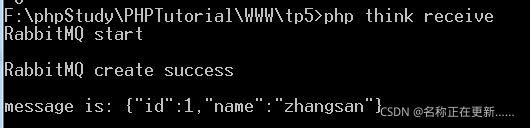
讯享网<?php / * Created by msciwang * User: fgc * Date: 2021-10-05 * Time: 11:58 * Desc: rabbimtMQ测试类 */ namespace app\command; use think\console\Command; use think\console\Input; use think\console\input\Argument; use think\console\input\Option; use think\console\Output; use PhpAmqpLib\Connection\AMQPStreamConnection; use PhpAmqpLib\Message\AMQPMessage; class Receive extends Command { protected function configure() { // 指令配置 $this->setName('receive') ->setDescription('rabbitmq queque'); } protected function execute(Input $input, Output $output) { $connection = new AMQPStreamConnection('localhost', '5672', 'guest', ''); $channel = $connection->channel(); // // 指令输出 $output->writeln("RabbitMQ start\n"); $output->writeln("RabbitMQ create success\n"); $channel->queue_declare('hello', false, false, false, false); $callback = function ($msg) use ($output) { $output->writeln("message is: $msg->body \n"); /ack应答机制 basic_consume第四个参数药设置false, $msg->delivery_info['channel']->basic_ack($msg->delivery_info['delivery_tag']); $channel->basic_consume('hello', '', false, false, false, false, $callback); / }; //多个消费者情况下,设置了均衡消费$channel->basic_qos(null, 1, null); $channel->basic_consume('hello', '', false, true, false, false, $callback); /while (count($channel->callbacks)) { $channel->wait(); }/ while ($channel->is_open) { $channel->wait(); } } }
其他学习:thinkphp如何使用rabbitmq消息队列 | 志博日记
版权声明:本文内容由互联网用户自发贡献,该文观点仅代表作者本人。本站仅提供信息存储空间服务,不拥有所有权,不承担相关法律责任。如发现本站有涉嫌侵权/违法违规的内容,请联系我们,一经查实,本站将立刻删除。
如需转载请保留出处:https://51itzy.com/kjqy/123566.html