
效果展示
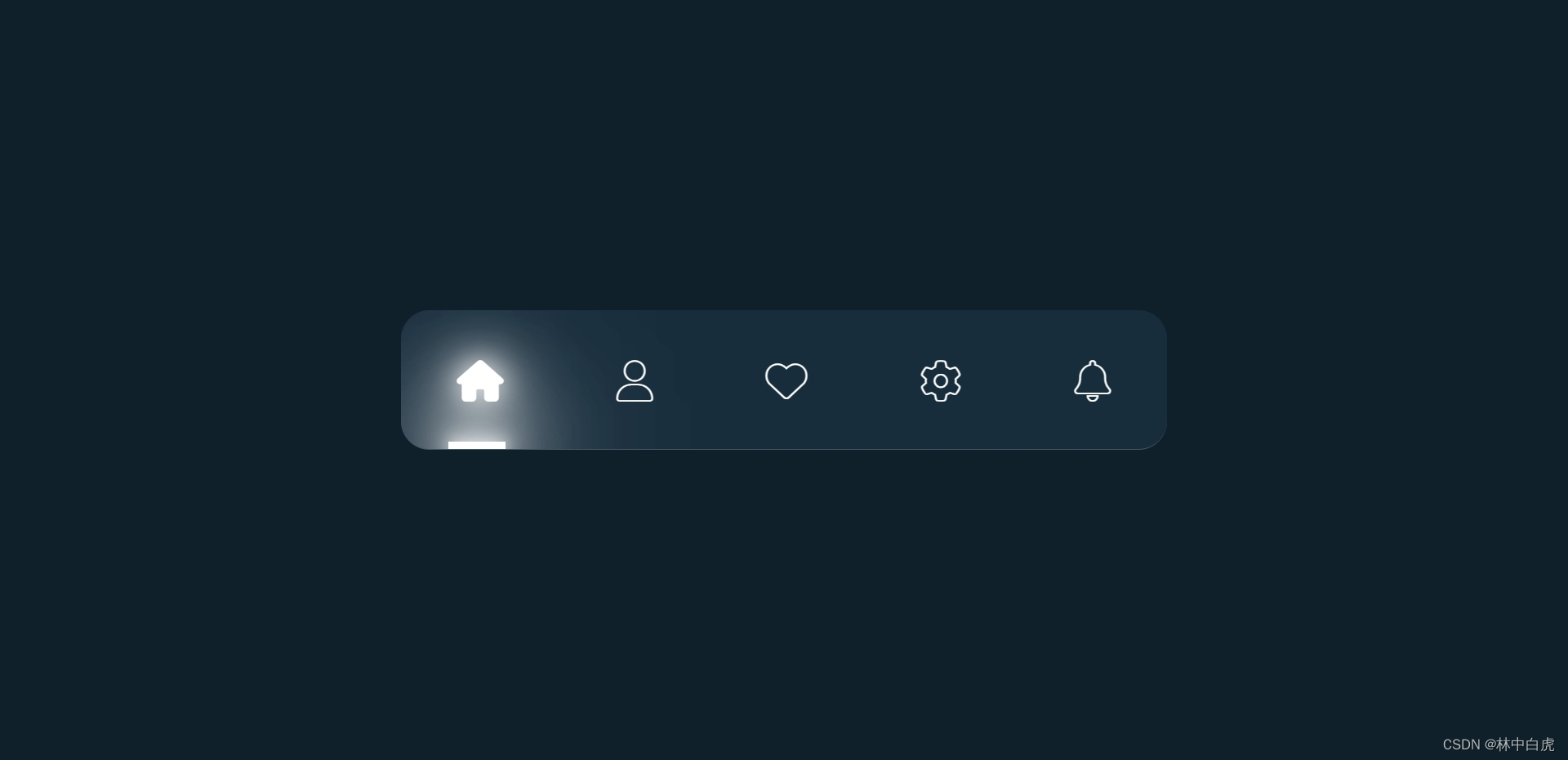
CSS 知识点
- filter 属性回顾
- transition 属性回顾

- 使用单选框实现导航菜单的思路
单选框当点击完成后就会有一个
:checked属性,可以利用这个属性来实现导航菜单底部滑动块的滑动动画和当前菜单项激活状态的管理。

整体页面结构
<div class="tabs"> <!-- 单选 --> <input type="radio" id="home" name="tabsMenu" /> <input type="radio" id="profile" name="tabsMenu" /> <input type="radio" id="likes" name="tabsMenu" /> <input type="radio" id="settings" name="tabsMenu" /> <input type="radio" id="notifications" name="tabsMenu" /> <!-- 图标 --> <div class="buttons"> <label for="home"> <i class="fa-solid fa-house"></i> </label> <label for="profile"> <i class="fa-solid fa-user"></i> </label> <label for="likes"> <i class="fa-solid fa-heart"></i> </label> <label for="settings"> <i class="fa-sharp fa-solid fa-gear"></i> </label> <label for="notifications"> <i class="fa-solid fa-bell"></i> </label> <!-- 滑块 --> <div class="underline"></div> </div> </div> 讯享网
实现整体布局
讯享网.tabs input {
    visibility: hidden; display: none; } .buttons {
    position: relative; display: flex; gap: 80px; padding: 30px 40px; border-bottom: 1px solid rgba(255, 255, 255, 0.2); background: #182d3c; overflow: hidden; border-radius: 20px; }
编写菜单图标激活后的样式
.buttons label {
    width: 20%; font-size: 1.75em; -webkit-text-stroke: 1px #fff; color: transparent; cursor: pointer; transition: 0.5s; } .buttons label:hover {
    opacity: 1; filter: drop-shadow(0 0 10px #fff) drop-shadow(0 0 20px #fff); } /* 通过单选框激活状态,设置图标的激活状态 */ .tabs input:nth-child(1):checked ~ .buttons label:nth-child(1), .tabs input:nth-child(2):checked ~ .buttons label:nth-child(2), .tabs input:nth-child(3):checked ~ .buttons label:nth-child(3), .tabs input:nth-child(4):checked ~ .buttons label:nth-child(4), .tabs input:nth-child(5):checked ~ .buttons label:nth-child(5) {
    color: #fff; opacity: 1; filter: drop-shadow(0 0 10px #fff) drop-shadow(0 0 20px #fff); }
实现菜单底部块的样式和移动样式
讯享网.underline {
    position: absolute; left: 0; bottom: 0; width: 20%; height: 5px; /* 设置滑块的移动时间 */ transition: 0.5s; } .underline::before {
    content: ""; position: absolute; left: 50%; transform: translateX(-50%); width: 40px; height: 100%; background: #fff; filter: drop-shadow(0 0 10px #fff) drop-shadow(0 0 20px #fff) drop-shadow( 0 0 30px #fff ) drop-shadow(0 0 50px #fff); } .underline::after {
    content: ""; position: absolute; left: 50%; transform: translateX(-50%); width: 40px; height: 100%; background: #fff; filter: drop-shadow(0 0 10px #fff) drop-shadow(0 0 20px #fff) drop-shadow( 0 0 30px #fff ) drop-shadow(0 0 50px #fff) blur(5px); } /* 通过单选框激活状态,设置滑块的移动距离 */ .tabs input:nth-child(1):checked ~ .buttons .underline {
    left: 0; } .tabs input:nth-child(2):checked ~ .buttons .underline {
    left: 20%; } .tabs input:nth-child(3):checked ~ .buttons .underline {
    left: 40%; } .tabs input:nth-child(4):checked ~ .buttons .underline {
    left: 60%; } .tabs input:nth-child(5):checked ~ .buttons .underline {
    left: 80%; }
完整代码下载
完整代码下载
版权声明:本文内容由互联网用户自发贡献,该文观点仅代表作者本人。本站仅提供信息存储空间服务,不拥有所有权,不承担相关法律责任。如发现本站有涉嫌侵权/违法违规的内容,请联系我们,一经查实,本站将立刻删除。
如需转载请保留出处:https://51itzy.com/kjqy/122987.html