
人脸识别技术的发展异常迅速,从二十世纪五十年代的心理学和工程学的研究,人脸特征的识别再到人机交互识别和机器自动识别阶段,如今的人脸识别到处存在,支付、登录、实名认证等等。今天主要记录一下项目中人脸识别登录的功能。
人脸识别的SDK有很多Face++、OpenCV、百度Api等等,本文主要介绍虹软人脸识别SDK,虹软人脸识别SDK最大的特点是可以免费使用,而且支持离线部署(需在线激活),提供了Android、IOS、C\C++、JAVA、C#版SDK,现在现在已经升级到3.0版本。
本文基于虹软基于C#,.Net FrameWork4.6.1,ArcFace 2.2运行。

1、下载
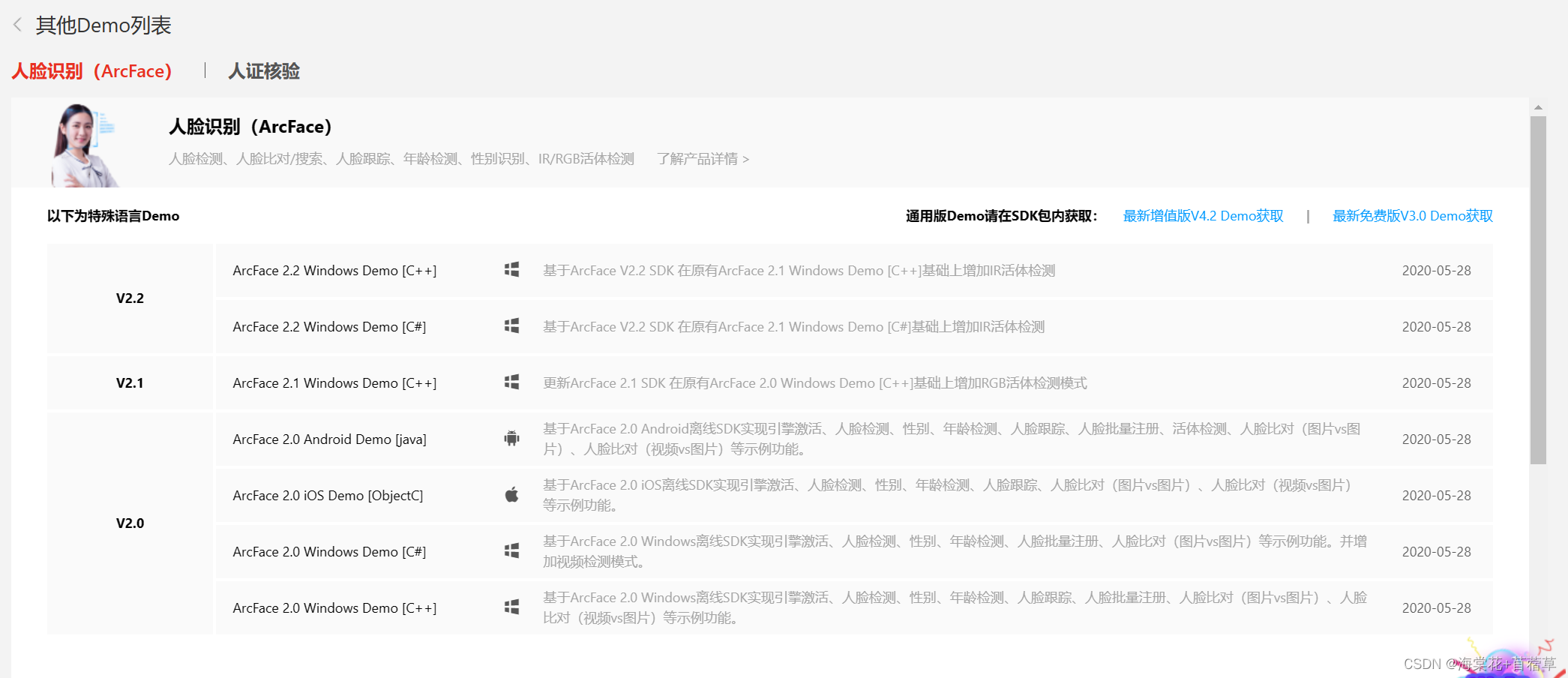
注册后可以在开发者中心 (arcsoft.com.cn)下载相关语言的SDK和Demo。
2、初始化
- 从开发者后台获取到APP_ID和SDKKEY,key分为32位和64位,
- 根据cpu类型加载响应的key
- 激活设备,第一次需要联网在线激活,后面就可以注释掉相关代码
- 初始化引擎,包括检测功能、RGB视频专用FR引擎、IR视频专用FR引擎
public void InitEngines() { //读取配置文件 AppSettingsReader reader = new AppSettingsReader(); string appId = (string)reader.GetValue("APP_ID", typeof(string)); string sdkKey64 = (string)reader.GetValue("SDKKEY64", typeof(string)); string sdkKey32 = (string)reader.GetValue("SDKKEY32", typeof(string)); rgbCameraIndex = (int)reader.GetValue("RGB_CAMERA_INDEX", typeof(int)); irCameraIndex = (int)reader.GetValue("IR_CAMERA_INDEX", typeof(int)); String Activation = (String)reader.GetValue("Activation", typeof(string)); var is64CPU = true; if (string.IsNullOrWhiteSpace(appId) || string.IsNullOrWhiteSpace(is64CPU ? sdkKey64 : sdkKey32)) { //禁用相关功能按钮 //ControlsEnable(false, chooseMultiImgBtn, matchBtn, btnClearFaceList, chooseImgBtn); MessageBox.Show(string.Format("请在App.config配置文件中先配置APP_ID和SDKKEY{0}!", is64CPU ? "64" : "32")); return; } int retCode = 0; //在线激活引擎 //激活后可以注释掉 if (Activation.Equals("0")) { try { retCode = ASFFunctions.ASFActivation(appId, is64CPU ? sdkKey64 : sdkKey32); } catch (Exception ex) { if (ex.Message.Contains("无法加载 DLL")) { MessageBox.Show("请将sdk相关DLL放入bin对应的x86或x64下的文件夹中!"); } else { MessageBox.Show("激活引擎失败!"); } return; } } //end 激活 //初始化引擎 uint detectMode = DetectionMode.ASF_DETECT_MODE_IMAGE; //Video模式下检测脸部的角度优先值 int videoDetectFaceOrientPriority = ASF_OrientPriority.ASF_OP_0_HIGHER_EXT; //Image模式下检测脸部的角度优先值 int imageDetectFaceOrientPriority = ASF_OrientPriority.ASF_OP_0_ONLY; //人脸在图片中所占比例,如果需要调整检测人脸尺寸请修改此值,有效数值为2-32 int detectFaceScaleVal = 16; //最大需要检测的人脸个数 int detectFaceMaxNum = 5; //引擎初始化时需要初始化的检测功能组合 int combinedMask = FaceEngineMask.ASF_FACE_DETECT | FaceEngineMask.ASF_FACERECOGNITION | FaceEngineMask.ASF_AGE | FaceEngineMask.ASF_GENDER | FaceEngineMask.ASF_FACE3DANGLE; //初始化引擎,正常值为0 retCode = ASFFunctions.ASFInitEngine(detectMode, imageDetectFaceOrientPriority, detectFaceScaleVal, detectFaceMaxNum, combinedMask, ref pImageEngine); if (retCode != 0) { String msg = string.Format("引擎初始化失败!错误码为:{0}\r\n", retCode); if (appendText != null) appendText(msg); LogUtil.WriteErrorLog("初始化引擎", msg); return; } //初始化视频模式下人脸检测引擎 uint detectModeVideo = DetectionMode.ASF_DETECT_MODE_VIDEO; int combinedMaskVideo = FaceEngineMask.ASF_FACE_DETECT | FaceEngineMask.ASF_FACERECOGNITION; retCode = ASFFunctions.ASFInitEngine(detectModeVideo, videoDetectFaceOrientPriority, detectFaceScaleVal, detectFaceMaxNum, combinedMaskVideo, ref pVideoEngine); //RGB视频专用FR引擎 detectFaceMaxNum = 1; combinedMask = FaceEngineMask.ASF_FACE_DETECT | FaceEngineMask.ASF_FACERECOGNITION | FaceEngineMask.ASF_LIVENESS; retCode = ASFFunctions.ASFInitEngine(detectMode, imageDetectFaceOrientPriority, detectFaceScaleVal, detectFaceMaxNum, combinedMask, ref pVideoRGBImageEngine); //IR视频专用FR引擎 combinedMask = FaceEngineMask.ASF_FACE_DETECT | FaceEngineMask.ASF_FACERECOGNITION | FaceEngineMask.ASF_IR_LIVENESS; retCode = ASFFunctions.ASFInitEngine(detectMode, imageDetectFaceOrientPriority, detectFaceScaleVal, detectFaceMaxNum, combinedMask, ref pVideoIRImageEngine); LogUtil.WriteLog("初始化引擎成功"); }讯享网
3、采集人脸注册
获取摄像头,利用虹软的FilterInfoCollection方法获取到摄像头集合,这里默认取第一个,也可以通过界面控件手动选择。
同时将摄像头关联到VideoSourcePlayer中,并开启摄像头。

讯享网var videoDevices = new FilterInfoCollection(FilterCategory.VideoInputDevice); if (videoDevices.Count == 0) { LogUtil.WriteErrorLog("注册", "没有找到摄像头,请重新尝试"); MessageBox.Show("没有找到摄像头,请重新尝试"); return; } //连接第一个摄像头 var videoSource = new VideoCaptureDevice(videoDevices[0].MonikerString); var videoResolution = videoSource.VideoCapabilities[0]; videoSource.VideoResolution = videoResolution; irDeviceVideo = videoSource; this.videoSourcePlayer1.VideoSource = irDeviceVideo; this.videoSourcePlayer1.Start();
4、检测人脸
人脸检测需要持续不断的运行,避免UI假死,因此这里开启一个单独的线程进行人脸处理。
ThreadPool.QueueUserWorkItem(new WaitCallback(delegate { Thread.Sleep(1000); while (resultShowImgRect) { ...... } }获取摄像头的图像this.videoSourcePlayer1.GetCurrentVideoFrame()。
利用ASFFunctions.ASFDetectFaces方法检测图像中的人脸。
讯享网/// <summary> /// 人脸检测 /// </summary> /// <param name="pEngine">引擎handle</param> /// <param name="width">图像宽度</param> /// <param name="height">图像高度</param> /// <param name="format">图像颜色空间</param> /// <param name="imgData">图像数据</param> /// <param name="detectedFaces">人脸检测结果</param> /// <returns>调用结果</returns> [DllImport(Dll_PATH, CallingConvention = CallingConvention.Cdecl)] public static extern int ASFDetectFaces(IntPtr pEngine, int width, int height, int format, IntPtr imgData, IntPtr detectedFaces);
获取检测结果。
MemoryUtil.PtrToStructure<ASF_MultiFaceInfo>(pMultiFaceInfo); public struct ASF_MultiFaceInfo { /// <summary> /// 人脸Rect结果集 /// </summary> public IntPtr faceRects; /// <summary> /// 人脸角度结果集,与faceRects一一对应 对应ASF_OrientCode /// </summary> public IntPtr faceOrients; /// <summary> /// 结果集大小 /// </summary> public int faceNum; /// <summary> /// face ID,IMAGE模式下不返回FaceID /// </summary> public IntPtr faceID; } 5、获取特征点
ASFFunctions.ASFFaceFeatureExtract可以将图像中的人脸特征提取出来,特征点是byte[]类型,可以将其保存到文件或者数据库中用于后续验证登录使用。
讯享网 /// <summary> /// 单人脸特征提取 /// </summary> /// <param name="pEngine">引擎handle</param> /// <param name="width">图像宽度</param> /// <param name="height">图像高度</param> /// <param name="format">图像颜色空间</param> /// <param name="imgData">图像数据</param> /// <param name="faceInfo">单张人脸位置和角度信息</param> /// <param name="faceFeature">人脸特征</param> /// <returns>调用结果</returns> [DllImport(Dll_PATH, CallingConvention = CallingConvention.Cdecl)] public static extern int ASFFaceFeatureExtract(IntPtr pEngine, int width, int height, int format, IntPtr imgData, IntPtr faceInfo, IntPtr faceFeature);
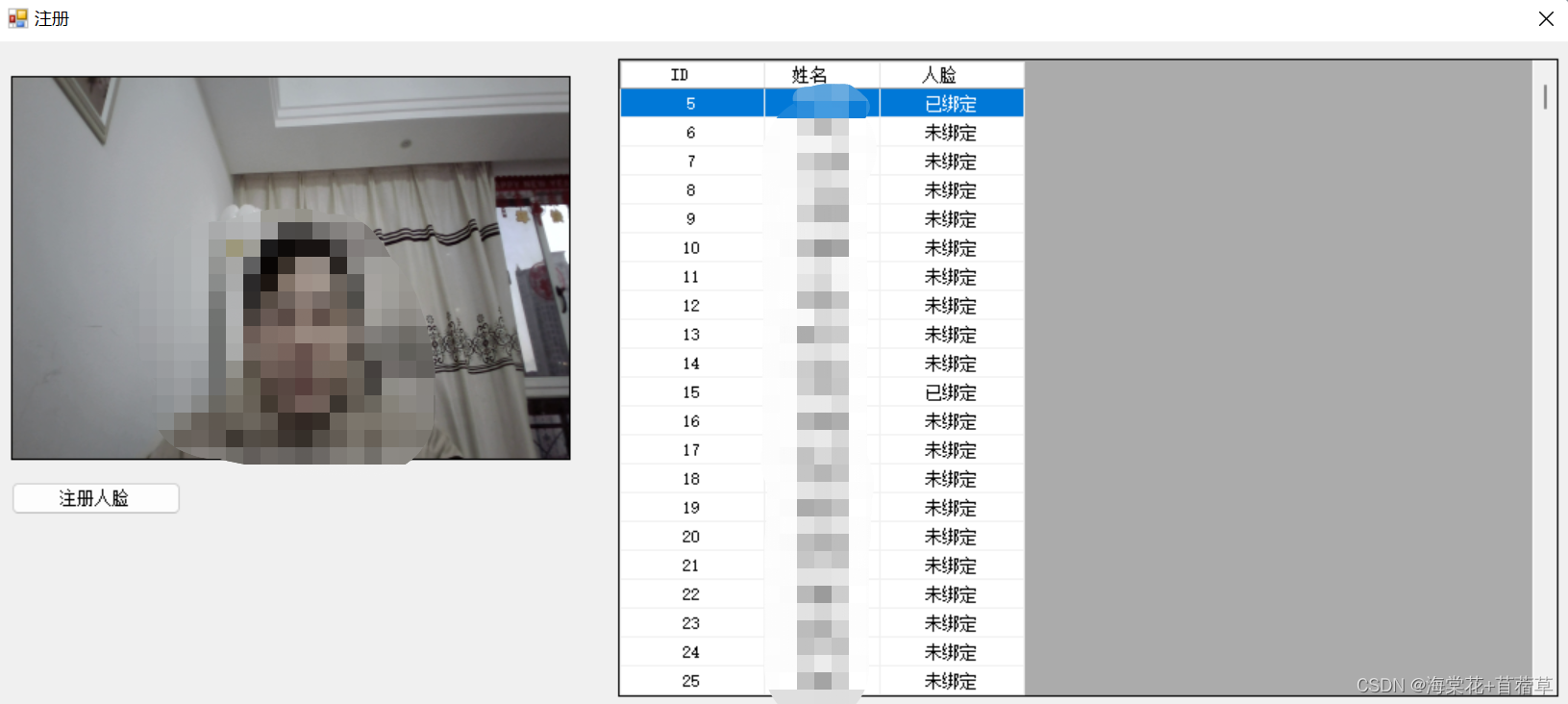
6、运行结果
7、注册完整代码
DataGridViewSelectedRowCollection rows = dataGridView1.SelectedRows; if (rows.Count <= 0) { MessageBox.Show("请选择一个用户"); return; } if (rows[0].Cells[2].Value.ToString() == "已绑定") { DialogResult dr = MessageBox.Show("当前用户已经绑定,是否重新绑定?", "提示",MessageBoxButtons.OKCancel); if (dr == DialogResult.OK) { } else { return; } } String memberid = rows[0].Cells[0].Value.ToString(); String name = rows[0].Cells[1].Value.ToString(); currentLeftFeature = IntPtr.Zero; Bitmap img = null; while (this.videoSourcePlayer1.IsRunning) { img = this.videoSourcePlayer1.GetCurrentVideoFrame(); if (img == null) continue; else break; } Thread.Sleep(500); //人脸检测以及提取人脸特征 ThreadPool.QueueUserWorkItem(new WaitCallback(delegate { Image image = img; if (image.Width > 1536 || image.Height > 1536) { image = ImageUtil.ScaleImage(image, 1536, 1536); } if (image.Width % 4 != 0) { image = ImageUtil.ScaleImage(image, image.Width - (image.Width % 4), image.Height); } //人脸检测 ASF_MultiFaceInfo multiFaceInfo = FaceUtil.DetectFace(engine.ImageEngine, image); //判断检测结果 if (multiFaceInfo.faceNum <= 0) { MessageBox.Show("没有人脸"); return; } if (multiFaceInfo.faceNum > 1) { MessageBox.Show("检测到多个人脸"); return; } //提取人脸特征 ASF_SingleFaceInfo singleFaceInfo = new ASF_SingleFaceInfo(); Image image1 = img; currentLeftFeature = FaceUtil.ExtractFeature(engine.ImageEngine, image1, out singleFaceInfo); if (singleFaceInfo.faceRect.left == 0 && singleFaceInfo.faceRect.right == 0) { MessageBox.Show(string.Format("未识别到人脸信息")); } else { String imgPath = System.Configuration.ConfigurationManager.AppSettings["ZhuCeImg"]; if (!System.IO.Directory.Exists(imgPath)) System.IO.Directory.CreateDirectory(imgPath); image1.Save(imgPath + DateTime.Now.ToString("yyyyMMddHHmmssfff-") + id + ".jpg"); this.Invoke(new Action(delegate { ASF_FaceFeature faceFeature = MemoryUtil.PtrToStructure<ASF_FaceFeature>(currentLeftFeature); int size = faceFeature.featureSize; byte[] managedArray = new byte[size]; Marshal.Copy(faceFeature.feature, managedArray, 0, size); String sql = "UPDATE members SET face_feature=?face_feature WHERE id=?id"; MySqlParameter[] mySqlParameters = new MySqlParameter[2]; mySqlParameters[0] = new MySqlParameter("face_feature", managedArray); //mySqlParameters[1] = new MySqlParameter("face_photo", ""); mySqlParameters[1] = new MySqlParameter("id", memberid); MySqlHelper.ExecuteNonQuery(CommandType.Text, sql, mySqlParameters); //IntPtr pMultiFaceInfo = MemoryUtil.Malloc(MemoryUtil.SizeOf<ASF_MultiFaceInfo>()); //MemoryUtil.StructureToPtr<ASF_FaceFeature>(faceFeature,pMultiFaceInfo); //global.imagesFeatureDictionary.Add(currentLeftFeature, textBoxName.Text); MessageBox.Show(string.Format("{0} 注册成功!", name)); })); } }));
版权声明:本文内容由互联网用户自发贡献,该文观点仅代表作者本人。本站仅提供信息存储空间服务,不拥有所有权,不承担相关法律责任。如发现本站有涉嫌侵权/违法违规的内容,请联系我们,一经查实,本站将立刻删除。
如需转载请保留出处:https://51itzy.com/kjqy/117892.html