
欢迎关注作者,更多数据库相关安装配置,troubleshooting,调优,备份恢复等资源
公众号:潇湘秦
---------------------------------------------------------------------------------------------
前提 NBU master和media服务器已经配置OK,现在需要oracle主机安装agent并配置备份任务。
NBU master版本8.3.0.2
Oracle OS版本redhat 6.8
Oracle版本 11.2.0.4
1.Oracle 安装agent
下载安装档
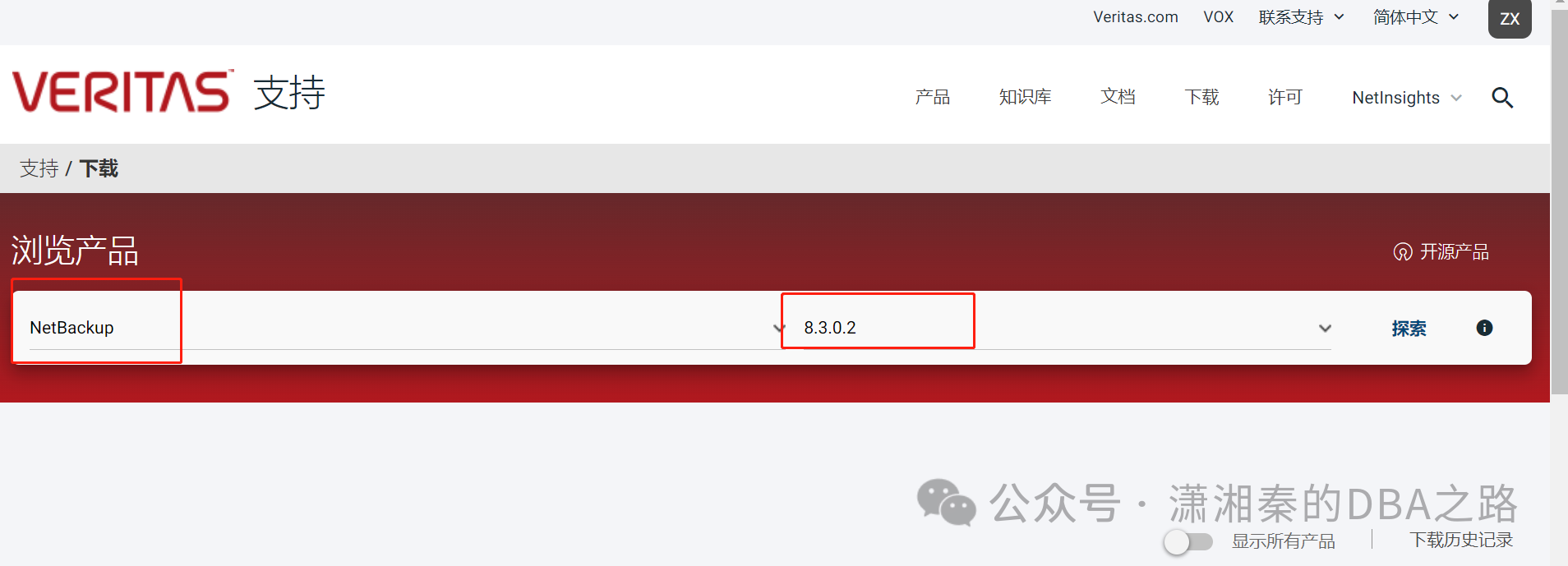
https://www.veritas.com/content/support/zh_CN
选择产品和版本号
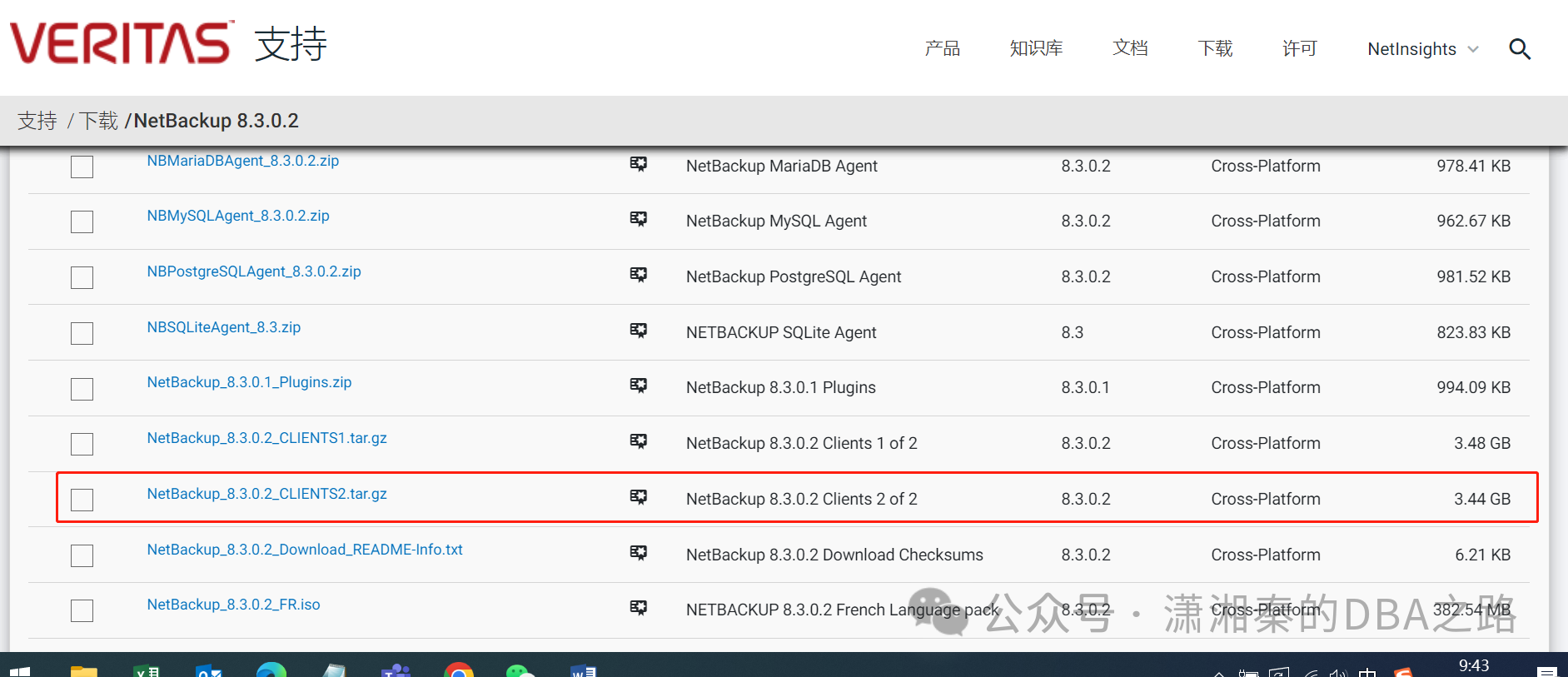
Windows 选择NetBackup_8.3.0.2_CLIENTS1.tar.gz
Linux/unix 选择NetBackup_8.3.0.2_CLIENTS2.tar.gz
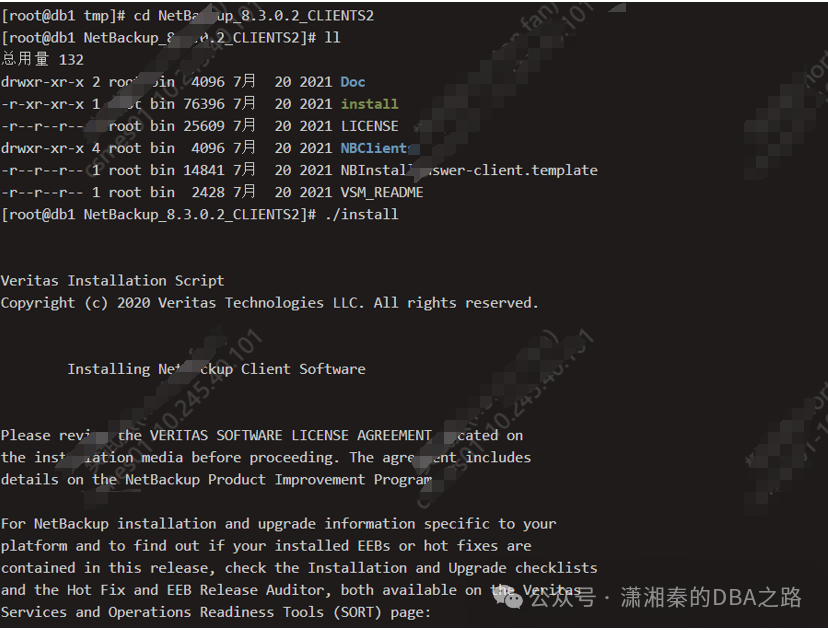
解压tar -xzf NetBackup_8.3.0.2_CLIENTS2.tar.gz
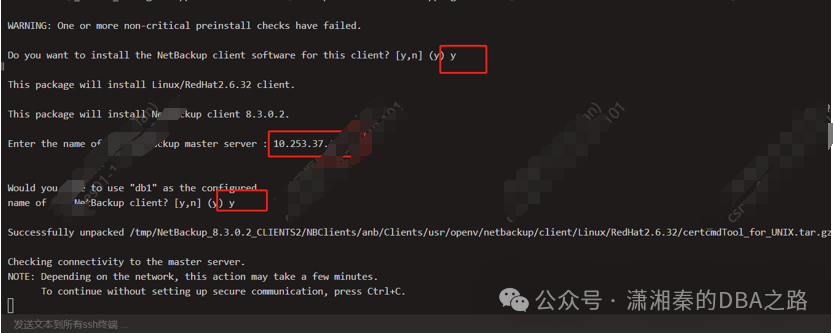
安装
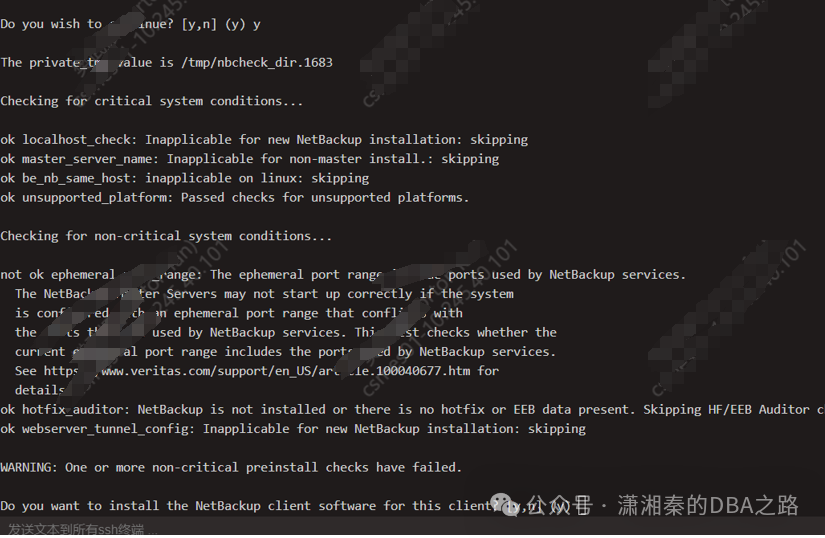
输入master服务器的IP/hostname
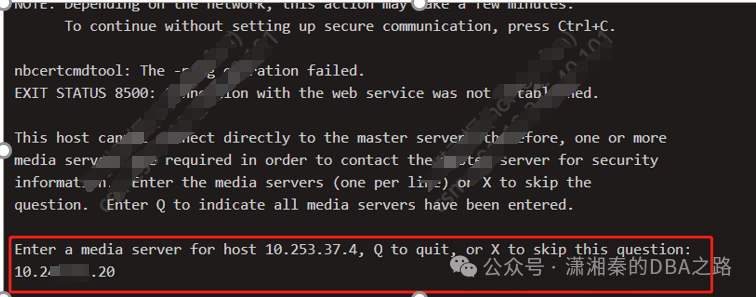
Media 服务器的地址
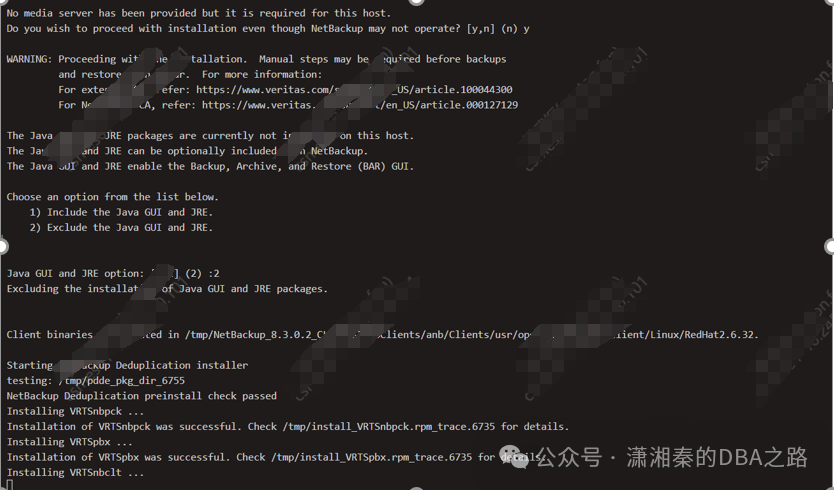

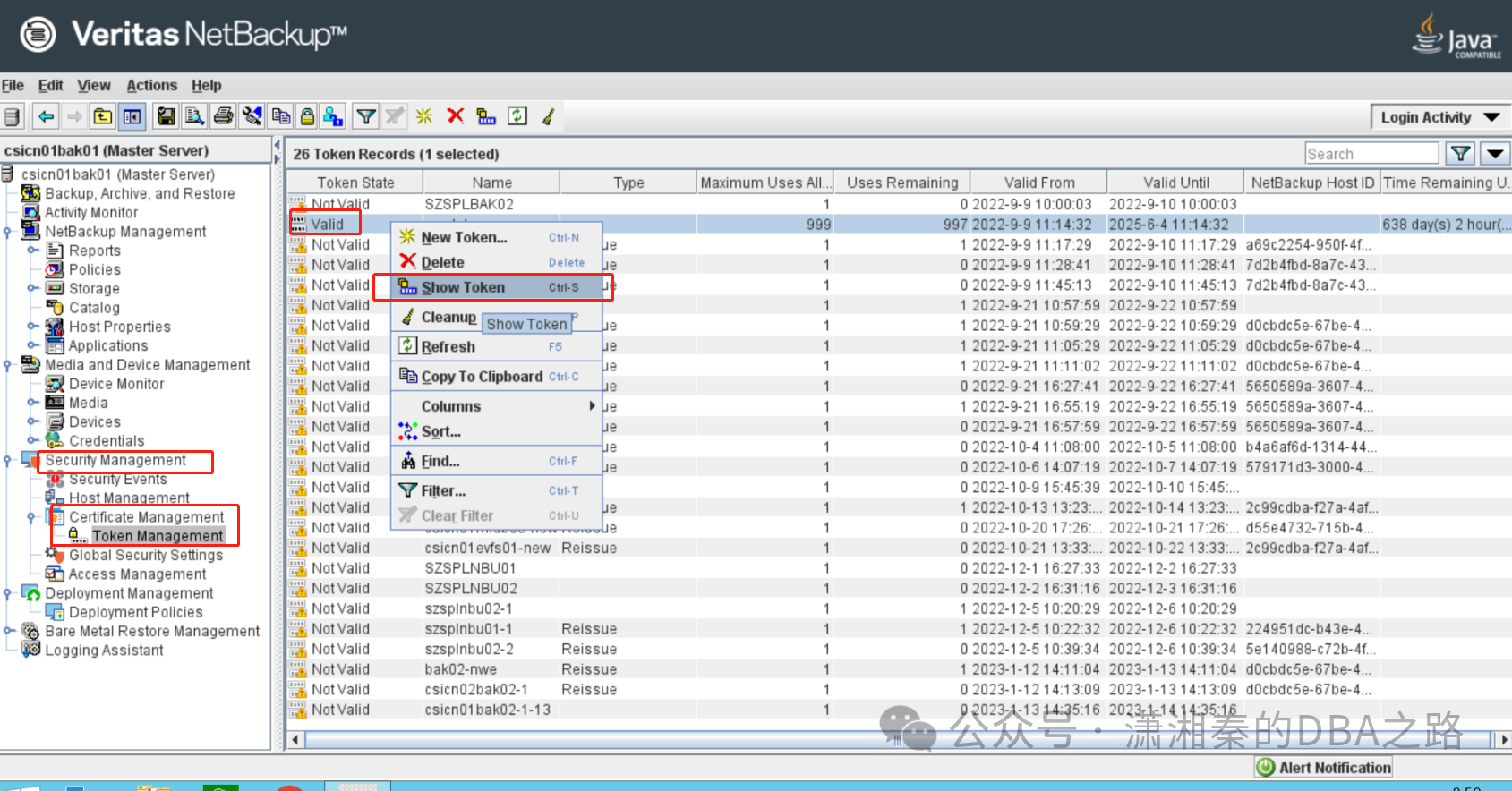
这里注意 需要输入授权的token
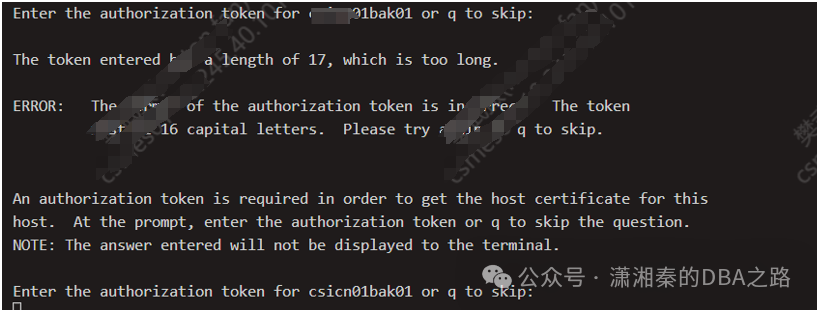
该token需要在master服务器上找 如下图
找到valid token
Copy token
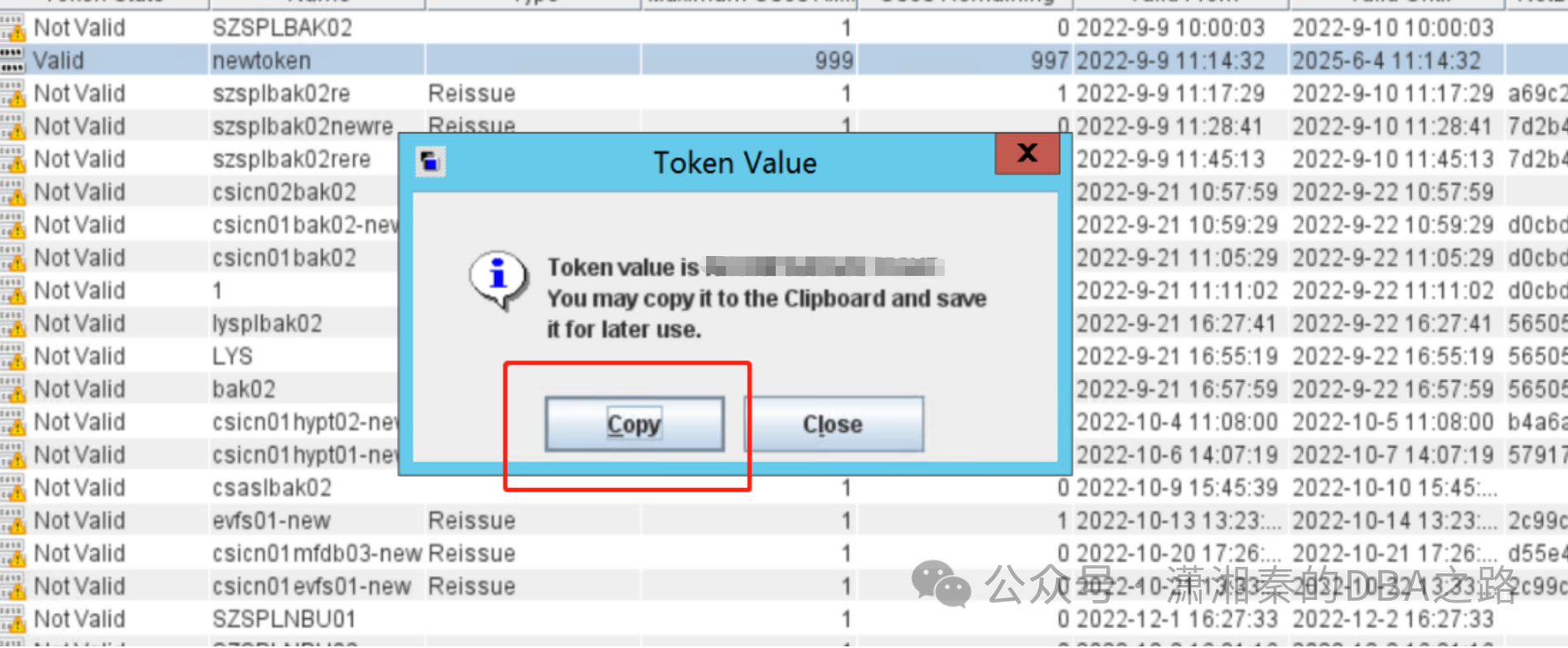
ps :然后直接粘贴到安装界面,因为这个是密码界面,输入任何结果都不会显示,所以粘贴后直接回车即可(这里容易出错)
之后就会正常安装
2.Master上配置备份计划
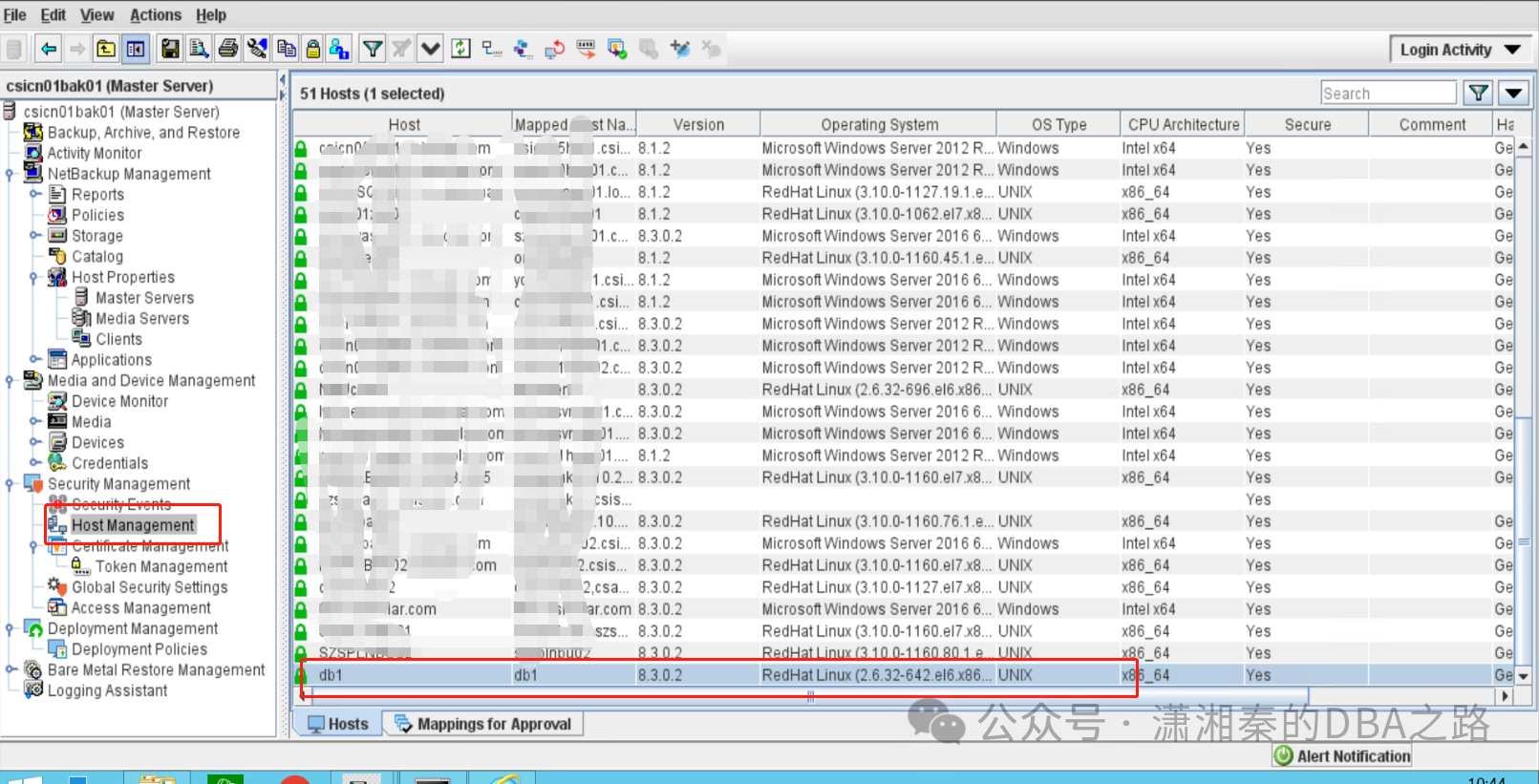
oracle db上安装好客户端后可以在master上看到host的信息
创建新的policy
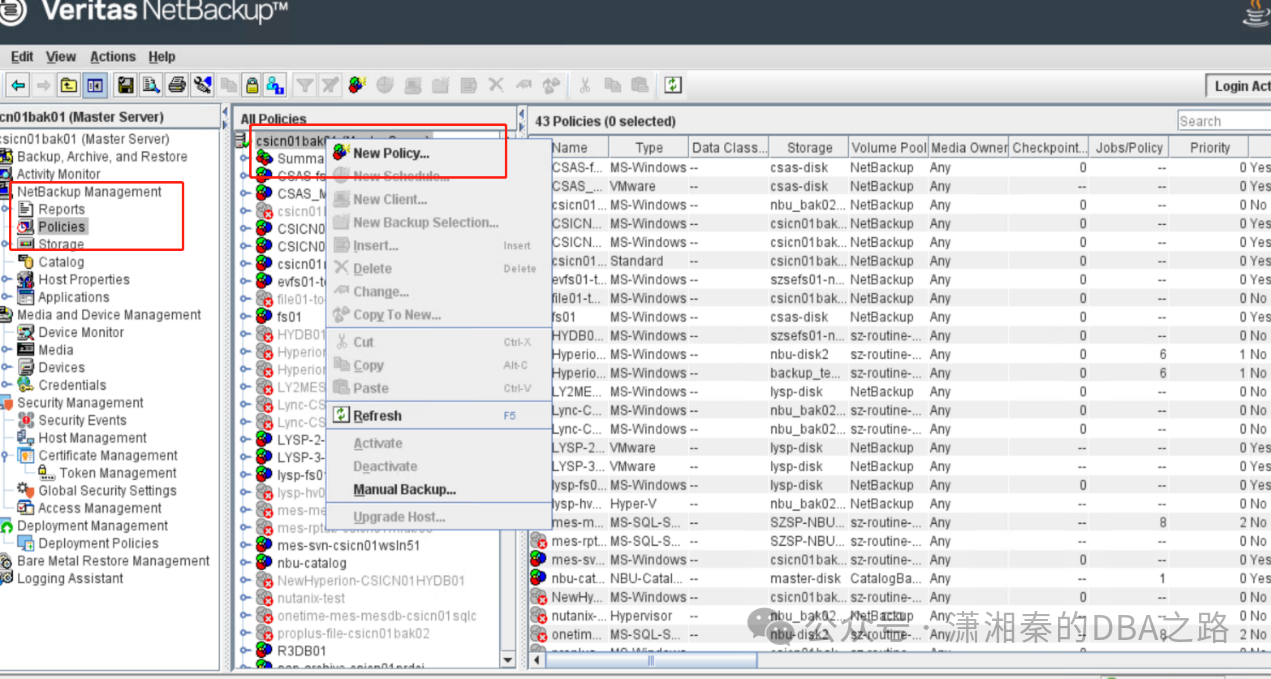
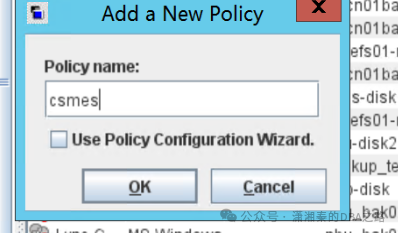
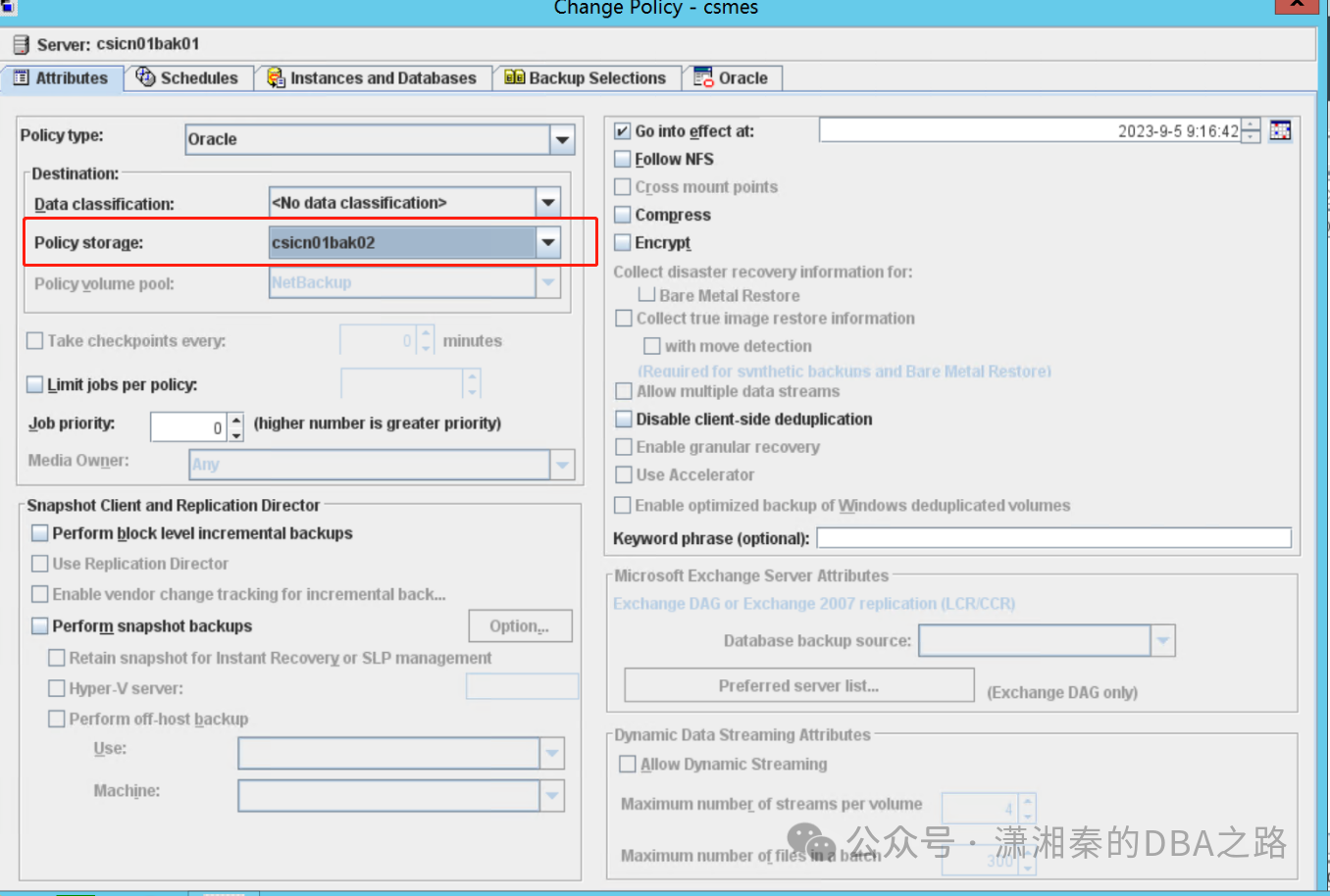
这里只需要注意两点
Policy的type选择oracle,
Policy的storage选择对应的media服务器

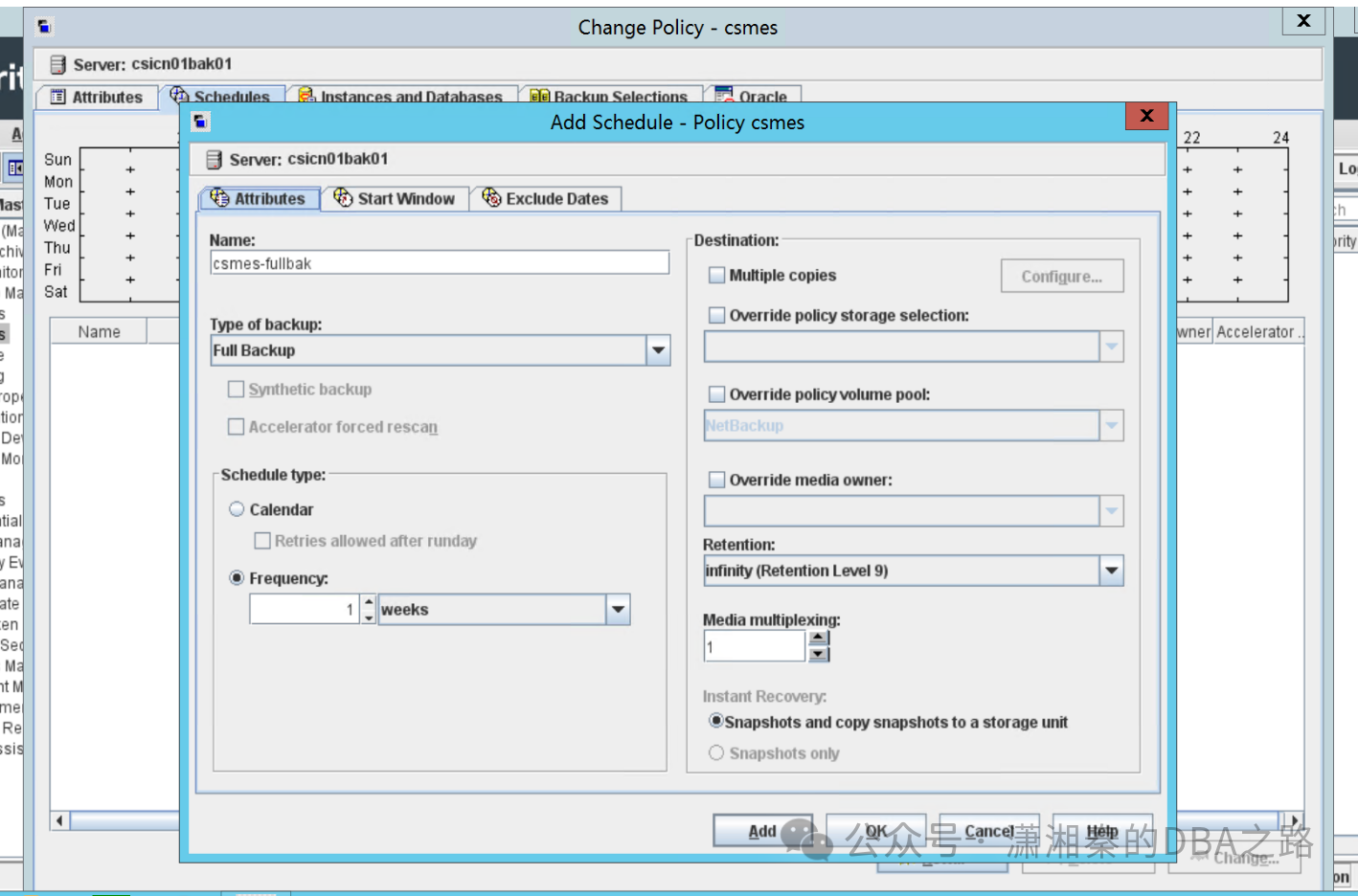
Schedule按自己需求设定
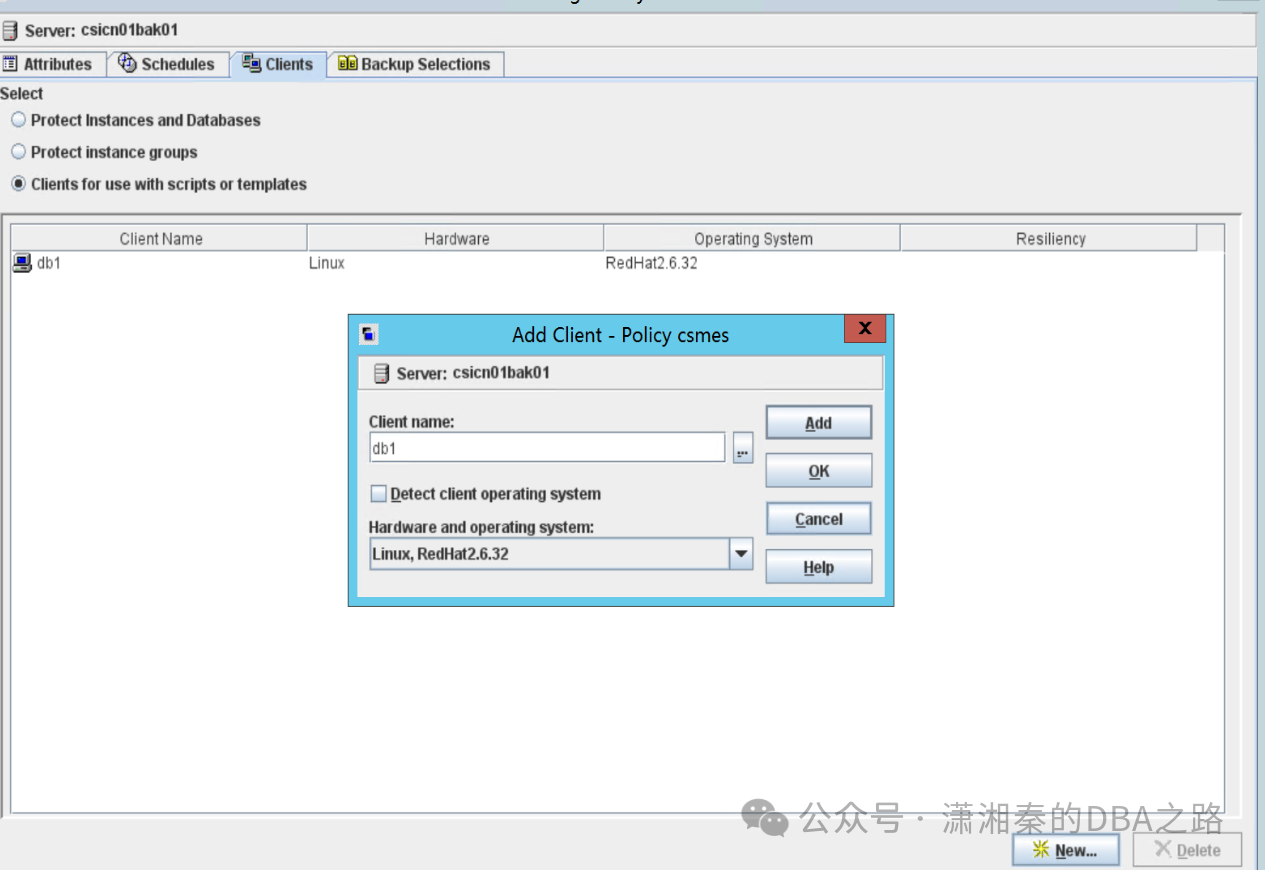
Clients选择client for use with scripts
然后添加db客户端
注意:oracle 主机,master主机,media主机都需要配置hosts ,并且网络互通,端口互通(1556,13724)不然会有问题
Backup selections 选择rman备份脚本
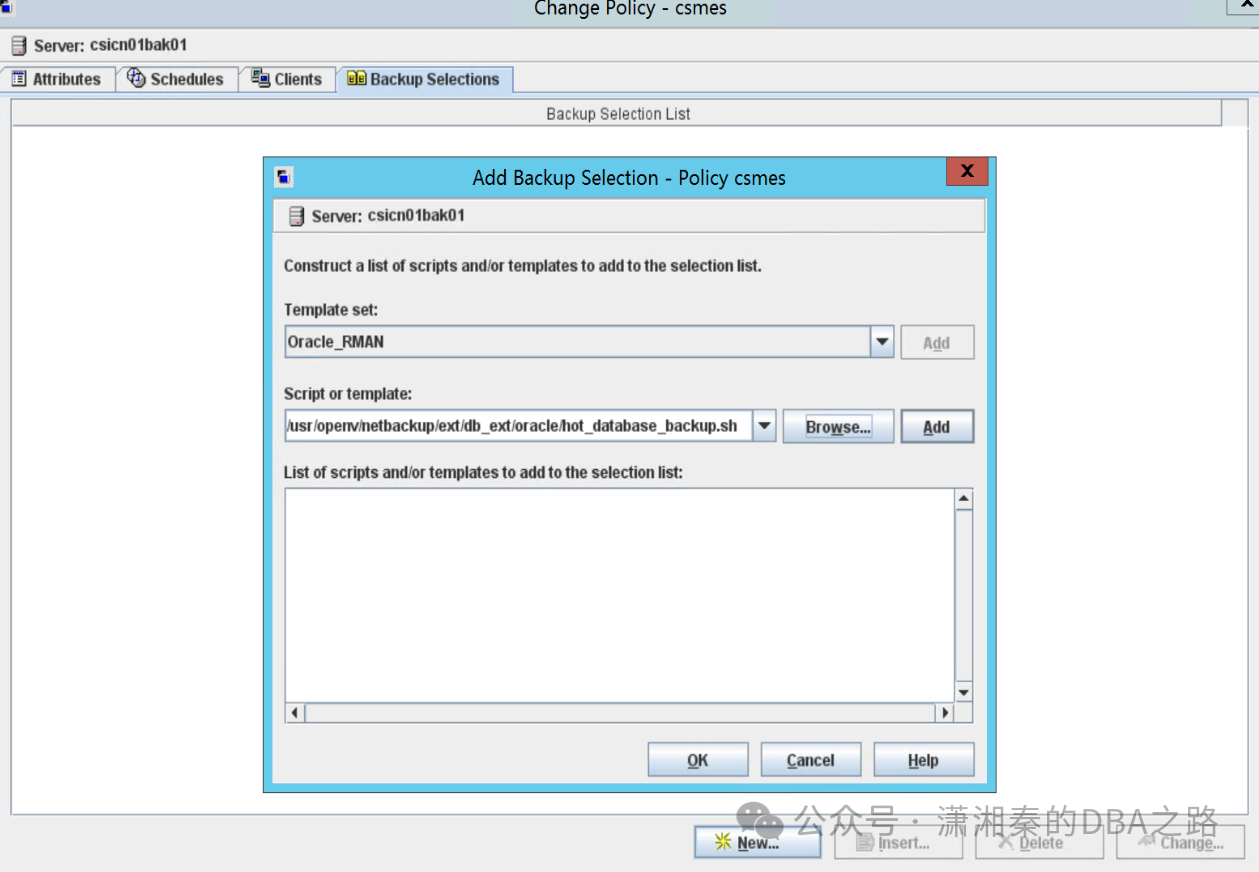
默认的sample脚本在如下路径
/usr/openv/netbackup/ext/db_ext/oracle/samples/rman
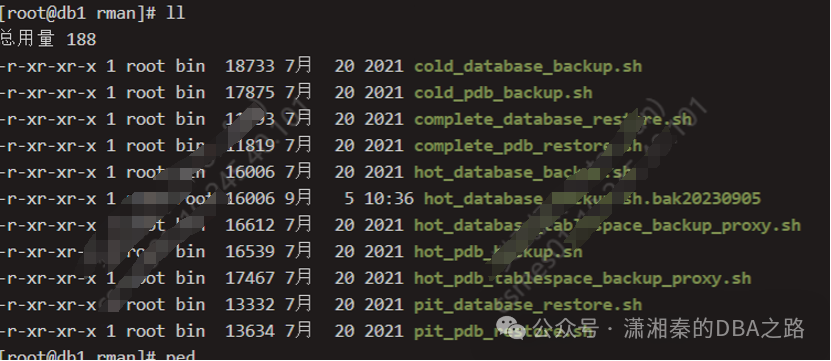
我这里使用的是hot_database_backup.sh
需要修改环境变量和部分参数具体如下
#!/bin/sh# $Header$##bcpyrght#*# $Copyright: Copyright (c) 2020 Veritas Technologies LLC. All rights reserved $#*#ecpyrght## Note: Only make modifications to a copy of this file. Changes to this file# are lost when this example is overwritten during NetBackup upgrade.# Delete this comment from the copy.## -----------------------------------------------------------------------------# hot_database_backup.sh# -----------------------------------------------------------------------------# This script uses Recovery Manager to take a hot (inconsistent) database# backup. A hot backup is inconsistent because portions of the database are# being modified and written to the disk while the backup is progressing.# You must run your database in ARCHIVELOG mode to make hot backups. It is# assumed that this script will be executed by user root. In order for RMAN# to work properly we switch user (su -) to the oracle dba account before# execution. If this script runs under a user account that has Oracle dba# privilege, it will be executed using this user's account.# -----------------------------------------------------------------------------# -----------------------------------------------------------------------------# Log the start of this script to both the stdout/obk_stdout# and stderr/obk_stderr.# -----------------------------------------------------------------------------echo "==== $0 started on `date` ==== stdout"echo "==== $0 started on `date` ==== stderr" 1>&2DEBUG=0if [ "$DEBUG" -gt 0 ]; thenset -xfi# ---------------------------------------------------------------------------# Put output in.out. Change as desired.# Note: output directory requires write permission.# ---------------------------------------------------------------------------RMAN_LOG_FILE=${0}.out# -----------------------------------------------------------------------------# Delete the log file before each execution so that it does not grow unbounded.# Remove or comment these lines if all historical output must be retained or if# the log file size is managed externally.# -----------------------------------------------------------------------------if [ -f "$RMAN_LOG_FILE" ]; thenrm -f "$RMAN_LOG_FILE"fi# -----------------------------------------------------------------------------# Initialize the log file. By default it is readable by the DBA and other# users. Restrict the permissions as needed.# -----------------------------------------------------------------------------echo >> $RMAN_LOG_FILEchmod 644 $RMAN_LOG_FILE# -----------------------------------------------------------------------------# Redirect all stderr and stdout into the specified log file and also to# stdout. No output will appear on stderr (or in the obk_stderr).# -----------------------------------------------------------------------------out=/tmp/`basename $0`.stdout.$$trap "rm -f $out" EXIT SIGHUP SIGINT SIGQUIT SIGTRAP SIGKILL SIGUSR1 SIGUSR2 SIGPIPE SIGTERM SIGSTOPmkfifo "$out"tee -a $RMAN_LOG_FILE < "$out" &exec 1>&- 2>&-exec 1>"$out" 2>&1# -----------------------------------------------------------------------------# Log the start of this script to the log file and stdout.# Log any additional arguments to the script.# -----------------------------------------------------------------------------echo "==== $0 started on `date` ===="echo "==== $0 $*"echo# *-*-*-*-*-*-*-*-*-*-*-*-*-*-*-*-*-*-*-*-*-*-*-*-*-*-*-*-*-*-*-*-*-*-*-*-*-*-*# *-*-*-*-*-*-*-*-*-*-*-*-*-*-*-*-*-*-*-*-*-*-*-*-*-*-*-*-*-*-*-*-*-*-*-*-*-*-*## NOTE: User modifications should be made only below this point.## USER CUSTOMIZABLE VARIABLE SECTION## ORACLE_HOME - Oracle Home path# ORACLE_SID - Oracle Sid of the target database# ORACLE_USER - Oracle user with permissions to execute RMAN# ORACLE_TARGET_CONNECT_STR - Connect string for the target database# [user]/[password][@TNSalias]# RMAN_EXECUTABLE - Path to the rman executable# RMAN_SBT_LIBRARY - SBT library path;# on AIX see technote TECH.# RMAN_CATALOG - Recovery catalog option and connect string# BACKUP_SCHEDULE - If overriding Default-Application-Backup schedule# BACKUP_TAG - User specified backup tag----需要修改的部分参数-------ORACLE_HOME=/u01/app/oracle/product/11.2.0/db_1ORACLE_SID=orcl1ORACLE_USER=oracleORACLE_TARGET_CONNECT_STR=sys/*RMAN_EXECUTABLE=$ORACLE_HOME/bin/rmanRMAN_SBT_LIBRARY="/usr/openv/netbackup/bin/libobk.so64"# Set the Recovery catalog to use. In This example we do not use a# Recovery Catalog. If you choose to use one, replace the option 'nocatalog'# with a "'catalog/@'" statement.RMAN_CATALOG="nocatalog"BACKUP_SCHEDULE=""# Note: This tag will be appended with the dected schedule type, see schedule# section.BACKUP_TAG="hot_db_bk"export ORACLE_HOME ORACLE_SID# Note: Additional tuning may be desired to RMAN_SEND and CMD_INPUT below.# *-*-*-*-*-*-*-*-*-*-*-*-*-*-*-*-*-*-*-*-*-*-*-*-*-*-*-*-*-*-*-*-*-*-*-*-*-*-*# *-*-*-*-*-*-*-*-*-*-*-*-*-*-*-*-*-*-*-*-*-*-*-*-*-*-*-*-*-*-*-*-*-*-*-*-*-*-*# -----------------------------------------------------------------------------# Determine the user which is executing this script.# -----------------------------------------------------------------------------BACKUP_CUSER=`id |cut -d"(" -f2 | cut -d ")" -f1`# -----------------------------------------------------------------------------# This script assumes that the database is properly opened. If desired,# this would be the place to verify that.# -----------------------------------------------------------------------------# -----------------------------------------------------------------------------# If this script is executed from a NetBackup schedule, NetBackup# sets NB_ORA environment variables based on the schedule type.# These variables can then used to dynamically select the appropriate# RMAN backup type.# For example, when:# schedule type is BACKUP_TYPE is# ---------------- --------------# Automatic Full INCREMENTAL LEVEL=0# Automatic Differential Incremental INCREMENTAL LEVEL=1# Automatic Cumulative Incremental INCREMENTAL LEVEL=1 CUMULATIVE## For client initiated backups, BACKUP_TYPE defaults to incremental# level 0 (full). To change the default for a user initiated# backup to incremental or incremental cumulative, uncomment# one of the following two lines.# BACKUP_TYPE="INCREMENTAL LEVEL=1"# BACKUP_TYPE="INCREMENTAL LEVEL=1 CUMULATIVE"## Note that we use incremental level 0 to specify full backups.# That is because, although they are identical in content, only# the incremental level 0 backup can have incremental backups of# level > 0 applied to it.# -----------------------------------------------------------------------------if [ "$NB_ORA_FULL" = "1" ]; thenecho "Full backup requested from Schedule"BACKUP_TYPE="INCREMENTAL LEVEL=0"BACKUP_TAG="${BACKUP_TAG}_inc_lvl0"elif [ "$NB_ORA_INCR" = "1" ]; thenecho "Differential incremental backup requested from Schedule"BACKUP_TYPE="INCREMENTAL LEVEL=1"BACKUP_TAG="${BACKUP_TAG}_inc_lvl1"elif [ "$NB_ORA_CINC" = "1" ]; thenecho "Cumulative incremental backup requested from Schedule"BACKUP_TYPE="INCREMENTAL LEVEL=1 CUMULATIVE"BACKUP_TAG="${BACKUP_TAG}_inc_lvl1_cinc"elif [ "$BACKUP_TYPE" = "" ]; thenecho "Manual execution - defaulting to Full backup"BACKUP_TYPE="INCREMENTAL LEVEL=0"BACKUP_TAG="${BACKUP_TAG}_inc_lvl0"fiecho# -----------------------------------------------------------------------------# Construct an RMAN SEND command when initiated from the master server.# This ensures that the resulting application backup jobs utilize the same# master server, client name, and policy name.## If desired, initialize RMAN_SEND with additional NB_ORA_* variable=value# pairs.## NOTE WHEN USING NET SERVICE NAME: When connecting to a database# using a net service name, you must use a send command or a parms operand to# specify environment variables. In other words, when accessing a database# through a listener, any environment variable set in this script are not# inherited by the Oracle channel processes because it is a child of the# listener process and not of this script. For more information on the# environment variables, please refer to the NetBackup for Oracle Admin. Guide.# -----------------------------------------------------------------------------RMAN_SEND=""if [ "$NB_ORA_SERV" != "" ]; thenRMAN_SEND="NB_ORA_SERV=${NB_ORA_SERV}"fiif [ "$NB_ORA_CLIENT" != "" ]; thenif [ "$RMAN_SEND" != "" ]; thenRMAN_SEND="${RMAN_SEND},NB_ORA_CLIENT=${NB_ORA_CLIENT}"elseRMAN_SEND="NB_ORA_CLIENT=${NB_ORA_CLIENT}"fifiif [ "$NB_ORA_POLICY" != "" ]; thenif [ "$RMAN_SEND" != "" ]; thenRMAN_SEND="${RMAN_SEND},NB_ORA_POLICY=${NB_ORA_POLICY}"elseRMAN_SEND="NB_ORA_POLICY=${NB_ORA_POLICY}"fifiif [ "$BACKUP_SCHEDULE" != "" ]; thenif [ "$RMAN_SEND" != "" ]; thenRMAN_SEND="${RMAN_SEND},NB_ORA_SCHED=${BACKUP_SCHEDULE}"elseRMAN_SEND="NB_ORA_SCHED=${BACKUP_SCHEDULE}"fifiif [ "$RMAN_SEND" != "" ]; thenRMAN_SEND="SEND '${RMAN_SEND}';"fi# ---------------------------------------------------------------------------# Call Recovery Manager to initiate the backup.## Note: Any environment variables needed at run time by RMAN# must be set and exported within the CMDS variable.# ---------------------------------------------------------------------------# Backs up the whole database. This backup is part of the incremental# strategy (this means it can have incremental backups of levels > 0# applied to it).## We do not need to explicitly request the control file to be included# in this backup, as it is automatically included each time file 1 of# the system tablespace is backed up (the inference: as it is a whole# database backup, file 1 of the system tablespace will be backed up,# hence the controlfile will also be included automatically).## Typically, a level 0 backup would be done at least once a week.## The scenario assumes:# o you are backing your database up to two tape drives# o you want each backup set to include a maximum of 5 files# o you wish to include offline datafiles, and read-only tablespaces,# in the backup# o you want the backup to continue if any files are inaccessible.# o This script explicitly backs up the control file. If you specify or# default to nocatalog, the controlfile backup that occurs# automatically as the result of backing up the system file is# not sufficient; it will not contain records for the backup that# is currently in progress.# o you want to archive the current log, back up all the# archive logs using two channels, putting a maximum of 20 logs# in a backup set, and deleting them once the backup is complete.## Note that the format string is constructed to guarantee uniqueness and# to enhance NetBackup for Oracle backup and restore performance.## -----------------------------------------------------------------------------# When needed, commands to debug the environment present in the subshell where# RMAN will be started.if [ "$DEBUG" -gt 0 ]; thenENV_COMMANDS="echo ----- LIST OF DECLARED VARIABLES IN SUBSHELL -----echoset | sortechoecho ----- LANGUAGE AND LOCALE -----echolocaleechoecho ----- PROCESS LIST -----echops -efecho"elseENV_COMMANDS=""fi# The RMAN commands to be executed.# NOTE: If the default shell for the ORACLE_USER is the C shell, then update# the export syntax as follows:# setenv ORACLE_HOME "$ORACLE_HOME"# setenv ORACLE_SID "$ORACLE_SID"CMDS="export ORACLE_HOME=$ORACLE_HOMEexport ORACLE_SID=$ORACLE_SIDechoecho ----- SUBSHELL ENV VARIABLES -----echoenv | sort | egrep '^ORACLE_|^NB_ORA_|^RMAN_|^BACKUP_|^TNS_'echo$ENV_COMMANDSecho ----- STARTING RMAN EXECUTION -----echo$RMAN_EXECUTABLE target $ORACLE_TARGET_CONNECT_STR $RMAN_CATALOG"# Building the PARMS option for the RMAN channelsif [ $RMAN_SBT_LIBRARY != "" ]; thenRMAN_SBT_LIBRARY_PARMS="PARMS 'SBT_LIBRARY=$RMAN_SBT_LIBRARY'"elseRMAN_SBT_LIBRARY_PARMS=""fi# The RMAN statements that are needed to perform the desired backup.# Add, delete, or modify the CMD_INPUT per the backup requirements for the# instance.CMD_INPUT="<< EOFSHOW ALL;RUN {ALLOCATE CHANNEL ch00 TYPE 'SBT_TAPE' $RMAN_SBT_LIBRARY_PARMS;ALLOCATE CHANNEL ch01 TYPE 'SBT_TAPE' $RMAN_SBT_LIBRARY_PARMS;$RMAN_SENDBACKUP$BACKUP_TYPESKIP INACCESSIBLETAG $BACKUP_TAGFILESPERSET 5# recommended format, must end with %tFORMAT 'bk_%s_%p_%t'DATABASE;sql 'alter system archive log current';RELEASE CHANNEL ch00;RELEASE CHANNEL ch01;# backup all archive logsALLOCATE CHANNEL ch00 TYPE 'SBT_TAPE' $RMAN_SBT_LIBRARY_PARMS;ALLOCATE CHANNEL ch01 TYPE 'SBT_TAPE' $RMAN_SBT_LIBRARY_PARMS;$RMAN_SENDBACKUPfilesperset 20# recommended format, must end with %tFORMAT 'al_%s_%p_%t'ARCHIVELOG ALL DELETE INPUT;RELEASE CHANNEL ch00;RELEASE CHANNEL ch01;## Note: During the process of backing up the database, RMAN also backs up the# control file. That backup of the control file does not contain the# information about the archive log backup if "nocatalog" has been specified.# To include the information about the current backup, the control file should# be backed up as the last step. This step may not be necessary if using# a recovery catalog or AUTOBACKUP CONTROLFILE.#ALLOCATE CHANNEL ch00 TYPE 'SBT_TAPE' $RMAN_SBT_LIBRARY_PARMS;$RMAN_SENDBACKUP# recommended format, must end with %tFORMAT 'cntrl_%s_%p_%t'CURRENT CONTROLFILE;RELEASE CHANNEL ch00;}EOF"# -----------------------------------------------------------------------------# Print out the values of various variables matched by the following patterns.# -----------------------------------------------------------------------------if [ "$DEBUG" -gt 0 ]; thenecho ----- LIST OF DECLARED VARIABLES IN SCRIPT -----echoset | sortechofiechoecho "----- SCRIPT VARIABLES -----"echoset | sort | egrep '^ORACLE_|^NB_ORA_|^RMAN_|^BACKUP_|^TNS_'echoecho "----- RMAN CMD -----"echoecho "$CMDS"echoecho "----- RMAN INPUT -----"echoecho "$CMD_INPUT"echo# Sanity check the environment.if [ ! -x $RMAN_EXECUTABLE ]; thenecho "ERR: $RMAN_EXECUTABLE: required executable not found!" 1>&2exit 1fiif [ ! -f `echo $RMAN_SBT_LIBRARY | cut -d'(' -f1` ]; thenecho "ERR: $RMAN_SBT_LIBRARY: required library not found!" 1>&2exit 1fiecho "----- STARTING CMDS EXECUTION -----"echoif [ "$BACKUP_CUSER" = "root" ]; thensu - $ORACLE_USER -c "$CMDS $CMD_INPUT"RSTAT=$?else/bin/sh -c "$CMDS $CMD_INPUT"RSTAT=$?fi# ---------------------------------------------------------------------------# Log the completion of this script to both stdout/obk_stdout# and stderr/obk_stderr.# ---------------------------------------------------------------------------if [ "$RSTAT" = "0" ]; thenLOGMSG="ended successfully"elseLOGMSG="ended in error"fiechoecho "==== $0 $LOGMSG on `date` ==== stdout"echo "==== $0 $LOGMSG on `date` ==== stderr" 1>&2echoexit $RSTAT
讯享网
手动启动备份任务验证是否可以正常备份
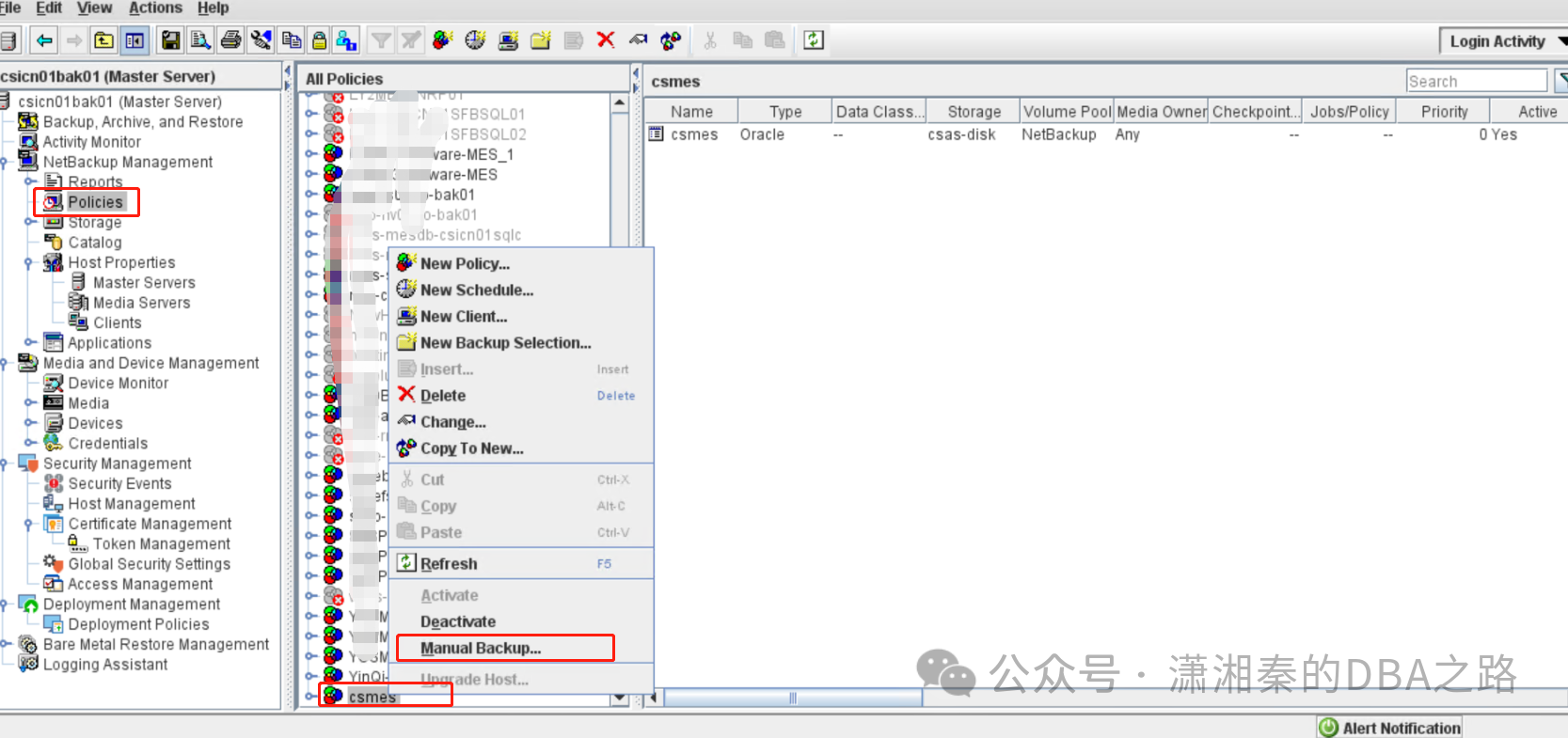
Active monitor 查看备份任务的状态
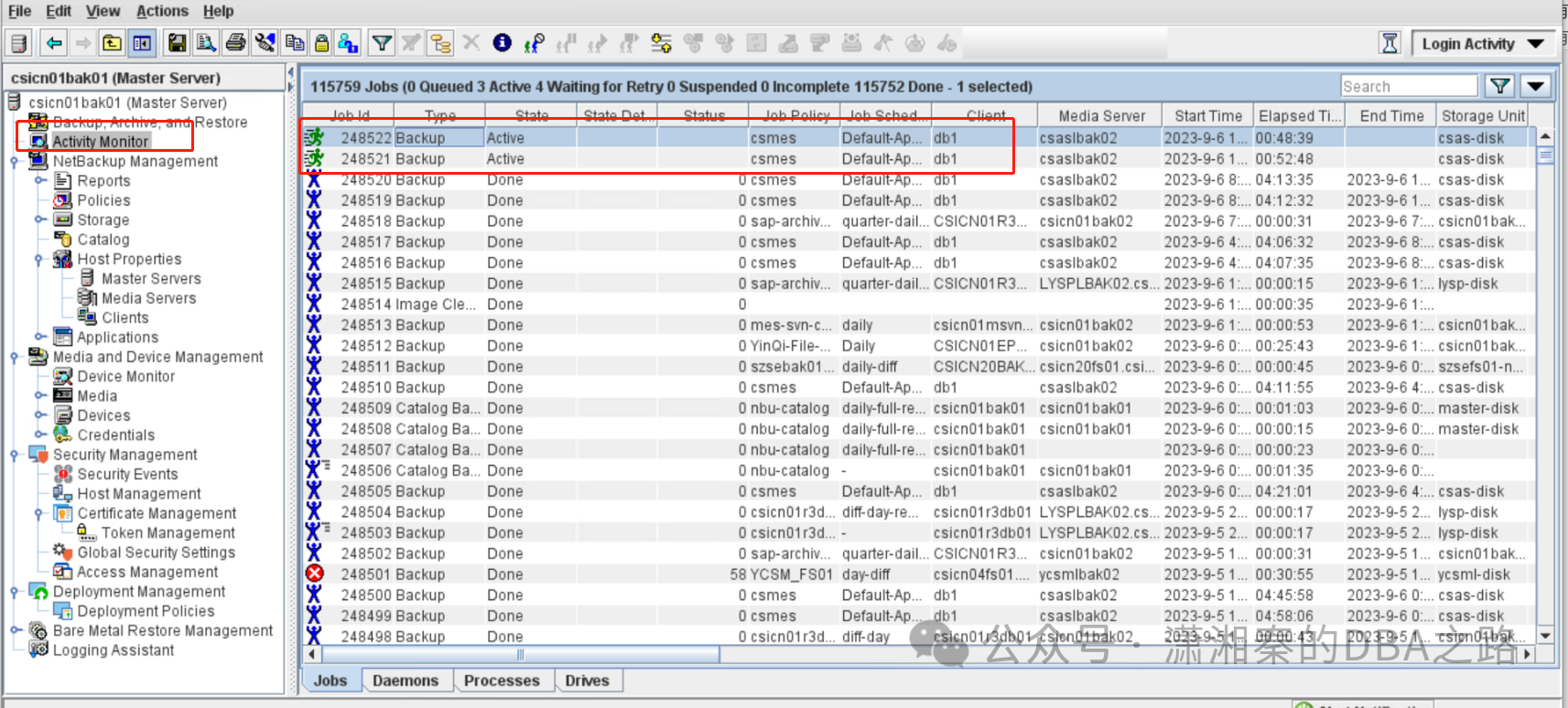
双击备份任务可以看到详细的信息,如有报错也是在这里看
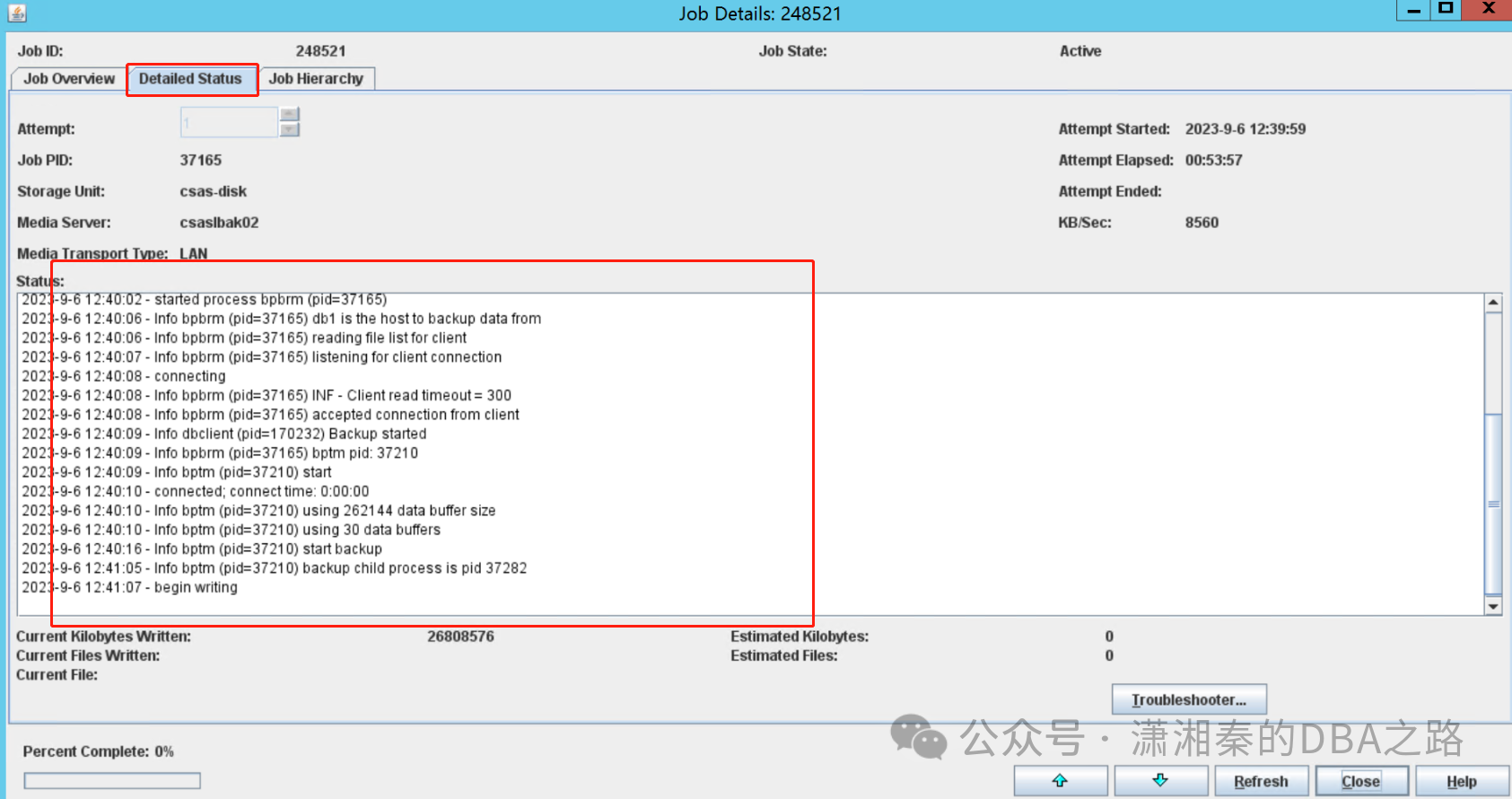
3.常见报错处理
3.1bpcd on db1 exited with status 48: client hostname could not be found
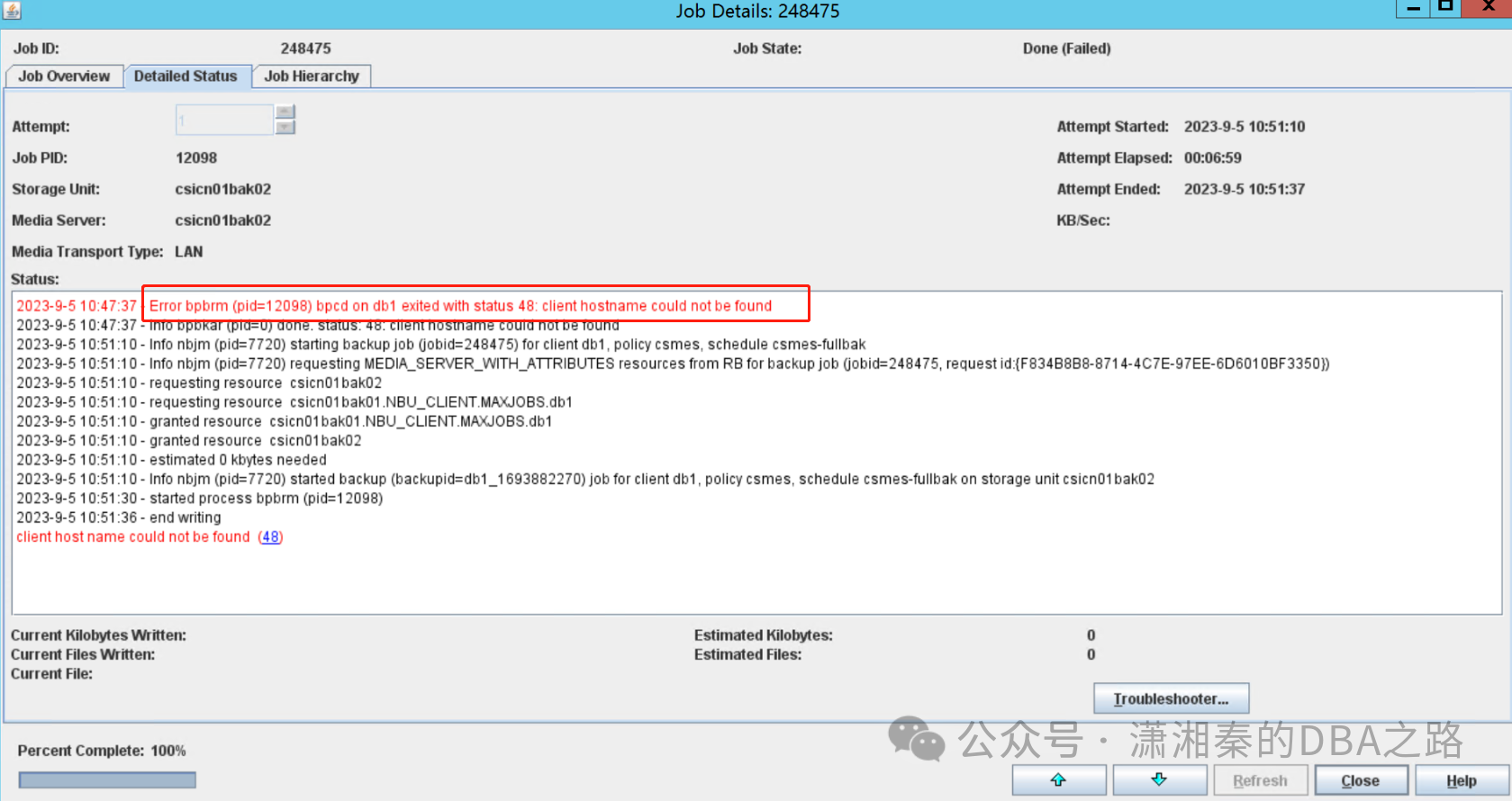
原因:一般是因为master,media主机和db主机网络或者端口不通
解决办法:确认hosts已经配置ok 并且互相都能ping通
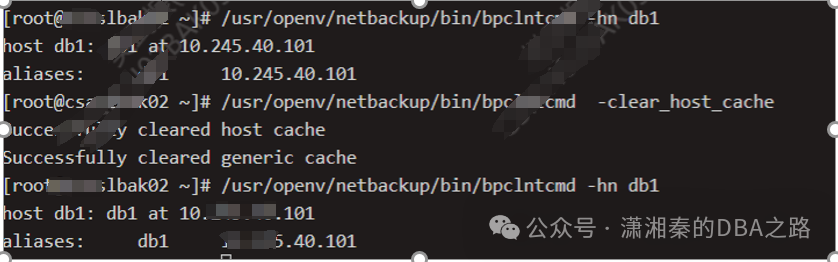
检查办法
讯享网[root@csaslbak02 ~]# /usr/openv/netbackup/bin/bpclntcmd -hn db1(hostname) host db1: db1 at 10.245.40.101 aliases: db1 10.245.40.10 [~]# /usr/openv/netbackup/bin/bpclntcmd -clear_host_cache 可以清理一下cache 再重新获取 Successfully cleared host cache Successfully cleared generic cache
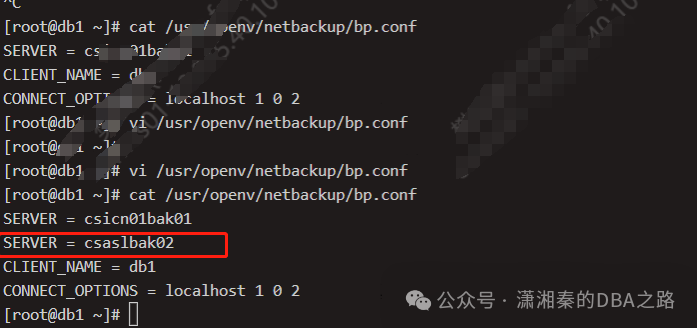
3.2Error bpbrm (pid=36341) bpcd on db1 exited with status 59: access to the client was not allowed
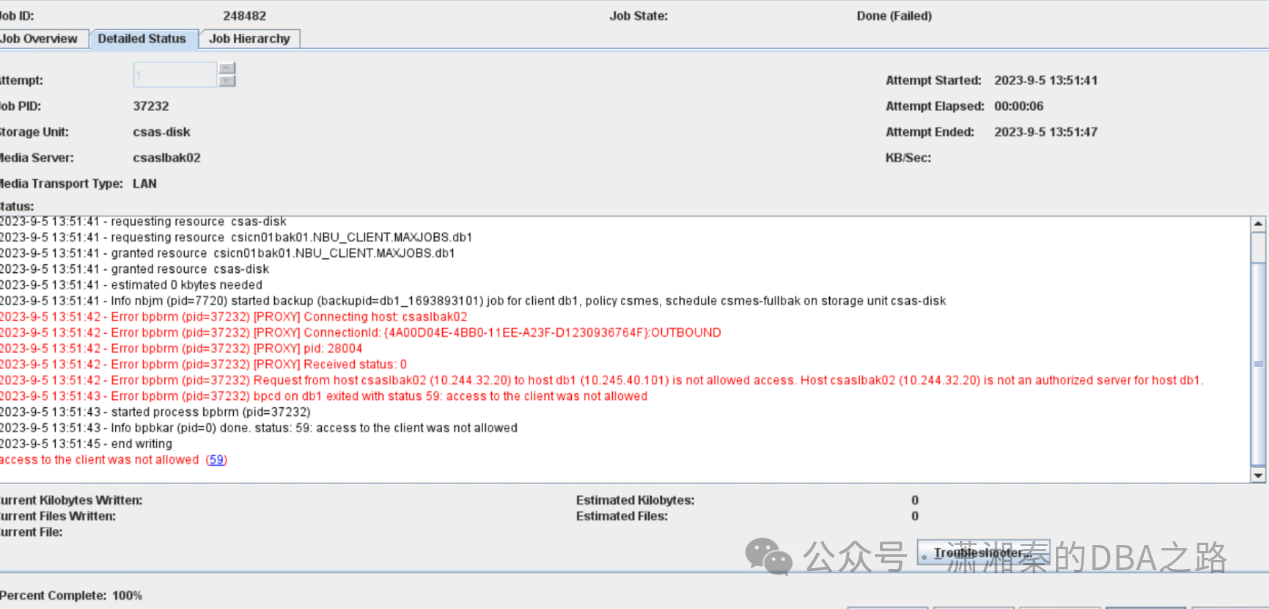
原因:客户端配置问题
解决办法:
cd /usr/openv/netbackup/[root@db1 netbackup]# vi bp.confSERVER = cscn01bak01SERVER = csaslbak02 media服务器没有加入到该配置文件CLIENT_NAME = db1CONNECT_OPTIONS = localhost 1 0 2
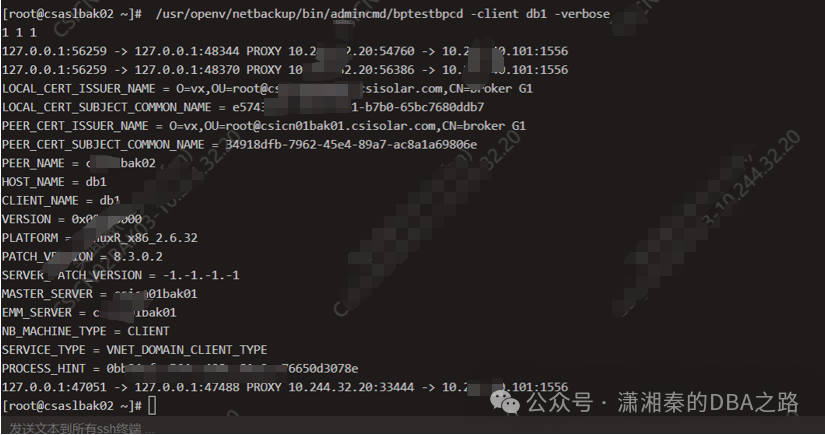
验证办法:
Media服务端验证client的连接性
讯享网/usr/openv/netbackup/bin/admincmd/bptestbpcd -client db1 -verbose

修改bp.conf添加media服务器
再次验证 可以抓取client的信息 即表示正常
-------------------历史文章推荐----------------------------
oracle常用监控脚本(纯干货,没有EMCC,ZABBIX也不怕)
Oracle利用BBED恢复崩溃实例
只要网通就可以实现异构数据库交互?
oracle 19c 打补丁教程
Oracle systemstate、gdb、dbx介绍
小心!udev异常导致的oracle集群宕机
传统制造型企业数据库选型之困
版权声明:本文内容由互联网用户自发贡献,该文观点仅代表作者本人。本站仅提供信息存储空间服务,不拥有所有权,不承担相关法律责任。如发现本站有涉嫌侵权/违法违规的内容,请联系我们,一经查实,本站将立刻删除。
如需转载请保留出处:https://51itzy.com/kjqy/117775.html