
ES 简介
ES是一个使用java语言编写的并且基于Lucene编写的搜索引擎, 他提供了分布式的全文搜索服务, 还提供了一个RESTful风格的web接口, 官方还对多种语言提供了相应的API
Lucene?
Lucene 本身就是一个搜索引擎的底层,
ES特点
分布式: ES主要为了横向扩展能力
全文检索: 将一段词语进行分词, 并且将分出的单个词语统一的放入一个分词库中,在搜索时,根据关键字去分词库中搜索去找到想找到的内容,(倒排索引)
RESTful风格web接口: 操作ES非常简单, 只需要发送一个Http请求并且根据请求方式不同和携带参数不同,执行相应的功能,
倒排索引
待补充
安装ES&kibana
version: "3.1" services: elasticsearch: image: daocloud.io/library/elasticsearch:6.5.4 restart: always container_name: elasticsearch environment: - "cluster.name=elasticsearch" #设置集群名称为elasticsearch - "discovery.type=single-node" #以单一节点模式启动 - "ES_JAVA_OPTS=-Xms4096m -Xmx4096m" #设置使用jvm内存大小 ports: - 9200:9200 kibana: image: daocloud.io/library/kibana:6.5.4 restart: always container_name: kibane ports: - 5601:5601 depends_on: - elasticsearch #kibana在elasticsearch启动之后再启动 environment: - "elasticsearch.hosts=http://127.0.0.1:9200" #设置访问elasticsearch的地址 讯享网
IK 分词器
安装
下载地址: https://github.com/medcl/elasticsearch-analysis-ik/releases?after=v6.7.2
下载需要与ES版本一直否则无法启动ES,
在 elasticsearch/plugins 下新建IK文件夹, 解压 后 重启ES即可
IK 介绍
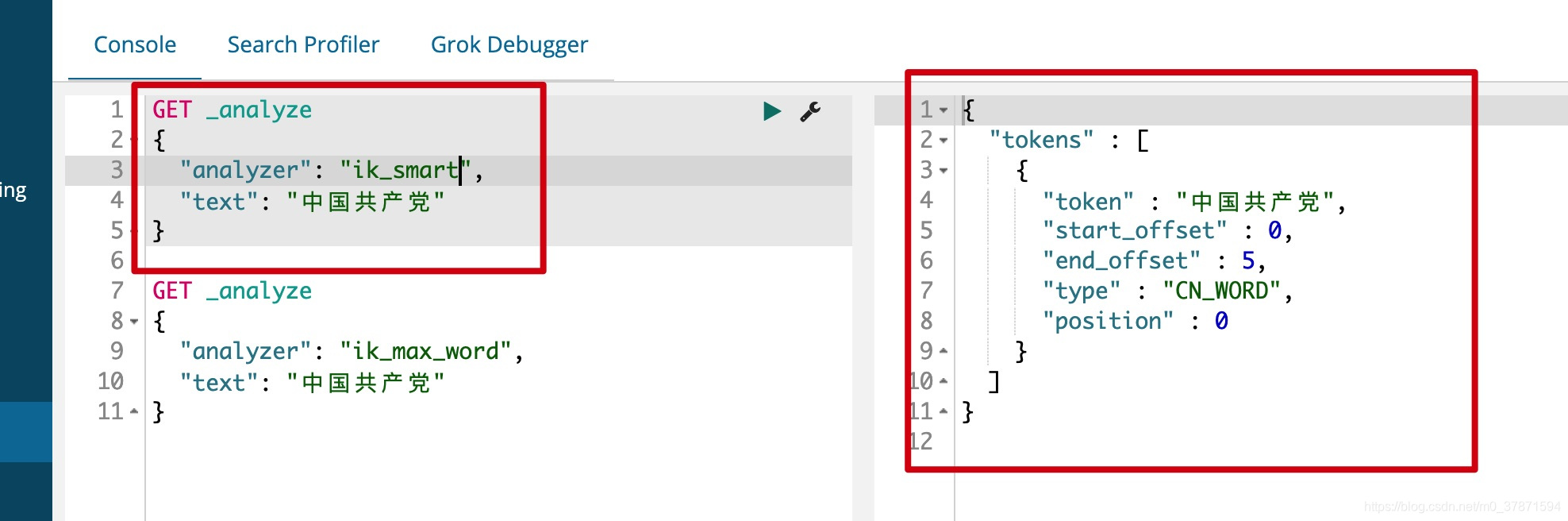
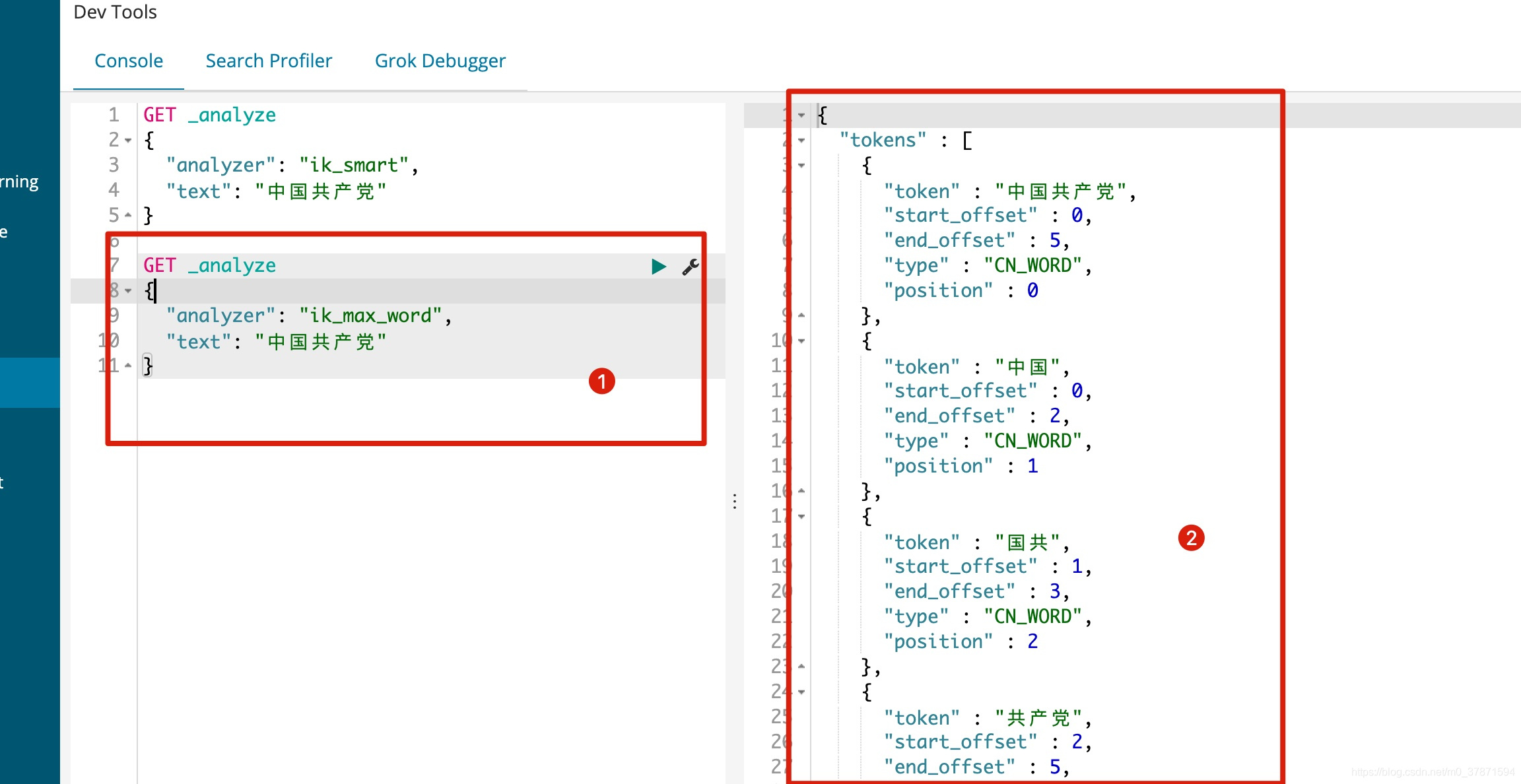
如果使用中文建议使用IK,他有两种分词模式 ik_mart(最少切分)与 ik_max_word(最细粒度划分)
ik_mart 使用介绍
ik_max_word使用介绍
但是使用IK_MAX_WORD有一个问题, 他是根据他认识的进行分词, 比如我们想把胡雪阔当连起来他是不可以的
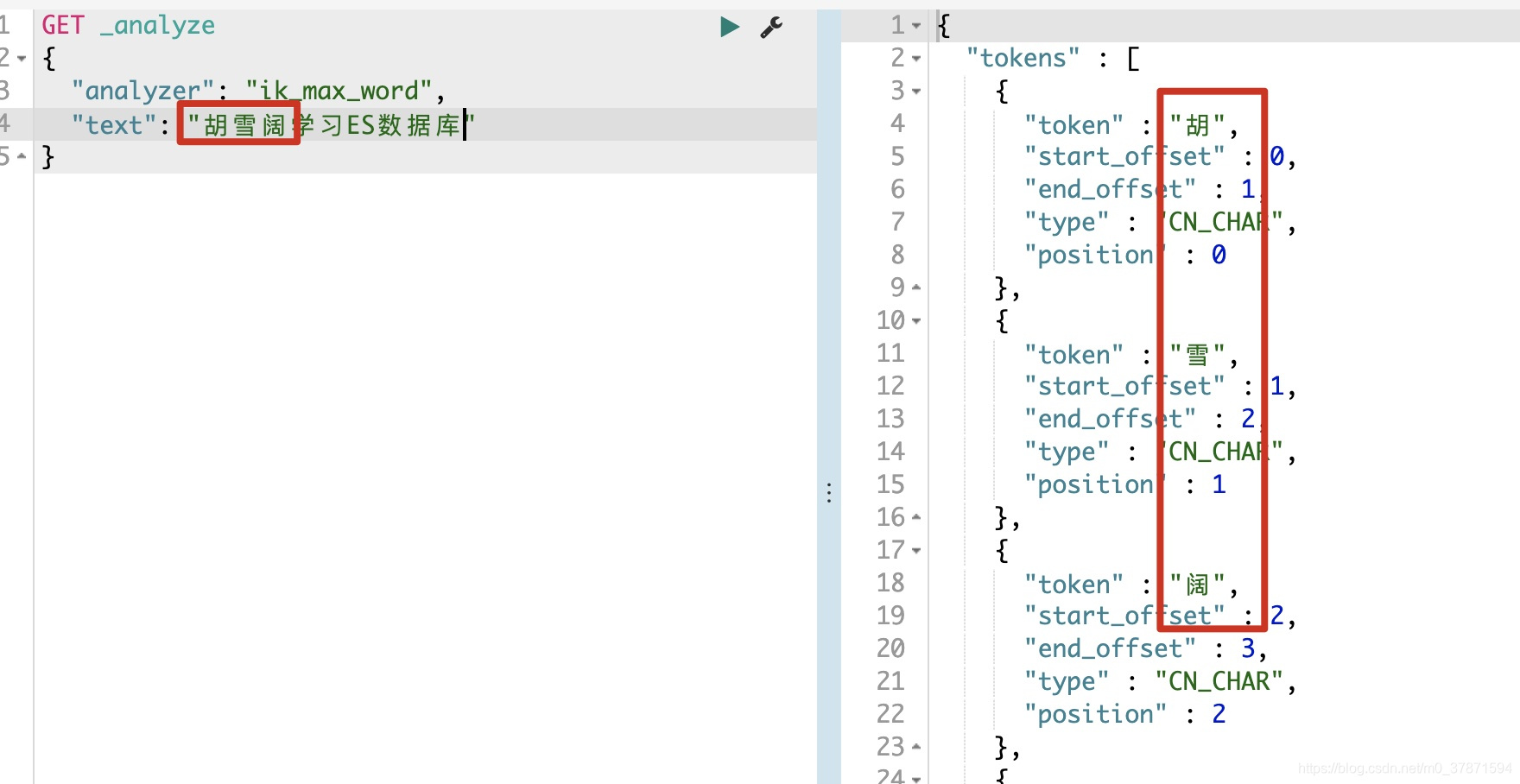
这个时候就需要自己加到字典中,
IK 分词器加入自定义词语
首先在elasticsearch/plugins/ik/config文件夹下面创建自己的字典my.dic后加入huxuekuo一行文字
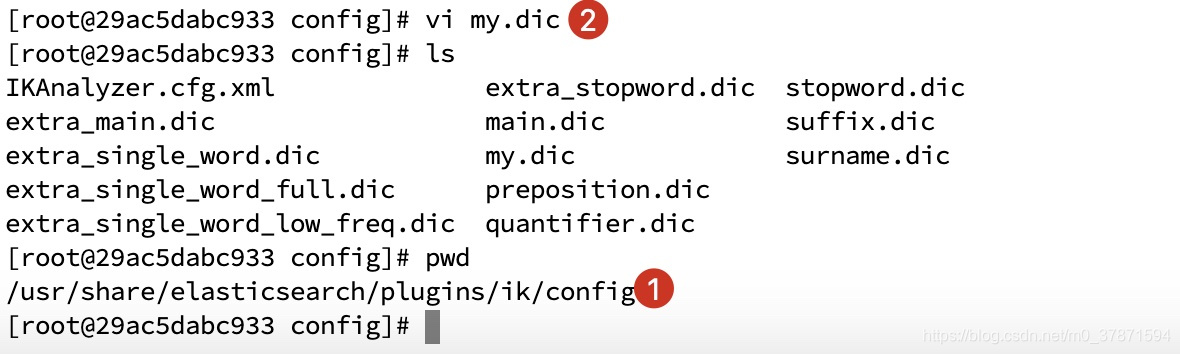
然后编辑IKAnalyzer.cfg.xml配置文件,修改<entry key="ext_dict">my.dic</entry>
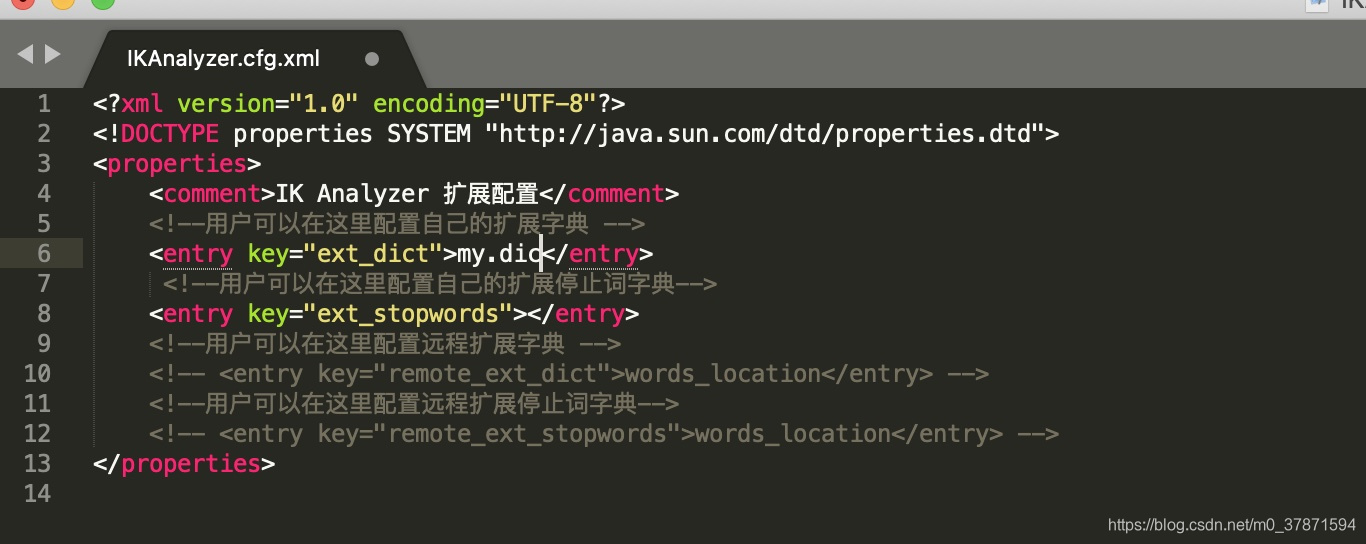
然后重启ES看效果 !!
Restful请求详解
通过Http请求进行操作
| Method | URL | remarks |
|---|---|---|
| PUT | 127.0.0.1:9200/索引名称/类型名称/文档ID | 添加文档(自动创建索引) |
| POST | 127.0.0.1:9200/索引名称/类型名称 | 创建文档(随机索引ID) |
| POST | 127.0.0.1:9200/索引名称/类型名称/文档ID/_update | 修改文档 |
| DELETE | 127.0.0.1:9200/索引名称/类型名称/文档ID | 删除文档 |
| GET | 127.0.0.1:9200/索引名称/类型名称/文档ID | 根据文档ID获取文档 |
| POST | 127.0.0.1:9200/索引名称/类型名称/_search | 查询索引下所有文档 |
PUT 语法
创建文档案例
讯享网PUT /test1/type1/1 {
    "name":"huxuekuo", "age" : 12 } 返回 结果: {
    "_index" : "test1", "_type" : "type1", "_id" : "1", "_version" : 1, "result" : "created", "_shards" : {
    "total" : 2, "successful" : 1, "failed" : 0 }, "_seq_no" : 0, "_primary_term" : 1 }
有一个问题是, 当前数据的类型是ES自动识别的,

PUT /test1/type1/1 语句中的type1 可以没有默认为_doc, PUT /test1/__doc/1 或者doc也不用加
创建索引(指定属性的数据类型)
 ES7 语法 PUT /test2 {
    "mappings":{
    "properties":{
    "name":{
    "type":"text" }, "age":{
    "type":"long" } } } }  ES6 语法 PUT /test3 {
    "mappings":{
    "product":{
    "properties":{
    "name": {
    "type": "text" }, "age": {
    "type": "long" } } } } } 返回结果 {
"acknowledged" : true, "shards_acknowledged" : true, "index" : "test3" } 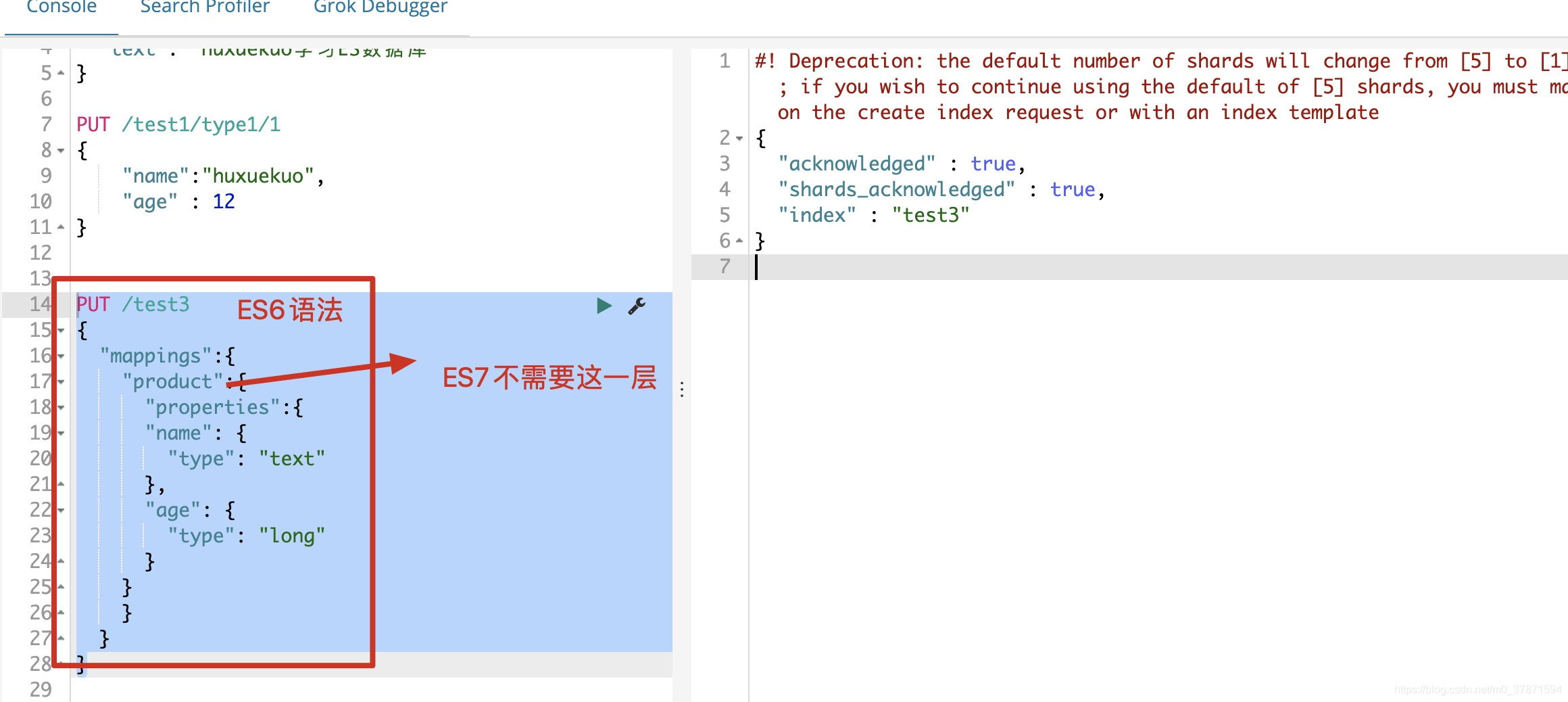
GET语法
获取索引信息
讯享网GET /test3 返回数据 {
    "test3" : {
    "aliases" : {
    }, "mappings" : {
    "product" : {
    "properties" : {
    "age" : {
    "type" : "long" }, "name" : {
    "type" : "text" } } } }, "settings" : {
    "index" : {
    "creation_date" : "52", "number_of_shards" : "5", "number_of_replicas" : "1", "uuid" : "UHXqcMJnSWKQE4The-_mcQ", "version" : {
    "created" : "" }, "provided_name" : "test3" } } } }
获取文档信息
GET /test1/type1/1 {
    "_index" : "test1", "_type" : "type1", "_id" : "1", "_version" : 1, "found" : true, "_source" : {
    "name" : "huxuekuo", "age" : 12 } }
简单条件查询
讯享网GET /test1/type1/_search?q=name:1 返回结果 { "_index" : "test1", "_type" : "type1", "_id" : "1", "_score" : 0., "_source" : { "name" : "1", "age" : "1" } }
注意在简单查询中返回了
"_score" : 0.,这是什么? 如果存在多条数据,匹配度越高则分数越高
POST 语法
post可以用作修改文档, put 也可以修改文档, 我们先看一下put 修改文档的方式
PUT /test1/type1/1 {
    "name":"huxuekuo1", "age" : 12 }
当文档ID已经创建, 一下语句就是修改语句, 有一个问题是, 如果修改时丢字段了
丢字段以后的文档数据:
讯享网{
    "_index" : "test1", "_type" : "type1", "_id" : "1", "_version" : 2, "found" : true, "_source" : {
    "name" : "huxuekuo1" } }
_version 发生改变, name值确实改了,但是丢失的age字段也没有了
看一下正常的修改方式
POST /test1/type1/1/_update {
    "doc":{
"name":"1" } } 这样就算没有age字段他就不会更新age字段
当前的
age类型为long类型, 我们尝试看看修改为text是否可以成功
讯享网POST /test1/type1/1/_update {
    "doc":{
    "age":"1爱我的" } }  返回结果 {
    "type": "mapper_parsing_exception", "reason": "failed to parse field [age] of type [long]" }
一旦数据类型确认下来将不可以通过修改数据的方式去修改
DELETE语法
删除索引
DELETE test1 删除文档
讯享网DELETE /test1/type1/1
复杂查询
精准查询
GET /vms/product/_search {
    "query": {
    "match": {
    "title": "iphone11" } } } 返回结果 {
    "took" : 16, "timed_out" : false, "_shards" : {
    "total" : 5, "successful" : 5, "skipped" : 0, "failed" : 0 }, "hits" : {
    "total" : 1, "max_score" : 0., "hits" : [ {
    "_index" : "vms", "_type" : "product", "_id" : "3", "_score" : 0., "_source" : {
    "title" : "iphone11", "date" : "2020-11-04", "remarks" : "苹果手机无敌啊" } } ] } }
略部分字段显示(_source)
讯享网GET /vms/product/_search {
    "query": {
    "match_phrase_prefix": {
    "title": "iphone" } } , "_source": ["title","date"] } 返回结果 {
    "_index" : "vms", "_type" : "product", "_id" : "4", "_score" : 0., "_source" : {
    "date" : "2018-11-04", "title" : "iphonex" } },
_source标记了只显示title - date在返回结果中就只有这两样
排序(sort)
简单排序
GET /vms/product/_search {
    "query": {
    "match_phrase_prefix": {
    "title": "iphone" } }, "sort": [ {
    "date": {
    "order": "asc" } } ] } 返回结果 {
    "took" : 12, "timed_out" : false, "_shards" : {
    "total" : 5, "successful" : 5, "skipped" : 0, "failed" : 0 }, "hits" : {
    "total" : 3, "max_score" : null, "hits" : [ {
    "_index" : "vms", "_type" : "product", "_id" : "4", "_score" : null, "_source" : {
    "date" : "2018-11-04", "title" : "iphonex" }, "sort" : [ 00 ] }, {
    "_index" : "vms", "_type" : "product", "_id" : "1", "_score" : null, "_source" : {
    "date" : "2020-11-04", "title" : "iphone12" }, "sort" : [ 00 ] }, {
    "_index" : "vms", "_type" : "product", "_id" : "3", "_score" : null, "_source" : {
    "date" : "2020-11-04", "title" : "iphone11" }, "sort" : [ 00 ] } ] } }
asc: 升序
desc: 降序在使用
sort以后_score就没有了为null
分页查询
讯享网GET /vms/product/_search {
    "query": {
    "match_phrase_prefix": {
    "title": "iphone" } }, "sort": [ {
    "date": {
    "order": "asc" } } ], "from": 0, "size": 1 }
关键词
from(从第几个开始)与size(返回多少条数据), 数据的下标还是从0开始的
布尔值查询
must (并且)
GET /vms_test/_doc/_search {
    "query":{
    "bool":{
    "must":[ {
    "match":{
    "name":"胡" } }, {
    "match":{
    "age":"20" } } ] } } }
获取同时满足两个条件的数据
should (或)
讯享网GET /vms_test/_doc/_search {
    "query":{
    "bool":{
    "should":[ {
    "match":{
    "name":"胡" } }, {
    "match":{
    "age":"20" } } ] } } }
must_not(不等于)
GET /vms_test/_doc/_search {
    "query":{
    "bool":{
    "must_not":[ {
    "match":{
    "name":"胡" } }, {
    "match":{
    "age":"20" } } ] } } }
filter(过滤器)
range(范围过滤)
讯享网GET vms_test/_doc/_search {
    "query":{
    "bool":{
    "filter":{
    "range":{
    "age":{
    "gt":10 } } } } } }
gt大于
lt小于
gte大于等于
lte小于等于是可以联合使用的
版权声明:本文内容由互联网用户自发贡献,该文观点仅代表作者本人。本站仅提供信息存储空间服务,不拥有所有权,不承担相关法律责任。如发现本站有涉嫌侵权/违法违规的内容,请联系我们,一经查实,本站将立刻删除。
如需转载请保留出处:https://51itzy.com/kjqy/117495.html