

<!DOCTYPE html>
<html lang="en">
<head>
    <meta charset="UTF-8">
    <meta http-equiv="X-UA-Compatible" content="IE=edge">
    <meta name="viewport" content="width=device-width, initial-scale=1.0">
    <title>Document</title>
    <style>
        * {
            margin: 0;
            padding: 0;
            box-sizing: border-box;
        }

        body {
            height: 100vh;
            display: flex;
            /* 水平垂直居中 */
            align-items: center;
            justify-content: center;
            background-color: rgb(243, 239, 8);
        }

        .btn,.btn::after {
            /* margin: 50px auto; */
            font-family: 'fangsong';
            width: 260px;
            height: 80px;
            text-align: center;
            font-size: 22px;
            line-height: 80px;
            color: rgb(255, 251, 251);
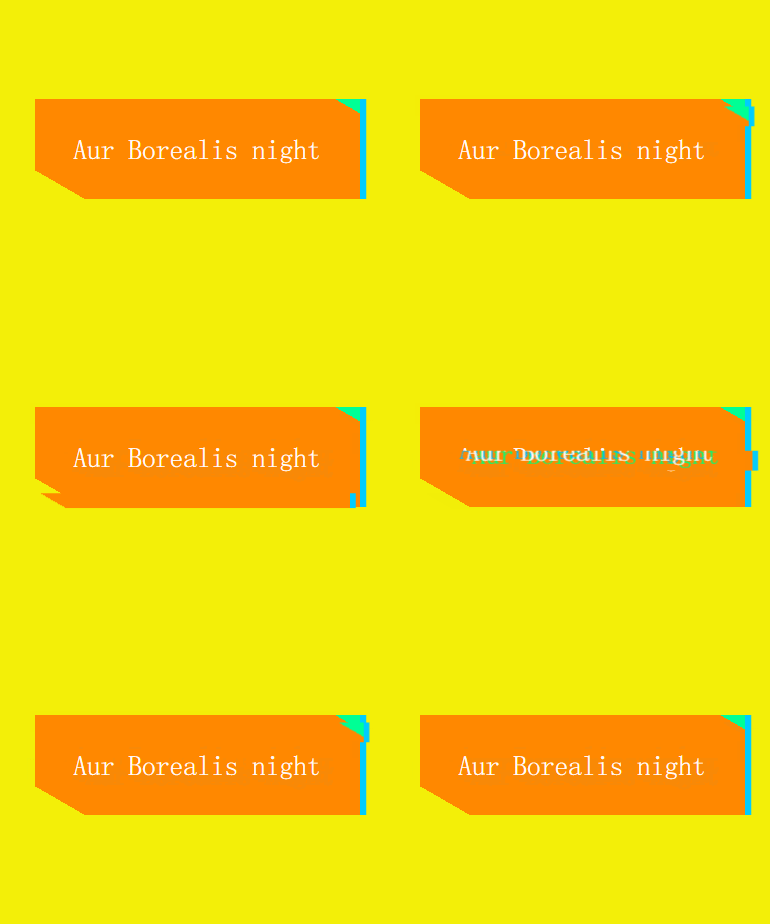
            /* 以30度角开始显示渐变颜色,0-10%时显示 transparent透明色,10%-95%时显示橘色,95%-100%时显示绿色 */
            background: linear-gradient(30deg, transparent 10%, rgb(255, 136, 0) 10% 95%, rgb(0, 255, 149) 95%);
            /* 设置最右侧的蓝色阴影 */
            box-shadow: 5px 0 0 rgb(0, 204, 255);
            cursor: pointer;

            position: relative;
        }

        .btn::after {
            content: "Aur Borealis night";

            position: absolute;
            top: 0;
            left: 0;
            /* 表示字体的阴影,让其字体在偏左上和偏右下分别有不同的颜色 */
            text-shadow: -5px -2px 0 rgb(0, 183, 255),5px 2px 0 rgb(0, 255, 115);
            /* 隐藏伪类 */
            visibility: hidden;
        }

        .btn:hover::after {
            animation: san 1s infinite;
            animation-timing-function: steps(1, end);
        }

        /*
            clip-path: inset() 可以用裁剪方式创建元素的可显示区域(矩形),那么区域内的部分显示,区域外的部分隐藏
            例如:clip-path: inset(20% -5px 60% 0); 表示从上到下裁剪20%,从右向左裁剪-5px(这里由于要显示阴影,因此需要为负值),
        从上到下裁剪60%,从左到右裁剪0%,这样一来就只会剩下中间的20%,宽多了5px的矩形区域,其余部分被裁剪掉的边角料就会被隐藏
        */
        @keyframes san {
            0% {
                clip-path: inset(20% -5px 60% 0);
                transform: translate(-6px, 5px);
                visibility: visible;
            }

            10% {
                clip-path: inset(50% -5px 30% 0);
                transform: translate(6px, -5px);
            }

            20% {
                clip-path: inset(20% -5px 60% 0);
                transform: translate(5px, 0px);
            }

            30% {
                clip-path: inset(80% -5px 5% 0);
                transform: translate(-8px, 5px);
            }

            40% {
                clip-path: inset(0 -5px 80% 0);
                transform: translate(-4px, -3px);
            }

            50% {
                clip-path: inset(50% -5px 30% 0);
                transform: translate(-6px, -5px);
            }

            60% {
                clip-path: inset(80% -5px 5% 0);
                transform: translate(-7px, 5px);
            }

            70% {
                clip-path: inset(0 -5px 80% 0);
                transform: translate(3px, 6px);
            }

            80% {
                clip-path: inset(50% -5px 30% 0);
                transform: translate(5px, 5px);
            }

            90% {
                clip-path: inset(20% -5px 60% 0);
                transform: translate(6px, -5px);
            }

            100% {
                clip-path: inset(0 -5px 80% 0);
                transform: translate(1px, 5px);
            }
        }
    </style>
</head>
<body>
    <div class="btn">Aur Borealis night</div>
</body>
</html>
讯享网
版权声明:本文内容由互联网用户自发贡献,该文观点仅代表作者本人。本站仅提供信息存储空间服务,不拥有所有权,不承担相关法律责任。如发现本站有涉嫌侵权/违法违规的内容,请联系我们,一经查实,本站将立刻删除。
如需转载请保留出处:https://51itzy.com/kjqy/116164.html