
前言
前两天搞了一个微信支付,发现跟支付宝相比麻烦的不是一点半点,百度上都是V2支付还特别老,后来看了狂神说的v3支付,受益匪浅,感谢各位热爱分享的大佬,本文是结合狂神和微信官方的代码进行了修改,希望能给需要的小伙伴们提供一些帮助。
一:准备工作
微信官方api文档:微信支付开发者文档
01、需要的参数
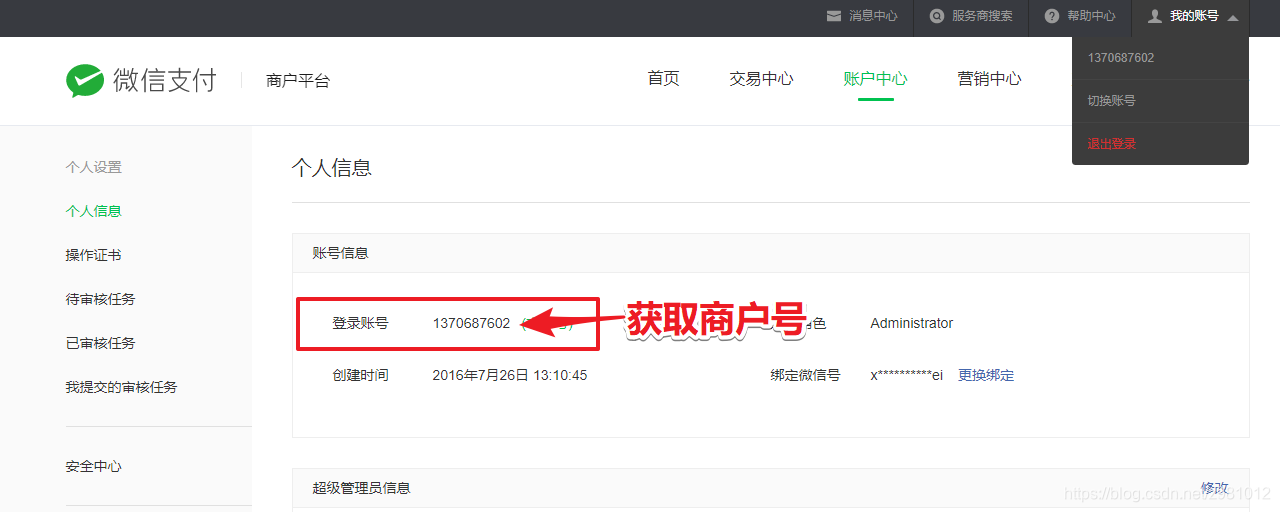
1.mchid:商户号,个人微信申请成为商家后微信号就是商家号
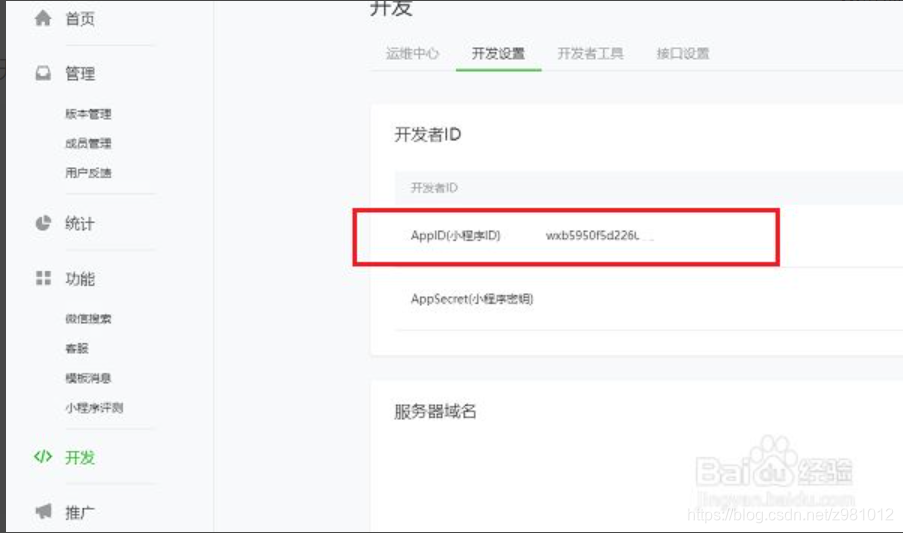
2.appid:应用号,一个小程序或公众号的唯一标识,一个商家可拥有多个应用
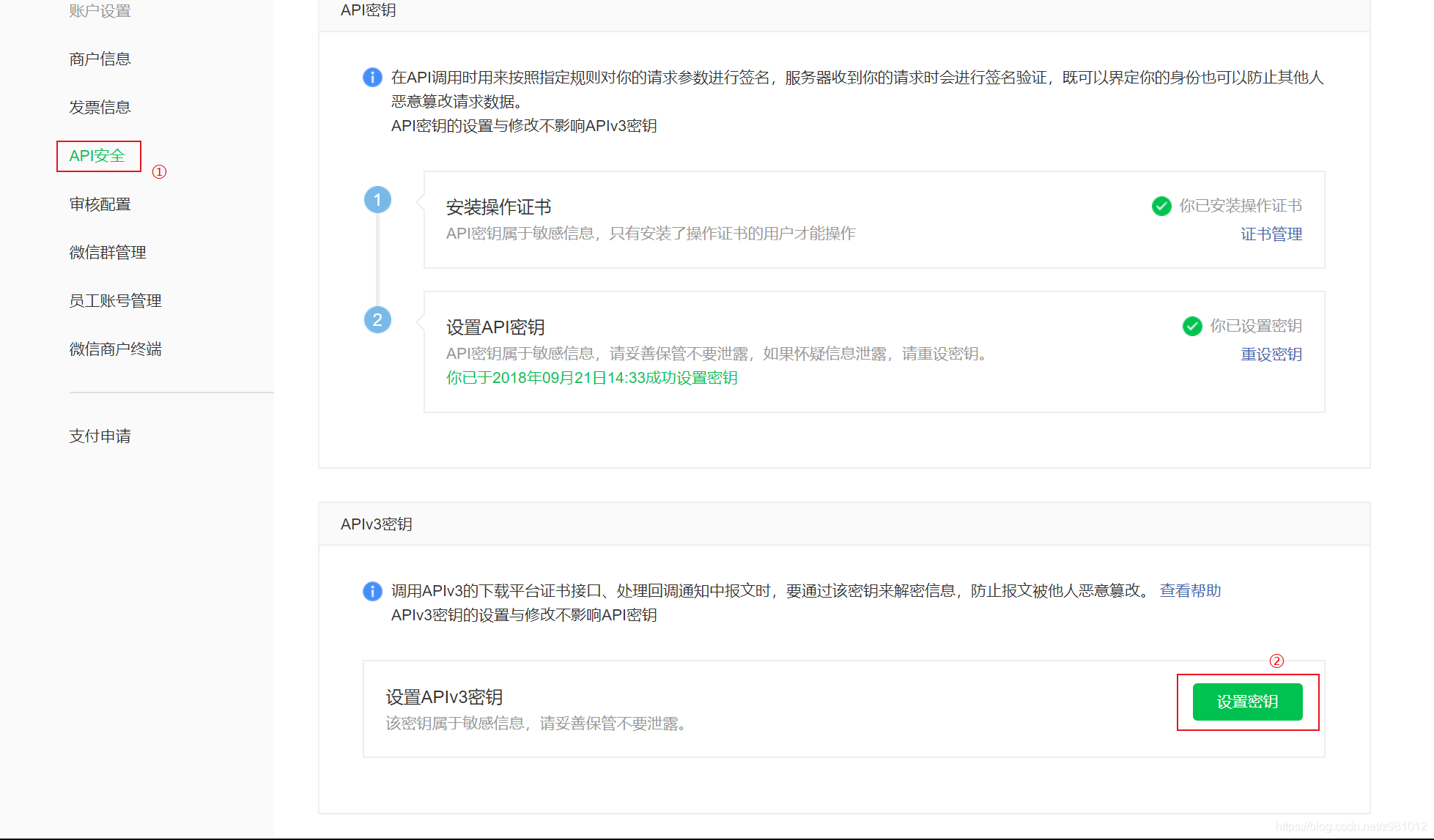
3.APIv3密钥:主要用于平台证书解密、回调信息解密。
登录微信商户平台,进入【账户中心 > API安全 > API安全】目录,点击【设置密钥】。(此密钥个人设置,内容为32位字符)
附带生成32位随机数代码
/ * 生成随机数 * @return */ public static String getNonceStr(){ return UUID.randomUUID().toString() .replaceAll("-", "") .substring(0, 32); } public static void main(String[] args) { System.out.println(getNonceStr()); }讯享网
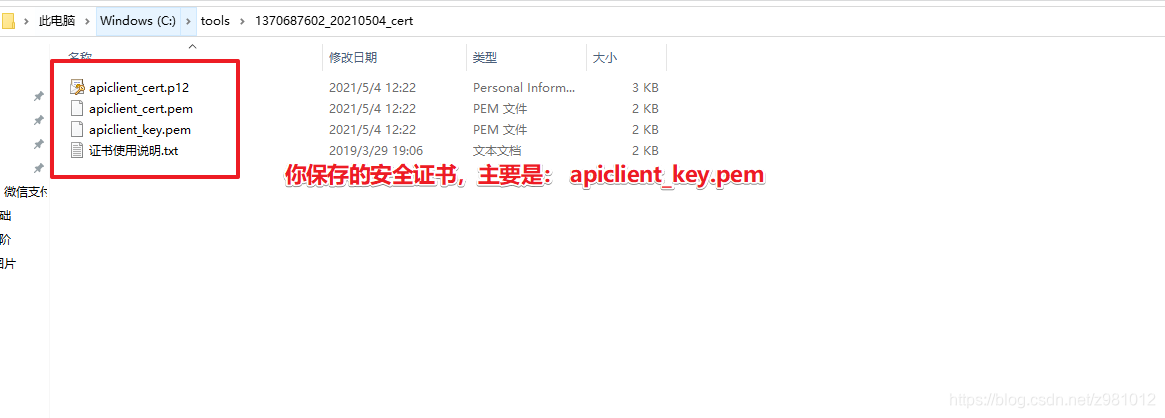
4.API密钥证书:
商户可登录微信商户平台,在【账户中心】->【API安全】->【API证书】目录下载证书
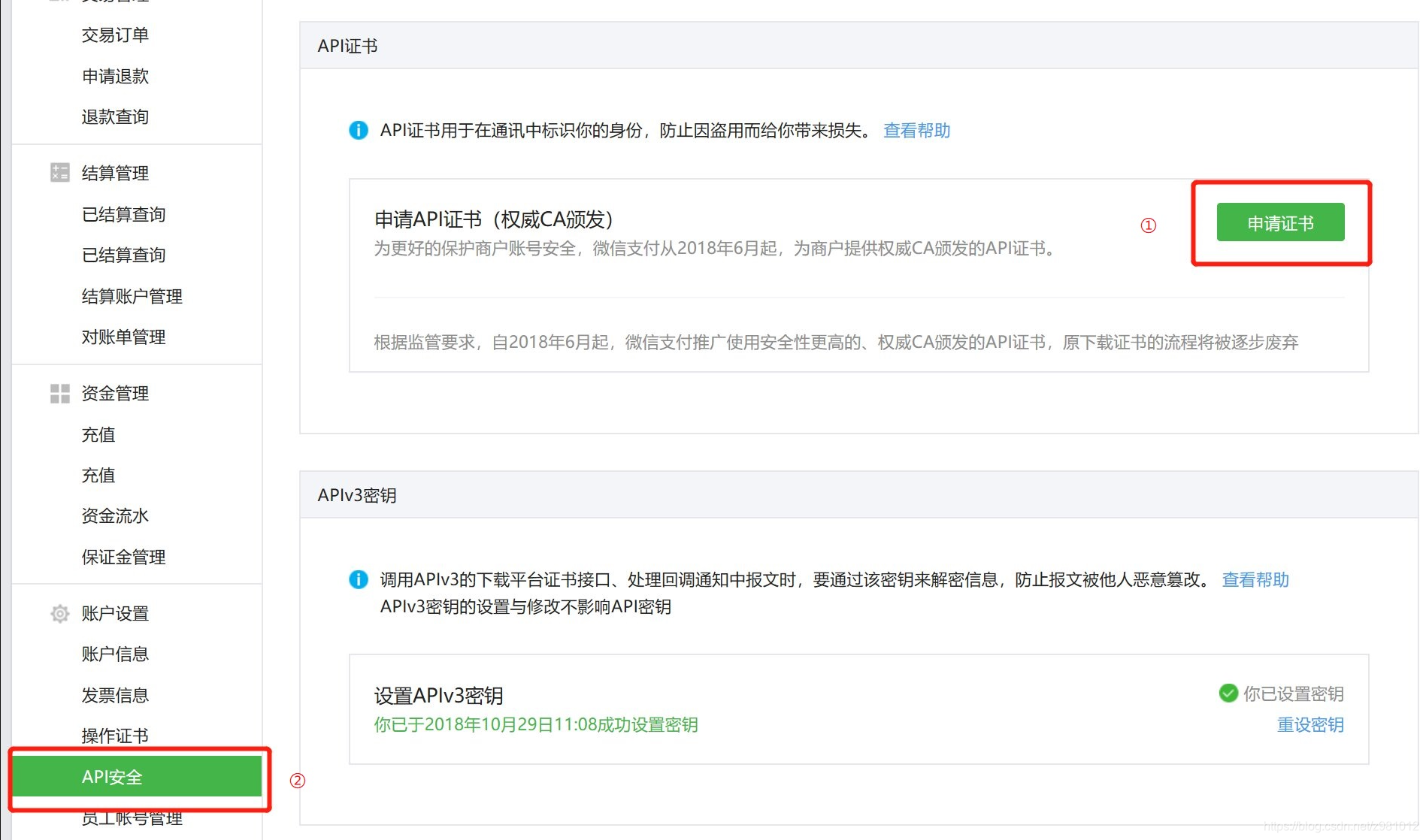
跟着一步一步往下做生成证书(主要是要证书里的私钥字符串)
二:撸代码
步骤:
1.创建一个boot项目这里就不演示了
2在项目的pom.xml中完成相关微信支付的依赖
讯享网 <!--http依赖发送请求--> <dependency> <groupId>org.apache.httpcomponents</groupId> <artifactId>httpclient</artifactId> <version>4.5.3</version> </dependency> <dependency> <groupId>org.apache.httpcomponents</groupId> <artifactId>httpmime</artifactId> <version>4.5.2</version> </dependency> <!--里面都是一些工具类--> <dependency> <groupId>org.apache.commons</groupId> <artifactId>commons-lang3</artifactId> <version>3.10</version> </dependency> <!--也是工具类,中国人做的很好用--> <dependency> <groupId>cn.hutool</groupId> <artifactId>hutool-all</artifactId> <version>5.7.2</version> </dependency> <!--读取xml的--> <dependency> <groupId>com.fasterxml.jackson.dataformat</groupId> <artifactId>jackson-dataformat-avro</artifactId> </dependency>
3.配置类
WxpayConfig参数配置类
KeyPath: api密钥路径,根据路径读取密钥文件,也可以把密钥复制到这里,用字符串保存都是一样的。
certificateMap:键就是mchSerialNo,值是X509Certificate,回调解密用的,初始化certificateMap的方法在下面的工具类中
@Data @Component public class WxpayConfig { public static String app_id = "*"; // 公众账号ID public static String mch_id = ""; // 商户号 public static String mchSerialNo = ""; //微信商家api序列号 public static String v3Key = "*"; // 回调报文解密V3密钥key public static String KeyPath = "*"; // 商户的key【API密匙】存放路径 public static String notify_order_url = "*"; // 服务器异步通知页面路径--下单 public static String notify_refound_url = "*"; // 服务器异步通知页面路径-退款 public static String return_url = "*"; // 服务器同步通知页面路径 public static Map<String, X509Certificate> certificateMap = new ConcurrentHashMap<>(); // 定义全局容器 保存微信平台证书公钥 } 还有个配置类,保存的是发请求的url,没有用第三方支付的sdk,微信本身也没有(辣鸡),啥都要自己做
讯享网public class WechatUrlConfig { / * 适用对象:小程序下单 * 请求方式:POST */ public static final String JSAPIURL = "https://api.mch.weixin..com/v3/pay/transactions/jsapi"; / * 适用对象:APP下单 * 请求方式:POST */ public static final String APPURL = "https://api.mch.weixin..com/v3/pay/transactions/app"; / * 获取证书 */ public static final String CERTIFICATESURL = "https://api.mch.weixin..com/v3/certificates"; / * 退款地址 */ public static final String REFUNDSURL = "https://api.mch.weixin..com/v3/refund/domestic/refunds"; }
4.工具类
关于json操作
import org.codehaus.jackson.map.DeserializationConfig; import org.codehaus.jackson.map.ObjectMapper; import org.codehaus.jackson.map.SerializationConfig; import org.codehaus.jackson.map.annotate.JsonSerialize.Inclusion; import org.codehaus.jackson.type.JavaType; import org.codehaus.jackson.type.TypeReference; import org.slf4j.Logger; import org.slf4j.LoggerFactory; import org.springframework.util.StringUtils; import java.text.SimpleDateFormat; / * by mofeng * <dependency> * <groupId>com.fasterxml.jackson.dataformat</groupId> * <artifactId>jackson-dataformat-avro</artifactId> * </dependency> * * <dependency> * <groupId>org.apache.commons</groupId> * <artifactId>commons-lang3</artifactId> * <version>3.6</version> * </dependency> */ public class JsonUtil { private static ObjectMapper objectMapper = new ObjectMapper(); private static Logger log = LoggerFactory.getLogger(JsonUtil.class); static { // 对象的所有字段全部列入 objectMapper.setSerializationInclusion(Inclusion.ALWAYS); // 取消默认转换timestamps形式 objectMapper.configure(SerializationConfig.Feature.WRITE_DATES_AS_TIMESTAMPS, false); // 忽略空Bean转json的错误 objectMapper.configure(SerializationConfig.Feature.FAIL_ON_EMPTY_BEANS, false); // 所有的日期格式都统一为以下的样式,即yyyy-MM-dd HH:mm:ss objectMapper.setDateFormat(new SimpleDateFormat("yyyy-MM-dd HH:mm:ss")); // 忽略 在json字符串中存在,但是在java对象中不存在对应属性的情况。防止错误 objectMapper.configure(DeserializationConfig.Feature.FAIL_ON_UNKNOWN_PROPERTIES, false); // 精度的转换问题 objectMapper.configure(DeserializationConfig.Feature.USE_BIG_DECIMAL_FOR_FLOATS, true); objectMapper.configure(DeserializationConfig.Feature.ACCEPT_SINGLE_VALUE_AS_ARRAY, true); } public static <T> String obj2String(T obj) { if (obj == null) { return null; } try { return obj instanceof String ? (String) obj : objectMapper.writeValueAsString(obj); } catch (Exception e) { log.warn("Parse Object to String error", e); return null; } } public static <T> String obj2StringPretty(T obj) { if (obj == null) { return null; } try { return obj instanceof String ? (String) obj : objectMapper.writerWithDefaultPrettyPrinter().writeValueAsString(obj); } catch (Exception e) { log.warn("Parse Object to String error", e); return null; } } public static <T> T string2Obj(String str, Class<T> clazz) { if (StringUtils.isEmpty(str) || clazz == null) { return null; } try { return clazz.equals(String.class) ? (T) str : objectMapper.readValue(str, clazz); } catch (Exception e) { log.warn("Parse String to Object error", e); return null; } } public static <T> T string2Obj(String str, TypeReference<T> typeReference) { if (StringUtils.isEmpty(str) || typeReference == null) { return null; } try { return (T) (typeReference.getType().equals(String.class) ? str : objectMapper.readValue(str, typeReference)); } catch (Exception e) { log.warn("Parse String to Object error", e); return null; } } public static <T> T string2Obj(String str, Class<?> collectionClass, Class<?>... elementClasses) { JavaType javaType = objectMapper.getTypeFactory().constructParametricType(collectionClass, elementClasses); try { return objectMapper.readValue(str, javaType); } catch (Exception e) { log.warn("Parse String to Object error", e); return null; } } }发送http请求的(主要就是通过他发http请求)
讯享网import com.fasterxml.jackson.databind.JsonNode; import com.fasterxml.jackson.databind.ObjectMapper; import org.apache.http.HttpEntity; import org.apache.http.client.methods.CloseableHttpResponse; import org.apache.http.client.methods.HttpGet; import org.apache.http.client.methods.HttpPost; import org.apache.http.entity.StringEntity; import org.apache.http.impl.client.CloseableHttpClient; import org.apache.http.impl.client.HttpClientBuilder; import org.apache.http.impl.client.HttpClients; import org.apache.http.util.EntityUtils; import java.net.URL; import java.util.HashMap; import java.util.Map; public class HttpUtils { private static final ObjectMapper JSON=new ObjectMapper(); / * 封装get请求 * @param url * @return */ public static JsonNode doGet(String url){ CloseableHttpClient httpClient = HttpClientBuilder.create().build(); HttpGet httpget = new HttpGet(url); httpget.addHeader("Content-Type", "application/json;charset=UTF-8"); httpget.addHeader("Accept", "application/json"); try{ String token = WechatPayUtils.getToken("GET", new URL(url), ""); httpget.addHeader("Authorization", token); CloseableHttpResponse httpResponse = httpClient.execute(httpget); if(httpResponse.getStatusLine().getStatusCode() == 200){ String jsonResult = EntityUtils.toString( httpResponse.getEntity()); return JSON.readTree(jsonResult); }else{ System.err.println(EntityUtils.toString( httpResponse.getEntity())); } }catch (Exception e){ e.printStackTrace(); }finally { try { httpClient.close(); }catch (Exception e){ e.printStackTrace(); } } return null; } / * 封装post请求 * @return */ public static Map<String,Object> doPostWexin(String url, String body){ CloseableHttpClient httpClient = HttpClients.createDefault(); HttpPost httpPost = new HttpPost(url); httpPost.addHeader("Content-Type","application/json;chartset=utf-8"); httpPost.addHeader("Accept", "application/json"); try{ String token = WechatPayUtils.getToken("POST", new URL(url), body); httpPost.addHeader("Authorization", token); if(body==null){ throw new IllegalArgumentException("data参数不能为空"); } StringEntity stringEntity = new StringEntity(body,"utf-8"); httpPost.setEntity(stringEntity); CloseableHttpResponse httpResponse = httpClient.execute(httpPost); HttpEntity httpEntity = httpResponse.getEntity(); if(httpResponse.getStatusLine().getStatusCode() == 200){ String jsonResult = EntityUtils.toString(httpEntity); return JSON.readValue(jsonResult, HashMap.class); }else{ System.err.println("微信支付错误信息"+EntityUtils.toString(httpEntity)); } }catch (Exception e){ e.printStackTrace(); }finally { try{ httpClient.close(); }catch (Exception e){ e.printStackTrace(); } } return null; } }
解密工具类,用于解密回调信息
import javax.crypto.Cipher; import javax.crypto.NoSuchPaddingException; import javax.crypto.spec.GCMParameterSpec; import javax.crypto.spec.SecretKeySpec; import java.io.IOException; import java.security.GeneralSecurityException; import java.security.InvalidAlgorithmParameterException; import java.security.InvalidKeyException; import java.security.NoSuchAlgorithmException; import java.util.Base64; public class AesUtil { static final int KEY_LENGTH_BYTE = 32; static final int TAG_LENGTH_BIT = 128; private final byte[] aesKey; public AesUtil(byte[] key) { if (key.length != KEY_LENGTH_BYTE) { throw new IllegalArgumentException("无效的ApiV3Key,长度必须为32个字节"); } this.aesKey = key; } public String decryptToString(byte[] associatedData, byte[] nonce, String ciphertext) throws GeneralSecurityException, IOException { try { Cipher cipher = Cipher.getInstance("AES/GCM/NoPadding"); SecretKeySpec key = new SecretKeySpec(aesKey, "AES"); GCMParameterSpec spec = new GCMParameterSpec(TAG_LENGTH_BIT, nonce); cipher.init(Cipher.DECRYPT_MODE, key, spec); cipher.updateAAD(associatedData); return new String(cipher.doFinal(Base64.getDecoder().decode(ciphertext)), "utf-8"); } catch (NoSuchAlgorithmException | NoSuchPaddingException e) { throw new IllegalStateException(e); } catch (InvalidKeyException | InvalidAlgorithmParameterException e) { throw new IllegalArgumentException(e); } } }签名工具类
讯享网import java.io.ByteArrayInputStream; import java.io.IOException; import java.net.URL; import java.nio.file.Files; import java.nio.file.Paths; import java.security.*; import java.security.cert.CertificateFactory; import java.security.cert.X509Certificate; import java.security.spec.InvalidKeySpecException; import java.security.spec.PKCS8EncodedKeySpec; import java.util.Base64; import java.util.HashMap; import java.util.Map; import java.util.UUID; public class WechatPayUtils { / * 获取私钥 * @param filename 私钥文件路径 (required) * @return 私钥对象 */ public static PrivateKey getPrivateKey(String filename) throws IOException { System.out.println("filename:" + filename); String content = new String(Files.readAllBytes(Paths.get(filename)), "utf-8"); try { String privateKey = content.replace("-----BEGIN PRIVATE KEY-----", "") .replace("-----END PRIVATE KEY-----", "") .replaceAll("\\s+", ""); KeyFactory kf = KeyFactory.getInstance("RSA"); return kf.generatePrivate(new PKCS8EncodedKeySpec(Base64.getDecoder().decode(privateKey))); } catch (NoSuchAlgorithmException e) { throw new RuntimeException("当前Java环境不支持RSA", e); } catch (InvalidKeySpecException e) { throw new RuntimeException("无效的密钥格式"); } } / * 生成token 也就是生成签名 * * @param method * @param url * @param body * @return * @throws Exception */ public static String getToken(String method, URL url, String body) throws Exception { String nonceStr = getNonceStr(); long timestamp = System.currentTimeMillis() / 1000; String message = buildMessage(method, url, timestamp, nonceStr, body); String signature = sign(message.getBytes("utf-8")); return "WECHATPAY2-SHA256-RSA2048 " + "mchid=\"" + WxpayConfig.mch_id + "\"," + "nonce_str=\"" + nonceStr + "\"," + "timestamp=\"" + timestamp + "\"," + "serial_no=\"" + WxpayConfig.mchSerialNo + "\"," + "signature=\"" + signature + "\""; } / * 获取平台证书 * * @return */ public static Map<String, X509Certificate> refreshCertificate() throws Exception { Map<String, X509Certificate> certificateMap = new HashMap(); // 1: 执行get请求 JsonNode jsonNode = HttpUtils.doGet(WechatUrlConfig.CERTIFICATESURL); // 2: 获取平台验证的相关参数信息 JsonNode data = jsonNode.get("data"); if (data != null) { for (int i = 0; i < data.size(); i++) { JsonNode encrypt_certificate = data.get(i).get("encrypt_certificate"); //对关键信息进行解密 AesUtil aesUtil = new AesUtil(WxpayConfig.v3Key.getBytes()); String associated_data = encrypt_certificate.get("associated_data").toString().replaceAll("\"", ""); String nonce = encrypt_certificate.get("nonce").toString().replaceAll("\"", ""); String ciphertext = encrypt_certificate.get("ciphertext").toString().replaceAll("\"", ""); //证书内容 String certStr = aesUtil.decryptToString(associated_data.getBytes(), nonce.getBytes(), ciphertext); //证书内容转成证书对象 CertificateFactory cf = CertificateFactory.getInstance("X509"); X509Certificate x509Cert = (X509Certificate) cf.generateCertificate( new ByteArrayInputStream(certStr.getBytes("utf-8")) ); String serial_no = data.get(i).get("serial_no").toString().replaceAll("\"", ""); certificateMap.put(serial_no, x509Cert); } } return certificateMap; } / * 生成签名 * * @param message * @return * @throws Exception */ public static String sign(byte[] message) throws Exception { Signature sign = Signature.getInstance("SHA256withRSA"); sign.initSign(getPrivateKey(WxpayConfig.KeyPath)); sign.update(message); return Base64.getEncoder().encodeToString(sign.sign()); } / * 生成签名串 * * @param method * @param url * @param timestamp * @param nonceStr * @param body * @return */ public static String buildMessage(String method, URL url, long timestamp, String nonceStr, String body) { String canonicalUrl = url.getPath(); if (url.getQuery() != null) { canonicalUrl += "?" + url.getQuery(); } return method + "\n" + canonicalUrl + "\n" + timestamp + "\n" + nonceStr + "\n" + body + "\n"; } / * 生成随机数 * * @return */ public static String getNonceStr() { return UUID.randomUUID().toString() .replaceAll("-", "") .substring(0, 32); } // / * 验证签名 * * @param certificate * @param message * @param signature * @return */ public static boolean verify(X509Certificate certificate, byte[] message, String signature) { try { Signature sign = Signature.getInstance("SHA256withRSA"); sign.initVerify(certificate); sign.update(message); return sign.verify(Base64.getDecoder().decode(signature)); } catch (NoSuchAlgorithmException e) { throw new RuntimeException("当前Java环境不支持SHA256withRSA", e); } catch (SignatureException e) { throw new RuntimeException("签名验证过程发生了错误", e); } catch (InvalidKeyException e) { throw new RuntimeException("无效的证书", e); } } / * 生成随机数 * * @return */ public static String getNonceStr() { return UUID.randomUUID().toString() .replaceAll("-", "") .substring(0, 32); } / * 拼接参数 * * @return */ private static String buildMessageTwo(String appId, long timestamp, String nonceStr, String packag) { return appId + "\n" + timestamp + "\n" + nonceStr + "\n" + packag + "\n"; } / * 生成签名 * * @return */ private static String sign(byte[] message) throws NoSuchAlgorithmException, SignatureException, IOException, InvalidKeyException { Signature sign = Signature.getInstance("SHA256withRSA"); //SHA256withRSA sign.initSign(WechatPayUtils.getPrivateKey(WxpayConfig.KeyPath)); sign.update(message); return Base64.getEncoder().encodeToString(sign.sign()); } }
下单请求工具类(只写了app和小程序支付,如果需要其他方式可进行修改)
public class WeixinchatPayUtils {


    public static String getNonceStr() {
        return UUID.randomUUID().toString()
                .replaceAll("-", "")
                .substring(0, 32);
    }

    /
     * 参考网站 https://pay.weixin..com/wiki/doc/apiv3/apis/chapter3_5_4.shtml
     * 计算签名值
     *
     * @param appId
     * @param prepay_id
     * @return
     * @throws IOException
     * @throws SignatureException
     * @throws NoSuchAlgorithmException
     * @throws InvalidKeyException
     */
    public static HashMap<String, Object> getTokenJSAPI(String appId, String prepay_id) throws IOException, SignatureException, NoSuchAlgorithmException, InvalidKeyException {
        // 获取随机字符串
        String nonceStr = getNonceStr();
        // 获取微信小程序支付package
        String packagestr = "prepay_id=" + prepay_id;
        long timestamp = System.currentTimeMillis() / 1000;
        //签名,使用字段appId、timeStamp、nonceStr、package计算得出的签名值
        String message = buildMessageTwo(appId, timestamp, nonceStr, packagestr);
        //获取对应的签名
        String signature = sign(message.getBytes("utf-8"));
        // 组装返回
        HashMap<String, Object> map = new HashMap<>();
        map.put("appId", appId);
        map.put("timeStamp", String.valueOf(timestamp));
        map.put("nonceStr", nonceStr);
        map.put("package", packagestr);
        map.put("signType", "RSA");
        map.put("paySign", signature);
        return map;
    }


    /
     * 参考网站 https://pay.weixin..com/wiki/doc/apiv3/apis/chapter3_5_4.shtml
     * 计算签名值
     * @param appId
     * @param prepay_id
     * @return
     * @throws IOException
     * @throws SignatureException
     * @throws NoSuchAlgorithmException
     * @throws InvalidKeyException
     */
    public static HashMap<String, Object> getTokenApp(String appId, String prepay_id) throws IOException, SignatureException, NoSuchAlgorithmException, InvalidKeyException {
        // 获取随机字符串
        String nonceStr = getNonceStr();
        // 获取微信小程序支付package
        long timestamp = System.currentTimeMillis() / 1000;
        //签名,使用字段appId、timeStamp、nonceStr、package计算得出的签名值
        String message = buildMessageTwo(appId, timestamp, nonceStr, prepay_id);
        //获取对应的签名
        String signature = sign(message.getBytes("utf-8"));
        // 组装返回
        HashMap<String, Object> map = new HashMap<>();
        map.put("appId", appId);
        map.put("partnerid", WxpayConfig.mch_id);
        map.put("prepayid", prepay_id);
        map.put("package", "Sign=WXPay");
        map.put("nonceStr", nonceStr);
        map.put("timeStamp", String.valueOf(timestamp));
        map.put("sign", signature);
        return map;
    }
}
5.用代码发起支付请求(小程序,APP)
首先我们看下微信官方提供的
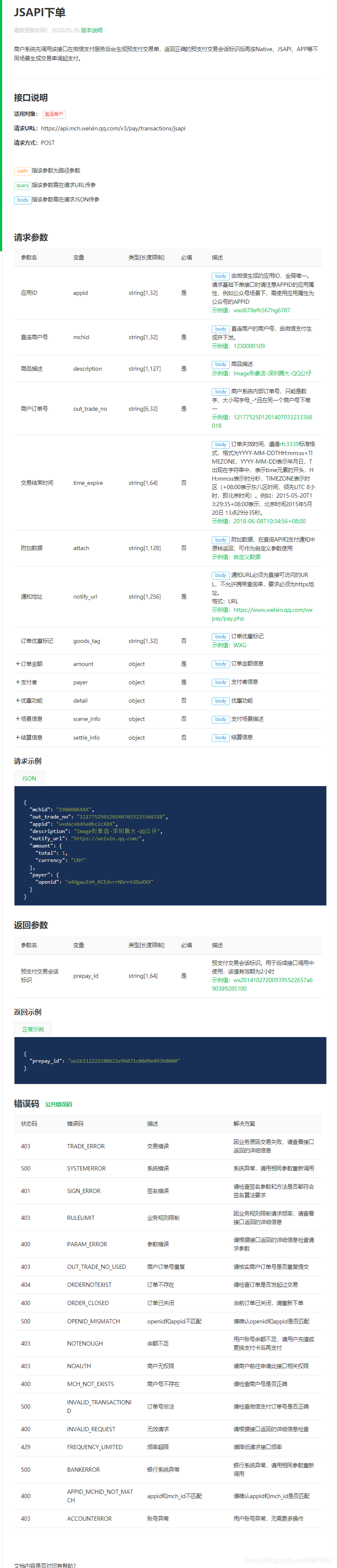
接下来用java代码实现
讯享网 public Map<String, Object> wxPay(String openid, Integer type, Product product) throws JsonProcessingException { Map<String, Object> map = new HashMap(); // 支付的产品(小程序或者公众号,主要需要和微信支付绑定哦) map.put("appid", WxpayConfig.app_id); // 支付的商户号 map.put("mchid", WxpayConfig.mch_id); //临时写死配置 map.put("description", product.getSubject()); map.put("out_trade_no", product.getOutTradeNo()); map.put("notify_url", WxpayConfig.notify_order_url); Map<String, Object> amount = new HashMap(); //订单金额 单位分 amount.put("total", Integer.parseInt(product.getTotalFee()) * 100); amount.put("currency", "CNY"); map.put("amount", amount); // 设置小程序所需的opendi Map<String, Object> payermap = new HashMap(); payermap.put("openid", openid); map.put("payer", payermap); ObjectMapper objectMapper = new ObjectMapper(); String body = objectMapper.writeValueAsString(map); Map<String, Object> stringObjectMap = null; HashMap<String, Object> dataMap = null; try { switch (type) { case 1: stringObjectMap = HttpUtils.doPostWexin(WechatUrlConfig.JSAPIURL, body); dataMap = WeixinchatPayUtils.getTokenJSAPI(WxpayConfig.app_id, String.valueOf(stringObjectMap.get("prepay_id"))); break; default: stringObjectMap = HttpUtils.doPostWexin(WechatUrlConfig.APPURL, body); dataMap = WeixinchatPayUtils.getTokenApp(WxpayConfig.app_id, String.valueOf(stringObjectMap.get("prepay_id"))); break; } return dataMap; } catch (Exception ex) { } return null; }
把以上的代码生成map返回前端人员,他们用返回值唤醒微信支付,咱们后端的活就ok了。
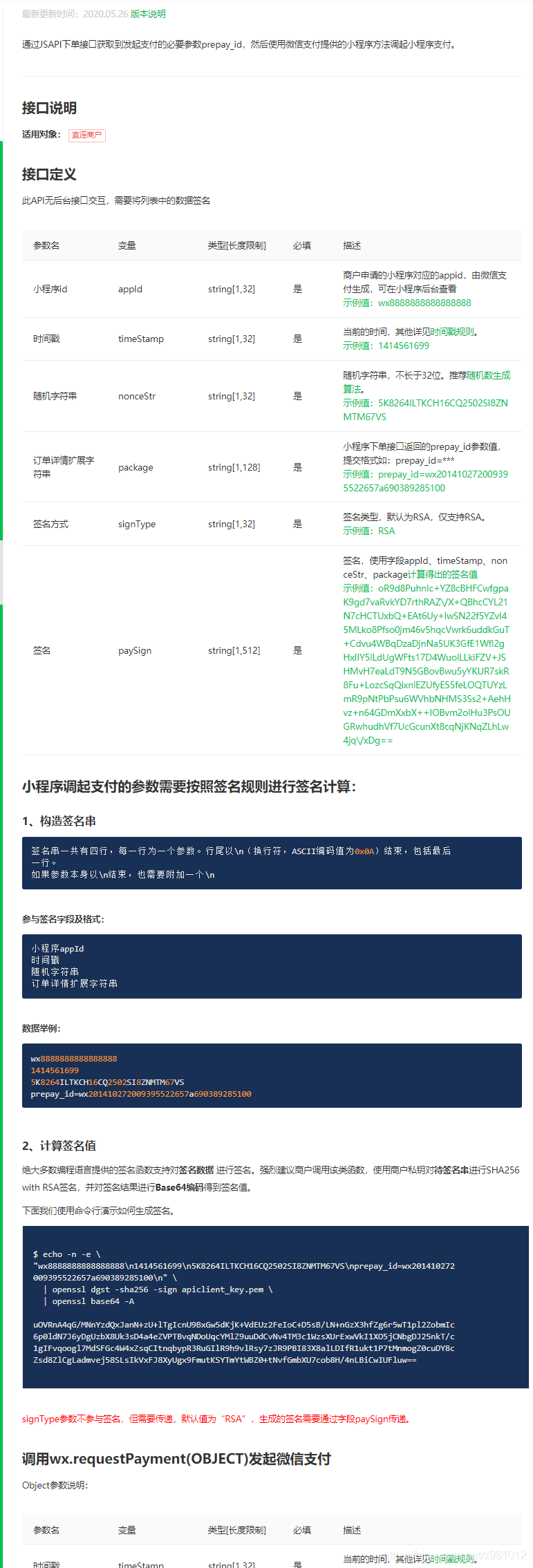
才发现商品Product类没发
@Data public class Product implements Serializable { private static final long serialVersionUID = 1L; private String productId;// 商品ID private String subject;//订单名称 private String body;// 商品描述 private String totalFee;// 总金额 private String outTradeNo;// 订单号(唯一) private Short payType;// 支付类型(1:支付宝 2:微信 ) private Short payWay;// 支付方式 (1:app 2:公众号) } 接下来是回调方法,还是先看官方文档

通过官方文档的回调信息我们可以发现我们所需要的信息都在resource中,因此在回调成功后还要解密resource获得我们需要的信息
讯享网@PostMapping("pay/callback") public Map orderPayCallback(@RequestBody Map body, HttpServletRequest request) { log.info("1----------->微信支付回调开始"); Map<String, Object> result = new HashMap(); //1:获取微信支付回调的获取签名信息 String timestamp = request.getHeader("Wechatpay-Timestamp"); String nonce = request.getHeader("Wechatpay-Nonce"); ObjectMapper objectMapper = new ObjectMapper(); try { // 2: 开始解析报文体 String data = objectMapper.writeValueAsString(body); String message = timestamp + "\n" + nonce + "\n" + data + "\n"; //3:获取应答签名 String sign = request.getHeader("Wechatpay-Signature"); //4:获取平台对应的证书 String serialNo = request.getHeader("Wechatpay-Serial"); if (!WxpayConfig.certificateMap.containsKey(serialNo)) { WxpayConfig.certificateMap = WechatPayUtils.refreshCertificate(); } X509Certificate x509Certificate = WxpayConfig.certificateMap.get(serialNo); if (!WechatPayUtils.verify(x509Certificate, message.getBytes(), sign)) { throw new IllegalArgumentException("微信支付签名验证失败:" + message); } // log.info("签名验证成功"); Map<String, String> resource = (Map) body.get("resource"); // 5:回调报文解密 AesUtil aesUtil = new AesUtil(WxpayConfig.v3Key.getBytes()); //解密后json字符串 String decryptToString = aesUtil.decryptToString( resource.get("associated_data").getBytes(), resource.get("nonce").getBytes(), resource.get("ciphertext")); // log.info("2------------->decryptToString====>{}", decryptToString); //6:获取微信支付返回的信息 Map<String, Object> jsonData = objectMapper.readValue(decryptToString, Map.class); //7: 支付状态的判断 如果是success就代表支付成功 if ("SUCCESS".equals(jsonData.get("trade_state"))) { // 8:获取支付的交易单号,流水号,和附属参数 String out_trade_no = jsonData.get("out_trade_no").toString(); String transaction_id = jsonData.get("transaction_id").toString(); String attach = jsonData.get("attach").toString(); //TODO 根据订单号查询支付状态,如果未支付,更新支付状态 为已支付 // log.info("3----------->微信支付成功,支付流水号是:{},附属参数是:{}", out_trade_no, attach); // log.info("4----------->微信支付成功,支付流水号是:{}", transaction_id); // 转换附属参数 HashMap<String, Object> map = JsonUtil.string2Obj(attach, HashMap.class); // 9:保存用户支付信息 } result.put("code", "SUCCESS"); result.put("message", "成功"); } catch (Exception e) { result.put("code", "fail"); result.put("message", "系统错误"); e.printStackTrace(); } return result; }
以上就是下单和回调的全部代码,其他方式创建订单,退款,可以按照官方文档的参数进行修改,换汤不换药,希望能给正在做微信支付的同学一些帮助,另外说一句王亘是笨比,谢谢大家。

版权声明:本文内容由互联网用户自发贡献,该文观点仅代表作者本人。本站仅提供信息存储空间服务,不拥有所有权,不承担相关法律责任。如发现本站有涉嫌侵权/违法违规的内容,请联系我们,一经查实,本站将立刻删除。
如需转载请保留出处:https://51itzy.com/kjqy/112688.html