
系列文章
Svg Flow Editor 原生svg流程图编辑器(一)
Svg Flow Editor 原生svg流程图编辑器(二)
Svg Flow Editor 原生svg流程图编辑器(三)
Svg Flow Editor 原生svg流程图编辑器(四)
Svg Flow Editor 原生svg流程图编辑器(五)
效果展示

项目概述
svg flow editor 是一款流程图编辑器,提供了一系列流程图交互、编辑所必需的功能,支持前端研发自定义开发各种逻辑编排场景,如流程图、ER 图、BPMN 流程等。
目前也有比较好的流程图设计框架,但是还是难满足项目个性化定制,BMPN.js、Jsplumb 的拓展能力不足,自定义节点支持成本很高。
技术选型
本项目使用typescript与svg、canvas等技术进行搭建,脱离vue、react等框架的限制,使得用户更快、更轻松融合到自己的项目中,在底层结合typescript,使得数据类型得到更加健壮、完整的支持,对图形元组使用 svg 技术进行绘制,使得用户操作、底层实现更加轻松,同时对其他模块(背景网格、水印)使用了canvas技术进行绘制。
功能规划
本项目大体功能模块如下:
background 背景
背景模块支持网格绘制、水印的绘制、水印定制化配置等
graph
graph 是系统交互的核心元素,支持Rect(矩形)、Circle(圆形)、Ellipse(椭圆)、Polygon(多边形)、Diamond(菱形)、Triangle(三角形)、Text(文本)、HTML(HTML元素)、Image(图片)、Line(线)等多种类型,后期会考虑慢慢完善元件库
websocket
websocket 是用于处理用户协同的模块
graphData
graph Data 是双向绑定的数据管理模块
tools
工具模块,包含图片导出、一键美化、层级处理、布局方式、元件组合、辅助线等

apis
API 是外部访问内部实现执行动作、获取数据的窗口,并在设计上提供了command、adapt 两个类,在command中隔离内部对象,通过调用adapt实现数据的处理,放置用户通过command对象对内部对象进行风险操作
event
提供统一的事件处理机制,支持对内部事件的监听、外部事件的注册等,同时,还对graph元件的统一事件进行处理,例如元件的点击事件、双击事件等
history
历史记录管理模块,支持 redo undo version 等历史相关操作
项目架构
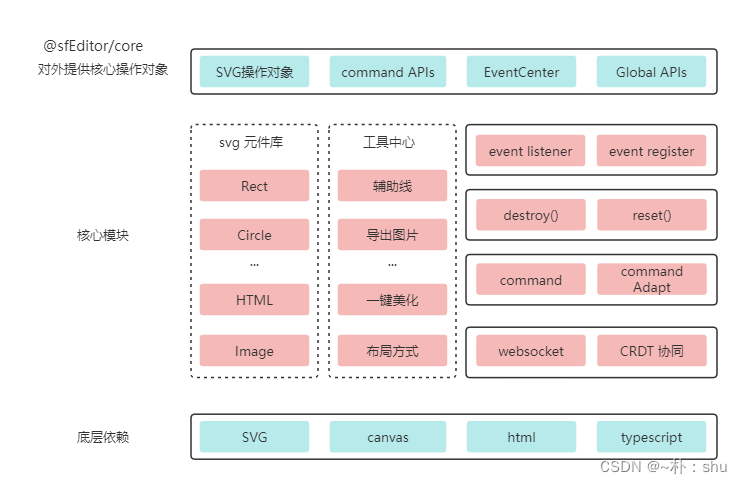
项目对外暴露基础操作,例如: svg 构造器、command api操作、event事件中心以及全局api,通过暴露对象 sfEditor,实现对内部的数据访问、对象操作等。在核心模块中,需要考虑用户的使用习惯,封装完整的工具类,实现流程图的基本操作、拓展功能。底层依赖了svg对项目元件库的基础元件进行创作,同时使用了canvas对背景网格、水印等进行绘制,使用html进行页面布局,并且提供了typescript的全类型支持。
在API设计的设计上,采取了Command CommandAdapt 两个类实现,Command中不进行用户方法的直接处理,增加adapt类进行方法中转,防止用户通过API直接操作核心类。Command调用 adapt 的实例方法,在adapt 中获取draw、svg 等核心类进行用户的响应。
未来的功能模块规划中,还是以协同为核心重点。
项目结构说明
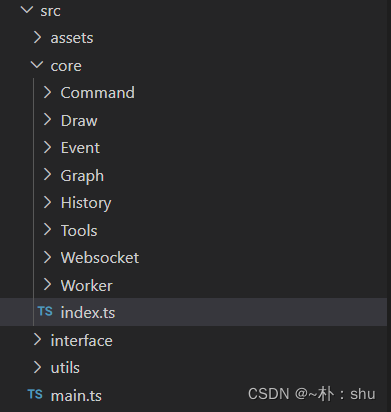
如上图,核心类在 core 中,index.ts 向外暴露了API,main.ts 则是测试结果的入口文件,interface是类型文件,命名上基本上都是按功能模块走的。
Graph 实体类
构建 svg 对象
export class SVG {
  private xmlns!: string;
  private svg: Element;
  private svgID!: string;
  private draw: Draw; // 绘制实例
  private graphOption: IGraphOption | undefined;
  constructor(graphOption?: IGraphOption) {
    this.draw = new Draw();
    this.svgID = getNanoid();
    this.graphOption = graphOption;

    //SVG命名空间
    this.xmlns = graphOption?.xmlns || "http://www.w3.org/2000/svg";

    // 1. 判断是否存在当前命名空间的svg
    const svgElement = this.draw.getSvg(this.xmlns);

    // 2. 如果存在 则保存
    if (svgElement) throw new Error(messageInfo.isHaveSvgElement); // 如果已经存在相同xmlns属性的svg 则报错

    // 3. 不存在 则创建新的 svg
    this.svg = this.draw.createSvg(this.xmlns, this.svgID);
  }

  // 将当前创建的svg添加到html DOM 的节点上
  public addTo(container: string | Element) {
    this.draw.addTo(container, this.svg); // 添加到指定容器

    this.size(); // 设置默认大小

    const { gridLines, waterMark, waterMarkText } = this.graphOption || {};

    if (gridLines !== false) this.draw.gridLines(); // 绘制网格

    if (waterMark !== false) this.draw.waterMark(waterMarkText); // 绘制水印

    return this; // 返回 this 供链式调用
  }

  // 设置当前 svg 的大小
  public size(width?: number, height?: number) {
    this.svg.setAttribute("width", width?.toString() || "100%");
    this.svg.setAttribute("height", height?.toString() || "100%");
    return this;
  }
讯享网
相关的draw方法:
讯享网import { messageInfo } from "../Message"; // 绘制、DOM 操作的核心类 尽量将所有的DOM操作都汇集在该类中,防止多处操作DOM引起的其他问题 export class Draw { constructor() {} // 通过指定的 xmlns 获取 svg public getSvg(xmlns: string) { return document.querySelector(`svg[xmlns="${xmlns}"]`); } // 创建 svg public createSvg(xmlns: string, svgID: string) { const svg = document.createElementNS(xmlns, "svg"); svg.setAttribute("ID", svgID); svg.setAttribute("xmlns", xmlns); svg.setAttribute("version", "1.1"); svg.setAttribute("baseProfile", "full"); return svg; } // 将创建 svg 添加到指定容器 public addTo(container: string | Element, svg: Element) { const type = typeof container === "string"; // 判断传入参数是选择器还是dom let dom = type ? document.querySelector(container) : container; dom?.appendChild(svg); } // 绘制网格线 public gridLines() { console.log("gridLines"); } // 绘制水印 public waterMark(waterMarkText?: string) { const text = waterMarkText || messageInfo.waterMarkText; } // 清除网格线 public clearGridLines() {} // 清除水印 public clearWaterMark() {} }
构建 Rect 类
import { Common } from "./Common"; import { SVG } from "./index"; // 矩形类 export class Rect extends Common { private svg: SVG; // 根元素 svg private rect: Element; constructor(svg: SVG, width: number, height: number) { super(); this.svg = svg; this.rect = super.getDraw().createRect(svg.getSvgXmlns()); // 设置宽高 this.setAttribute(width, height); // 将当前创建的元件添加到 svg 下 super.addToSvg(this); } // 独有属性设置 private setAttribute(width: number, height: number) { this.rect.setAttribute("width", width.toString()); this.rect.setAttribute("height", height.toString()); } // 获取基本Element public getElement() { return this.rect; } // 获取 xmlns public getXmlns() { return this.svg.getSvgXmlns(); } } 抽离公共类
svg 元件具有的公共方法,例如 设置位置信息、设置宽高、设置样式等,还有事件处理机制,都是每一个元件都拥有的方法属性,因此,抽离为独立的类,实现 元件集成即可。
讯享网// svg 元件公共类 import { IGraphAttributes } from "../../interface/Graph"; import { Draw } from "../Draw"; import { Rect } from "./Rect"; // 定义元件类型 type IGraph = Rect; export class Common { private draw: Draw; constructor() { this.draw = new Draw(); } // 设置元件ID public setID() {} // 获取ID public getID() { const element = (this as unknown as IGraph).getElement(); return this.draw.getID(element); } // 将创建的元件 添加到 svg 下 protected addToSvg(graph: IGraph) { // 创建了基本元件后,需要构建 g 分组,方便处理 hover 及 click 的锚点 const xmlns = graph.getXmlns(); const element = graph.getElement(); const nodeID = graph.getID() as string; // 1. 获取分组 const group = this.draw.createGroup(element, xmlns, nodeID); // 2. 获取当前的 svg 根元素 const svg = this.draw.getSvg(xmlns); // 3. 初始化默认属性 this.attr.call(graph, {}); // 3. 将当前分组添加到根元素上 this.draw.addTo(svg as Element, group); } // 设置位置 public position(x: number, y: number) { const graph = this as unknown as IGraph; const element = graph.getElement(); // 因为设置位置属性的时候,不同的元素不一致,因此需要建立 原型与属性的映射 const { tagName } = element; const attrMap: { [key: string]: string[] } = { rect: ["x", "y"], circle: ["cx", "cy"], ellipse: ["cx", "cy"], }; element.setAttribute(attrMap[tagName][0], x.toString()); element.setAttribute(attrMap[tagName][1], y.toString()); // 重新渲染 this.draw.updateLinkAnchorPoint( graph.getID() as string, element, graph.getXmlns() ); return this; } // 设置属性 public attr({ stroke, fill }: IGraphAttributes) { // 设置样式 const graph = this as unknown as IGraph; const element = graph.getElement(); element.setAttribute("stroke", stroke || "black"); element.setAttribute("fill", fill || "#F2F2F2"); return this; } // 获取 draw 操作对象 protected getDraw() { return this.draw; } }
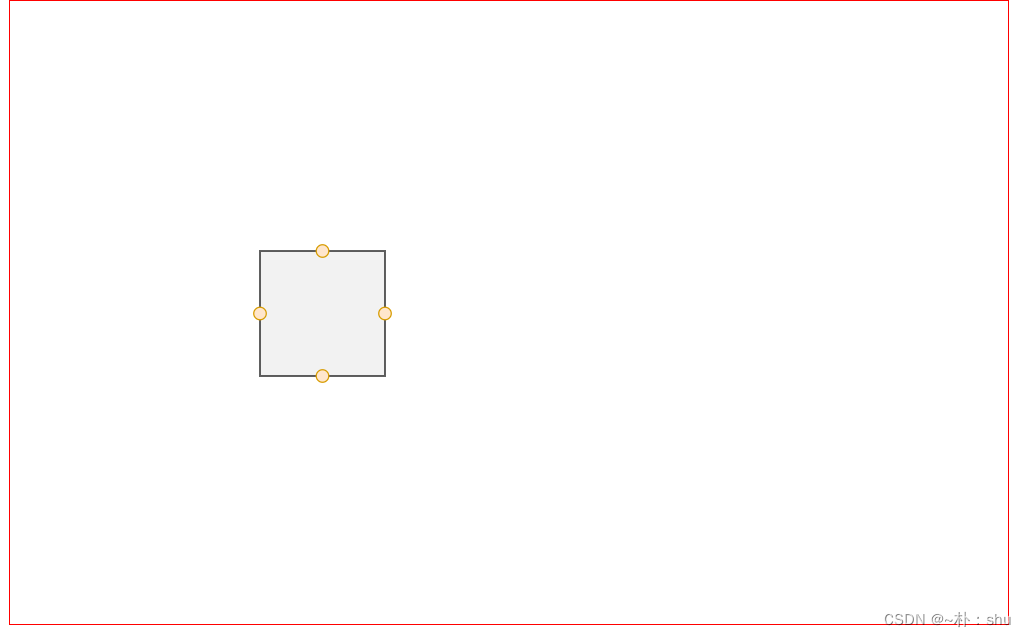
实现效果
公共事件处理机制
Common.ts // 为所有的子类构造事件 public click!: (_fun: Function) => IGraph; public dblclick!: (_fun: Function) => IGraph; public mousedown!: (_fun: Function) => IGraph; public mousemove!: (_fun: Function) => IGraph; public mouseup!: (_fun: Function) => IGraph; public mouseover!: (_fun: Function) => IGraph; public mouseout!: (_fun: Function) => IGraph; // 初始化公共事件 private initCommonEvent(graph: IGraph) { / * 事件处理机制: 不管用户有没有添加 click ,都需要实现 addEventListener */ const eventList: IEventList = { click: (e: Event, graph: IGraph) => this.commonEvent.click(e, graph), }; const element = graph.getElement(); Object.keys(eventList).forEach((eventname) => { let userfun: null | Function; // @ts-ignore 用户自定义事件 graph[eventname] = (_fun: Function | null) => { userfun = _fun; return graph; }; // 给元素添加事件 element.addEventListener(eventname, (e) => { // 1. 先执行默认事件 eventList[eventname](e, graph); // 在这里处理用户自定义的事件 userfun && userfun(e); // 阻止事件冒泡 e.preventDefault(); }); }); }全局指令
讯享网// 暴露对外操作API 需要经过 Command Adapt的中转,防止用户直接通过 Command 获取到内部对象 import { Draw } from "../Draw"; import { CommandAdapt } from "./CommandAdapt"; export class Command { // 测试设置水印 public executeWatermark: CommandAdapt["watermark"]; constructor(draw: Draw) { const adapt = new CommandAdapt(draw); this.executeWatermark = adapt.watermark.bind(adapt); } }
import { Draw } from "../Draw"; // Command Adapt API 操作核心库 export class CommandAdapt { private draw: Draw; constructor(draw: Draw) { this.draw = draw; } public watermark() { console.log("watermark"); } } 事件机制
事件处理中主要使用event Bus 实现:
讯享网export class EventBus<EventMap> { private eventHub: Map<string, Set<Function>> constructor() { this.eventHub = new Map() } public on<K extends string & keyof EventMap>( eventName: K, callback: EventMap[K] ) { if (!eventName || typeof callback !== 'function') return const eventSet = this.eventHub.get(eventName) || new Set() eventSet.add(callback) this.eventHub.set(eventName, eventSet) } public emit<K extends string & keyof EventMap>( eventName: K, payload?: EventMap[K] extends (payload: infer P) => void ? P : never ) { if (!eventName) return const callBackSet = this.eventHub.get(eventName) if (!callBackSet) return if (callBackSet.size === 1) { const callBack = [...callBackSet] return callBack[0](payload) } callBackSet.forEach(callBack => callBack(payload)) } public off<K extends string & keyof EventMap>( eventName: K, callback: EventMap[K] ) { if (!eventName || typeof callback !== 'function') return const callBackSet = this.eventHub.get(eventName) if (!callBackSet) return callBackSet.delete(callback) } public isSubscribe<K extends string & keyof EventMap>(eventName: K): boolean { const eventSet = this.eventHub.get(eventName) return !!eventSet && eventSet.size > 0 } }
总结
至此,整体项目的框架已经跑通了,包括API的封装(command adapt)、事件处理机制、svg元件构建,本文先处理这么多事情。
版权声明:本文内容由互联网用户自发贡献,该文观点仅代表作者本人。本站仅提供信息存储空间服务,不拥有所有权,不承担相关法律责任。如发现本站有涉嫌侵权/违法违规的内容,请联系我们,一经查实,本站将立刻删除。
如需转载请保留出处:https://51itzy.com/kjqy/111345.html