
背景
有个需求是需要对上传的图片做限制,大小为100m;对QA来说,就需要构造99m、100m、101m的图片来分别验证。但~事实上如果从图片库里找这么大的文件是非常困难的,况且还需要找三个固定大小的大图片就更难了。因此本文主要围绕如何使用merge.py脚本来进行生成固定大小的大图片展开。
思路
先生成固定大小的一个txt文件,再准备一张png图片与txt合并,原图片大小+txt文件大小=最终图片大小
准备
一个png图片
代码
merge.py
import zlib from struct import unpack_from import sys PNG_MAGIC = b"\x89PNG\r\n\x1a\n" if len(sys.argv) != 4: print(f"USAGE: {
     sys.argv[0]} cover.png content.bin output.png") exit() # this function is gross def fixup_zip(data, start_offset): # find the "end of central directory" marker end_central_dir_offset = data.rindex(b"PK\x05\x06") # adjust comment length so that any trailing data (i.e. PNG IEND) # is part of the comment comment_length = (len(data)-end_central_dir_offset) - 22 + 0x10 cl_range = slice(end_central_dir_offset+20, end_central_dir_offset+20+2) data[cl_range] = comment_length.to_bytes(2, "little") # find the number of central directory entries cdent_count = unpack_from("<H", data, end_central_dir_offset+10)[0] # find the offset of the central directory entries, and fix it cd_range = slice(end_central_dir_offset+16, end_central_dir_offset+16+4) central_dir_start_offset = int.from_bytes(data[cd_range], "little") data[cd_range] = (central_dir_start_offset + start_offset).to_bytes(4, "little") # iterate over the central directory entries for _ in range(cdent_count): central_dir_start_offset = data.index(b"PK\x01\x02", central_dir_start_offset) # fix the offset that points to the local file header off_range = slice(central_dir_start_offset+42, central_dir_start_offset+42+4) off = int.from_bytes(data[off_range], "little") data[off_range] = (off + start_offset).to_bytes(4, "little") central_dir_start_offset += 1 png_in = open(sys.argv[1], "rb") content_in = open(sys.argv[2], "rb") png_out = open(sys.argv[3], "wb") # check the PNG magic is present in the input file, and write it to the output file png_header = png_in.read(len(PNG_MAGIC)) assert(png_header == PNG_MAGIC) png_out.write(png_header) idat_body = b"" # iterate through the chunks of the PNG file while True: # parse a chunk chunk_len = int.from_bytes(png_in.read(4), "big") chunk_type = png_in.read(4) chunk_body = png_in.read(chunk_len) chunk_csum = int.from_bytes(png_in.read(4), "big") # if it's a non-essential chunk, skip over it if chunk_type not in [b"IHDR", b"PLTE", b"IDAT", b"IEND"]: print("Warning: dropping non-essential or unknown chunk:", chunk_type.decode()) continue # take note of the image width and height, for future calculations if chunk_type == b"IHDR": width, height = unpack_from(">II", chunk_body) print(f"Image size: {
     width}x{
     height}px") # There might be multiple IDAT chunks, we will concatenate their contents # and write them into a single chunk later if chunk_type == b"IDAT": idat_body += chunk_body continue # the IEND chunk should be at the end, now is the time to write our IDAT # chunk, before we actually write the IEND chunk if chunk_type == b"IEND": start_offset = png_out.tell()+8+len(idat_body) print("Embedded file starts at offset", hex(start_offset)) # concatenate our content that we want to embed idat_body += content_in.read() # if len(idat_body) > width * height: # exit("ERROR: Input files too big for cover image resolution.") # if its a zip file, fix the offsets if sys.argv[2].split(".")[-1].lower() in ["zip", "jar"]: print("Fixing up zip offsets...") idat_body = bytearray(idat_body) fixup_zip(idat_body, start_offset) # write the IDAT chunk png_out.write(len(idat_body).to_bytes(4, "big")) png_out.write(b"IDAT") png_out.write(idat_body) png_out.write(zlib.crc32(b"IDAT" + idat_body).to_bytes(4, "big")) # if we reached here, we're writing the IHDR, PLTE or IEND chunk png_out.write(chunk_len.to_bytes(4, "big")) png_out.write(chunk_type) png_out.write(chunk_body) png_out.write(chunk_csum.to_bytes(4, "big")) if chunk_type == b"IEND": # we're done! break # close our file handles png_in.close() content_in.close() png_out.close()
讯享网
执行
1、进入桌面文件夹,执行命令:cd ~/Desktop

讯享网

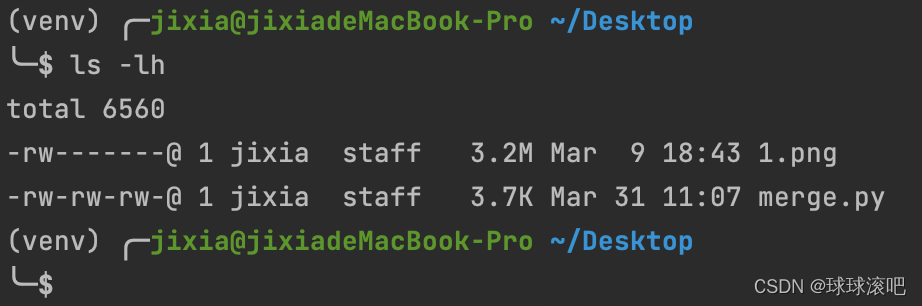
2、将merge.py脚本放在桌面,图片文件1.png也放在桌面,查看桌面文件,图片文件大小:3.2M
3、生成100M大小的txt文件,命令:mkfile -n 100m 100m.txt

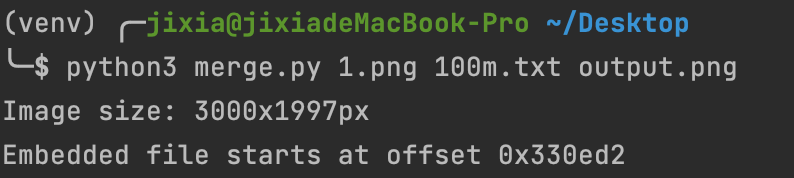
4、将准备的图片:1.png 和步骤3生成的文件:100m.txt合并,命令:python3 merge.py 1.png 100m.txt output.png
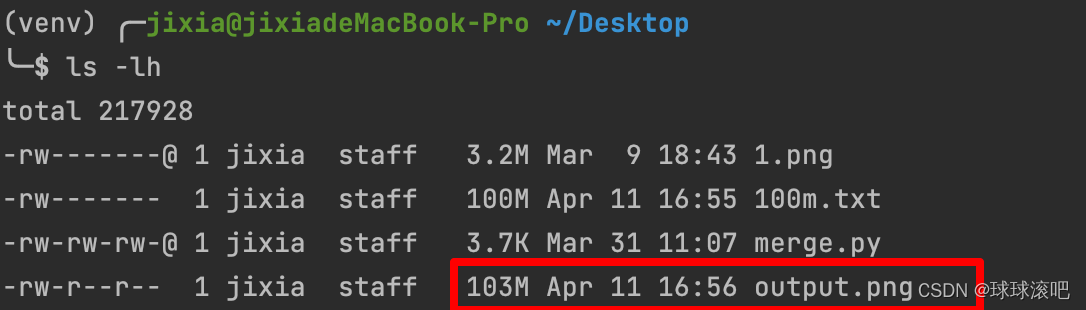
5、查看putput.png文件大小,output.png:103M =100m.txt :100M +1.png :3.2M
版权声明:本文内容由互联网用户自发贡献,该文观点仅代表作者本人。本站仅提供信息存储空间服务,不拥有所有权,不承担相关法律责任。如发现本站有涉嫌侵权/违法违规的内容,请联系我们,一经查实,本站将立刻删除。
如需转载请保留出处:https://51itzy.com/kjqy/110871.html