
基于NB-IoT的智慧路灯监控系统(手机应用开发)
2019年09月10日 12:29:35 不脱发的程序猿 阅读数 1038更多
分类专栏: NB-IoT项目实践
版权声明:本文为博主原创文章,遵循 CC 4.0 BY-SA 版权协议,转载请附上原文出处链接和本声明。
本文链接:https://blog.csdn.net/m0_/article/details/
目录
1、系统总体描述
2、使用技术
2.1、通用技术
2.2、核心技术
2.3、技术亮点
3、开发软件
3.1、开发软件
3.2、测试软件
3.3、打包发布软件
4、功能概述
4.1、系统导航
4.2、用户登录
4.3、扫码绑定
4.4、设备定位
4.5、设备状态
4.6、历史查询
4.7、设备控制
4.8、画像分析
4.9、系统设置
5、核心代码
5.1、数据获取核心代码
5.2、第三方SDK调用核心代码
5.3、图表数据展示核心代码
5.4、日历数据查询核心代码
通过与华为云平台进行数据对接及联动控制,为此开发智慧路灯APP控制系统。
1、系统总体描述
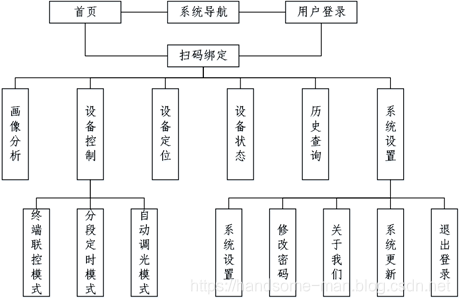
本系统共分为九个模块:系统导航、用户登录、扫码绑定、设备定位、设备状态、历史查询、设备控制、画像分析和系统设置。每个模块对应其各自的功能,通过设备的定位、设备的实时状态及设备控制能够全方位监控路灯的耗能量及使用情况。画像分析也可对某地方或某用户进行大数据AI分析得到监测数据,并且能够实时向用户推送用电情况,并为其用户进行合理的用电安排及方案。
2、使用技术
2.1、通用技术
- 系统总体使用java语言进行开发;
- 在界面设计及展示部分使用HTML搭配CSS技术使其界面美观大方;
- 框架设计使用MVP模式进行设计使其系统结构清晰明了;
- 数据对接使用HTTP和OkHttp3协议,大大降低数据处理难度;且提高了数据的完整性和实时性。
2.2、核心技术
- 登录界面使用视屏背景技术将登录界面进行高度美化。
- 在设备定位模块中使用第三方高德地图SDK进行开发;
- 在云平台对接时使用华为云平台相关模块接口进行开发;
- 使用Clendar相关类进行日期选择设计;
- 使用Zxing二维码扫描分析技术进行扫码分析;
- 使用Echart技术进行数据实时显示图表分析;
- 在画像分析模块使用AI大数据分析获取数据实例。
2.3、技术亮点
- 对第三方技术的合理运用;
- 对MVP开发框架的组合设计;
- 对API接口的清晰掌握;
- 对各种相关工具类的开发及调用;
- 结合大数据AI分析进行功能设计。
3、开发软件
3.1、开发软件
- 系统环境:Windows 10
- 开发环境:Android Studio 3.0,JDK 8.0
- 运行环境:Android 5.0级以上
3.2、测试软件
- 接口测试软件:Postman 6.5
3.3、打包发布软件
- 版本控制软件:Git
- 打包发布软件:Android Studio (Generate Signed APK)
- 软件签名:iot_project.jks
4、功能概述
4.1、系统导航
首次进入APP当进入导航界面,导航界面中介绍APP的Logo、简单描述、路灯模型、路灯功能分类及路灯运行方式。效果如下所示:

4.2、用户登录
用户登录界面使用视屏作为页面背景,通过输入用户名及密码进行系统登录。系统的用户名及密码在系统后台统一进行注册。效果如下所示:

4.3、扫码绑定
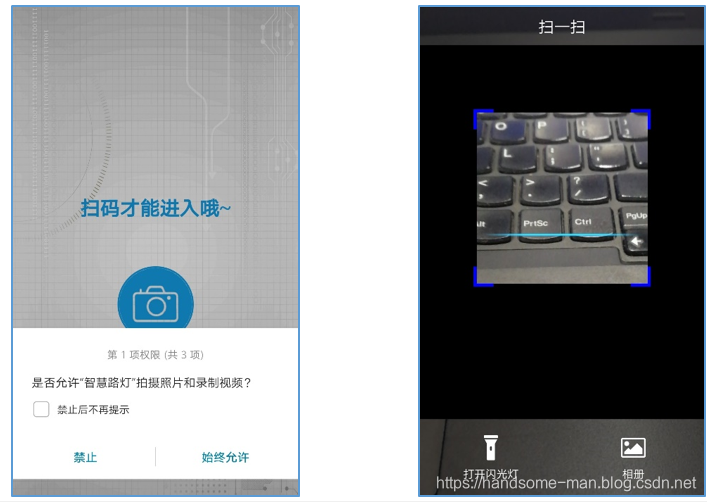
用户登录成功后将自动跳转至扫码界面,跳转界面后会对该移动设备进行权限访问,用户需要同意所有权限才能正常使用该系统。授权后进行二维码扫描。此时需要对路灯上的二维码进行扫码,通过扫码得到该路灯的设备信息,从而在主界面中可查看该路灯的其他信息。 效果如下所示:
4.4、设备定位
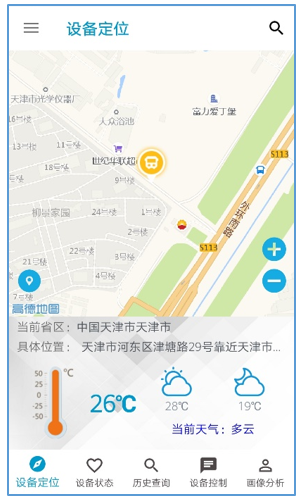
此模块中将对该扫描设备进行设备定位,观察其设备所在的具体位置,并能够查看当前地方的天气环境。此处的设计也是为后来的管理方便,对每一个路灯设备能够全方位的进行查看。效果如下所示:
4.5、设备状态
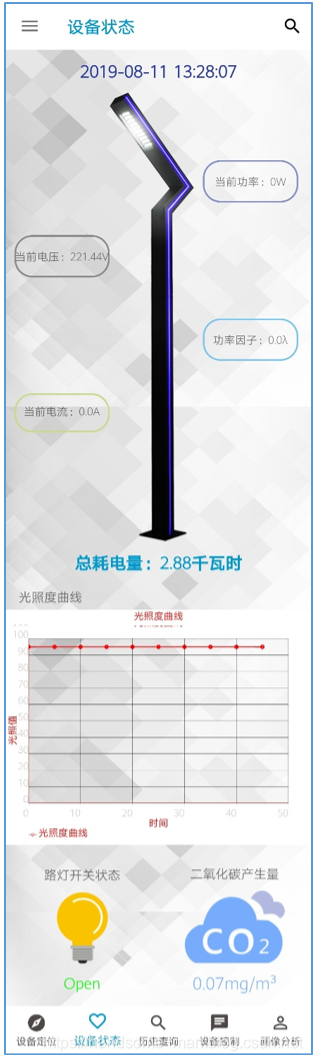
此模块将对所在设备的所有信息进行实时查看,有电压、电流、功率、功率因子、总耗电量、光照度、路灯开光状态及路灯耗能所产生的二氧化碳量。 效果如下所示:
4.6、历史查询
此模块是对该路灯所有数据的历史查询,通过对历史数据的查询可分析出该设备在本周、本月及本年的所有用电量情况。这样就能够合理的对路灯用电量进行管理。效果如下所示:

4.7、设备控制
此模块是对路灯的远程控制,共分为三个模式分别为:终端联控模式、分段定时模式及自动调光模式。三种模式分别对应三种不同的路灯控制,可远程也可自动,充分达到了用电量的控制。效果如下所示:

4.8、画像分析
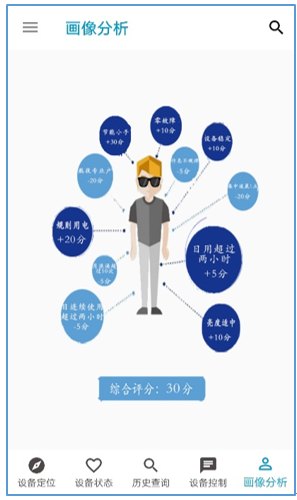
此模块涉及了大数据AI分析功能,将分析的数据下发至该系统,系统对其数据进行图文的可视化展示,清晰的可以查看到该使用者日常用电情况及地方用电情况。(由于数据集较少,建立的模型是我本人2019年7月份路灯节点使用状况) 效果如下所示:
4.9、系统设置
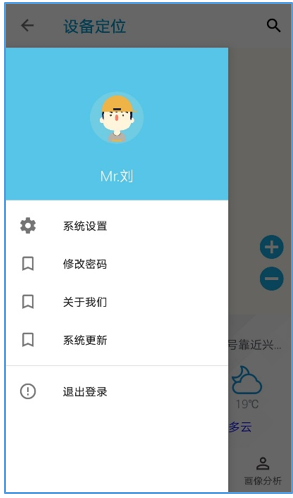
系统设置功能共分为以下几点:系统设置、修改密码、关于我们、系统更新及退出登录。效果如下所示:
5、核心代码
5.1、数据获取核心代码
讯享网
public class NetConnectHeaderDataJSON {public static final String REQUEST_TYPE_GET = "GET";public static final String REQUEST_TYPE_POST = "POST";public static final String REQUEST_TYPE_PUT = "PUT";/* 请求URL并返回内容** @param method* 方式get post* @param url* 地址* @param param* 参数* @return json*/public static String request(Context context, String method, String url, String app_id, String token,List<NameValuePair> param) throws Exception {HttpResponse response;String result_https="";if (method.equals(REQUEST_TYPE_GET)){String ps ="";if (param != null) {List<NameValuePair> param2 = new ArrayList<NameValuePair>();for (int i = 0; i < param.size(); i++) {if (i>0) ps+="&";String key = param.get(i).getName();String value =param.get(i).getValue();ps+=key+"="+value;}ps = URLEncodedUtils.format(param2, HTTP.UTF_8);// 通过url创建对象if (url.indexOf("?") > 0) {url += "&" + ps;} else {url += "?" + ps;}}SSLSocketFactory ssl=DataManager.GETSSLinitHttpClientBook(context);HttpClient httpClient = new DefaultHttpClient();if (ssl != null) {Scheme sch = new Scheme("https", ssl, 443);httpClient.getConnectionManager().getSchemeRegistry().register(sch);}HttpGet request = new HttpGet(url);request.setHeader("app_key",app_id);request.setHeader("Authorization","Bearer "+token);request.setHeader("Content-Type","application/json");// request.setEntity(new UrlEncodedFormEntity(param));// 发起请求,获取回应,自封装接口,详见附录response = httpClient.execute(request);HttpEntity httpEntity = response.getEntity();// 得到一些数据// 通过EntityUtils并指定编码方式取到返回的数据StatusLine statusLine = response.getStatusLine();statusLine.getProtocolVersion();int statusCode = statusLine.getStatusCode();if (statusCode == 200) {result_https = (EntityUtils.toString(httpEntity, "utf-8"));}else{result_https=""+statusCode;}}else if(method.equals(REQUEST_TYPE_POST)){SSLSocketFactory ssl=DataManager.GETSSLinitHttpClientBook(context);HttpClient httpClient = new DefaultHttpClient();if (ssl != null) {Scheme sch = new Scheme("https", ssl, 443);httpClient.getConnectionManager().getSchemeRegistry().register(sch);}HttpPost request = new HttpPost(url);if (param != null) {String JsonData="";String startdata="{";String enddata="}";for (int i = 0; i < param.size(); i++) {String key = param.get(i).getName();String values = param.get(i).getValue();// param2.add(new BasicNameValuePair(key, values));if (i>0)JsonData+=",";if (key.equals("timeout"))JsonData+="\""+key+"\":"+values;elseJsonData+="\""+key+"\":\""+values+"\"";}//传入的是json格式的数据JsonData=startdata+JsonData+enddata;request.setEntity(new StringEntity(JsonData, HTTP.UTF_8));}request.setHeader("app_key",app_id);request.setHeader("Authorization","Bearer "+token);request.setHeader("Content-Type","application/json");response = httpClient.execute(request);HttpEntity httpEntity = response.getEntity();// 通过EntityUtils并指定编码方式取到返回的数据StatusLine statusLine = response.getStatusLine();int statusCode = statusLine.getStatusCode();if (statusCode == 200) {result_https = (EntityUtils.toString(httpEntity, "utf-8"));}else{result_https=""+statusCode;}}else if(method.equals(REQUEST_TYPE_PUT)){SSLSocketFactory ssl=DataManager.GETSSLinitHttpClientBook(context);HttpClient httpClient = new DefaultHttpClient();if (ssl != null) {Scheme sch = new Scheme("https", ssl, 443);httpClient.getConnectionManager().getSchemeRegistry().register(sch);}HttpPut request = new HttpPut(url);if (param != null) {String JsonData="";String startdata="{";String enddata="}";for (int i = 0; i < param.size(); i++) {String key = param.get(i).getName();String values = param.get(i).getValue();if (i>0)JsonData+=",";if (key.equals("timeout"))JsonData+="\""+key+"\":"+values;elseJsonData+="\""+key+"\":\""+values+"\"";}//传入的是json格式的数据JsonData=startdata+JsonData+enddata;request.setEntity(new StringEntity(JsonData, HTTP.UTF_8));}//request.setHeader("app_key",app_id);request.setHeader("Authorization","Bearer "+token);request.setHeader("Content-Type","application/json");response = httpClient.execute(request);HttpEntity httpEntity = response.getEntity();// 通过EntityUtils并指定编码方式取到返回的数据StatusLine statusLine = response.getStatusLine();int statusCode = statusLine.getStatusCode();if (statusCode == 204) {result_https = (EntityUtils.toString(httpEntity, "utf-8"));}else{result_https=""+statusCode;}}else{Log.i("method==", ".....");}return result_https;}}
5.2、第三方SDK调用核心代码
讯享网
/* 方法必须重写*/@Overridepublic void onResume() {super.onResume();mapView.onResume();}/* 方法必须重写*/@Overridepublic void onPause() {super.onPause();mapView.onPause();}/* 方法必须重写*/@Overridepublic void onSaveInstanceState(Bundle outState) {super.onSaveInstanceState(outState);mapView.onSaveInstanceState(outState);}/* 方法必须重写*/@Overridepublic void onDestroy() {super.onDestroy();mapView.onDestroy();if (mTimerTask != null) {mTimerTask.cancel();mTimerTask = null;}try {mTimer.cancel();} catch (Throwable e) {e.printStackTrace();}deactivate();}@Overridepublic void onMapClick(LatLng latLng) {}@Overridepublic void onMapLoaded() {aMap.moveCamera(CameraUpdateFactory.zoomTo(zoomLevel));}@Overridepublic void activate(OnLocationChangedListener onLocationChangedListener) {mListener = onLocationChangedListener;startlocation();}@Overridepublic void deactivate() {mListener = null;if (mLocationClient != null) {mLocationClient.stopLocation();mLocationClient.onDestroy();}mLocationClient = null;}/* 开始定位。*/private void startlocation() {if (mLocationClient == null) {mLocationClient = new AMapLocationClient(getActivity());mLocationOption = new AMapLocationClientOption();// 设置定位监听mLocationClient.setLocationListener(this);// 设置为高精度定位模式mLocationOption.setLocationMode(AMapLocationClientOption.AMapLocationMode.Hight_Accuracy);//设置为单次定位mLocationOption.setNeedAddress(true);mLocationOption.setOnceLocation(true);// 设置定位参数mLocationClient.setLocationOption(mLocationOption);mLocationClient.startLocation();} else {mLocationClient.startLocation();}}@Overridepublic void onLocationChanged(AMapLocation aMapLocation) {if (mListener != null && aMapLocation != null) {if (mTimerTask != null) {mTimerTask.cancel();mTimerTask = null;}if (aMapLocation != null && aMapLocation.getErrorCode() == 0) {LatLng mylocation = new LatLng(Absoult.Latitude, Absoult.Longitude);changeCamera(CameraUpdateFactory.newLatLngZoom(mylocation,zoomLevel),null);SimpleDateFormat df = new SimpleDateFormat("yyyy-MM-dd HH:mm:ss");Date date = new Date(aMapLocation.getTime());mTextViewCity.setText(aMapLocation.getCountry()+aMapLocation.getProvince()+aMapLocation.getCity());mTextViewAddress.setText(aMapLocation.getAddress());cityName = aMapLocation.getCity().substring(0,aMapLocation.getCity().length()-1);initWaetherData(cityName);aMapLocation.getAddress();//地址,如果option中设置isNeedAddress为false,则没有此结果,网络定位结果中会有地址信息,GPS定位不返回地址信息。aMapLocation.getCountry();//国家信息aMapLocation.getProvince();//省信息aMapLocation.getCity();//城市信息aMapLocation.getDistrict();//城区信息aMapLocation.getStreet();//街道信息aMapLocation.getStreetNum();//街道门牌号信息aMapLocation.getCityCode();//城市编码aMapLocation.getAdCode();//地区编码df.format(date);//定位时间if (locMarker==null){addLocationMarker(mylocation);}else {locMarker.setPosition(mylocation);}if (ac!=null){ac.setCenter(mylocation);}if (c!=null){c.setCenter(mylocation);}if (d!=null){d.setCenter(mylocation);}} else {String errText = "定位失败," + aMapLocation.getErrorCode() + ": "+ aMapLocation.getErrorInfo();Log.e("AmapErr", errText);}}}/* 添加坐标点,这里可以添加任意坐标点位置* @param mylocation*/private void addLocationMarker(LatLng mylocation) {float accuracy = (float) ((mylocation.longitude/mylocation.latitude ));if (locMarker == null) {locMarker = addMarker(mylocation);if (ac==null){ac = aMap.addCircle(new CircleOptions().center(mylocation).fillColor(Color.argb(0, 98 ,189, 255)).radius(accuracy).strokeColor(Color.argb(0, 98, 198, 255)).strokeWidth(0));}if (c==null){c = aMap.addCircle(new CircleOptions().center(mylocation).fillColor(Color.argb(0, 98, 198, 255)).radius(accuracy).strokeColor(Color.argb(0,98, 198, 255)).strokeWidth(0));}if (d==null){d = aMap.addCircle(new CircleOptions().center(mylocation).fillColor(Color.argb(0, 98, 198, 255)).radius(accuracy).strokeColor(Color.argb(0,98, 198, 255)).strokeWidth(0));}} else {locMarker.setPosition(mylocation);ac.setCenter(mylocation);ac.setRadius(accuracy);c.setCenter(mylocation);c.setRadius(accuracy);d.setCenter(mylocation);d.setRadius(accuracy);}handle.postDelayed(rb,0);handle1.postDelayed(rb1,800);handle2.postDelayed(rb2,1600);}/* 位置波纹扩散动画* @param ac*/private void Scalecircle1(final Circle ac) {ValueAnimator vm = ValueAnimator.ofFloat(0,(float)ac.getRadius());vm.addUpdateListener(new ValueAnimator.AnimatorUpdateListener() {@Overridepublic void onAnimationUpdate(ValueAnimator animation) {float curent = (float) animation.getAnimatedValue();ac.setRadius(curent);aMap.invalidate();}});ValueAnimator vm1 = ValueAnimator.ofInt(160,0);vm1.addUpdateListener(new ValueAnimator.AnimatorUpdateListener() {@Overridepublic void onAnimationUpdate(ValueAnimator animation) {int color = (int) animation.getAnimatedValue();ac.setFillColor(Color.argb(color, 98, 198, 255));aMap.invalidate();}});vm.setRepeatCount(Integer.MAX_VALUE);vm.setRepeatMode(ValueAnimator.RESTART);vm1.setRepeatCount(Integer.MAX_VALUE);vm1.setRepeatMode(ValueAnimator.RESTART);AnimatorSet set = new AnimatorSet();set.play(vm).with(vm1);set.setDuration(2500);set.setInterpolator(interpolator1);set.start();}private final Interpolator interpolator1 = new LinearInterpolator();Runnable rb = new Runnable() {@Overridepublic void run() {Scalecircle1(ac);}};Handler handle =new Handler();Runnable rb1 = new Runnable() {@Overridepublic void run() {Scalecircle1(c);}};Handler handle1 =new Handler();Runnable rb2 = new Runnable() {@Overridepublic void run() {Scalecircle1(d);}};Handler handle2 =new Handler();
5.3、图表数据展示核心代码
public class ChartService {private GraphicalView mGraphicalView;private XYMultipleSeriesDataset multipleSeriesDataset;// 数据集容器private XYMultipleSeriesRenderer multipleSeriesRenderer;// 渲染器容器private XYSeries mSeries;// 单条曲线数据集private XYSeriesRenderer mRenderer;// 单条曲线渲染器private Context context;private Double xx ;int aa = 100;public ChartService(Context context) {this.context = context;}/* 获取图表** @return*/public GraphicalView getGraphicalView() {mGraphicalView = ChartFactory.getCubeLineChartView(context,multipleSeriesDataset, multipleSeriesRenderer, 0.1f);return mGraphicalView;}/* 获取数据集,及xy坐标的集合** @param curveTitle*/public void setXYMultipleSeriesDataset(String curveTitle) {multipleSeriesDataset = new XYMultipleSeriesDataset();mSeries = new XYSeries(curveTitle);multipleSeriesDataset.addSeries(mSeries);}/* 获取渲染器** @param maxX* x轴最大值* @param maxY* y轴最大值* @param chartTitle* 曲线的标题* @param xTitle* x轴标题* @param yTitle* y轴标题* @param axeColor* 坐标轴颜色* @param labelColor* 标题颜色* @param curveColor* 曲线颜色* @param gridColor* 网格颜色*/public void setXYMultipleSeriesRenderer(double maxX, double maxY,String chartTitle, String xTitle, String yTitle, int axeColor,int labelColor, int curveColor, int gridColor) {multipleSeriesRenderer = new XYMultipleSeriesRenderer();if (chartTitle != null) {multipleSeriesRenderer.setChartTitle(chartTitle);}multipleSeriesRenderer.setXTitle(xTitle);multipleSeriesRenderer.setYTitle(yTitle);multipleSeriesRenderer.setRange(new double[] { 0, maxX, 0, maxY });//xy轴的范围multipleSeriesRenderer.setLabelsColor(labelColor);multipleSeriesRenderer.setXLabels(5);multipleSeriesRenderer.setYLabels(10);multipleSeriesRenderer.setXLabelsAlign(Align.RIGHT);multipleSeriesRenderer.setYLabelsAlign(Align.RIGHT);multipleSeriesRenderer.setAxisTitleTextSize(35);multipleSeriesRenderer.setChartTitleTextSize(35);multipleSeriesRenderer.setLabelsTextSize(35);multipleSeriesRenderer.setLegendTextSize(35);multipleSeriesRenderer.setPointSize(5f);//曲线描点尺寸multipleSeriesRenderer.setFitLegend(true);multipleSeriesRenderer.setMargins(new int[] { 80, 80, 80, 80 });multipleSeriesRenderer.setShowGrid(true);
multipleSeriesRenderer.setPanEnabled(false, false);//允许X轴可拉动multipleSeriesRenderer.setZoomEnabled(false, false);multipleSeriesRenderer.setAxesColor(axeColor);multipleSeriesRenderer.setGridColor(gridColor);multipleSeriesRenderer.setBackgroundColor(Color.WHITE);//背景色multipleSeriesRenderer.setMarginsColor(Color.WHITE);//边距背景色,默认背景色为黑色,这里修改为白色mRenderer = new XYSeriesRenderer();mRenderer.setLineWidth(3f);mRenderer.setColor(curveColor);mRenderer.setPointStrokeWidth(5f);mRenderer.setPointStyle(PointStyle.CIRCLE);//描点风格,可以为圆点,方形点等等multipleSeriesRenderer.addSeriesRenderer(mRenderer);}/* 根据新加的数据,更新曲线,只能运行在主线程** @param x* 新加点的x坐标* @param y* 新加点的y坐标*/public void updateChart(double x, double y) {mSeries.add(x, y);if (x>aa) {aa += 1;multipleSeriesRenderer.setXAxisMax(aa);// 设置X最大值multipleSeriesRenderer.setXAxisMin(aa - 100);// 设置X最小值}mGraphicalView.repaint();//此处也可以调用invalidate()}/* 添加新的数据,多组,更新曲线,只能运行在主线程* @param xList* @param yList*/public void updateChart(List<Double> xList, List<Double> yList) {for (int i = 0; i < xList.size(); i++) {xx = xList.get(i);mSeries.add(xx, yList.get(i));}mGraphicalView.repaint();//此处也可以调用invalidate()}}

5.4、日历数据查询核心代码
讯享网
public abstract class NCalendar extends FrameLayout implements NestedScrollingParent, OnCalendarStateChangedListener, OnDateChangedListener, OnMonthAnimatorListener {protected WeekCalendar weekCalendar;protected MonthCalendar monthCalendar;protected int weekHeight;//周日历的高度protected int monthHeight;//月日历的高度,是日历整个的高protected int childLayoutLayoutTop;//onLayout中,定位的高度,protected int STATE;//默认月private int lastSate;//防止状态监听重复回调private OnCalendarChangedListener onCalendarChangedListener;//NCalendar内部包含的直接子view,直接子view并不一定是NestScrillChildprotected ChildLayout childLayout; protected Rect monthRect;//月日历大小的矩形protected Rect weekRect;//周日历大小的矩形 ,用于判断点击事件是否在日历的范private boolean isWeekHold;//是否需要周状态定住public NCalendar(@NonNull Context context) {this(context, null);}public NCalendar(@NonNull Context context, @Nullable AttributeSet attrs) {this(context, attrs, 0);}public NCalendar(@NonNull Context context, @Nullable AttributeSet attrs, int defStyleAttr) {super(context, attrs, defStyleAttr);setMotionEventSplittingEnabled(false);Attrs attrss = AttrsUtil.getAttrs(context, attrs);int duration = attrss.duration;monthHeight = attrss.monthCalendarHeight;STATE = attrss.defaultCalendar;weekHeight = monthHeight / 5;isWeekHold = attrss.isWeekHold;weekCalendar = new WeekCalendar(context, attrss);monthCalendar = new MonthCalendar(context, attrss, duration, this);childLayout = new ChildLayout(getContext(), attrs, monthHeight, duration, this);monthCalendar.setOnDateChangedListener(this);weekCalendar.setOnDateChangedListener(this);childLayout.setBackgroundColor(attrss.bgChildColor);setCalenadrState(STATE);childLayoutLayoutTop = STATE == Attrs.WEEK ? weekHeight : monthHeight;post(new Runnable() {@Overridepublic void run() {monthRect = new Rect(0, 0, monthCalendar.getWidth(), monthCalendar.getHeight());weekRect = new Rect(0, 0, weekCalendar.getWidth(), weekCalendar.getHeight());monthCalendar.setY(STATE == Attrs.MONTH ? 0 : getMonthYOnWeekState());childLayout.setY(STATE == Attrs.MONTH ? monthHeight : weekHeight);}});}/* 根据ChildLayout的自动滑动结束的状态来设置月周日历的状态* 依据ChildLayout的状态来设置日历的状态** @param isMonthState*/@Overridepublic void onCalendarStateChanged(boolean isMonthState) {if (isMonthState) {setCalenadrState(Attrs.MONTH);} else {setCalenadrState(Attrs.WEEK);}}/* xml文件加载结束,添加月,周日历和child到NCalendar中*/@Overrideprotected void onFinishInflate() {super.onFinishInflate();if (getChildCount() != 1) {throw new RuntimeException("NCalendar中的只能有一个直接子view");}childLayout.addView(getChildAt(0), new LayoutParams(ViewGroup.LayoutParams.MATCH_PARENT, ViewGroup.LayoutParams.MATCH_PARENT));addView(monthCalendar, new LayoutParams(ViewGroup.LayoutParams.MATCH_PARENT, monthHeight));addView(weekCalendar, new LayoutParams(ViewGroup.LayoutParams.MATCH_PARENT, weekHeight));addView(childLayout, new LayoutParams(ViewGroup.LayoutParams.MATCH_PARENT, ViewGroup.LayoutParams.MATCH_PARENT));}@Overrideprotected void onMeasure(int widthMeasureSpec, int heightMeasureSpec) {super.onMeasure(widthMeasureSpec, heightMeasureSpec);ViewGroup.LayoutParams childLayoutLayoutParams = childLayout.getLayoutParams();childLayoutLayoutParams.height = getMeasuredHeight() - weekHeight;//需要再调一次父类的方法?真机不调用首次高度不对,为何?super.onMeasure(widthMeasureSpec, heightMeasureSpec);}@Overrideprotected void onLayout(boolean changed, int l, int t, int r, int b) {//super.onLayout(changed, l, t, r, b); //调用父类的该方法会造成 快速滑动月日历同时快速上滑recyclerview造成月日历的残影int measuredWidth = getMeasuredWidth();weekCalendar.layout(0, 0, measuredWidth, weekHeight);monthCalendar.layout(0, 0, measuredWidth, monthHeight);childLayout.layout(0, childLayoutLayoutTop, measuredWidth, childLayout.getMeasuredHeight() + childLayoutLayoutTop);}/* 根据条件设置日历的月周状态,并回调状态变化** @param state*/private void setCalenadrState(int state) {if (state == Attrs.WEEK) {STATE = Attrs.WEEK;weekCalendar.setVisibility(VISIBLE);} else {STATE = Attrs.MONTH;weekCalendar.setVisibility(INVISIBLE);}if (onCalendarChangedListener != null && lastSate != state) {onCalendarChangedListener.onCalendarStateChanged(STATE == Attrs.MONTH);}lastSate = state;}/* 自动滑动到适当的位置*/private void autoScroll() {float childLayoutY = childLayout.getY();if (STATE == Attrs.MONTH && monthHeight - childLayoutY < weekHeight) {onAutoToMonthState();} else if (STATE == Attrs.MONTH && monthHeight - childLayoutY >= weekHeight) {onAutoToWeekState();} else if (STATE == Attrs.WEEK && childLayoutY < weekHeight * 2) {onAutoToWeekState();} else if (STATE == Attrs.WEEK && childLayoutY >= weekHeight * 2) {onAutoToMonthState();}}/* 月日历和周日历的日期变化回调,每次日期变化都会回调,用于不同状态下,设置另一个日历的日期** @param baseCalendar 日历本身* @param localDate 当前选中的时间* @param isDraw 是否绘制 此处选择都绘制,默认不选中,不适用鱼月周切换*/@Overridepublic void onDateChanged(BaseCalendar baseCalendar, LocalDate localDate, boolean isDraw) {if (baseCalendar instanceof MonthCalendar && STATE == Attrs.MONTH) {//月日历变化,改变周的选中weekCalendar.jumpDate(localDate, true);if (onCalendarChangedListener != null) {onCalendarChangedListener.onCalendarDateChanged(Util.getNDate(localDate));}} else if (baseCalendar instanceof WeekCalendar && STATE == Attrs.WEEK) {//周日历变化,改变月的选中monthCalendar.jumpDate(localDate, true);post(new Runnable() {@Overridepublic void run() {//此时需要根据月日历的选中日期调整Y值// post是因为在前面得到当前view是再post中完成,如果不这样直接获取位置信息,会出现老的数据,不能获取正确的数据monthCalendar.setY(getMonthYOnWeekState());}});if (onCalendarChangedListener != null) {onCalendarChangedListener.onCalendarDateChanged(Util.getNDate(localDate));}}}@Overridepublic boolean onStartNestedScroll(View child, View target, int nestedScrollAxes) {return true;}@Overridepublic void onNestedPreScroll(View target, int dx, int dy, int[] consumed) {//跟随手势滑动gestureMove(dy, consumed);}@Overridepublic boolean onNestedPreFling(View target, float velocityX, float velocityY) {//只有都在都在周状态下,才允许子View Fling滑动return !(childLayout.isWeekState() && monthCalendar.isWeekState());}@Overridepublic void onStopNestedScroll(View target) {//该方法手指抬起的时候回调,此时根据此刻的位置,自动滑动到相应的状态,//如果已经在对应的位置上,则不执行动画,if (monthCalendar.isMonthState() && childLayout.isMonthState() && STATE == Attrs.WEEK) {setCalenadrState(Attrs.MONTH);} else if (monthCalendar.isWeekState() && childLayout.isWeekState() && STATE == Attrs.MONTH) {setCalenadrState(Attrs.WEEK);} else if (!childLayout.isMonthState() && !childLayout.isWeekState()) {//不是周状态也不是月状态时,自动滑动autoScroll();}}/* 手势滑动的逻辑,做了简单处理,2种状态,都以ChildLayout滑动的状态判断* 1、向上滑动未到周状态* 2、向下滑动未到月状态** @param dy* @param consumed*/protected void gestureMove(int dy, int[] consumed) {float monthCalendarY = monthCalendar.getY();float childLayoutY = childLayout.getY();if (dy > 0 && !childLayout.isWeekState()) {monthCalendar.setY(-getGestureMonthUpOffset(dy) + monthCalendarY);childLayout.setY(-getGestureChildUpOffset(dy) + childLayoutY);if (consumed != null) consumed[1] = dy;} else if (dy < 0 && isWeekHold && childLayout.isWeekState()) {//不操作,} else if(dy < 0 && !childLayout.isMonthState() && !childLayout.canScrollVertically(-1)) {monthCalendar.setY(getGestureMonthDownOffset(dy) + monthCalendarY);childLayout.setY(getGestureChildDownOffset(dy) + childLayoutY);if (consumed != null) consumed[1] = dy;}onSetWeekVisible(dy);}/* 月日历执行自动滑动动画的回调* 用来控制周日历的显示还是隐藏** @param offset*/@Overridepublic void onMonthAnimatorChanged(int offset) {onSetWeekVisible(offset);}private int dowmY;private int downX;private int lastY;//上次的yprivate int verticalY = 50;//竖直方向上滑动的临界值,大于这个值认为是竖直滑动private boolean isFirstScroll = true; //第一次手势滑动,因为第一次滑动的偏移量大于verticalY,会出现猛的一划,这里只对第一次滑动做处理@Overridepublic boolean onInterceptTouchEvent(MotionEvent ev) {switch (ev.getAction()) {case MotionEvent.ACTION_DOWN:dowmY = (int) ev.getY();downX = (int) ev.getX();lastY = dowmY;break;case MotionEvent.ACTION_MOVE:int y = (int) ev.getY();int absY = Math.abs(dowmY - y);boolean inCalendar = isInCalendar(downX, dowmY);if (absY > verticalY && inCalendar) {//onInterceptTouchEvent返回true,触摸事件交给当前的onTouchEvent处理return true;}break;}return super.onInterceptTouchEvent(ev);}@Overridepublic boolean onTouchEvent(MotionEvent event) {switch (event.getAction()) {case MotionEvent.ACTION_MOVE:int y = (int) event.getY();int dy = lastY - y;if (isFirstScroll) {// 防止第一次的偏移量过大if (dy > verticalY) {dy = dy - verticalY;} else if (dy < -verticalY) {dy = dy + verticalY;}isFirstScroll = false;}// 跟随手势滑动gestureMove(dy, null);lastY = y;break;case MotionEvent.ACTION_UP:case MotionEvent.ACTION_CANCEL:isFirstScroll = true;autoScroll();break;}return true;}/* 点击事件是否在日历的范围内** @param x* @param y* @return*/private boolean isInCalendar(int x, int y) {if (STATE == Attrs.MONTH) {return monthRect.contains(x, y);} else {return weekRect.contains(x, y);}}/* 滑动过界处理 ,如果大于最大距离就返回最大距离** @param offset 当前滑动的距离* @param maxOffset 当前滑动的最大距离* @return*/protected float getOffset(float offset, float maxOffset) {if (offset > maxOffset) {return maxOffset;}return offset;}/* 自动回到月的状态 包括月日历和chilayout*/protected abstract void onAutoToMonthState();/* 自动回到周的状态 包括月日历和chilayout*/protected abstract void onAutoToWeekState();/* 设置weekCalendar的显示隐藏,该方法会在手势滑动和自动滑动的的时候一直回调*/protected abstract void onSetWeekVisible(int dy);/* 周状态下 月日历的getY 是个负值* 用于在 周状态下日期改变设置正确的y值** @return*/protected abstract float getMonthYOnWeekState();/* 月日历根据手势向上移动的距离** @param dy 当前滑动的距离 dy>0向上滑动,dy<0向下滑动* @return 根据不同日历的交互,计算不同的滑动值*/protected abstract float getGestureMonthUpOffset(int dy);/* Child根据手势向上移动的距离** @param dy 当前滑动的距离 dy>0向上滑动,dy<0向下滑动* @return 根据不同日历的交互,计算不同的滑动值*/protected abstract float getGestureChildUpOffset(int dy);/* 月日历根据手势向下移动的距离** @param dy 当前滑动的距离 dy>0向上滑动,dy<0向下滑动* @return 根据不同日历的交互,计算不同的滑动值*/protected abstract float getGestureMonthDownOffset(int dy);/* Child根据手势向下移动的距离** @param dy 当前滑动的距离 dy>0向上滑动,dy<0向下滑动* @return 根据不同日历的交互,计算不同的滑动值*/protected abstract float getGestureChildDownOffset(int dy);/* 跳转日期** @param formatDate*/public void jumpDate( String formatDate) {if (STATE == Attrs.MONTH) {monthCalendar.jumpDate(formatDate);} else {weekCalendar.jumpDate(formatDate);}}/* 日历初始化的日期* @param formatDate*/public void setInitializeDate(String formatDate) {monthCalendar.setInitializeDate(formatDate);weekCalendar.setInitializeDate(formatDate);}/* 回到今天*/public void toToday() {if (STATE == Attrs.MONTH) {monthCalendar.toToday();} else {weekCalendar.toToday();}}/* 自动滑动到周视图*/public void toWeek() {if (STATE == Attrs.MONTH) {onAutoToWeekState();}}/* 自动滑动到月视图*/public void toMonth() {if (STATE == Attrs.WEEK) {onAutoToMonthState();}}/* 设置小圆点** @param pointList*/public void setPointList(List<String> pointList) {weekCalendar.setPointList(pointList);monthCalendar.setPointList(pointList);}/* 获取当前日历的状态* Attrs.MONTH==月视图 Attrs.WEEK==周视图** @return*/public int getState() {return STATE;}/* 下一页*/public void toNextPager() {if (STATE == Attrs.MONTH) {monthCalendar.toNextPager();} else {weekCalendar.toNextPager();}}/* 上一页*/public void toLastPager() {if (STATE == Attrs.MONTH) {monthCalendar.toLastPager();} else {weekCalendar.toLastPager();}}/* 设置日期区间** @param startFormatDate* @param endFormatDate*/public void setDateInterval(String startFormatDate, String endFormatDate) {monthCalendar.setDateInterval(startFormatDate, endFormatDate);weekCalendar.setDateInterval(startFormatDate, endFormatDate);}/* 日期、状态回调** @param onCalendarChangedListener*/public void setOnCalendarChangedListener(OnCalendarChangedListener onCalendarChangedListener) {this.onCalendarChangedListener = onCalendarChangedListener;}/* 点击不可用的日期回调** @param onClickDisableDateListener*/public void setOnClickDisableDateListener(OnClickDisableDateListener onClickDisableDateListener) {monthCalendar.setOnClickDisableDateListener(onClickDisableDateListener);weekCalendar.setOnClickDisableDateListener(onClickDisableDateListener);}}
版权声明:本文内容由互联网用户自发贡献,该文观点仅代表作者本人。本站仅提供信息存储空间服务,不拥有所有权,不承担相关法律责任。如发现本站有涉嫌侵权/违法违规的内容,请联系我们,一经查实,本站将立刻删除。
如需转载请保留出处:https://51itzy.com/kjqy/109393.html