
本文参考:https://github.com/drichmond/RISC-V-On-PYNQ
RISC-V On PYNQ
下载依赖包及配置环境
1:下载PYNQ-Z2的镜像:PYNQ-Z2 v2.4 PYNQ image
http://www.pynq.io/board.html?tdsourcetag=s_pc_aiomsg
2:烧写镜像到SD卡上,在MobaXterm用SSH方式连接PYNQ-Z2
3:通过命令行下载git工具:
$sudo apt-get update $sudo apt-get install git 讯享网
4:下载和安装依赖包:
讯享网apt -y install autoconf automake autotools-dev curl libmpc-dev libmpfr-dev libgmp-dev gawk build-essential bison flex texinfo gperf libtool patchutils bc zlib1g-dev git
5:下载两个源存储库:
git clone --recursive https://github.com/riscv/riscv-gnu-toolchain /home/xilinx/riscv-gnu-toolchain git clone --recursive https://github.com/drichmond/RISC-V-On-PYNQ /home/xilinx/RISC-V-On-PYNQ 生成RISC-V处理器比特流
将RISC-V封装为Vivado IP
1:使用Vivado 2017.4创建一个工程:
Project name: picorv32_prj
Project location: /home/xilinx/RISC-V-On-PYNQ/ip/
Project Type: RTL Project
Source files: picorv32.v /home/xilinx/RISC-V-On-PYNQ/picorv32
Constraint files: None
parts: xc7z020clg400-1

讯享网
2:将自定义接口IP添加到Vivado工程:
Flow Navigator->PROJECT MANAGER->Settings

3:将picorv32 Vivado项目封装为IP:Tools -> Create and Package New IP…
Packaging Options: Package your current project
IP location: /home/xilinx/RISC-V-On-PYNQ/ip/picorv32_tut

Identification
Vendor: cliffordwolf
Library: ip
Name: picorv32_tut
Display name: PicoRV32 Processor with AXI Interface(Tutorial Version)
Vendor display name: PicoRV32 Processor with AXI Interface(Tutorial Version)

Customization Parameters
所有的参数值的格式都改为:bool
ENABLE_MUL Value: true
ENABLE_FAST_MUL Value: true

Ports and Interfaces

右键mem_axi->Edit Interface…
General:
Interface Definition: aximm_rtl
Port Mapping:
AWADDR - mem_axi_awaddr
AWPROT - mem_axi_awprot
AWVALID - mem_axi_awvalid
AWREADY - mem_axi_awready
WDATA - mem_axi_wdata
WSTRB - mem_axi_wstrb
WVALID - mem_axi_wvalid
WREADY - mem_axi_wready
BVALID - mem_axi_bvalid
BREADY - mem_axi_bready
ARADDR - mem_axi_araddr

ARPROT - mem_axi_arprot
ARVALID - mem_axi_arvalid
ARREADY - mem_axi_arready
RDATA - mem_axi_rdata
RVALID - mem_axi_rvalid
RREADY - mem_axi_rready

Addressing and Memory
运行Addressing and Memory Map Wizard:
IP Interface: mem_axi
mem_axi Range:
mem_axi Width: 32

Review and Package
点击Package IP:

为PYNQ-Z2创建RISC-V比特流
将/home/xilinx/RISC-V-On-PYNQ/riscvonpynq/目录下的PYNQ-Z1.xdc文件的72,73行改为如下:
讯享网set_property -dict {PACKAGE_PIN P15 IOSTANDARD LVCMOS33} [get_ports arduino_iic_scl_io] set_property -dict {PACKAGE_PIN P16 IOSTANDARD LVCMOS33} [get_ports arduino_iic_sda_io]
执行以下命令:
make -C /home/xilinx/RISC-V-On-PYNQ/riscvonpynq/picorv32/tut/ synth vivado tutorial/tutorial.xpr 
4:打开tutorial.bd文件
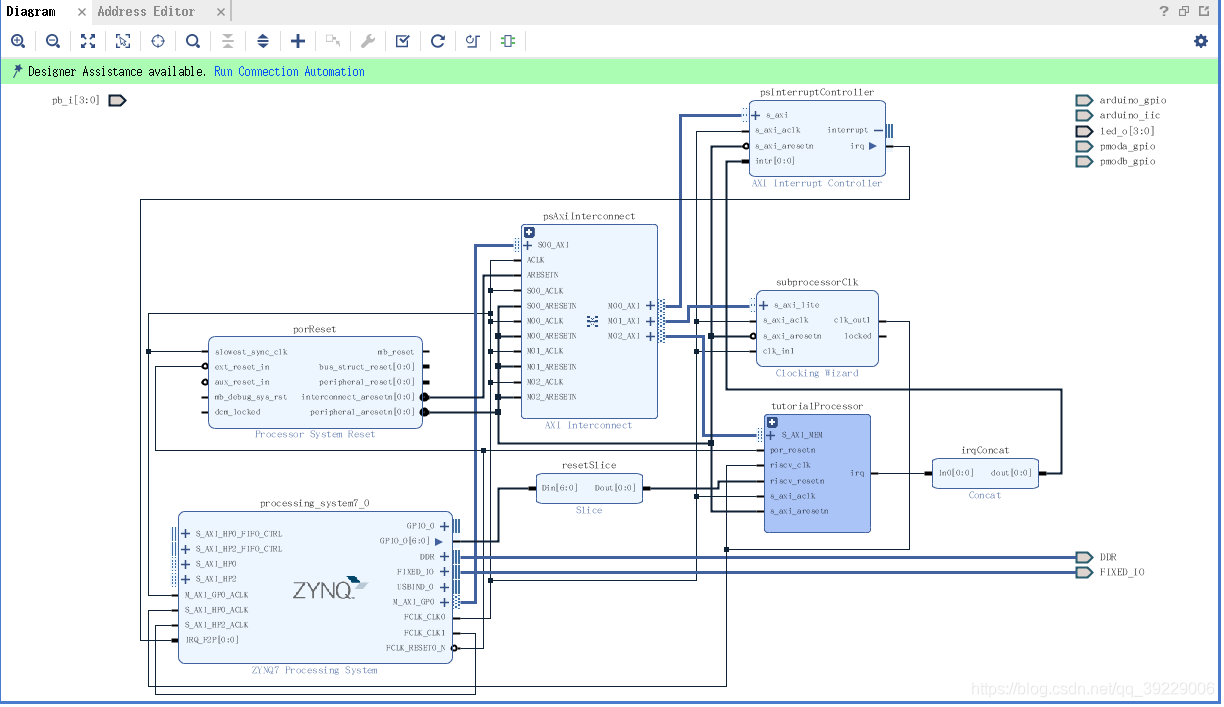
双击tutorialProcessor: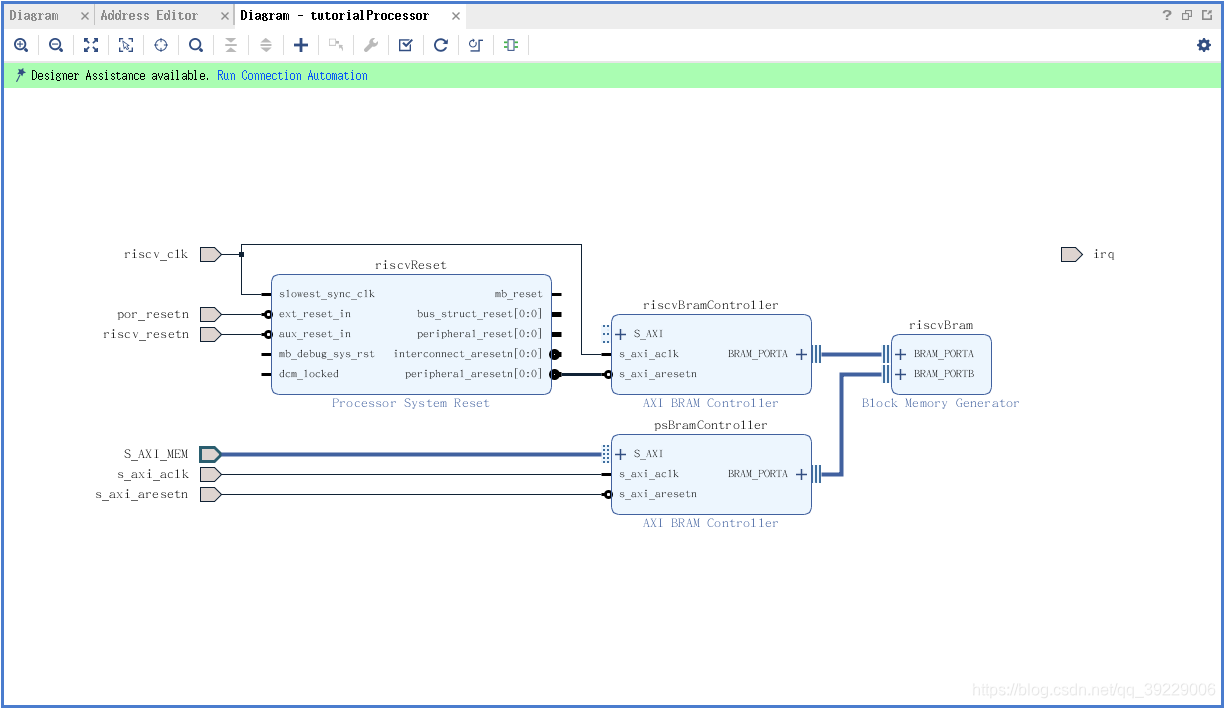
点击 + 号,将 PicoRV32 Processor with AXI Interface (Tutorial Version) IP添加进去:
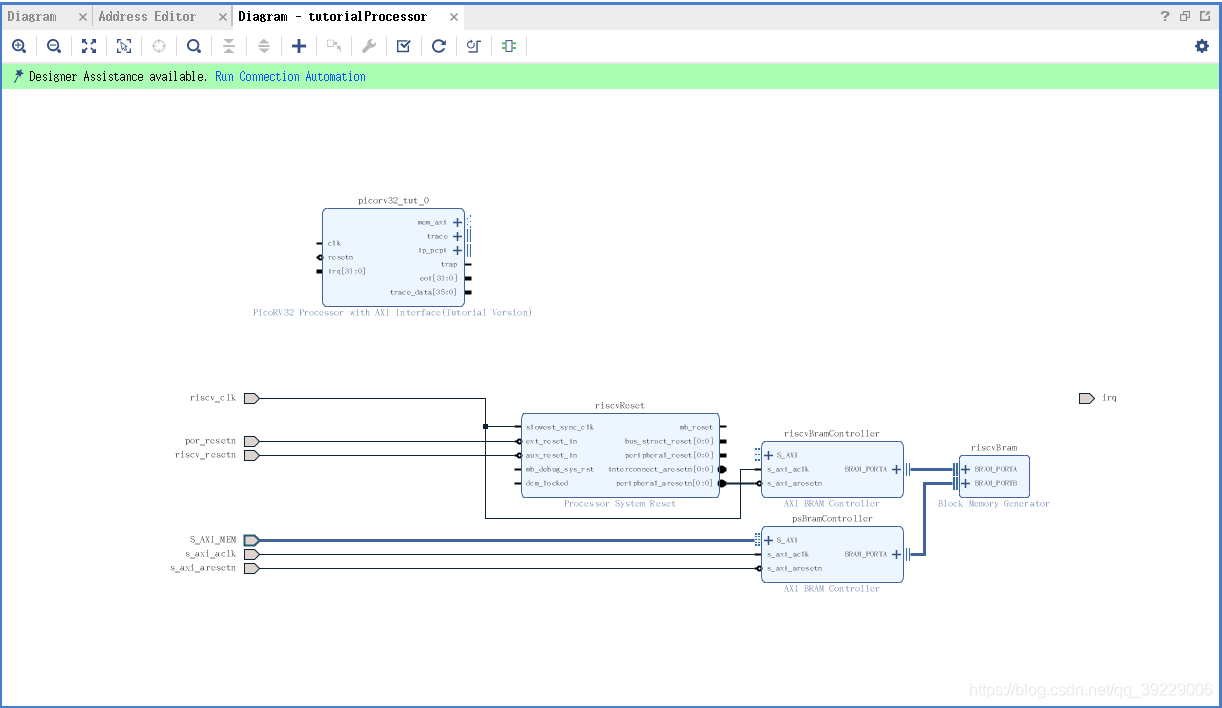
并按下图连线:
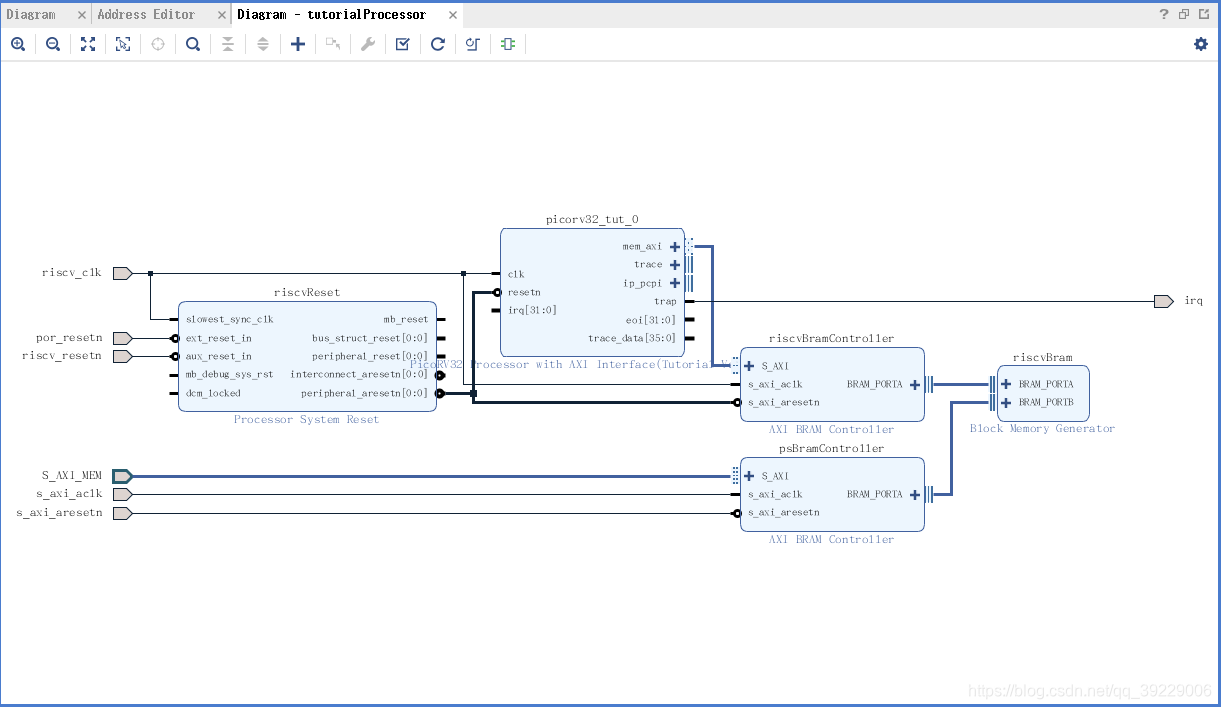
5:进入Address Editor窗口,分配地址映射:
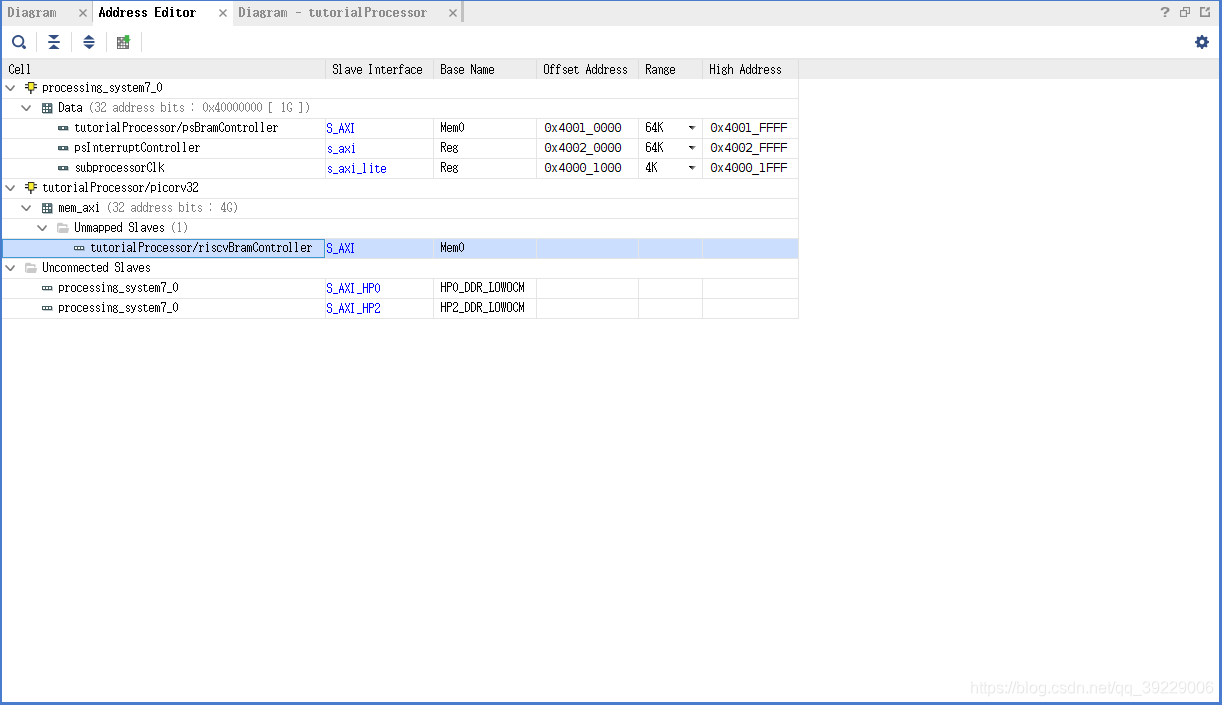
右击tutorialProcessor/riscvBramController->Assign Address
Offset Address: 0x0000_0000
High Address: 0x0000_FFFF
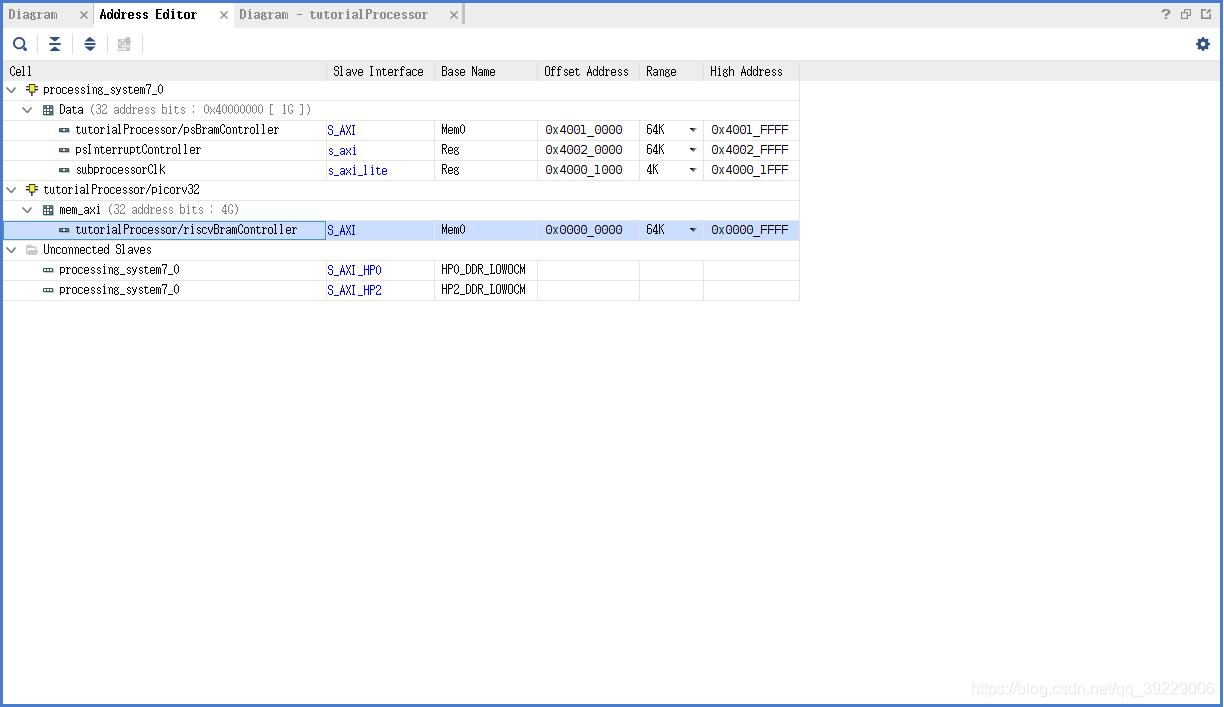
运行Tools->Validate Design:

将mem_axi频率改为,再次运行:

6:生成比特流,点击Generate Bitstream,最后在/tut/tutorial/tutorial.runs/impl_1目录下生成一个tutorial_wrapper.bit文件,将该文件移动到tut目录下,并改名为tutorial.bit.
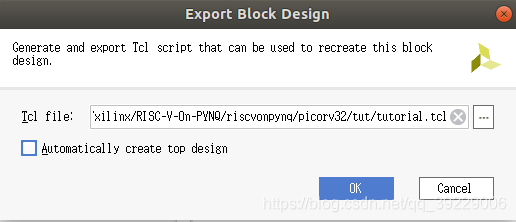
7:将设计导出到tcl文件中并覆盖之前的tcl文件,File->Exports…->Export Block Design,确保Automatically create top design没有被勾选
8:将上述tutorial.bit和tutorial.tcl文件通过SSH放到PYNQ-Z2的home/xilinx/RISC-V-On-PYNQ/riscvonpynq/picorv32/tut目录下
在PYNQ-Z2上编译RISC-V GCC工具链
1:通过MobaXterm以SSH方式连接PYNQ-Z2,在终端/home/xilinx/riscv-gnu-toolchain/目录下依次执行以下命令进行编译:
讯享网./configure --prefix=/opt/riscv32im --with-arch=rv32im make
最后在/opt目录下生成riscv32im文件夹
2:将生成的/opt/riscv32im/bin配置到环境变量中,在Jupyter Notebooks中执行以下代码:
import os path = os.environ['PATH'].split() riscv_path = '/opt/riscv32im/bin' if(riscv_path not in path): print('Updating /etc/environment file... ',end="") !sed -i 's/PATH=\"\(.*\)\"/PATH=\"\/opt\/riscv32im\/bin:\1\"/' /etc/environment print('done') else: print("/etc/environment file already updated") 显示 Updating /etc/environment file… done 即配置完成
3:重启PYNQ-Z2:
讯享网!shutdown -r now
4:重启后确认RISC-V工具链已经成功安装:
!riscv32-unknown-elf-gcc --version 显示 riscv32-unknown-elf-gcc 版本号即已成功安装。
封装成一个Overlay
1、在home/xilinx/RISC-V-On-PYNQ/riscvonpynq/picorv32/tut/文件夹下新建tutorial.py文件,文件内容如下:
讯享网from pynq import Overlay, GPIO, Register import os import inspect from riscvonpynq.Processor import BramProcessor #-------- class TutorialOverlay(Overlay): """Overlay driver for the PicoRV32 bram Overlay Note ---- This class definition must be co-located with the .tcl and .bit file for the overlay for the search path modifications in riscvonpynq.Overlay to work. __init__ in riscvonpynq.Overlay uses the path of this file to search for the .bit file using the inspect package. """ pass class TutorialProcessor(BramProcessor): """Hierarchy driver for the PicoRV32 BRAM Processor Note ---- In order to be recognized as a RISC-V Processor hierarchy, three conditions must be met: First, there must be a PS-Memory-Mapped Block RAM Controller where the name matches the variable _bram. Second, the hierarchy name (fullpath) must equal the variable _name. Finally, there must be a GPIO port with the name _reset_name. Subclasses of this module are responsible for setting _name (The name of the Hierarchy), _bits (Processor bit-width), _proc (Processor Type Name) This class must be placed in a known location relative to the build files for this processor. The relative path can be modified in __get_path. """ _name = 'tutorialProcessor' _proc = 'picorv32' _bits = 32 @classmethod def checkhierarchy(cls, description): return super().checkhierarchy(description) def __get_path(self): """Get the directory path of this file, or the directory path of the class that inherits from this class. """ # Get file path of the current class (i.e. /opt/python3.6/<...>/stream.py) file_path = os.path.abspath(inspect.getfile(inspect.getmodule(self))) # Get directory path of the current class (i.e. /opt/python3.6/<...>/stream/) return os.path.dirname(file_path) def __init__(self, description, *args): """Return a new Processor object. Parameters ---------- description : dict Dictionary describing this processor. """ build_path = os.path.join(self.__get_path(), "build") reset_value = 0 super().__init__(build_path, reset_value, description, *args)
2、在/home/xilinx/RISC-V-On-PYNQ/riscvonpynq/picorv32/tut/创建 __init__.py文件,文件内容如下:
from . import tutorial from . import build 3、将../bram/build拷贝到../tut/build中,具体jupyter命令如下
讯享网!cp /home/xilinx/RISC-V-On-PYNQ/riscvonpynq/picorv32/bram/build/ /home/xilinx/RISC-V-On-PYNQ/riscvonpynq/picorv32/tut/build
4、在jupyter中执行以下代码
import os os.chdir("/home/xilinx/RISC-V-On-PYNQ/") print(os.getcwd()) 即设置当前工作路径为/home/xilinx/RISC-V-On-PYNQ。接着继续执行以下代码:
讯享网import sys sys.path.insert(0, '/home/xilinx/RISC-V-On-PYNQ/riscvonpynq/picorv32/') from tut.tutorial import TutorialOverlay overlay = TutorialOverlay("/home/xilinx/RISC-V-On-PYNQ/riscvonpynq/picorv32/tut/tutorial.bit")
没有报错后继续执行以下代码,进行移植的测试
%%riscvc test overlay.tutorialProcessor int main(int argc, char argv){ unsigned int * arr = (unsigned int *)argv[1]; return arr[2]; } 执行结果如下:

表示编译成功,被编译的是test.c文件,若此步骤出现问题,请检查riscv32-unknown-elf-gcc命令是否能够正确执行、/home/xilinx/RISC-V-On-PYNQ/ip/路径下的picorv32_axi是否存在。
5、接着运行编译出来的文件:在jupyter执行以下代码
讯享网import numpy as np arg1 = np.array([4,2,3], np.uint32) retval = overlay.tutorialProcessor.run(test, arg1) if(retval != arg1[2]): print("Test failed!") else: print("Test passed!")
测试成功后将会看到输出如下:

若出现如下错误信息:
‘Unaligned write: data length must be multiple of 4.’
可将/usr/local/lib/python3.6/dist-packages/pynq/下的mmio.py文件的代码替换如下:
# Copyright (c) 2016, Xilinx, Inc. # All rights reserved. # # Redistribution and use in source and binary forms, with or without # modification, are permitted provided that the following conditions are met: # # 1. Redistributions of source code must retain the above copyright notice, # this list of conditions and the following disclaimer. # # 2. Redistributions in binary form must reproduce the above copyright # notice, this list of conditions and the following disclaimer in the # documentation and/or other materials provided with the distribution. # # 3. Neither the name of the copyright holder nor the names of its # contributors may be used to endorse or promote products derived from # this software without specific prior written permission. # # THIS SOFTWARE IS PROVIDED BY THE COPYRIGHT HOLDERS AND CONTRIBUTORS "AS IS" # AND ANY EXPRESS OR IMPLIED WARRANTIES, INCLUDING, BUT NOT LIMITED TO, # THE IMPLIED WARRANTIES OF MERCHANTABILITY AND FITNESS FOR A PARTICULAR # PURPOSE ARE DISCLAIMED. IN NO EVENT SHALL THE COPYRIGHT HOLDER OR # CONTRIBUTORS BE LIABLE FOR ANY DIRECT, INDIRECT, INCIDENTAL, SPECIAL, # EXEMPLARY, OR CONSEQUENTIAL DAMAGES (INCLUDING, BUT NOT LIMITED TO, # PROCUREMENT OF SUBSTITUTE GOODS OR SERVICES; LOSS OF USE, DATA, OR PROFITS; # OR BUSINESS INTERRUPTION). HOWEVER CAUSED AND ON ANY THEORY OF LIABILITY, # WHETHER IN CONTRACT, STRICT LIABILITY, OR TORT (INCLUDING NEGLIGENCE OR # OTHERWISE) ARISING IN ANY WAY OUT OF THE USE OF THIS SOFTWARE, EVEN IF # ADVISED OF THE POSSIBILITY OF SUCH DAMAGE. import os import mmap import numpy as np __author__ = "Yun Rock Qu" __copyright__ = "Copyright 2016, Xilinx" __email__ = "" #add this function below def modify_size(length): while(length%4): length=length+1 return length class MMIO: """ This class exposes API for MMIO read and write. Attributes ---------- virt_base : int The address of the page for the MMIO base address. virt_offset : int The offset of the MMIO base address from the virt_base. base_addr : int The base address, not necessarily page aligned. length : int The length in bytes of the address range. debug : bool Turn on debug mode if it is True. mmap_file : file Underlying file object for MMIO mapping mem : mmap An mmap object created when mapping files to memory. array : numpy.ndarray A numpy view of the mapped range for efficient assignment """ def __init__(self, base_addr, length=4, debug=False): """Return a new MMIO object. Parameters ---------- base_addr : int The base address of the MMIO. length : int The length in bytes; default is 4. debug : bool Turn on debug mode if it is True; default is False. """ if base_addr < 0 or length < 0: raise ValueError("Base address or length cannot be negative.") euid = os.geteuid() if euid != 0: raise EnvironmentError('Root permissions required.') # Align the base address with the pages self.virt_base = base_addr & ~(mmap.PAGESIZE - 1) # Calculate base address offset w.r.t the base address self.virt_offset = base_addr - self.virt_base # Storing the base address and length self.base_addr = base_addr self.length = length self.debug = debug self._debug('MMIO(address, size) = ({0:x}, {1:x} bytes).', self.base_addr, self.length) # Open file and mmap self.mmap_file = os.open('/dev/mem', os.O_RDWR | os.O_SYNC) self.mem = mmap.mmap(self.mmap_file, self.length + self.virt_offset, mmap.MAP_SHARED, mmap.PROT_READ | mmap.PROT_WRITE, offset=self.virt_base) self.array = np.frombuffer(self.mem, np.uint32, length >> 2, self.virt_offset) def __del__(self): """Destructor to ensure mmap file is closed """ os.close(self.mmap_file) def read(self, offset=0, length=4): """The method to read data from MMIO. Parameters ---------- offset : int The read offset from the MMIO base address. length : int The length of the data in bytes. Returns ------- list A list of data read out from MMIO """ if length != 4: raise ValueError("MMIO currently only supports 4-byte reads.") if offset < 0: raise ValueError("Offset cannot be negative.") idx = offset >> 2 if offset % 4: raise MemoryError('Unaligned read: offset must be multiple of 4.') self._debug('Reading {0} bytes from offset {1:x}', length, offset) # Read data out return int(self.array[idx]) def write(self, offset, data): """The method to write data to MMIO. Parameters ---------- offset : int The write offset from the MMIO base address. data : int / bytes The integer(s) to be written into MMIO. Returns ------- None """ if offset < 0: raise ValueError("Offset cannot be negative.") idx = offset >> 2 if offset % 4: raise MemoryError('Unaligned write: offset must be multiple of 4.') if type(data) is int: self._debug('Writing 4 bytes to offset {0:x}: {1:x}', offset, data) self.array[idx] = np.uint32(data) elif type(data) is bytes: length = len(data) num_words = length >> 2 length=modify_size(length) if length % 4: raise MemoryError( 'Unaligned write: data length must be multiple of 4.') buf = np.frombuffer(data, np.uint32, num_words, 0) for i in range(len(buf)): self.array[idx + i] = buf[i] else: raise ValueError("Data type must be int or bytes.") def _debug(self, s, *args): """The method provides debug capabilities for this class. Parameters ---------- s : str The debug information format string *args : any The arguments to be formatted Returns ------- None """ if self.debug: print('MMIO Debug: {}'.format(s.format(*args))) 6、测试成功后,为了安装资源到板子上,需运行下面的代码:
讯享网!pip3.6 install --upgrade /home/xilinx/RISC-V-On-PYNQ/
成功后出现如下信息:

成功安装资源后便可直接进行移植、编译、运行而不用修改系统变量了。
最后在/home/xilinx/RISC-V-On-PYNQ/riscvonpynq/picorv32/下的 __init__.py修改如下:
# ---------------------------------------------------------------------- # Copyright (c) 2018, The Regents of the University of California All # rights reserved. # # Redistribution and use in source and binary forms, with or without # modification, are permitted provided that the following conditions are # met: # # * Redistributions of source code must retain the above copyright # notice, this list of conditions and the following disclaimer. # # * Redistributions in binary form must reproduce the above # copyright notice, this list of conditions and the following # disclaimer in the documentation and/or other materials provided # with the distribution. # # * Neither the name of The Regents of the University of California # nor the names of its contributors may be used to endorse or # promote products derived from this software without specific # prior written permission. # # THIS SOFTWARE IS PROVIDED BY THE COPYRIGHT HOLDERS AND CONTRIBUTORS # "AS IS" AND ANY EXPRESS OR IMPLIED WARRANTIES, INCLUDING, BUT NOT # LIMITED TO, THE IMPLIED WARRANTIES OF MERCHANTABILITY AND FITNESS FOR # A PARTICULAR PURPOSE ARE DISCLAIMED. IN NO EVENT SHALL REGENTS OF THE # UNIVERSITY OF CALIFORNIA BE LIABLE FOR ANY DIRECT, INDIRECT, # INCIDENTAL, SPECIAL, EXEMPLARY, OR CONSEQUENTIAL DAMAGES (INCLUDING, # BUT NOT LIMITED TO, PROCUREMENT OF SUBSTITUTE GOODS OR SERVICES; LOSS # OF USE, DATA, OR PROFITS; OR BUSINESS INTERRUPTION) HOWEVER CAUSED AND # ON ANY THEORY OF LIABILITY, WHETHER IN CONTRACT, STRICT LIABILITY, OR # TORT (INCLUDING NEGLIGENCE OR OTHERWISE) ARISING IN ANY WAY OUT OF THE # USE OF THIS SOFTWARE, EVEN IF ADVISED OF THE POSSIBILITY OF SUCH # DAMAGE. # ---------------------------------------------------------------------- from . import axi from . import bram from . import tut 即可直接运行以下代码:
讯享网from riscvonpynq.picorv32.tut.tutorial import TutorialOverlay overlay = TutorialOverlay("/home/xilinx/RISC-V-On-PYNQ/riscvonpynq/picorv32/tut/tutorial.bit")
%%riscvc test overlay.tutorialProcessor int main(int argc, char argv){ unsigned int * arr = (unsigned int *)argv[1]; return arr[2]; } 讯享网import numpy as np arg1 = np.array([4,2,3], np.uint32) retval = overlay.tutorialProcessor.run(test, arg1) if(retval != arg1[2]): print("Test failed!") else: print("Test passed!")
到此RISC-V在PYNQ-Z2的移植结束。
版权声明:本文内容由互联网用户自发贡献,该文观点仅代表作者本人。本站仅提供信息存储空间服务,不拥有所有权,不承担相关法律责任。如发现本站有涉嫌侵权/违法违规的内容,请联系我们,一经查实,本站将立刻删除。
如需转载请保留出处:https://51itzy.com/kjqy/109219.html