
介绍
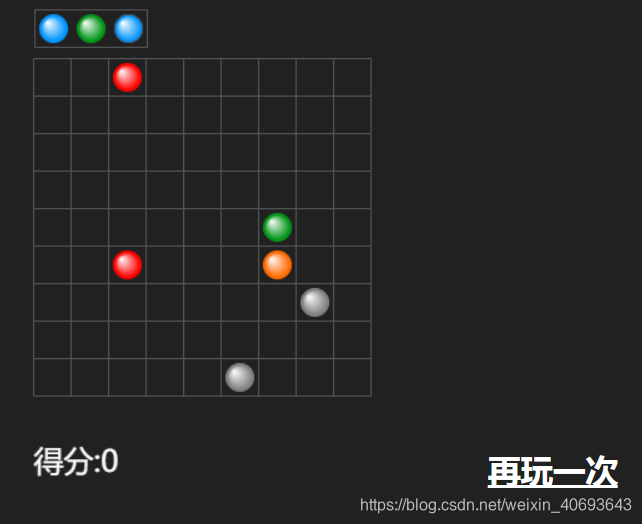
今天带给大家的是一款用JS+canvas开发的“五彩连珠小游戏”。相信不用我介绍,大家都知道游戏规则 了吧。
github源码地址

游戏截图:
作者有话说
下面附上源代码:
css部分:
*{
    padding: 0; margin: 0; }
html, body {
    width: 100%; height: 100%; background: #; text-align: center; font: 12px "微软雅黑"; overflow: hidden; } a{
    font-size: 26px; font-weight: 600; color: #fff; }
讯享网
html js 部分:
讯享网<!DOCTYPE html> <html lang="en"> <head> <meta charset="UTF-8"> <meta name="viewport" content="width=device-width, initial-scale=1.0"> <meta http-equiv="X-UA-Compatible" content="ie=edge"> <title>HTML5五彩连珠小游戏</title> <link rel="stylesheet" type="text/css" href="css/style.css" /> </head> <body> <canvas id="canvas" height="400" width="400" style="background: #;padding: 0;margin: 0;"></canvas> <a href="index.html">再玩一次</a> <script type="text/javascript"> var game = {
    canvas: document.getElementById("canvas"), ctx: document.getElementById("canvas").getContext("2d"), cellCount: 9, //九宫格9*9 cellWidth: 30, //方格大小 lineCount: 5, mode: 7, // 气泡有7种颜色 actions: {
   }, // 存放各个 name:定时器id值 键值对 // 创建定时器 play: function (name, action, interval) {
    var me = this; this.actions[name] = setInterval(function () {
    action(); me.draw(); // 刷新重绘界面:棋盘,分数,气泡 }, interval || 50); }, // 停止actions中键名为name的定时器 stop: function (name) {
    clearInterval(this.actions[name]); // 停止定时器 this.draw(); }, // 气泡颜色列表 colors: ["red", "#039518", "#ff00dc", "#ff6a00", "gray", "#0094ff", "#d2ce00"], // 游戏开始 start: function () {
    this.map.init(); // 初始化,创建棋盘气泡二维数组 this.ready.init(); // 初始三个气泡的移动 this.draw(); // 刷新绘制界面 this.canvas.onclick = this.onclick; // canvas上绑定click事件 }, // 游戏结束 over: function () {
    alert("GAME OVER"); this.onclick = function () {
    console.log("over"); return false; }; }, // 刷新绘制界面 draw: function () {
    this.ctx.clearRect(0, 0, 400, 600); // 清空给定矩形内的指定像素 this.ctx.save(); // 保存当前状态 this.map.draw(); // 绘制棋盘和里面的气泡 this.ready.draw(); // 绘制棋盘左上角上方的三个预备气泡 this.score.draw(); // 绘制初始化分数 this.ctx.restore(); // 恢复之前保存的绘图状态 }, // 被选中的气泡 clicked: null, // 判断气泡是否在移动 isMoving: function () {
    return this.ready.isMoving || this.map.isMoving; }, //气泡点击事件 onclick: function (e) {
    // 如果气泡还在移动中,则跳过点击事件的响应 if (game.isMoving()) {
    return; } var px = (e.offsetX || (e.clientX - game.canvas.offsetLeft)) - game.map.startX; // 以棋盘左上角为原点,点击的x坐标 var py = (e.offsetY || (e.clientY - game.canvas.offsetTop)) - game.map.startY; // 以棋盘左上角为原点,点击的y坐标 if (px < 0 || py < 0 || px > game.map.width || py > game.map.height) {
    // 点击范围超出棋盘,则跳过,不执行后面代码 return; } var x = parseInt(px / game.cellWidth); // 获取格子x坐标 var y = parseInt(py / game.cellWidth); // 获取格子y坐标 var clicked = game.clicked; // 声明一个clicked变量,存放前一个被选中的气泡  var bubble = game.map.getBubble(x, y); // 获取点击的气泡 if (bubble.color) {
    // 如果当前点击的气泡是有颜色的 if (clicked) {
    // 前一个选中的气泡是否存在 //同一个泡不做反映 if (clicked.x == x && clicked.y == y) {
    return; } clicked.stop(); // 停止前一个气泡的颜色渐变变化 } clicked = game.clicked = bubble; // 将当前气泡赋值给前一个气泡变量 bubble.play(); // 被点击选中的气泡进行颜色渐变变化 } else {
    //当前点击的气泡没有颜色 if (clicked) {
    // 前一个点击的气泡存在 clicked.stop(); // 停止前一个气泡的颜色渐变变化 //移动clicked上一个气泡的位置到bubble当前气泡的位置 game.map.move(clicked, bubble); } } //console.log("x:" + x + " y:" + y); }, // 随机获取0-max之间的整数值 getRandom: function (max) {
    return parseInt(Math.random() *  % (max)); }, }; // 游戏分数的计算和绘制 game.score = {
    basic: 0, //5颗 +5 operate: 0, // star1: 0, //6颗 +8  star2: 0, //7颗 +10 boom: 0, //7颗以上 +20 draw: function () {
    var startX = game.map.startX; var startY = game.cellWidth * 10 + game.map.startY; var ctx = game.ctx; ctx.save(); //保存当前的绘图状态。 ctx.translate(startX, startY); //重新映射画布上的 (0,0) 位置。 ctx.clearRect(0, 0, 150, 400); //清空给定矩形内的指定像素。 ctx.strokeStyle = "#456"; // 设置画笔颜色 //ctx.strokeRect(0, 0, 150, 200); ctx.font = "24px 微软雅黑"; //设置字体 ctx.fillStyle = "#fefefe"; // 设置字体颜色 //在画布上绘制填色的文本 ctx.fillText("得分:" + (this.basic * 5 + this.star1 * 8 + this.star2 * 10 + this.boom * 20), 0, 30); ctx.stroke(); // 开始绘制 ctx.restore(); // 恢复之前保存的绘图状态 }, addScore: function (length) {
    switch (length) {
    case 5: this.basic++; break; case 6: this.star1++; break; case 7: this.star2++; break; default: this.boom++; break; } this.draw(); }, }; // 棋盘左上角的三个预备气泡格子 game.ready = {
    startX: 41.5, // 左上角x坐标 startY: 21.5, // 左上角y坐标 width: game.cellWidth * 3, //宽度,三个格子 height: game.cellWidth, // 高度 bubbles: [], // 初始化 init: function () {
    this.genrate(); // 生成随机三个颜色的气泡 var me = this; me.flyin(); }, // 生成随机三个颜色的气泡数组 genrate: function () {
    for (var i = 0; i < 3; i++) {
    var color = game.colors[game.getRandom(game.mode)]; // 随机气泡颜色 this.bubbles.push(new Bubble(i, 0, color)); // 创建气泡并放入bubbles数组 } // console.log(this.bubbles); }, // 绘制气泡数组 draw: function () {
    var ctx = game.ctx; ctx.save(); ctx.translate(this.startX, this.startY); //重新映射画布上的 (0,0) 位置: 为棋盘左上角上面的三个格子的起始位置 ctx.beginPath(); // 开始绘画 ctx.strokeStyle = "#555"; // 设置笔触颜色 ctx.strokeRect(0, 0, this.width, this.height); // 绘制长方形格子轮廓 ctx.stroke(); // 开始绘制 //循环绘制气泡 this.bubbles.forEach(function (bubble) {
    bubble.draw(); }); ctx.restore(); // 恢复之前保存的绘图状态 }, isMoving: false, // 初始三个气泡的移动 flyin: function () {
    var emptys = game.map.getEmptyBubbles(); // 获取棋盘上的剩余空格 // 判断游戏是否结束,如果棋盘剩余空格小于3,则游戏结束 if (emptys.length < 3) {
    //GAME OVER game.over(); return; } var me = this; var status = [0, 0, 0]; // 三个气泡的状态值 var times = 1; game.play("flyin", function () {
    // 定时器,不断执行气泡移动路径的改变。 // 三个气泡的状态值都为1时,表示气泡移动结束 if (status[0] && status[1] && status[2]) {
    game.stop("flyin"); me.isMoving = false; status = [0, 0, 0]; me.bubbles = []; me.genrate(); return; } me.isMoving = true; for (var i = 0; i < me.bubbles.length; i++) {
    // 当前气泡的状态值为1,表示移动结束。continue跳过本次循环。 if (status[i]) {
    continue; } var target = emptys[i]; // 移动的终点坐标位置 var x2 = target.px + game.map.startX - me.startX; var y2 = target.py + game.map.startY - me.startY; var current = me.bubbles[i]; //当前气泡 // step 气泡移动距离 var step = Math.abs(x2 - current.px)/10 || Math.abs(y2 - current.y)/10; if (current.px < x2) {
    current.py = ((y2 - current.py) / (x2 - current.px)) * step + current.py; current.px += step; if (current.px > x2) {
    current.px = x2; } } else if (current.px > x2) {
    current.py = ((y2 - current.py) / (current.px - x2)) * step + current.py; current.px -= step; if (current.px < x2) {
    current.px = x2; } } else {
    current.py += step; } if (current.py > y2) {
    current.py = y2; } if (parseInt(current.px+0.1) == x2 && parseInt(current.py+0.1) == y2) {
    status[i] = 1; current.x = target.x; current.y = target.y; game.map.addBubble(current); // 添加气泡 game.map.clearLine(current.x, current.y, current.color, false); // 判断是否有连线气泡,满足条件则清空 } } }, 10); } }; // 棋盘中的气泡事件处理 game.map = {
    startX: 40.5, //棋盘的左上角X坐标 startY: 60.5, //棋盘的左上角Y坐标 width: game.cellCount * game.cellWidth, // 棋盘的宽度 小格子数9*小格子边长30 height: game.cellCount * game.cellWidth, // 棋盘的高度 小格子数9*小格子边长30 bubbles: [], // 气泡数组,二维数组 // 初始化,创建棋盘气泡二维数组 init: function () {
    for (var i = 0; i < game.cellCount; i++) {
    var row = []; for (var j = 0; j < game.cellCount; j++) {
    row.push(new Bubble(j, i, null)); } this.bubbles.push(row); } }, // 处理气泡连线,清空 clearLine: function (x1, y1, color, isClick) {
    if (this.isEmpty(x1, y1)) {
    if (isClick) game.ready.flyin(); return; }; //给定一个坐标,看是否有满足的line可以被消除 //4根线 一 | / \ //横线 var current = this.getBubble(x1, y1); if (!current.color) {
    console.log(current); } var arr1, arr2, arr3, arr4; arr1 = this.bubbles[y1]; // 得到该坐标气泡的y轴一整行坐标数组 arr2 = []; // 得到该坐标气泡的x轴一整列坐标数组 for (var y = 0; y < game.cellCount; y++) arr2.push(this.getBubble(x1, y)); // 得到该坐标气泡的x轴一整列坐标数组 arr3 = [current]; // 得到该坐标气泡的左下角到右上角,/ 坐标数组 arr4 = [current]; // 得到该坐标气泡的左上角到右下角,\ 坐标数组 for (var i = 1; i < game.cellCount ; i++) {
    if (x1 - i >= 0 && y1 - i >= 0) arr3.unshift(this.getBubble(x1 - i, y1 - i)); if (x1 + i < game.cellCount && y1 + i < game.cellCount) arr3.push(this.getBubble(x1 + i, y1 + i)); if (x1 - i >= 0 && y1 + i < game.cellCount) arr4.push(this.getBubble(x1 - i, y1 + i)); if (x1 + i < game.cellCount && y1 - i >= 0) arr4.unshift(this.getBubble(x1 + i, y1 - i)); } var line1 = getLine(arr1); var line2 = getLine(arr2); var line3 = getLine(arr3); var line4 = getLine(arr4); // 连接4个line数组赋值给line var line = line1.concat(line2).concat(line3).concat(line4); // 如果连线数组小于5,则发送预备气泡,return出去 if (line.length < 5) {
    if (isClick) game.ready.flyin(); return; } else {
    // 如果连线数组>=5 var me = this; var i = 0; game.play("clearline", function () {
    if (i == line.length) {
    game.score.addScore(line.length); //增加分数 game.stop("clearline"); me.isMoving = false; //game.ready.flyin(); return; } me.isMoving = true; var p = line[i]; me.setBubble(p.x, p.y, null); // 将line数组里的气泡一个一个循环清除 i++; }, 100); } // 返回颜色相同的气泡连线数组 function getLine(bubbles) {
    var line = []; for (var i = 0; i < bubbles.length; i++) {
    var b = bubbles[i]; if (b.color == color) {
    // 颜色相同,存入数组 line.push({
    "x": b.x, "y": b.y }); } else {
    if (line.length < 5) line = []; else return line; } } if (line.length < 5) return []; return line; } }, // 绘制棋盘和里面的气泡 draw: function () {
    var ctx = game.ctx; ctx.save(); ctx.translate(this.startX, this.startY); // 重新映射画布上的 (0,0) 位置: 为棋盘左上角的起始位置 ctx.beginPath(); // 绘制棋盘中的分隔线 for (var i = 0; i <= game.cellCount; i++) {
    // 循环绘制棋盘中的竖线 var p1 = i * game.cellWidth;; ctx.moveTo(p1, 0); ctx.lineTo(p1, this.height); // 循环绘制棋盘中的横线 var p2 = i * game.cellWidth; ctx.moveTo(0, p2); ctx.lineTo(this.width, p2); } ctx.strokeStyle = "#555"; // 线的颜色 ctx.stroke(); // 绘制 //绘制子元素(所有在棋盘上的泡) this.bubbles.forEach(function (row) {
    row.forEach(function (bubble) {
    bubble.draw(); // draw方法里,气泡没有设置颜色的:null, 则跳过绘制 }); }); ctx.restore(); }, isMoving: false, // 移动气泡 move: function (bubble, target) {
    // path存放气泡的移动路径 var path = this.search(bubble.x, bubble.y, target.x, target.y); if (!path) {
    //显示不能移动s //alert("过不去"); return; } //map开始播放当前泡的移动效果 //两种实现方式,1、map按路径染色,最后达到目的地 2、map生成一个临时的bubble负责展示,到目的地后移除 //console.log(path); var me = this; var name = "move_" + bubble.x + "_" + bubble.y; var i = path.length - 1; var color = bubble.color; game.play(name, function () {
    //循环path路径,移动气泡 if (i < 0) {
    game.stop(name); game.clicked = null; me.isMoving = false; me.clearLine(target.x, target.y, color, true); return; } me.isMoving = true; // 判断是否移动的isMoving变量设为true path.forEach(function (cell) {
    me.setBubble(cell.x, cell.y, null); // 将路径上的气泡颜色重置为null }); var currentCell = path[i]; me.setBubble(currentCell.x, currentCell.y, color);//设置当前气泡位置的颜色 i--; }, 50); }, // 返回气泡的移动路径 search: function (x1, y1, x2, y2) {
    var history = []; var goalCell = null; var me = this; getCell(x1, y1, null); if (goalCell) {
    // console.log(goalCell); var path = []; var cell = goalCell; while (cell) {
    path.push({
    "x": cell.x, "y": cell.y }); cell = cell.parent; } // console.log(path); return path; } return null; function getCell(x, y, parent) {
    // 气泡坐标超出气泡数组,则return if (x >= me.bubbles.length || y >= me.bubbles.length) return; // 气泡坐标改变后,该坐标已存在气泡,则return if (x != x1 && y != y2 && !me.isEmpty(x, y)) return; // 循环查询历史记录,有过该坐标,则return for (var i = 0; i < history.length; i++) {
    if (history[i].x == x && history[i].y == y) return; } var cell = {
    "x": x, "y": y, child: [], "parent": parent }; history.push(cell); // 如果当前cell里的x,y坐标等于终点x2,y2坐标,则返回当前cell if (cell.x == x2 && cell.y == y2) {
    goalCell = cell; return cell; } var child = []; var left, top, right, buttom; //最短路径的粗略判断就是首选目标位置的大致方向 if (x - 1 >= 0 && me.isEmpty(x - 1, y)) // 左移一格 child.push({
    "x": x - 1, "y": y }); if (x + 1 < me.bubbles.length && me.isEmpty(x + 1, y)) // 右移一格 child.push({
    "x": x + 1, "y": y }); if (y + 1 < me.bubbles.length && me.isEmpty(x, y + 1)) // 下移一格 child.push({
    "x": x, "y": y + 1 }); if (y - 1 >= 0 && me.isEmpty(x, y - 1)) // 上移一格 child.push({
    "x": x, "y": y - 1 }); var distance = []; for(var i=0;i<child.length;i++){
    var c = child[i]; if(c){
    distance.push({
   "i":i,"d":Math.abs(x2 - c.x) + Math.abs(y2 - c.y)}); // 将x,y轴的差和存入d键值对 }else{
    distance.push({
   "i":i,"d":-1}); } }; // distance数组升序排序 distance.sort(function (a, b) {
    return a.d - b.d }); for (var i = 0; i < child.length; i++) {
    var d = distance[i]; var c = child[d.i]; if (c) cell.child.push(getCell(c.x, c.y, cell)); } // console.log(cell); return cell; } }, // 循环得到棋盘上空的气泡位置 getEmptyBubbles: function () {
    var empties = []; this.bubbles.forEach(function (row) {
    row.forEach(function (bubble) {
    if (!bubble.color) {
    empties.push(new Bubble(bubble.x, bubble.y)); } }); }); if (empties.length <= 3) {
    return []; } var result = []; var useds = []; for (var i = 0; i < empties.length; i++) {
    if (result.length == 3) {
    break; } var isUsed = false; var ra = game.getRandom(empties.length); for (var m = 0; m < useds.length; m++) {
    isUsed = ra === useds[m]; if (isUsed) break; } if (!isUsed) {
    result.push(empties[ra]); useds.push(ra); } } //console.log(useds); return result; }, // 添加气泡, 通过改变坐标位置上color颜色,来达到气泡移动到此的效果 addBubble: function (bubble) {
    var thisBubble = this.getBubble(bubble.x, bubble.y); thisBubble.color = bubble.color; }, // 通过设置气泡颜色,来达到气泡的显示隐藏效果 setBubble: function (x, y, color) {
    this.getBubble(x, y).color = color; }, // 获取气泡位置 getBubble: function (x, y) {
    if (x < 0 || y < 0 || x > game.cellCount || y > game.cellCount) return null; return this.bubbles[y][x]; }, // 判断该坐标是否存在气泡 不存在:true 存在:false isEmpty: function (x, y) {
    var bubble = this.getBubble(x, y); return !bubble.color; }, }; var Cell = function (x, y) {
    this.x = x; this.y = y; } var Bubble = function (x, y, color) {
    this.x = x; this.y = y; this.px = game.cellWidth * (this.x + 1) - game.cellWidth / 2; // 小格子中心x坐标 this.py = game.cellWidth * (this.y + 1) - game.cellWidth / 2; // 小格子中心y坐标 this.color = color; this.light = 10; // 圆半径 }; // 绘制气泡 Bubble.prototype.draw = function () {
    // 没有设置气泡颜色,则跳过 if (!this.color) {
    return; } var ctx = game.ctx; ctx.beginPath(); // 开始绘画 //console.log("x:" + px + "y:" + py); // 创建放射状/圆形渐变对象。 渐变开始圆x坐标 y坐标 半径 结束圆x坐标 y坐标 半径  var gradient = ctx.createRadialGradient(this.px - 5, this.py - 5, 0, this.px, this.py, this.light); gradient.addColorStop(0, "white"); // 规定 gradient 对象中的颜色和位置。 gradient.addColorStop(1, this.color); ctx.arc(this.px, this.py, 11, 0, Math.PI * 2); // 创建圆形:圆心x坐标,圆心y坐标,圆半径,开始角,结束角 ctx.strokeStyle = this.color; // 设置笔触颜色 ctx.fillStyle = gradient; // 设置填充绘图的渐变对象 ctx.fill(); //内部填充 ctx.stroke(); //轮廓绘制 }; // 气泡被点击选中时,不断变化颜色渐变 Bubble.prototype.play = function () {
    var me = this; var isUp = true; game.play("light_" + this.x + "_" + this.y, function () {
    if (isUp) {
    me.light += 3; } if (!isUp) {
    me.light -= 3; } if (me.light >= 30) {
    isUp = false; } if (me.light <= 10) {
    isUp = true; } }, 50); }; // 气泡停止颜色渐变变化,恢复原样 Bubble.prototype.stop = function () {
    //this.light = 10; var me = this; game.stop("light_" + this.x + "_" + this.y); // 好像可以取消,待定 game.play("restore_" + this.x + "_" + this.y, function () {
    if (me.light > 10) {
    me.light--; } else {
    me.light = 10; game.stop("restore_" + me.x + "_" + me.y); } }, 50); }; game.start(); </script> </body> </html>
版权声明:本文内容由互联网用户自发贡献,该文观点仅代表作者本人。本站仅提供信息存储空间服务,不拥有所有权,不承担相关法律责任。如发现本站有涉嫌侵权/违法违规的内容,请联系我们,一经查实,本站将立刻删除。
如需转载请保留出处:https://51itzy.com/kjqy/108879.html