

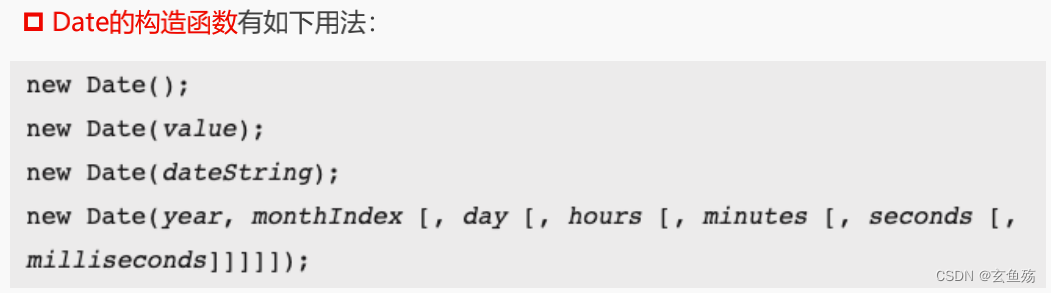
一、创建Date对象

二、dateString时间的表示方式
日期的表示方式有两种:RFC 2822 标准 或者 ISO 8601 标准
RFC 2822 标准
默认打印的时间格式是RFC 2822标准的

ISO 8601 标准


- YYYY:年份,0000 ~ 9999
- MM:月份,01 ~ 12
- DD:日,01 ~ 31
- T:分隔日期和时间,没有特殊含义,可以省略
- HH:小时,00 ~ 24
- mm:分钟,00 ~ 59
- ss:秒,00 ~ 59
- .sss:毫秒
- Z:时区
三、常用时间获取方法
- getFullYear():获取年份(4 位数)
- getMonth():获取月份,从 0 到 11
- getDate():获取当月的具体日期,从 1 到 31
- getHours():获取小时
- getMinutes():获取分钟
- getSeconds():获取秒钟
- getMilliseconds():获取毫秒
- getDay():获取一周中的第几天,从 0(星期日)到 6(星期六)
四、时间设置方法
- setDate() 设置 Date 对象中月的某一天 (1 ~ 31)。
- setMonth() 设置 Date 对象中月份 (0 ~ 11)。
- setFullYear() 设置 Date 对象中的年份(四位数字)。
- setYear() 请使用 setFullYear() 方法代替。
- setHours() 设置 Date 对象中的小时 (0 ~ 23)。
- setMinutes() 设置 Date 对象中的分钟 (0 ~ 59)。
- setSeconds() 设置 Date 对象中的秒钟 (0 ~ 59)。
- setMilliseconds() 设置 Date 对象中的毫秒 (0 ~ 999)。
- setTime() 以毫秒设置 Date 对象。
五、获取Unix时间戳
Unix 时间戳:它是一个整数值,表示自1970年1月1日00:00:00 UTC以来的毫秒数
- 方式一:new Date().getTime()
- 方式二:new Date().valueOf()
- 方式三:+new Date()
- 方式四:Date.now()
获取到Unix时间戳之后,我们可以利用它来测试代码的性能

六、封装方法
1. 获取最近的日期
01 - 获取前几天、后几天的日期
/ * 原理 : 在今天日期的基础上进行变动 * 例如,获取明天的值 * 这样设定,才不会有问题 * 1. 第一种方式 * const nowDate = new Date(); * nowDate.setDate(nowDate.getDate() + 1); 注 : 这个修改的是本身,返回修改后的时间戳 * * 2. 第二种方式 : 通过时间戳 * nowDate.getTIme() + 24 * 60 * 60 * 1000 (如果获取到的是10位数的时间戳就要再 * 1000) */ const getLatelyDate = (fewDays = 1) => { // 当前日期时间 const nowDate = new Date(); // 返回生成的日期 // 第一种方式 return new Date(nowDate.setDate(nowDate.getDate() + fewDays)).toISOString(); // 第二种方式 // return new Date(nowDate.value.getTime() + fewDays * 24 * 60 * 60 * 1000).toISOString(); }; console.log('今天 :>> ', getLatelyDate(0)); // 2022-10-21T02:16:37.464Z console.log('昨天 :>> ', getLatelyDate(-1)); // 2022-10-20T02:16:37.465Z console.log('明天 :>> ', getLatelyDate(1)); // 2022-10-22T02:16:37.465Z console.log('前30天 :>> ', getLatelyDate(-30)); // 2022-09-21T02:16:47.537Z console.log('后15天 :>> ', getLatelyDate(+15)); // 2022-11-05T02:16:53.540Z讯享网
02 - 获取前几月、后几月日期
讯享网const getLatelyMonth = (fewMonth = 1) => { // 当前日期时间 const nowDate = new Date(); // 返回生成的日期 return new Date(nowDate.setMonth(nowDate.getMonth() + fewMonth)).toISOString(); }; console.log('这个月 :>> ', getLatelyMonth(0)); console.log('上个月 :>> ', getLatelyMonth(-1)); console.log('下个月 :>> ', getLatelyMonth(1)); console.log('前10个月 :>> ', getLatelyMonth(-10)); console.log('后10个月 :>> ', getLatelyMonth(+10));
03 - 获取前几年、后几年日期
const getLatelyYear = (fewYear = 1) => { // 当前日期时间 const nowDate = new Date(); // 返回生成的日期 return new Date(nowDate.setFullYear(nowDate.getFullYear() + fewYear)).toISOString(); }; console.log('今年 :>> ', getLatelyYear(0)); console.log('去年 :>> ', getLatelyYear(-1)); console.log('明年 :>> ', getLatelyYear(1)); console.log('前10年 :>> ', getLatelyYear(-10)); console.log('后10年 :>> ', getLatelyYear(+10));2. 时间戳转换为标准时间
讯享网/ * 参数一 : 时间戳 timestamp: 26 * 参数二 : 需要转换的格式 yyyy/MM/dd hh:mm:ss * 返回值 : 根据格式生成的时间 */ const formatTime = (timestamp, fmtString) => { // 1. 获取时间对象 const data = new Date(timestamp); // Wed Aug 24 2022 14:44:36 GMT+0800 (中国标准时间) // 2. 时间转换 const dataO = { // 匹配 yyyy => 年份 'y+': data.getFullYear(), // 匹配 MM => 月份 'M+': data.getMonth() + 1, // 匹配 dd => 日 'd+': data.getDate(), // 匹配 hh => 时 'h+': data.getHours(), // 匹配 mm => 分 'm+': data.getMinutes(), // 匹配 ss => 秒 's+': data.getSeconds() }; for (const key in dataO) { // 拿到对应的正则字符串 const timeRegex = new RegExp(key, 'g'); // 看是否需要匹配 if (timeRegex.test(fmtString)) { // 小于两位数的,用 0 在前方补齐 const value = ('' + dataO[key]).padStart(2, '0'); // 把匹配到的位置用数值来替换 fmtString = fmtString.replace(timeRegex, value); } } return fmtString; }; // 1. 获取当前时间戳 const nowDate = ref(new Date().getTime()); // 2. 设置格式 // 格式一 => yyyy-MM-dd hh:mm:ss const fmt1 = 'yyyy-MM-dd hh:mm:ss'; console.log(`格式一 ${fmt1} => `, formatTime(nowDate.value, fmt1)); // 2022-10-21 10:11:57 // 格式二 => yyyy/MM/dd hh-mm-ss const fmt2 = 'yyyy/MM/dd hh-mm-ss'; console.log(`格式二 ${fmt2} => `, formatTime(nowDate.value, fmt2)); // 2022-10-21 10:11:57 // 格式三 => yyyy MM dd hh:mm:ss const fmt3 = 'yyyy MM dd hh:mm:ss'; console.log(`格式三 ${fmt3} => `, formatTime(nowDate.value, fmt3)); // 2022-10-21 10:11:57 // 格式四 => hh:mm:ss yyyy-MM-dd const fmt4 = 'hh:mm:ss yyyy-MM-dd'; console.log(`格式四 ${fmt4} => `, formatTime(nowDate.value, fmt4)); // 2022-10-21 10:11:57
3. 获取最近一年(12个月)的月份
/ * 功能 : 获取获取最近一年(12个月)的月份 * 注意 : 不包含本月 * 例如 现在是2022年10月 * 返回 ['2021-10', '2021-11', '2021-12', ... '2022-08', '2022-09] */ const monthAgo = () => { // 1. 生成的日期数组 const dataArr = []; // 2. 获取当前的日期 const nowDate = new Date(); for (let i = 0; i < 12; i++) { // 3. 每次循环一次 月份值减1 nowDate.setMonth(nowDate.getMonth() - 1); let m = nowDate.getMonth() + 1; m = ('' + m).padStart(2, 0); dataArr.push(nowDate.getFullYear() + '-' + m); } // 4. 返回新生成的日期 return dataArr.reverse(); }; // ['2021-10', '2021-11', '2021-12', '2022-01', '2022-02', '2022-03', '2022-04', '2022-05', '2022-06', '2022-07', '2022-08', '2022-09'] console.log(monthAgo());4. 获取传入时间距离现在的距离
讯享网/ * 判断传入的时间距离现在的距离 * 刚刚,几秒前,几分钟前,几天前,几周前,几月前,几年前 * @param {String} timeStamp 时间戳 * @returns 几天前...... */ const getoUpdateTime = (timeStamp) => { if (timeStamp === null) return ''; // 获取当前时间戳 const nowTimeStamp = new Date().getTime(); // 秒钟 let second = Math.floor((nowTimeStamp - timeStamp) / 1000); // 分钟 let minute = Math.floor(second / 60); // 小时 let hour = Math.floor(minute / 60); // 天 let day = Math.floor(hour / 24); // 月 let month = Math.floor(day / 31); // 年 let year = Math.floor(month / 12); if (year > 0) { return year + '年前'; } else if (month > 0) { return month + '月前'; } else if (day > 0) { let ret = day + '天前'; if (day >= 7 && day < 14) { ret = '1周前'; } else if (day >= 14 && day < 21) { ret = '2周前'; } else if (day >= 21 && day < 28) { ret = '3周前'; } else if (day >= 28 && day < 31) { ret = '4周前'; } return ret; } else if (hour > 0) { return hour + '小时前'; } else if (minute > 0) { return minute + '分钟前'; } else if (second > 0) { return second + '秒前'; } else { return '刚刚'; } }; const nowDate = new Date(); // 1. 获取三天前时间戳 const one = new Date(nowDate.setDate(nowDate.getDate() - 3)).getTime(); console.log(getoUpdateTime(one)); // 3天前 // 2. 获取24天前时间戳 const two = new Date(nowDate.setDate(nowDate.getDate() - 24)).getTime(); console.log(getoUpdateTime(two)); // 3周前 // 3. 获取60天前时间戳 const three = new Date(nowDate.setDate(nowDate.getDate() - 60)).getTime(); console.log(getoUpdateTime(three)); // 2月前
七、Moment.js
1. 安装
npm install moment2. 获取时间戳
讯享网import moment from 'moment'; / * 以毫秒为单位 * 小写的x */ const smallStr = '2023-01-03 13:34:23'; // 获取当前毫秒时间戳 console.log('当前毫秒时间戳', moment().format('x')); // 10 console.log('当前毫秒时间戳', moment().valueOf()); // 10 // 获取指定时间的毫秒时间戳 console.log('指定时间的毫秒时间戳', moment(smallStr).valueOf()); // 00 console.log('------------------'); / * 以秒为单位 * 大写的X */ const bigStr = '2023-01-03 13:34:23'; // 获取当前秒时间戳 console.log('当前秒时间戳', moment().format('X')); // console.log('当前秒时间戳', moment().unix()); // // 获取指定时间的秒时间戳 console.log('指定时间的秒时间戳', moment(bigStr).unix()); //
3. 获取日期
获取当前日期
import moment from 'moment'; // 获取当前日期 console.log(moment().format('YYYY-MM-DD')); // 2023-12-08 console.log(moment().format('YYYY-MM-DD HH:mm:ss')); // 2023-12-08 15:20:23 console.log(moment().format('YYYY年MM月DD日 HH时mm分ss秒 星期dddd')); // 2023年12月08日 15时20分23秒 星期Friday console.log(moment().format('YYYY')); // 年 2023 console.log(moment().format('MM')); // 月 12 console.log(moment().format('DD')); // 日 08 console.log(moment().format('HH')); // 时 15 console.log(moment().format('mm')); // 分 20 console.log(moment().format('ss')); // 秒 23获取指定日期
讯享网import moment from 'moment'; // 获取指定日期,常规格式(用-分割的) console.log(moment('1995-12-25').format('YYYY-MM-DD')); // 1995-12-25 console.log(moment('1995-12-25').format('DD-YYYY-MM')); // 25-1995-12 console.log(moment('1995-12-25 15:20:23').format('YYYY年MM月DD日 HH时mm分ss秒')); // 1995-12-25 15:20:23 console.log('-------------------'); / * 获取指定日期,自定义格式 * 25/12/1995,需要指定格式为DD-MM-YYYY,对应上后,再指定输出格式为YYYY-MM-DD */ console.log(moment('25/12/1995', 'DD-MM-YYYY').format('YYYY-MM-DD')); // 1995-12-25 console.log(moment('1995年12月25日', 'YYYY年MM月DD日').format('YYYY-MM-DD')); // 1995-12-25 console.log(moment('12月25年1995', 'MM月DD年YYYY').format('YYYY年MM月DD')); // 1995年12月25
时间戳转为日期
时间戳需使用13位的毫秒时间戳
import moment from 'moment'; // 时间戳转为时间 const timeStep = Number(10); console.log(moment(timeStep).format('YYYY-MM-DD HH:mm:ss')); // 2023-12-08 09:15:06 console.log(moment(timeStep).format('YYYY年MM月DD日 HH时mm分ss')); // 2023-12-08 09:15:064. 获取时辰
讯享网import moment from 'moment'; const nowTime = moment().hour(); // const hour = moment().format('HH'); // 获取的是字符串 // 判断早上、中午、下午、晚上 function getTime(hour: number) { switch (true) { case hour >= 0 && hour < 6: return '凌晨'; case hour >= 6 && hour < 12: return '上午'; case hour >= 12 && hour < 14: return '中午'; case hour >= 14 && hour < 18: return '下午'; case hour >= 18 && hour < 24: return '晚上'; default: return '时间错误'; } } console.log('getTime', nowTime, getTime(nowTime)); // getTime 10 上午
版权声明:本文内容由互联网用户自发贡献,该文观点仅代表作者本人。本站仅提供信息存储空间服务,不拥有所有权,不承担相关法律责任。如发现本站有涉嫌侵权/违法违规的内容,请联系我们,一经查实,本站将立刻删除。
如需转载请保留出处:https://51itzy.com/kjqy/106826.html