
目录
1.功能介绍
2.工程准备
2.1pom.xml
2.2mybatis-config.xml
2.3SqlSessionFactoryUtils
2.4CheckCodeUtil
3.注册页面
3.1User
3.2UserMapper.xml
3.3UserMapper
3.4UserService
3.5register.html
3.6RegisterServlet
3.7CheckCodeServlet
4.登录页面
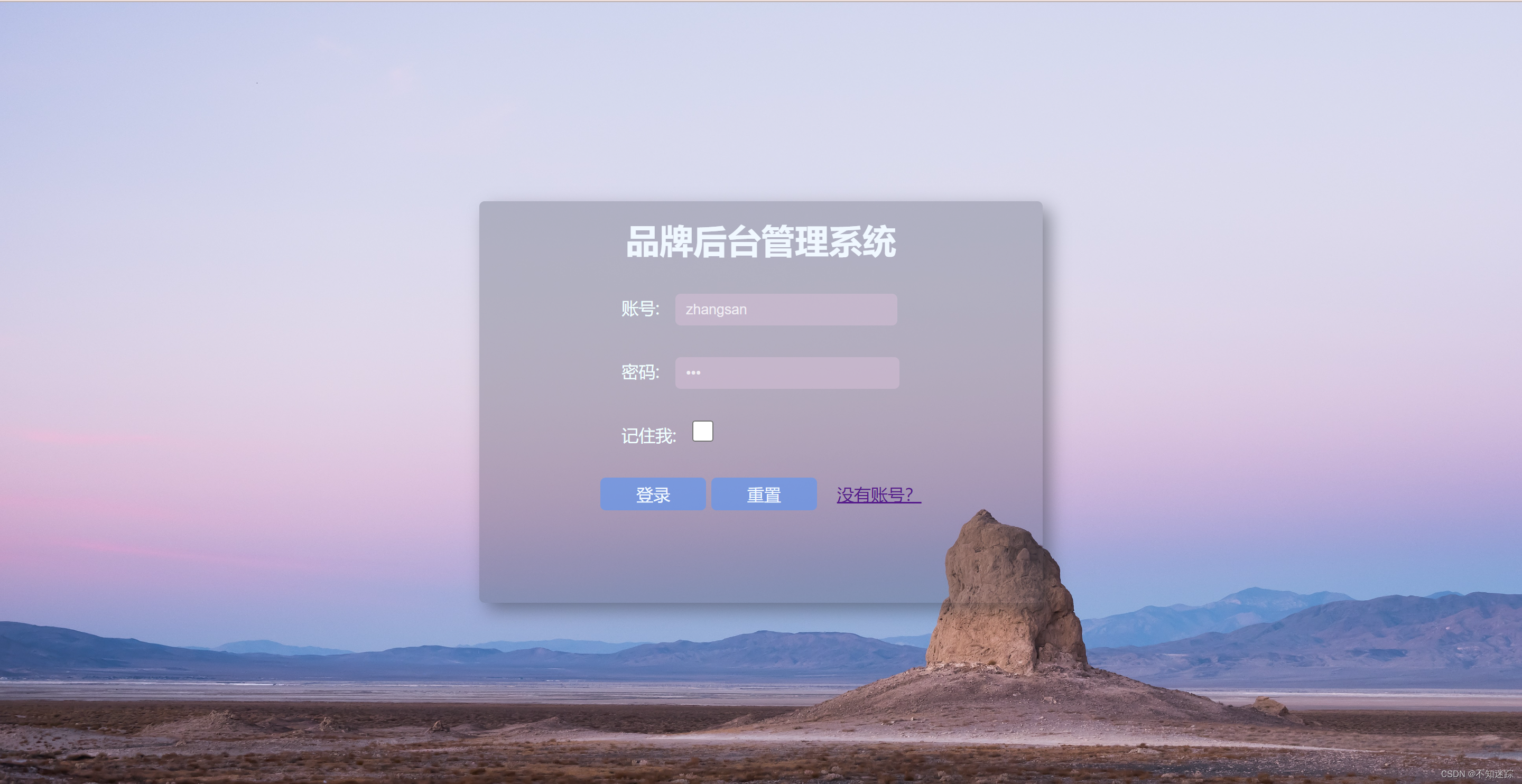
4.1login.html
4.2LoginServlet
4.3LoginFilter
5.后台主页面
5.1Brand
5.2BrandMapper
5.3BrandMapper.xml
5.4BrandService
5.5BrandServiceImpl

5.6BaseServlet
5.7BrandServlet
5.8PageBean
5.9brand.html
6.工程结构
7.代码下载
JavaWeb 综合案例
黑马程序员视频链接: 01-综合案例-环境搭建_哔哩哔哩_bilibili
1.功能介绍
- 用户登录(账号密码登录)
- 用户注册(新用户注册账号)
- 查询所有(查询所有品牌数据)
- 新增品牌(增加新的品牌数据)
- 修改品牌(修改品牌数据)
- 删除品牌(删除品牌数据)
- 批量删除(删除多条品牌数据)
- 分页查询(分页展示品牌数据)
- 条件查询(通过条件精确查询品牌数据)
所用技术及工具:Mybatis+Maven+Filter+Ajax+JSON+JavaScript+HTML+CSS+Element+VUE
2.工程准备
注:该项目的Tomcat启动地址应设为下图所示:
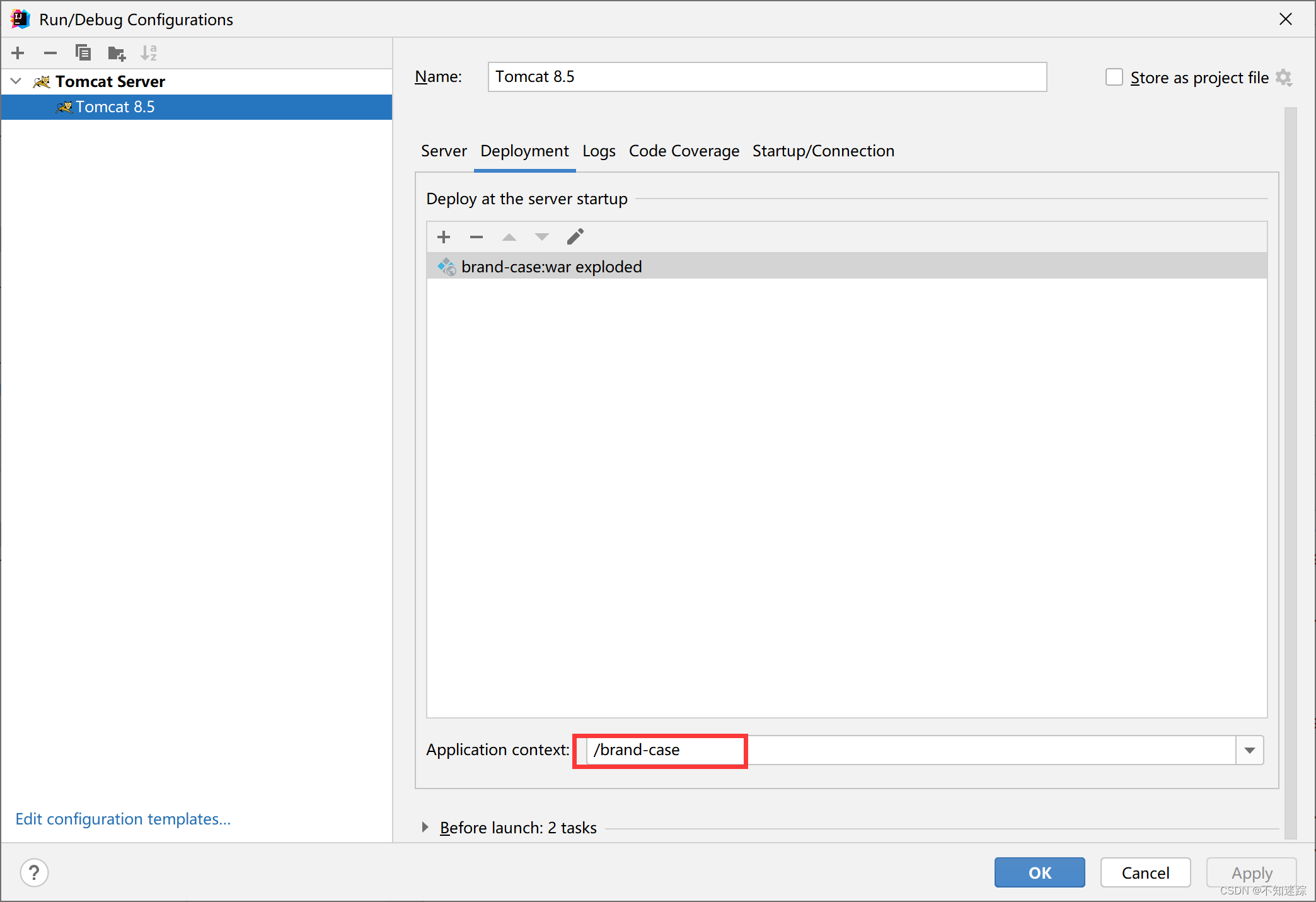
Maven配置:
2.1pom.xml
<?xml version="1.0" encoding="UTF-8"?> <project xmlns="http://maven.apache.org/POM/4.0.0" xmlns:xsi="http://www.w3.org/2001/XMLSchema-instance" xsi:schemaLocation="http://maven.apache.org/POM/4.0.0 http://maven.apache.org/xsd/maven-4.0.0.xsd"> <modelVersion>4.0.0</modelVersion> <groupId>org.example</groupId> <artifactId>brand-case</artifactId> <version>1.0-SNAPSHOT</version> <packaging>war</packaging> <properties> <maven.compiler.source>8</maven.compiler.source> <maven.compiler.target>8</maven.compiler.target> </properties> <dependencies> <!--Servlet--> <dependency> <groupId>javax.servlet</groupId> <artifactId>javax.servlet-api</artifactId> <version>3.1.0</version> <scope>provided</scope> </dependency> <!--MyBatis--> <dependency> <groupId>org.mybatis</groupId> <artifactId>mybatis</artifactId> <version>3.5.5</version> </dependency> <!--MySQL--> <dependency> <groupId>mysql</groupId> <artifactId>mysql-connector-java</artifactId> <version>5.1.34</version> </dependency> <!--fastjson--> <dependency> <groupId>com.alibaba</groupId> <artifactId>fastjson</artifactId> <version>1.2.62</version> </dependency> </dependencies> <build> <plugins> <plugin> <groupId>org.apache.tomcat.maven</groupId> <artifactId>tomcat7-maven-plugin</artifactId> <version>2.2</version> </plugin> </plugins> </build> </project>讯享网
Mybatis配置:
2.2mybatis-config.xml
讯享网<?xml version="1.0" encoding="UTF-8" ?> <!DOCTYPE configuration PUBLIC "-//mybatis.org//DTD Config 3.0//EN" "http://mybatis.org/dtd/mybatis-3-config.dtd"> <configuration> <typeAliases> <package name="com.pojo"/> </typeAliases> <environments default="development"> <environment id="development"> <transactionManager type="JDBC"/> <dataSource type="POOLED"> <property name="driver" value="com.mysql.jdbc.Driver"/> <!-- 连接数据库--> <property name="url" value="jdbc:mysql://localhost:13306/db1"/> <property name="username" value="root"/> <property name="password" value="1234"/> </dataSource> </environment> </environments> <mappers> <!--扫描mapper--> <package name="com.mapper"/> </mappers> </configuration>
2.3SqlSessionFactoryUtils
package com.util; import org.apache.ibatis.io.Resources; import org.apache.ibatis.session.SqlSessionFactory; import org.apache.ibatis.session.SqlSessionFactoryBuilder; import java.io.IOException; import java.io.InputStream; //通过mybatis操作数据库的工具类,里面封装了对数据库的操作 //只能使用一次,一旦创建后可以重复使用 public class SqlSessionFactoryUtils { private static SqlSessionFactory sqlSessionFactory; static { //静态代码块会随着类的加载而自动执行,且只执行一次 try { String resource = "mybatis-config.xml"; InputStream inputStream = Resources.getResourceAsStream(resource); sqlSessionFactory = new SqlSessionFactoryBuilder().build(inputStream); } catch (IOException e) { e.printStackTrace(); } } public static SqlSessionFactory getSqlSessionFactory(){ return sqlSessionFactory; } }验证码生成工具类:
2.4CheckCodeUtil
讯享网package com.util; import javax.imageio.ImageIO; import java.awt.*; import java.awt.geom.AffineTransform; import java.awt.image.BufferedImage; import java.io.*; import java.util.Arrays; import java.util.Random; / * 生成验证码工具类 */ public class CheckCodeUtil { public static final String VERIFY_CODES = "ABCDEFGHIJKLMNOPQRSTUVWXYZ"; private static Random random = new Random(); public static void main(String[] args) throws Exception { //调用主方法,在D盘产生名为a的验证码图片,并在服务端打印验证码内容 OutputStream fos=new FileOutputStream("d://a.jpg"); String s = CheckCodeUtil.outputVerifyImage(100, 50, fos, 4); System.out.println(s); //此为CheckCodeServlet写入,在jsp中可直接调用 // 如:“<img id="checkCodeImg" src="/brand-demo/CheckCodeServlet">” //ServletOutputStream os = response.getOutputStream(); //String s = CheckCodeUtil.outputVerifyImage(100, 50, os, 4); } / * 输出随机验证码图片流,并返回验证码值(一般传入输出流,响应response页面端,Web项目用的较多) * * @param width 图片宽度 * @param height 图片高度 * @param os 输出流 * @param verifySize 数据长度 * @return 验证码数据 * @throws IOException */ public static String outputVerifyImage(int width, int height, OutputStream os, int verifySize) throws IOException { String verifyCode = generateVerifyCode(verifySize); outputImage(width, height, os, verifyCode); return verifyCode; } / * 使用系统默认字符源生成验证码 * * @param verifySize 验证码长度 * @return */ public static String generateVerifyCode(int verifySize) { return generateVerifyCode(verifySize, VERIFY_CODES); } / * 使用指定源生成验证码 * * @param verifySize 验证码长度 * @param sources 验证码字符源 * @return */ public static String generateVerifyCode(int verifySize, String sources) { // 未设定展示源的字码,赋默认值大写字母+数字 if (sources == null || sources.length() == 0) { sources = VERIFY_CODES; } int codesLen = sources.length(); Random rand = new Random(System.currentTimeMillis()); StringBuilder verifyCode = new StringBuilder(verifySize); for (int i = 0; i < verifySize; i++) { verifyCode.append(sources.charAt(rand.nextInt(codesLen - 1))); } return verifyCode.toString(); } / * 生成随机验证码文件,并返回验证码值 (生成图片形式,用的较少) * * @param w * @param h * @param outputFile * @param verifySize * @return * @throws IOException */ public static String outputVerifyImage(int w, int h, File outputFile, int verifySize) throws IOException { String verifyCode = generateVerifyCode(verifySize); outputImage(w, h, outputFile, verifyCode); return verifyCode; } / * 生成指定验证码图像文件 * * @param w * @param h * @param outputFile * @param code * @throws IOException */ public static void outputImage(int w, int h, File outputFile, String code) throws IOException { if (outputFile == null) { return; } File dir = outputFile.getParentFile(); //文件不存在 if (!dir.exists()) { //创建 dir.mkdirs(); } try { outputFile.createNewFile(); FileOutputStream fos = new FileOutputStream(outputFile); outputImage(w, h, fos, code); fos.close(); } catch (IOException e) { throw e; } } / * 输出指定验证码图片流 * * @param w * @param h * @param os * @param code * @throws IOException */ public static void outputImage(int w, int h, OutputStream os, String code) throws IOException { int verifySize = code.length(); BufferedImage image = new BufferedImage(w, h, BufferedImage.TYPE_INT_RGB); Random rand = new Random(); Graphics2D g2 = image.createGraphics(); g2.setRenderingHint(RenderingHints.KEY_ANTIALIASING, RenderingHints.VALUE_ANTIALIAS_ON); // 创建颜色集合,使用java.awt包下的类 Color[] colors = new Color[5]; Color[] colorSpaces = new Color[]{Color.WHITE, Color.CYAN, Color.GRAY, Color.LIGHT_GRAY, Color.MAGENTA, Color.ORANGE, Color.PINK, Color.YELLOW}; float[] fractions = new float[colors.length]; for (int i = 0; i < colors.length; i++) { colors[i] = colorSpaces[rand.nextInt(colorSpaces.length)]; fractions[i] = rand.nextFloat(); } Arrays.sort(fractions); // 设置边框色 g2.setColor(Color.GRAY); g2.fillRect(0, 0, w, h); Color c = getRandColor(200, 250); // 设置背景色 g2.setColor(c); g2.fillRect(0, 2, w, h - 4); // 绘制干扰线 Random random = new Random(); // 设置线条的颜色 g2.setColor(getRandColor(160, 200)); for (int i = 0; i < 20; i++) { int x = random.nextInt(w - 1); int y = random.nextInt(h - 1); int xl = random.nextInt(6) + 1; int yl = random.nextInt(12) + 1; g2.drawLine(x, y, x + xl + 40, y + yl + 20); } // 添加噪点 // 噪声率 float yawpRate = 0.05f; int area = (int) (yawpRate * w * h); for (int i = 0; i < area; i++) { int x = random.nextInt(w); int y = random.nextInt(h); // 获取随机颜色 int rgb = getRandomIntColor(); image.setRGB(x, y, rgb); } // 添加图片扭曲 shear(g2, w, h, c); g2.setColor(getRandColor(100, 160)); int fontSize = h - 4; Font font = new Font("Algerian", Font.ITALIC, fontSize); g2.setFont(font); char[] chars = code.toCharArray(); for (int i = 0; i < verifySize; i++) { AffineTransform affine = new AffineTransform(); affine.setToRotation(Math.PI / 4 * rand.nextDouble() * (rand.nextBoolean() ? 1 : -1), (w / verifySize) * i + fontSize / 2, h / 2); g2.setTransform(affine); g2.drawChars(chars, i, 1, ((w - 10) / verifySize) * i + 5, h / 2 + fontSize / 2 - 10); } g2.dispose(); ImageIO.write(image, "jpg", os); } / * 随机颜色 * * @param fc * @param bc * @return */ private static Color getRandColor(int fc, int bc) { if (fc > 255) { fc = 255; } if (bc > 255) { bc = 255; } int r = fc + random.nextInt(bc - fc); int g = fc + random.nextInt(bc - fc); int b = fc + random.nextInt(bc - fc); return new Color(r, g, b); } private static int getRandomIntColor() { int[] rgb = getRandomRgb(); int color = 0; for (int c : rgb) { color = color << 8; color = color | c; } return color; } private static int[] getRandomRgb() { int[] rgb = new int[3]; for (int i = 0; i < 3; i++) { rgb[i] = random.nextInt(255); } return rgb; } private static void shear(Graphics g, int w1, int h1, Color color) { shearX(g, w1, h1, color); shearY(g, w1, h1, color); } private static void shearX(Graphics g, int w1, int h1, Color color) { int period = random.nextInt(2); boolean borderGap = true; int frames = 1; int phase = random.nextInt(2); for (int i = 0; i < h1; i++) { double d = (double) (period >> 1) * Math.sin((double) i / (double) period + (6.95862D * (double) phase) / (double) frames); g.copyArea(0, i, w1, 1, (int) d, 0); if (borderGap) { g.setColor(color); g.drawLine((int) d, i, 0, i); g.drawLine((int) d + w1, i, w1, i); } } } private static void shearY(Graphics g, int w1, int h1, Color color) { int period = random.nextInt(40) + 10; // 50; boolean borderGap = true; int frames = 20; int phase = 7; for (int i = 0; i < w1; i++) { double d = (double) (period >> 1) * Math.sin((double) i / (double) period + (6.95862D * (double) phase) / (double) frames); g.copyArea(i, 0, 1, h1, 0, (int) d); if (borderGap) { g.setColor(color); g.drawLine(i, (int) d, i, 0); g.drawLine(i, (int) d + h1, i, h1); } } } }
3.注册页面
3.1User
package com.pojo; public class User { private Integer id; private String username; private String password; public Integer getId() { return id; } public void setId(Integer id) { this.id = id; } public String getUsername() { return username; } public void setUsername(String username) { this.username = username; } public String getPassword() { return password; } public void setPassword(String password) { this.password = password; } @Override public String toString() { return "User{" + "id=" + id + ", username='" + username + '\'' + ", password='" + password + '\'' + '}'; } }3.2UserMapper.xml
讯享网<?xml version="1.0" encoding="UTF-8" ?> <!DOCTYPE mapper PUBLIC "-//mybatis.org//DTD Mapper 3.0//EN" "http://mybatis.org/dtd/mybatis-3-mapper.dtd"> <mapper namespace="com.mapper.UserMapper"> </mapper>
3.3UserMapper
package com.mapper; import com.pojo.User; import org.apache.ibatis.annotations.Insert; import org.apache.ibatis.annotations.Param; import org.apache.ibatis.annotations.Select; public interface UserMapper { / * 根据用户名和密码查询用户对象 * @param username * @param password * @return */ @Select("select * from tb_user where username = #{username} and password = #{password}") User select(@Param("username") String username, @Param("password") String password); / * 根据用户名查询用户对象 * @param username * @return */ @Select("select * from tb_user where username = #{username}") User selectByUsername(String username); / * 添加用户 * @param user */ @Insert("insert into tb_user values(null,#{username},#{password})") void add(User user); }3.4UserService
讯享网package com.service; import com.mapper.UserMapper; import com.pojo.User; import com.util.SqlSessionFactoryUtils; import org.apache.ibatis.session.SqlSession; import org.apache.ibatis.session.SqlSessionFactory; public class UserService { SqlSessionFactory factory = SqlSessionFactoryUtils.getSqlSessionFactory(); / * 登录方法 * @param username * @param password * @return */ public User login(String username, String password) { // 2.获取SqlSession SqlSession sqlSession = factory.openSession(); // 3.获取UserMapper UserMapper mapper = sqlSession.getMapper(UserMapper.class); User user = mapper.select(username, password); // 释放资源 sqlSession.close(); return user; } / * 注册方法 * @param user * @return */ public boolean register(User user) { // 2.获取SqlSession SqlSession sqlSession = factory.openSession(); // 3.获取UserMapper UserMapper mapper = sqlSession.getMapper(UserMapper.class); // 4.判断用户名是否存在 User u = mapper.selectByUsername(user.getUsername()); if(u == null){ // 用户名不存在 mapper.add(user); // 提交事务 sqlSession.commit(); } sqlSession.close(); return u == null; } }
3.5register.html
<!DOCTYPE html>
<html lang="en">
<head>
  <meta charset="UTF-8">
  <title>欢迎注册</title>
  <link href="css/register.css" rel="stylesheet">
  <script src="js/vue.js"></script>
  <script src="js/axios-0.18.0.js"></script>
</head>
<body>

<div id="app">
  <div class="form-div">
    <div class="reg-content">
      <h1>欢迎注册</h1>
      <span>已有帐号?</span> <a href="login.html">登录</a>
    </div>
    <form id="reg-form" action="#" method="get">

      <table>

        <tr>
          <td>用户名</td>
          <td class="inputs">
            <input v-model="username" type="text" id="username" >
            <br>
            <span id="username_err" class="err_msg" ref="unerr" style="display: none">用户名已被注册</span>
          </td>
        </tr>

        <tr>
          <td>密码</td>
          <td class="inputs">
            <input v-model="password" type="password" id="password">
            <br>
            <span id="password_err" class="err_msg" style="display: none">密码格式有误</span>
          </td>
        </tr>

        <tr>
          <td>验证码</td>
          <td class="inputs">
            <input v-model="checkCode" type="text" id="checkCode">
            <img :src="url" id="checkCodeImg">
            <a @click="switchPic" id="changeImg">看不清?</a>
            <br>
            <span class="err_msg">{


  {message}}</span>
          </td>
        </tr>

      </table>

      <div class="buttons">
        <input value="注 册" type="button" id="reg_btn" @click="submit">
      </div>
      <br class="clear">
    </form>

  </div>
</div>

<script>
    new Vue({
      el: "#app",
      data: {
        username:'',
        password:'',
        message:'',
        checkCode:'',
        url:''
      },
      mounted(){
        this.url = "http://localhost:8080/brand-case/checkCodeServlet"
      },
      methods:{
        switchPic(){
          //如果网址一样,浏览器可能会有缓存导致验证码换不了,增加时间函数,每次网址唯一
          this.url = "http://localhost:8080/brand-case/checkCodeServlet?"+new Date().getMilliseconds()
        },
        submit(){
          if(!this.username.trim()){
            this.message = "账号不能为空"
            return
          }
          if(!this.password.trim()){
            this.message = "密码不能为空"
            return
          }
          axios.get("http://localhost:8080/brand-case/registerServlet?username=" + this.username + "&password=" + this.password+ "&checkCode=" + this.checkCode).then((res)=>{
            //console.log(res)
            if(res.data==="success"){
              location.href = 'http://localhost:8080/brand-case/login.html'
            }else if(res.data === 1){
              this.message = "验证码错误"
              /*
              在vue2中,我们可以直接使用ref获取元素,也就是直接在元素上绑定ref属性,
              在直接使用this.$refs[‘自定义属性名’] 就能直接获取。
              */
              this.$refs.unerr.style.display = 'none'
            }else {
              this.$refs.unerr.style.display = ''
              this.message = ""
            }
          })
        }
      }
    })
</script>

<script>
    //点击图片更换验证码
    document.getElementById("checkCodeImg").onclick=function (){
      //如果src地址与上次相同,验证码会缓存,为保证每次不一样,src后加?和时间
      document.getElementById("checkCodeImg").src="http://localhost:8080/brand-case/checkCodeServlet?"+new Date().getMilliseconds();
    }
</script>
</body>
</html>
3.6RegisterServlet
讯享网package com.web.servlet; import com.pojo.User; import com.service.UserService; import javax.servlet.ServletException; import javax.servlet.annotation.WebServlet; import javax.servlet.http.HttpServlet; import javax.servlet.http.HttpServletRequest; import javax.servlet.http.HttpServletResponse; import javax.servlet.http.HttpSession; import java.io.IOException; @WebServlet("/registerServlet") public class RegisterServlet extends HttpServlet { / * 注册验证 */ private UserService service = new UserService(); @Override protected void doGet(HttpServletRequest request, HttpServletResponse response) throws ServletException, IOException { // 1.获取用户名和密码数据 String username = request.getParameter("username"); String password = request.getParameter("password"); User user = new User(); user.setUsername(username); user.setPassword(password); // 获取用户输入验证码 String checkCode = request.getParameter("checkCode"); // 程序生成的验证码 HttpSession session = request.getSession(); String checkCodeGen = (String) session.getAttribute("checkCodeGen"); // 比对 if(!checkCodeGen.equalsIgnoreCase(checkCode)){ response.getWriter().write("1"); // 不允许注册 return; } // 2.调用service 注册 boolean flag = service.register(user); // 3.判断注册成功与否 if(flag){ // 注册成功 跳转登陆页面 response.getWriter().write("success"); }else { // 注册失败 跳转到注册页面 response.getWriter().write("error"); } } @Override protected void doPost(HttpServletRequest request, HttpServletResponse response) throws ServletException, IOException { this.doGet(request, response); } }
3.7CheckCodeServlet
package com.web.servlet; import com.util.CheckCodeUtil; import javax.servlet.ServletException; import javax.servlet.ServletOutputStream; import javax.servlet.annotation.WebServlet; import javax.servlet.http.HttpServlet; import javax.servlet.http.HttpServletRequest; import javax.servlet.http.HttpServletResponse; import javax.servlet.http.HttpSession; import java.io.IOException; @WebServlet("/checkCodeServlet") public class CheckCodeServlet extends HttpServlet { @Override protected void doGet(HttpServletRequest request, HttpServletResponse response) throws ServletException, IOException { HttpSession session = request.getSession(); // 生成验证码 ServletOutputStream os = response.getOutputStream(); String checkCode = CheckCodeUtil.outputVerifyImage(100, 50, os, 4); // 存入Session session.setAttribute("checkCodeGen",checkCode); } @Override protected void doPost(HttpServletRequest request, HttpServletResponse response) throws ServletException, IOException { this.doGet(request, response); } }
4.登录页面
4.1login.html
讯享网<!DOCTYPE html>
<html lang="en">
<head>
<meta charset="UTF-8">
<title>login</title>
<link href="css/login.css" rel="stylesheet">
<script src="js/vue.js"></script>
<script src="js/axios-0.18.0.js"></script>
</head>
<body>
<div id="app">
<div id="loginDiv" style="height: 350px">
<form action="" id="form">
<h1 id="loginMsg">品牌后台管理系统</h1>
<div id="errorMsg">{
{ message }}</div>
<p>账号:<input id="username" v-model="username" type="text"></p>
<p>密码:<input id="password" v-model="password" type="password"></p>
<p>记住我:<input id="remember" v-model="remember" type="checkbox"></p>
<div id="subDiv">
<input type="button" class="button" value="登录" @click="submit">
<input type="reset" class="button" value="重置">
<a href="register.html">没有账号?</a>
</div>
</form>
</div>
</div>
<script>
new Vue({
el: "#app",
data: {
username:'',
password:'',
remember:'',
message:'',
},
mounted(){
//记住账号密码操作,username和password为Cookie名称
//console.log(location.search)
//console.log(document.cookie);
let strCookie = document.cookie;//获取Cookie
let arrCookie = strCookie.split(";");//多个cookie值是以;分隔的,用split把cookie分割开并赋值给数组arrCookie
for (let i = 0; i < arrCookie.length; i++) {//历遍数组
/*
原来割好的数组是:username=zhangsan,再用split('=')分割成:
username zhangsan 这样可以通过arr[0] arr[1]来分别获取username和zhangsan
*/
let arr = arrCookie[i].split("=");
//console.log(arr)
if(arr[0]==='username'){
//如果有相应的Cookie,运用v-model赋值
this.username = arr[1];
// trim() 函数移除字符串两侧的空白字符或其他预定义字符。
}else if(arr[0].trim()==='password'){
this.password = arr[1]
}
}
},
methods:{
submit(){
axios.get("http://localhost:8080/brand-case/loginServlet?username=" + this.username + "&password=" + this.password + "&remember=" + this.remember).then((res)=>{
if(res.data==="success"){
location.href = 'http://localhost:8080/brand-case/brand.html?'+new Date().getMilliseconds()
}else {
this.message = "账号或密码错误"
}
})
}
}
})
</script>
</body>
</html>
4.2LoginServlet
package com.web.servlet; import com.pojo.User; import com.service.UserService; import javax.servlet.*; import javax.servlet.http.*; import javax.servlet.annotation.*; import java.io.IOException; @WebServlet("/loginServlet") public class LoginServlet extends HttpServlet { / * 登录验证 */ private UserService service = new UserService(); @Override protected void doGet(HttpServletRequest request, HttpServletResponse response) throws ServletException, IOException { // 1.获取用户名密码 String username = request.getParameter("username"); String password = request.getParameter("password"); // 获取复选框数据 String remember = request.getParameter("remember"); // 2.调用service查询 User user = service.login(username,password); // 3.判断 if(user != null){ // 登陆成功 跳转到查询所有的BrandServlet // 判断用户是否勾选记住我 空指针异常 if("true".equals(remember)){ // 勾选了 发送Cookie // 1.创建Cookie对象 Cookie c_username = new Cookie("username",username); Cookie c_password = new Cookie("password",password); // 设置Cookie存活时间 c_username.setMaxAge(60 * 60 * 24 * 7); c_password.setMaxAge(60 * 60 * 24 * 7); // 2.发送 response.addCookie(c_username); response.addCookie(c_password); } // 将登陆成功后的User对象 存储到session HttpSession session = request.getSession(); session.setAttribute("user",user); response.getWriter().write("success"); }else { // 登陆失败 response.getWriter().write("error"); } } @Override protected void doPost(HttpServletRequest request, HttpServletResponse response) throws ServletException, IOException { this.doGet(request, response); } }4.3LoginFilter
讯享网package com.web.filter;

import javax.servlet.*;
import javax.servlet.annotation.WebFilter;
import javax.servlet.http.HttpServletRequest;
import javax.servlet.http.HttpSession;
import java.io.IOException;

/
 * 登陆验证的过滤器
 */
@WebFilter("/*")
public class LoginFilter implements Filter {
    @Override
    public void doFilter(ServletRequest request, ServletResponse response, FilterChain chain) throws ServletException, IOException {
        HttpServletRequest req = (HttpServletRequest) request;
        // 判断访问路径资源是否和登陆注册相关
        String[] urls = {"login.html","/element-ui/","/imgs/","/css/","/js/","/loginServlet","register.html","/registerServlet","/checkCodeServlet"};
        // 获取当前访问的资源路径
        String url = req.getRequestURL().toString();

        // 循环判断
        for (String u : urls) {
            if(url.contains(u)){
                // 找到了
                // 放行
                chain.doFilter(request, response);
                return;
            }
        }

        // 1.判断session中是否有user
        HttpSession session = req.getSession();
        Object user = session.getAttribute("user");

        // 2.判断user是否为null
        if(user !=null){
            // 登陆过了
            // 放行
            chain.doFilter(request, response);
        }else {
            // 没有登陆 存储提示信息 跳转到登陆页面
            //req.getRequestDispatcher("/login.html").forward(req,response);
            req.getRequestDispatcher("/login.html?"+System.currentTimeMillis()).forward(req,response);
        }

    }

    public void init(FilterConfig config) throws ServletException {
    }

    public void destroy() {
    }

}
5.后台主页面
5.1Brand
package com.pojo; public class Brand { // id 主键 private Integer id; // 品牌名称 private String brandName; // 企业名称 private String companyName; // 排序字段 private Integer ordered; // 描述信息 private String description; // 状态:0:禁用 1:启用 private Integer status; public Integer getId() { return id; } public void setId(Integer id) { this.id = id; } public String getBrandName() { return brandName; } public void setBrandName(String brandName) { this.brandName = brandName; } public String getCompanyName() { return companyName; } public void setCompanyName(String companyName) { this.companyName = companyName; } public Integer getOrdered() { return ordered; } public void setOrdered(Integer ordered) { this.ordered = ordered; } public String getDescription() { return description; } public void setDescription(String description) { this.description = description; } public Integer getStatus() { return status; } //逻辑视图 public String getStatusStr(){ if (status == null){ return "未知"; } return status == 0 ? "禁用":"启用"; } public void setStatus(Integer status) { this.status = status; } @Override public String toString() { return "Brand{" + "id=" + id + ", brandName='" + brandName + '\'' + ", companyName='" + companyName + '\'' + ", ordered=" + ordered + ", description='" + description + '\'' + ", status=" + status + '}'; } }5.2BrandMapper
讯享网package com.mapper; import com.pojo.Brand; import org.apache.ibatis.annotations.Param; import java.util.List; public interface BrandMapper { //查询所有 List<Brand> SelectAll(); //添加数据 void add(Brand brand); //修改数据 void update(Brand brand); //删除单个数据,通过id void deleteById(Brand brand); //批量删除数据 void deleteByIds(@Param("ids") int[] ids); //分页查询 List<Brand> selectByPage(@Param("begin") int begin,@Param("size") int size); //查询数据总数 int selectTotalCount(); //在条件查询的基础上进行分页查询 List<Brand> selectByPageAndCondition(@Param("begin") int begin,@Param("size") int size,@Param("brand") Brand brand); //通过条件查询符合的数据总数 int selectTotalCountByCondition(Brand brand); }
5.3BrandMapper.xml
<?xml version="1.0" encoding="UTF-8" ?> <!DOCTYPE mapper PUBLIC "-//mybatis.org//DTD Mapper 3.0//EN" "http://mybatis.org/dtd/mybatis-3-mapper.dtd"> <mapper namespace="com.mapper.BrandMapper"> <resultMap id="brandResultMap" type="brand"> <result property="brandName" column="brand_name" /> <result property="companyName" column="company_name" /> </resultMap> <insert id="add"> insert into tb_brand values(null,#{brandName},#{companyName},#{ordered},#{description},#{status}); </insert> <update id="update"> update tb_brand set brand_name=#{brandName},company_name=#{companyName},ordered=#{ordered}, description=#{description},status=#{status} where id=#{id}; </update> <delete id="deleteById"> delete from tb_brand where id=#{id}; </delete> <!--批量删除--> <delete id="deleteByIds"> delete from tb_brand where id in <foreach collection="ids" item="id" separator="," open="(" close=")"> #{id} </foreach> <!--第二种方法:不过ids必须为字符串,如:String ids="1,2,3,4" delete from tb_brand where id in (${ids}) --> </delete> <select id="SelectAll" resultMap="brandResultMap"> select * from tb_brand; </select> <select id="selectByPage" resultMap="brandResultMap"> select * from tb_brand limit #{begin},#{size}; </select> <select id="selectTotalCount" resultType="java.lang.Integer"> select count(*) from tb_brand; </select> <!--查询满足条件的数据并进行分页--> <!--${}的本质就是字符串拼接,需要手动加单引号;#{}的本质就是占位符赋值,自动添加单引号--> <select id="selectByPageAndCondition" resultMap="brandResultMap"> select * from tb_brand <where> <if test="brand.brandName != null and brand.brandName != '' "> and brand_name like #{brand.brandName} <!-- 模糊查询1: 例子所示使用原始方法,因此输入的brand.brandName字符串必须包括%%, 所以由于该例子的brandName包含%%字符串,不能直接替换下面的方法 模糊查询2: and brand_name like concat('%',#{brand.brandName},'%') 模糊查询3: and brand_name like '%${brand.brandName}%' 模糊查询4: and brand_name like "%"#{brand.brandName}"%" --> </if> <if test="brand.companyName != null and brand.companyName != '' "> and company_name like #{brand.companyName} </if> <if test="brand.status != null"> and status = #{brand.status} </if> </where> limit #{begin} , #{size} </select> <!--查询满足条件的数据条目数--> <select id="selectTotalCountByCondition" resultType="java.lang.Integer"> select count(*) from tb_brand <where> <if test="brandName != null and brandName != '' "> and brand_name like #{brandName} </if> <if test="companyName != null and companyName != '' "> and company_name like #{companyName} </if> <if test="status != null"> and status = #{status} </if> </where> </select> </mapper>5.4BrandService
讯享网package com.service; import com.pojo.Brand; import com.pojo.PageBean; import java.util.List; //原本方法可在BrandService直接实现,现在为了方便管理和动态处理,在接口实现类BrandServiceImpl实现 public interface BrandService { //查询所有 /*这个建立的不是接口,是类 public class BrandService { SqlSessionFactory sqlSessionFactory = SqlSessionFactoryUtils.getSqlSessionFactory(); public List<Brand> selectAll(){ SqlSession sqlSession = sqlSessionFactory.openSession(); BrandMapper mapper = sqlSession.getMapper(BrandMapper.class); List<Brand> brands = mapper.SelectAll(); sqlSession.close(); return brands; } }*/ List<Brand> SelectAll(); //添加数据 void add(Brand brand); //修改数据 void update(Brand brand); //删除单个数据,通过id void deleteById(Brand brand); //批量删除数据 void deleteByIds(int[] ids); //分页查询,(当前页码,每页展示数据数) PageBean<Brand> selectByPage(int currentPage,int pageSize); //分页条件查询,(当前页码,每页展示数据数,条件) PageBean<Brand> selectByPageAndCondition(int currentPage,int pageSize,Brand brand); }
5.5BrandServiceImpl
package com.service.impl; import com.mapper.BrandMapper; import com.pojo.Brand; import com.pojo.PageBean; import com.service.BrandService; import com.util.SqlSessionFactoryUtils; import org.apache.ibatis.session.SqlSession; import org.apache.ibatis.session.SqlSessionFactory; import java.util.List; public class BrandServiceImpl implements BrandService { //1. 创建SqlSessionFactory 工厂对象 SqlSessionFactory factory = SqlSessionFactoryUtils.getSqlSessionFactory(); @Override public List<Brand> SelectAll() { //2. 获取SqlSession对象 SqlSession sqlSession = factory.openSession(); //3. 获取BrandMapper BrandMapper mapper = sqlSession.getMapper(BrandMapper.class); //4. 调用方法 List<Brand> brands = mapper.SelectAll(); //5. 释放资源 sqlSession.close(); return brands; } @Override public void add(Brand brand) { //2. 获取SqlSession对象 SqlSession sqlSession = factory.openSession(); //3. 获取BrandMapper BrandMapper mapper = sqlSession.getMapper(BrandMapper.class); //4. 调用方法 mapper.add(brand); //5. 执行操作,提交事务 sqlSession.commit(); //6. 释放资源 sqlSession.close(); } @Override public void update(Brand brand) { //2. 获取SqlSession对象 SqlSession sqlSession = factory.openSession(); //3. 获取BrandMapper BrandMapper mapper = sqlSession.getMapper(BrandMapper.class); //4. 调用方法 mapper.update(brand); //5. 执行操作,提交事务 sqlSession.commit(); //6. 释放资源 sqlSession.close(); } @Override public void deleteById(Brand brand) { //2. 获取SqlSession对象 SqlSession sqlSession = factory.openSession(); //3. 获取BrandMapper BrandMapper mapper = sqlSession.getMapper(BrandMapper.class); //4. 调用方法 mapper.deleteById(brand); //5. 执行操作,提交事务 sqlSession.commit(); //6. 释放资源 sqlSession.close(); } @Override public void deleteByIds(int[] ids) { //2. 获取SqlSession对象 SqlSession sqlSession = factory.openSession(); //3. 获取BrandMapper BrandMapper mapper = sqlSession.getMapper(BrandMapper.class); //4. 调用方法 mapper.deleteByIds(ids); //5. 执行操作,提交事务 sqlSession.commit(); //6. 释放资源 sqlSession.close(); } @Override public PageBean<Brand> selectByPage(int currentPage, int pageSize) { //2. 获取SqlSession对象 SqlSession sqlSession = factory.openSession(); //3. 获取BrandMapper BrandMapper mapper = sqlSession.getMapper(BrandMapper.class); //4.1 计算开始索引 int begin=(currentPage-1)*pageSize; //4.2. 计算查询条目数 int size=pageSize; //5. 查询当前页数据 List<Brand> brands = mapper.selectByPage(begin, size); //6. 查询总记录数 int totalCount = mapper.selectTotalCount(); //补充:如果最后一页没有数据不够导致没有显示完,自动补充空白行,美观 Brand brand1 = null; int number1=totalCount-(currentPage-1)*pageSize; if(number1<pageSize){ int number2=pageSize-number1; for (int i = 1; i <=number2 ; i++) { brands.add(brand1); } } //7. 封装pageBean对象 PageBean<Brand> pageBean=new PageBean<>(); pageBean.setRows(brands); pageBean.setTotalCount(totalCount); //8. 释放资源 sqlSession.close(); return pageBean; } @Override public PageBean<Brand> selectByPageAndCondition(int currentPage, int pageSize, Brand brand) { //2. 获取SqlSession对象 SqlSession sqlSession = factory.openSession(); //3. 获取BrandMapper BrandMapper mapper = sqlSession.getMapper(BrandMapper.class); //4. 计算开始索引 int begin = (currentPage - 1) * pageSize; // 计算查询条目数 int size = pageSize; // 处理brand条件,模糊表达式 String brandName = brand.getBrandName(); if (brandName != null && brandName.length() > 0) { brand.setBrandName("%" + brandName + "%"); } String companyName = brand.getCompanyName(); if (companyName != null && companyName.length() > 0) { brand.setCompanyName("%" + companyName + "%"); } //5. 查询当前页数据 List<Brand> rows = mapper.selectByPageAndCondition(begin, size, brand); //6. 查询总记录数 int totalCount = mapper.selectTotalCountByCondition(brand); //补充:如果最后一页没有数据不够导致没有显示完,自动补充空白行,美观 Brand brand1 = null; int number1=totalCount-(currentPage-1)*pageSize; if(number1<pageSize){ int number2=pageSize-number1; for (int i = 1; i <=number2 ; i++) { rows.add(brand1); } } //7. 封装PageBean对象 PageBean<Brand> pageBean = new PageBean<>(); pageBean.setRows(rows); pageBean.setTotalCount(totalCount); //8. 释放资源 sqlSession.close(); return pageBean; } }5.6BaseServlet
讯享网package com.web.servlet; /* 替换HttpServlet,根据请求的最后一段路径来进行方法分发 * */ import javax.servlet.ServletException; import javax.servlet.http.HttpServlet; import javax.servlet.http.HttpServletRequest; import javax.servlet.http.HttpServletResponse; import java.io.IOException; import java.lang.reflect.InvocationTargetException; import java.lang.reflect.Method; public class BaseServlet extends HttpServlet { //根据请求的最后一段路径进行方法的分发 @Override protected void service(HttpServletRequest req, HttpServletResponse resp) throws ServletException, IOException { //1.获取请求的路径 String uri = req.getRequestURI(); // 例如路径为:/brand-case/brand/selectAll //2. 获取最后一段路径,方法名 //从路径的后面找到第一个“/”所处位置,然后最后的路径截下来,不携带“/”字符,如“selectAll” int index = uri.lastIndexOf('/'); //将index位置开始进行索引,返回字符串(方法名) String methodName = uri.substring(index + 1); // 获取到资源的二级路径 selectAll //3. 执行方法 //3.1 获取BrandServlet /UserServlet 字节码对象 Class /* this为谁调用用它(this所在的方法,如service方法),它(this)代表谁 如:service方法被BrandServlet调用,this代表BrandServlet */ //System.out.println(this); //下面是通过this获得字节码对象 Class<? extends BaseServlet> cls =this.getClass(); //3.2 获取方法 Method对象 try { Method method = cls.getMethod(methodName, HttpServletRequest.class, HttpServletResponse.class); //3.3 执行方法 method.invoke(this,req,resp); } catch (NoSuchMethodException e) { e.printStackTrace(); } catch (IllegalAccessException e) { e.printStackTrace(); } catch (InvocationTargetException e) { e.printStackTrace(); } } }
5.7BrandServlet
package com.web.servlet; import com.alibaba.fastjson.JSON; import com.pojo.Brand; import com.pojo.PageBean; import com.service.BrandService; import com.service.impl.BrandServiceImpl; import javax.servlet.ServletException; import javax.servlet.annotation.WebServlet; import javax.servlet.http.HttpServletRequest; import javax.servlet.http.HttpServletResponse; import java.io.BufferedReader; import java.io.IOException; import java.util.List; @WebServlet("/brand/*") public class BrandServlet extends BaseServlet{ //提供impl接口,减小耦合性,可以后进行动态获取实现类,只需要改变BrandServiceImpl private BrandService brandService = new BrandServiceImpl(); public void SelectAll(HttpServletRequest request, HttpServletResponse response) throws ServletException, IOException{ //System.out.println("selectAll....."); //1. 调用service查询 List<Brand> brands = brandService.SelectAll(); //2. 转为JSON(用的Fastjson) String jsonString = JSON.toJSONString(brands); //3. 写数据 //告知浏览器响应的数据是什么, 告知浏览器使用什么字符集进行解码 response.setContentType("text/json;charset=utf-8"); response.getWriter().write(jsonString); } public void add(HttpServletRequest request, HttpServletResponse response) throws ServletException, IOException{ //System.out.println("Add....."); request.setCharacterEncoding("UTF-8"); //1. 接收品牌数据 BufferedReader br = request.getReader(); String params = br.readLine();//json字符串 //转为Brand对象 Brand brand = JSON.parseObject(params, Brand.class); //2. 调用service添加 brandService.add(brand); //3. 响应成功的标识 response.getWriter().write("success"); } public void update(HttpServletRequest request, HttpServletResponse response) throws ServletException, IOException{ request.setCharacterEncoding("UTF-8"); //1. 接收品牌数据 BufferedReader br = request.getReader(); String params = br.readLine();//json字符串 //转为Brand对象 Brand brand = JSON.parseObject(params, Brand.class); //2. 调用service修改 brandService.update(brand); //3. 响应成功的标识 response.getWriter().write("success"); } public void deleteById(HttpServletRequest request, HttpServletResponse response) throws ServletException, IOException{ //1. 接收品牌数据 BufferedReader br = request.getReader(); String params = br.readLine();//json字符串 //转为Brand对象 Brand brand = JSON.parseObject(params, Brand.class); //2. 调用service修改 brandService.deleteById(brand); //3. 响应成功的标识 response.getWriter().write("success"); } public void deleteByIds(HttpServletRequest request, HttpServletResponse response) throws ServletException, IOException{ //1. 接收品牌数据,像这样的[1,2,3,4],所以还用JSON BufferedReader br = request.getReader(); String params = br.readLine();//json字符串 //转为 int[]数组 int[] ids = JSON.parseObject(params, int[].class); //2. 调用service修改 brandService.deleteByIds(ids); //3. 响应成功的标识 response.getWriter().write("success"); } //分页查询 public void selectByPage(HttpServletRequest request, HttpServletResponse response) throws ServletException, IOException{ //1. 接收参数,(当前页码,每页展示条数) 如:url?currentPage=1&pageSize=20 String currentPageX = request.getParameter("currentPage"); String pageSizeX = request.getParameter("pageSize"); int currentPage = Integer.parseInt(currentPageX); int pageSize = Integer.parseInt(pageSizeX); //2. 调用service PageBean<Brand> pageBean = brandService.selectByPage(currentPage, pageSize); //2. 转为JSON(用的Fastjson) String jsonString = JSON.toJSONString(pageBean); //3. 写数据 //告知浏览器响应的数据是什么, 告知浏览器使用什么字符集进行解码 response.setContentType("text/json;charset=utf-8"); response.getWriter().write(jsonString); } //条件分页查询 public void selectByPageAndCondition(HttpServletRequest request, HttpServletResponse response) throws ServletException, IOException { //1. 接收 当前页码 和 每页展示条数 url?currentPage=1&pageSize=5 String _currentPage = request.getParameter("currentPage"); String _pageSize = request.getParameter("pageSize"); int currentPage = Integer.parseInt(_currentPage); int pageSize = Integer.parseInt(_pageSize); // 获取查询条件对象 BufferedReader br = request.getReader(); String params = br.readLine();//json字符串 //转为 Brand Brand brand = JSON.parseObject(params, Brand.class); //2. 调用service查询 PageBean<Brand> pageBean = brandService.selectByPageAndCondition(currentPage,pageSize,brand); //2. 转为JSON String jsonString = JSON.toJSONString(pageBean); //3. 写数据 response.setContentType("text/json;charset=utf-8"); response.getWriter().write(jsonString); } }5.8PageBean
讯享网package com.pojo; import java.util.List; //分页查询的javabean /*为可以应用其他数据,创造一个泛型T 可在创建PageBean对象时进行指定,提高数据通用性*/ public class PageBean<T> { //总记录数 private int totalCount; //当前页数据 private List<T> rows; public int getTotalCount() { return totalCount; } public void setTotalCount(int totalCount) { this.totalCount = totalCount; } public List<T> getRows() { return rows; } public void setRows(List<T> rows) { this.rows = rows; } @Override public String toString() { return "PageBean{" + "totalCount=" + totalCount + ", rows=" + rows + '}'; } }
5.9brand.html
<!DOCTYPE html>
<html lang="en">
<head>
<meta charset="UTF-8">
<title>主页面</title>
<style>
.el-table .warning-row {
background: white;
}
.el-table .success-row {
background: #f0f9eb;
}
</style>
</head>
<body>
<!--elementUI 页面如果需要加载很多东西的时候,
自己定义的按钮或者弹出框dialog的文字就会显示在页面上, 一闪而过, 因此需要优化一下-->
<!--在页面完成加载前先显示loddingg,加载完成后,将appLoading设为none,将app显示-->
<div id="appLoading">
<span><h1>Loading...</h1></span>
</div>
<div id="app" style="display: none">
<!--搜索表单-->
<el-form :inline="true" :model="brand" class="demo-form-inline">
<el-form-item label="当前状态">
<el-select v-model="brand.status" placeholder="当前状态" clearable>
<!-- clearable使表格点击后可清空选择 -->
<el-option label="启用" value="1"></el-option>
<el-option label="禁用" value="0"></el-option>
</el-select>
</el-form-item>
<el-form-item label="企业名称">
<el-input v-model="brand.companyName" placeholder="企业名称" clearable></el-input>
</el-form-item>
<el-form-item label="品牌名称">
<el-input v-model="brand.brandName" placeholder="品牌名称" clearable></el-input>
</el-form-item>
<el-form-item>
<el-button type="primary" @click="onSubmit">查询</el-button>
</el-form-item>
</el-form>
<!--按钮-->
<el-row>
<el-button type="danger" plain @click="deleteByIds">批量删除</el-button>
<el-button type="primary" plain @click="AddData">新增</el-button>
</el-row>
<!--添加数据对话框表单-->
<el-dialog
title="添加品牌"
:visible.sync="AddDialogVisible"
width="30%"
@close="close"
>
<el-form ref="form" :model="brand" label-width="80px">
<el-form-item label="品牌名称">
<el-input v-model="brand.brandName"></el-input>
</el-form-item>
<el-form-item label="企业名称">
<el-input v-model="brand.companyName"></el-input>
</el-form-item>
<el-form-item label="排序">
<el-input v-model="brand.ordered"></el-input>
</el-form-item>
<el-form-item label="备注">
<el-input type="textarea" v-model="brand.description"></el-input>
</el-form-item>
<el-form-item label="状态">
<el-switch v-model="brand.status"
active-text="启用"
inactive-text="禁用"
active-value="1"
inactive-value="0"
></el-switch>
</el-form-item>
<el-form-item>
<el-button type="primary" @click="addBrand">提交</el-button>
<el-button @click="AddDialogVisible = false">取消</el-button>
</el-form-item>
</el-form>
</el-dialog>
<!--修改数据对话框表单-->
<el-dialog
title="修改品牌"
:visible.sync="UpdateDialogVisible"
width="30%"
@close="close"
>
<el-form ref="form" :model="brand" label-width="80px">
<el-form-item label="品牌名称">
<el-input v-model="brand.brandName"></el-input>
</el-form-item>
<el-form-item label="企业名称">
<el-input v-model="brand.companyName"></el-input>
</el-form-item>
<el-form-item label="排序">
<el-input v-model="brand.ordered"></el-input>
</el-form-item>
<el-form-item label="备注">
<el-input type="textarea" v-model="brand.description"></el-input>
</el-form-item>
<el-form-item label="状态">
<el-switch v-model="brand.status"
active-text="启用"
inactive-text="禁用"
active-value="1"
inactive-value="0"
></el-switch>
</el-form-item>
<el-form-item>
<el-button type="primary" @click="updateBrand">修改</el-button>
<el-button @click="Updatecancel">取消</el-button>
</el-form-item>
</el-form>
</el-dialog>
<!--表格-->
<template>
<el-table
:data="tableData"
style="width: 100%"
:row-class-name="tableRowClassName"
@selection-change="handleSelectionChange"
>
<el-table-column
type="selection"
width="55">
</el-table-column>
<el-table-column
prop="id"
label="ID"
width="50"
align="center"
>
</el-table-column>
<el-table-column
prop="brandName"
label="品牌名称"
align="center"
>
</el-table-column>
<el-table-column
prop="companyName"
label="企业名称"
align="center"
>
</el-table-column>
<el-table-column
prop="ordered"
align="center"
label="排序">
</el-table-column>
<el-table-column
prop="statusStr"
align="center"
label="当前状态">
</el-table-column>
<el-table-column
align="center"
label="操作">
<template slot-scope="scope">
<el-row>
<!-- scope.row获取某一行数据,scope.row.id获取此行id -->
<el-button type="primary" @click="beforeUpdate(scope.row)">修改</el-button>
<el-button type="danger" @click="deleteById(scope.row)">删除</el-button>
</el-row>
</template>
</el-table-column>
</el-table>
</template>
<!--分页工具条-->
<el-pagination
@size-change="handleSizeChange"
@current-change="handleCurrentChange"
:current-page="currentPage"
:page-sizes="[8, 10, 15, 20]"
:page-size="8"
layout="total, sizes, prev, pager, next, jumper"
:total="totalCount">
</el-pagination>
</div>
<script src="js/vue.js"></script>
<script src="element-ui/lib/index.js"></script>
<script src="js/axios-0.18.0.js"></script>
<link rel="stylesheet" href="element-ui/lib/theme-chalk/index.css">
<script>
new Vue({
el: "#app",
//页面加载完毕后发送 ajax 请求,要用mounted
mounted(){
//加载完成后,div加载页面变为none,主页面显示
document.getElementById('app').style.display = 'block';
document.getElementById('appLoading').style.display = 'none';
//将查询所有操作封装为了一个方法,以便以后调用
this.selectAll();
/*var _this = this;
axios({
method:"get",
url:"http://localhost:8080/brand-case/SelectAllServlet"
}).then(function (resp) {
//将表格的值tableData赋值响应得到的集合
_this.tableData = resp.data;
})*/
},
methods: {
//查询所有数据的方法
selectAll(){
/*var _this = this;
axios({
method:"get",
// url:"http://localhost:8080/brand-case/SelectAllServlet"
url:"http://localhost:8080/brand-case/brand/SelectAll",
}).then(function (resp) {
//将表格的值tableData赋值响应得到的集合
_this.tableData = resp.data;
})*/
//分页查询
//页面挂载完成后及添加后修改后正在使用此方法
var _this = this;
axios({
method:"get",
//分页查询:
url:"http://localhost:8080/brand-case/brand/selectByPage?currentPage="+ _this.currentPage+"&pageSize="+_this.pageSize,
}).then(function (resp) {
//此时返回的数据为pageBean对象,具有一个brand数据集合,一个数据总数
//将表格的值tableData赋值响应得到的集合
_this.tableData = resp.data.rows;// {rows:[],totalCount:100}
//设置总记录数
_this.totalCount = resp.data.totalCount;
})
},
//分页条件查询,大范围:全部分页和条件分页均可用,不过全部分页默认data为空
//搜索框查询和分页后查询正在使用
selectByPageAndCondition(){
//分页条件查询
axios({
method:"post",
url:"http://localhost:8080/brand-case/brand/selectByPageAndCondition?currentPage="+this.currentPage+"&pageSize="+this.pageSize,
data:this.brand
/*
then里匿名函数的this特点:需要在成功的回调函数(也就是then 函数中的匿名函数)中使用this,
都需要在外边使用 _this 记录一下 this 所指向的对象;
因为在外边的 this 表示的是 Vue 对象,而回调函数中的 this 表示的是window对象。
*/
/*箭头函数的作用:
替换(简化)匿名函数。then(箭头函数)里面的this是vue不是window。*/
//所有的function (resp){}均可替换为resp =>{},且不再需要this的转化
}).then(resp =>{
//补充:如果分页查询最后一页没有数据不够导致没有显示完,
// BrandServiceImpl里的分页查询方法会自动补充空白行,美观
//设置表格数据
this.tableData = resp.data.rows; // {rows:[],totalCount:100}
//设置总记录数
this.totalCount = resp.data.totalCount;
})
},
//Element自带表格方法,表格颜色
tableRowClassName({row, rowIndex}) {
if (rowIndex%2===1) {
return 'warning-row';
} else{
return 'success-row';
}
return '';
},
// 复选框选中后执行的方法
handleSelectionChange(val) {
console.log(this.multipleSelection);
//返回brand集合
this.multipleSelection = val;
},
// 搜索框查询方法
onSubmit() {
console.log(this.brand);
//点击查询后,自动回到数据第一页
this.currentPage=1;
this.selectByPageAndCondition();
},
// 添加数据
addBrand(){
//console.log(this.brand);
var _this=this;
//发送ajax异步请求,添加数据
axios({
method: "post",
// url:"http://localhost:8080/brand-case/AddServlet",
url:"http://localhost:8080/brand-case/brand/add",
data:_this.brand
}).then(function (resp) {
if(resp.data=="success"){
//添加成功
//1.关闭窗口
_this.AddDialogVisible = false;
//2.重新查询数据
//该操作结束后,回到第一页,查询全部,清除brand数据,防止干扰下次操作
_this.currentPage=1;
_this.selectAll();
_this.clear();
//3.弹出消息提示
_this.$message({
message: '恭喜你,添加成功',
type: 'success'
});
}else {
_this.$message.error('添加数据失败');
}
})
},
//修改绑定数据
beforeUpdate(row){
/*注意:
问题:一旦表单的数据被改变,表格中相对应的数据也会直接跟着改变,
且无论是点击确定还是点击取消按钮,表格的数据依旧会被修改。
原因:因为row是Object对象类型,如果直接赋值的话,就变成了浅拷贝,复制的是地址,
导致在表单中改变值的时候表格中的数据也跟着改变,所以要进行深拷贝。
解决方法:JSON.parse(JSON.stringify(obj)) 这行代码的意思就是利用 JSON.stringify 将 js 对象序列化(JSON字符串),
再使用 JSON.parse 来反序列化(还原) js 对象。序列化的作用是存储和传输。
*/
//this.brand=row;
this.brand = JSON.parse(JSON.stringify(row));
this.UpdateDialogVisible=true;
//控制修改页面表单按钮
if(row.status=="1"){
this.brand.status="1";
}else{
this.brand.status="0";
}
},
//修改数据
updateBrand(){
var _this=this;
axios({
method:"post",
url:"http://localhost:8080/brand-case/brand/update",
data:this.brand
}).then(function (resp){
if (resp.data=="success"){
//修改成功
_this.UpdateDialogVisible = false;
//该操作结束后,回到第一页,查询全部,清除brand数据,防止干扰下次操作
//修改操作,既没有添加数据,又没有删除数据,不需要回到第一页的操作
_this.selectByPageAndCondition();
_this.clear();
_this.$message({
message: '恭喜你,修改完成',
type: 'success'
});
}else {
_this.$message.error('修改数据失败');
}
})
},
//修改表单点击取消后触发
Updatecancel(){
this.UpdateDialogVisible = false;
//清除brand数据,防止干扰下次操作
this.clear();
},
//关闭添加和修改表单时,点击×号
close(){
//清除brand数据,防止干扰下次操作
this.clear();
},
//删除单个数据
deleteById(row){
this.brand = JSON.parse(JSON.stringify(row));
this.$confirm('是否删除该品牌, 请继续?', '提示', {
confirmButtonText: '确定',
cancelButtonText: '取消',
type: 'warning'
}).then(() => {
//用户点击确定删除
var _this=this;
axios({
method:"post",
url:"http://localhost:8080/brand-case/brand/deleteById",
data:_this.brand
}).then(function (resp){
if (resp.data=="success"){
//删除成功
//该操作结束后,回到第一页,查询全部,清除brand数据,防止干扰下次操作
_this.currentPage=1;
_this.selectAll();
_this.clear();
_this.$message({
type: 'success',
message: '删除成功!'
});
}else {
_this.$message.error('删除数据失败');
}
})
}).catch(() => {
_this.$message({
type: 'info',
message: '已取消删除'
});
});
},
//复选框批量删除
deleteByIds(){
//这是批量选中后的数据模型,可以从 `multipleSelection` 数据模型中获取所选数据的id值
//console.log(this.multipleSelection);
//如果复选框选中则可进行批量删除,否则弹出未选中提示框
if(this.multipleSelection.length==0){
this.$alert('请先进行多选,然后点击批量删除', '消息提示', {
confirmButtonText: '确定'
});
}else{
//弹出确认框
this.$confirm('正在批量删除数据, 是否继续?', '提示', {
confirmButtonText: '确定',
cancelButtonText: '取消',
type: 'warning'
}).then(() => {
//用户点击确定删除
//1.创建id数组 [1,2,3,4],从this.multipleSelection获取
for (let i = 0; i < this.multipleSelection.length; i++) {
let selectionElement = this.multipleSelection[i];
this.selectedIds[i]=selectionElement.id;
}
//2.发送ajax请求
var _this=this;
axios({
method: "post",
url:"http://localhost:8080/brand-case/brand/deleteByIds",
data:_this.selectedIds
}).then(function (resp) {
if(resp.data=="success"){
//批量删除成功
//1.重新查询数据
_this.currentPage=1;
_this.selectAll();
_this.clear();
//2.弹出消息提示
_this.$message({
message: '恭喜你,批量删除成功',
type: 'success'
});
}else {
_this.$message.error('批量删除失败');
}
})
}).catch(() => {
this.$message({
type: 'info',
message: '已取消删除'
});
});
}
},
//模型清空操作,防止新增操作时,新增页面具有默认数据
clear(){
this.brand.brandName="";
this.brand.companyName="";
this.brand.ordered="";
this.brand.description="";
this.brand.status="";
},
//点击新增按钮操作
AddData(){
this.clear();
this.AddDialogVisible = true;
},
//分页
handleSizeChange(val) {
//console.log(`每页 ${val} 条`);
//重新设置每页显示条数
this.pageSize=val;
this.selectByPageAndCondition();
},
handleCurrentChange(val) {
//console.log(`当前页: ${val}`);
//重新设置当前页码
this.currentPage=val;
this.selectByPageAndCondition();
}
},
data() {
return {
//每页显示的条数
pageSize:8,
//总记录数
totalCount:100,
// 当前页码
currentPage: 1,
// 添加数据对话框是否展示的标记
AddDialogVisible: false,
// 修改数据对话框是否展示的标记
UpdateDialogVisible: false,
// 品牌模型数据
brand: {
status: '',
brandName: '',
companyName: '',
id:"",
ordered:"",
description:""
},
//被选中的id数组
selectedIds:[],
// 复选框选中数据集合
multipleSelection: [],
// 表格数据
//初始设置8个初数据,防止进入主页面时产生闪烁干扰,影响体验
tableData: [{
id:"",
brandName: '',
companyName: '',
ordered:"",
status: ''
}, {
id:"",
brandName: '',
companyName: '',
ordered:"",
status: ''
}, {
id:"",
brandName: '',
companyName: '',
ordered:"",
status: ''
}, {
id:"",
brandName: '',
companyName: '',
ordered:"",
status: ''
},{
id:"",
brandName: '',
companyName: '',
ordered:"",
status: ''
}, {
id:"",
brandName: '',
companyName: '',
ordered:"",
status: ''
}, {
id:"",
brandName: '',
companyName: '',
ordered:"",
status: ''
}, {
id:"",
brandName: '',
companyName: '',
ordered:"",
status: ''
}]
}
}
})
</script>
</body>
</html>
6.工程结构

7.代码下载
Gitte:品牌后台管理系统: JavaWeb综合案例——品牌后台管理系统 mybatis+maven+filter+ajax+json+js+html+css+element+VUE (gitee.com)
CSDN:黑马程序员最新版JavaWeb综合案例——品牌后台管理系统-Java文档类资源-CSDN文库
https://download.csdn.net/download/weixin_/
 https://download.csdn.net/download/weixin_/
可以点个免费的赞吗!!!
版权声明:本文内容由互联网用户自发贡献,该文观点仅代表作者本人。本站仅提供信息存储空间服务,不拥有所有权,不承担相关法律责任。如发现本站有涉嫌侵权/违法违规的内容,请联系我们,一经查实,本站将立刻删除。
如需转载请保留出处:https://51itzy.com/kjqy/106791.html