
github地址:
https://github.com/GumTreeDiff/gumtree
startup guide:
https://github.com/GumTreeDiff/gumtree/wiki/Getting-Started
1.试下java的
环境要求:
Java 11
Gradle
You have to install srcML if you want to diff C++ and C# code
You have to install cgum if you want to diff C code
You have to install pythonparser to diff Python code
You have to install jsparser to diff JS code
支持的语言:
C, C++, C#, CSS, Java, JavaScript, Ocaml, PHP, Python, R, Ruby, TypeScript, XML
(1)构建:
git clone https://github.com/GumTreeDiff/gumtree.git
cd gumtree
./gradlew build
(2)使用:
构建完成后,在dist/build/distributions有一个zip压缩包,解压后,进入bin文件夹,即可看懂啊gumtree和gumtree.bat,可作为命令行程序使用。
help:
Available Options:

-C <2>  Set system property (-c property value).

-v      Verbose mode

--help  Display help (this screen).


Available Commands:

* webdiff: Web diff client

* cluster: Extract action clusters

* dotdiff: A dot diff client

* htmldiff: Dump diff as HTML in stdout

* list: List matchers, generators, clients and properties

* parse: Parse file and dump result.

* swingdiff: A swing diff client

* textdiff: Dump actions in a textual format.

* axmldiff: Dump annotated xml tree
讯享网
测试:
(1)webdiff

浏览器打开http://127.0.0.1:4567,显示效果如下:
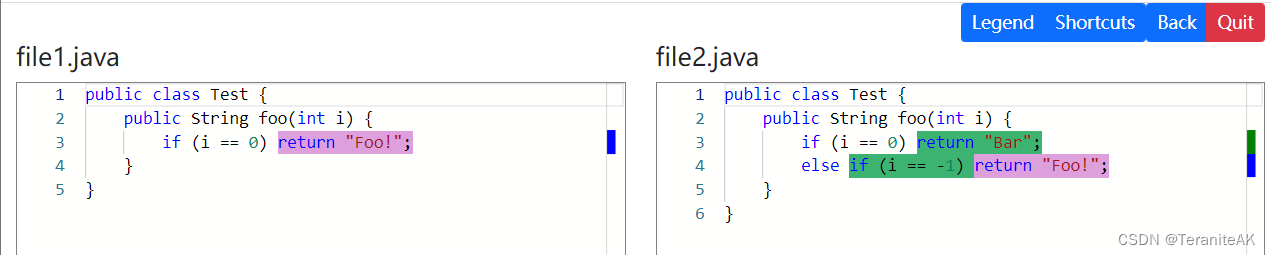
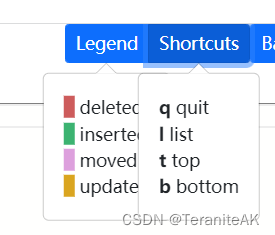
(2)dotdiff:
gumtree dotdiff file1.java file2.java
返回的结果是dot文件内容,可以用graphviz画图
dot -Tpng diffAST.dot -o diffAST.png
图片如下:
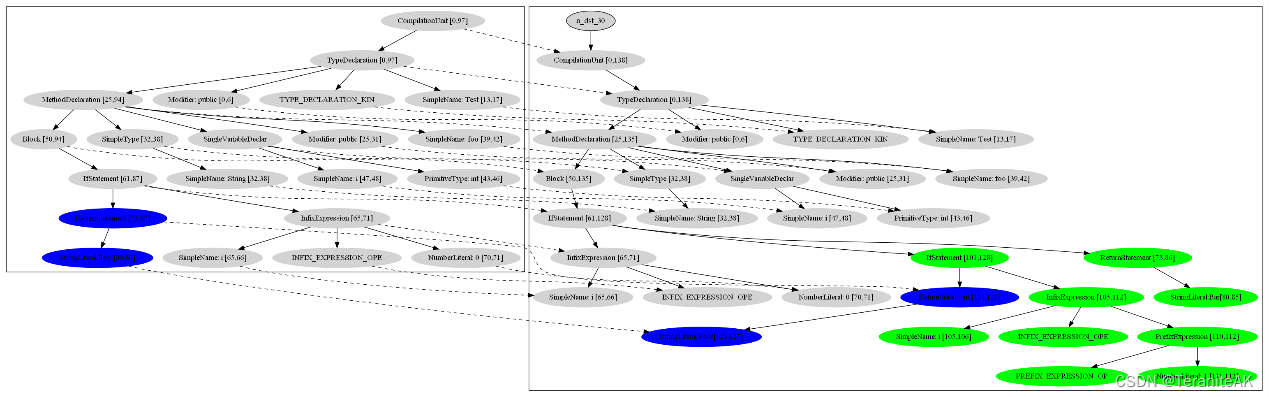
根据论文里的描述和个人猜测,左右两个框框出来的两个不同AST分别是source和destination的AST,虚线代表两个AST中node的mapping关系,蓝色节点代表move,绿色节点代表add。
再试试update和remove
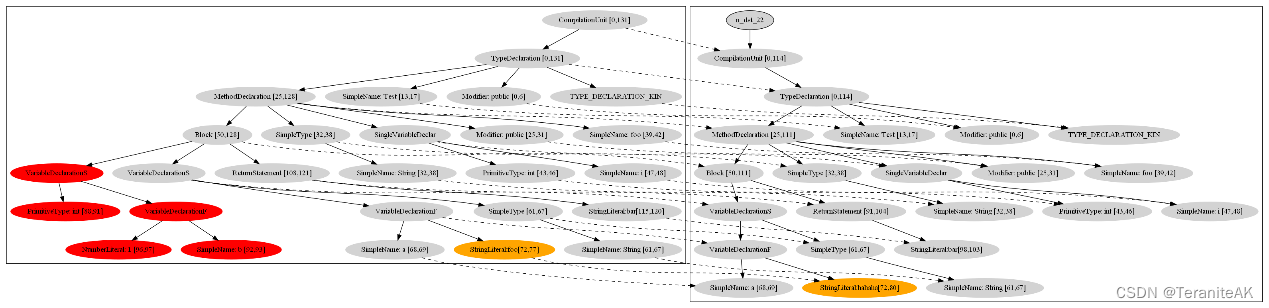
看来红色代表remove 橙色代表update
(3)htmldiff
其实就是webdiff出来的效果 只不过是把那个html返回给你了 个人评价是不如webdiff
(4)textdiff
返回一些文本上的匹配结果:
讯享网=== match --- INFIX_EXPRESSION_OPERATOR: == [67,69] INFIX_EXPRESSION_OPERATOR: == [67,69] === match --- SimpleName: foo [39,42] SimpleName: foo [39,42] === match --- SimpleName: i [47,48] SimpleName: i [47,48] === match --- SimpleName: i [65,66] SimpleName: i [65,66] === match --- SimpleName: String [32,38] SimpleName: String [32,38] === match --- PrimitiveType: int [43,46] PrimitiveType: int [43,46] === match --- IfStatement [61,87] IfStatement [61,128] === match --- SimpleType [32,38] SimpleType [32,38] === match --- Block [50,94] Block [50,135] === match --- NumberLiteral: 0 [70,71] NumberLiteral: 0 [70,71] === match --- Modifier: public [25,31] Modifier: public [25,31] === match --- TypeDeclaration [0,97] TypeDeclaration [0,138] === match --- SimpleName: Test [13,17] SimpleName: Test [13,17] === match --- CompilationUnit [0,97] CompilationUnit [0,138] === match --- StringLiteral: "Foo!" [80,86] StringLiteral: "Foo!" [121,127] === match --- ReturnStatement [73,87] ReturnStatement [114,128] === match --- MethodDeclaration [25,94] MethodDeclaration [25,135] === match --- TYPE_DECLARATION_KIND: class [7,12] TYPE_DECLARATION_KIND: class [7,12] === match --- InfixExpression [65,71] InfixExpression [65,71] === match --- Modifier: public [0,6] Modifier: public [0,6] === match --- SingleVariableDeclaration [43,48] SingleVariableDeclaration [43,48] === insert-tree --- ReturnStatement [73,86] StringLiteral: "Bar" [80,85] to IfStatement [61,87] at 1 === insert-node --- IfStatement [101,128] to IfStatement [61,87] at 2 === insert-tree --- InfixExpression [105,112] SimpleName: i [105,106] INFIX_EXPRESSION_OPERATOR: == [107,109] PrefixExpression [110,112] PREFIX_EXPRESSION_OPERATOR: - [110,111] NumberLiteral: 1 [111,112] to IfStatement [101,128] at 0 === move-tree --- ReturnStatement [73,87] StringLiteral: "Foo!" [80,86] to IfStatement [101,128] at 1
这里的101 128这些数字啊其实是这个ast node在文件中的字符的起始和终止位置,我验证过(就是把整个file作为一个字符串读入 这个node在这个字符串的哪个下标位置)
(5)cluster
看不太懂的中间信息
(6)list
显示一些内部信息吧 也是要涉及高级用法时才用得到
用法:
gumtree list (matchers | generators | clients | properties)
(7)parse
解析一个file并返回解析出的AST
例子:gumtree parse file1.java
结果:
CompilationUnit [0,97] TypeDeclaration [0,97] Modifier: public [0,6] TYPE_DECLARATION_KIND: class [7,12] SimpleName: Test [13,17] MethodDeclaration [25,94] Modifier: public [25,31] SimpleType [32,38] SimpleName: String [32,38] SimpleName: foo [39,42] SingleVariableDeclaration [43,48] PrimitiveType: int [43,46] SimpleName: i [47,48] Block [50,94] IfStatement [61,87] InfixExpression [65,71] SimpleName: i [65,66] INFIX_EXPRESSION_OPERATOR: == [67,69] NumberLiteral: 0 [70,71] ReturnStatement [73,87] StringLiteral: "Foo!" [80,86](8)swingdiff
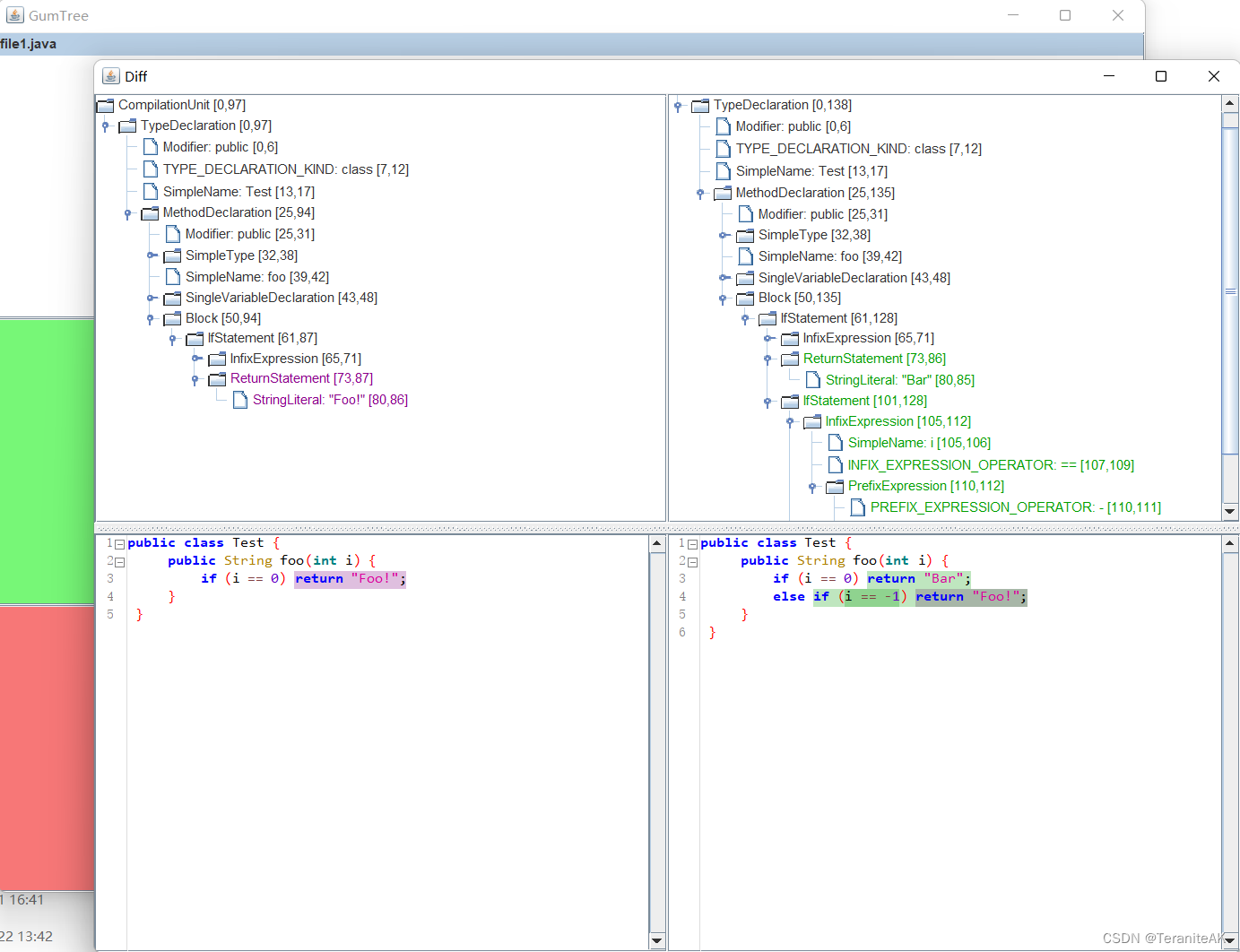
显示一个GUI界面(应该是java swing实现的GUI窗口),效果还不错,上面是AST tree,下面的源代码,同时用颜色标记出了
例子
(9)axmldiff
返回diff结果的xml结果
例如:gumtree axmldiff file1.java file2.java
结果:

讯享网<?xml version="1.0" ?> <root> <context></context> <tree type="CompilationUnit" pos="0" length="97" other_pos="0" other_length="138"> <tree type="TypeDeclaration" pos="0" length="97" other_pos="0" other_length="138"> <tree type="Modifier" label="public" pos="0" length="6" other_pos="0" other_length="6"></tree> <tree type="TYPE_DECLARATION_KIND" label="class" pos="7" length="5" other_pos="7" other_length="5"></tree> <tree type="SimpleName" label="Test" pos="13" length="4" other_pos="13" other_length="4"></tree> <tree type="MethodDeclaration" pos="25" length="69" other_pos="25" other_length="110"> <tree type="Modifier" label="public" pos="25" length="6" other_pos="25" other_length="6"></tree> <tree type="SimpleType" pos="32" length="6" other_pos="32" other_length="6"> <tree type="SimpleName" label="String" pos="32" length="6" other_pos="32" other_length="6"></tree> </tree> <tree type="SimpleName" label="foo" pos="39" length="3" other_pos="39" other_length="3"></tree> <tree type="SingleVariableDeclaration" pos="43" length="5" other_pos="43" other_length="5"> <tree type="PrimitiveType" label="int" pos="43" length="3" other_pos="43" other_length="3"></tree> <tree type="SimpleName" label="i" pos="47" length="1" other_pos="47" other_length="1"></tree> </tree> <tree type="Block" pos="50" length="44" other_pos="50" other_length="85"> <tree type="IfStatement" pos="61" length="26" other_pos="61" other_length="67"> <tree type="InfixExpression" pos="65" length="6" other_pos="65" other_length="6"> <tree type="SimpleName" label="i" pos="65" length="1" other_pos="65" other_length="1"></tree> <tree type="INFIX_EXPRESSION_OPERATOR" label="==" pos="67" length="2" other_pos="67" other_length="2"></tree> <tree type="NumberLiteral" label="0" pos="70" length="1" other_pos="70" other_length="1"></tree> </tree> <tree type="ReturnStatement" pos="73" length="14" other_pos="114" other_length="14"> <tree type="StringLiteral" label=""Foo!"" pos="80" length="6" other_pos="121" other_length="6"></tree> </tree> </tree> </tree> </tree> </tree> </tree> </root>
可以后续用于其他程序解析
2.试试diff python
https://github.com/GumTreeDiff/pythonparser
弄好后
最好用linux 我这里是windows 暂时没用上
Linux的效果:

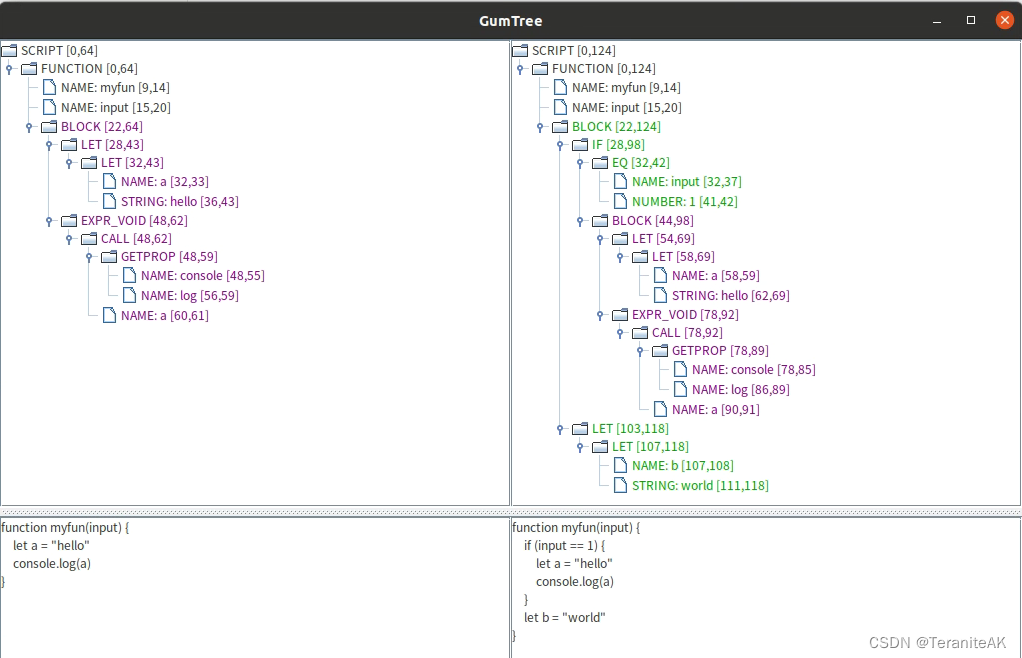
3.试试diff js
https://github.com/GumTreeDiff/jsparser
同理
4.试试调用gumtree API
教程:
GumTree API · GumTreeDiff/gumtree Wiki · GitHub
首先按照之前build的方法 构建出distribution后,在压缩包里面的lib目录就会有gumtree.jar包,然后直接按照上面的教程的方法 在java code里面调用即可。
【顺便学习一下如何在IDEA里面利用gradle管理jar包 在自己的代码里引入jar包并使用里面的类 方法啥的,这个写得还不错:
https://blog.csdn.net/u0/article/details/】
代码:
package com.example.gumtreetest; import com.github.gumtreediff.actions.EditScript; import com.github.gumtreediff.actions.EditScriptGenerator; import com.github.gumtreediff.actions.SimplifiedChawatheScriptGenerator; import com.github.gumtreediff.client.Run; import com.github.gumtreediff.gen.TreeGenerators; import com.github.gumtreediff.matchers.MappingStore; import com.github.gumtreediff.matchers.Matcher; import com.github.gumtreediff.matchers.Matchers; import com.github.gumtreediff.tree.Tree; import java.io.IOException; public class Main { public static void main(String args[]) throws IOException { Run.initGenerators(); // registers the available parsers String srcFile = "input/file5.java"; String dstFile = "input/file6.java"; Tree src = TreeGenerators.getInstance().getTree(srcFile).getRoot(); // retrieves and applies the default parser for the file Tree dst = TreeGenerators.getInstance().getTree(dstFile).getRoot(); // retrieves and applies the default parser for the file Matcher defaultMatcher = Matchers.getInstance().getMatcher(); // retrieves the default matcher MappingStore mappings = defaultMatcher.match(src, dst); // computes the mappings between the trees EditScriptGenerator editScriptGenerator = new SimplifiedChawatheScriptGenerator(); // instantiates the simplified Chawathe script generator EditScript actions = editScriptGenerator.computeActions(mappings); // computes the edit script System.out.println(actions.asList()); } }运行结果:
讯享网[=== insert-tree --- MethodDeclaration [100,172] Modifier: public [100,106] SimpleType [107,113] SimpleName: String [107,113] SimpleName: newFoo [114,120] SingleVariableDeclaration [121,126] PrimitiveType: int [121,124] SimpleName: i [125,126] Block [128,172] IfStatement [139,165] InfixExpression [143,149] SimpleName: i [143,144] INFIX_EXPRESSION_OPERATOR: == [145,147] NumberLiteral: 0 [148,149] ReturnStatement [151,165] StringLiteral: "Foo!" [158,164] to TypeDeclaration [0,97] at 4]
个人感觉跟textdiff command的功能差不多
4.试试gumtree-cp
来源论文 2017 ASE:
Yoshiki Higo, Akio Ohtani, and Shinji Kusumoto, “Generating Simpler AST Edit Scripts by Considering Copy-and-Paste”, accepted by the 32nd IEEE/ACM International Conference on Automated Software Engineering (ASE2017), Urbana-Champaign, Illinois, USA, October 30 -- November 3, 2017.
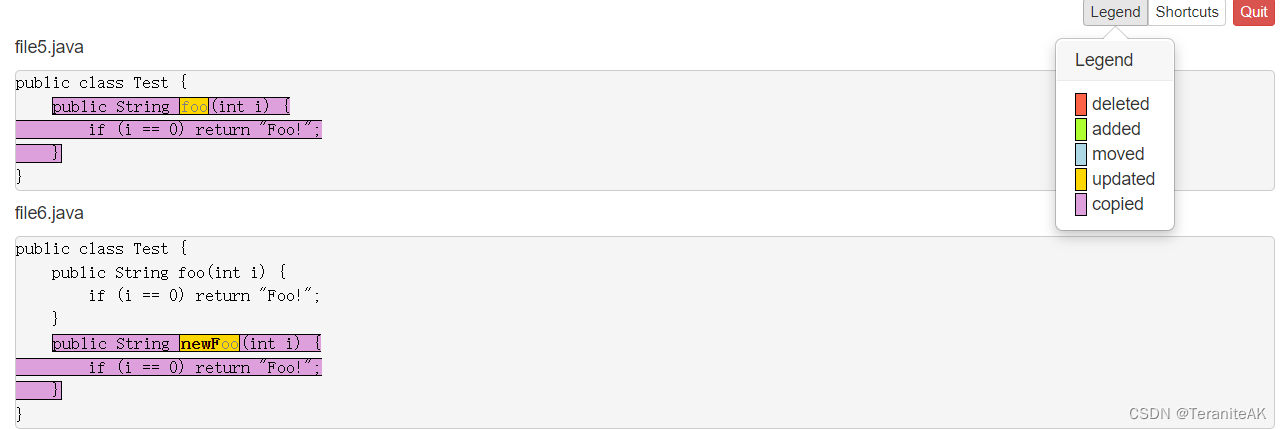
是在gumtree所有的move update add delete四种操作基础上,增加了c&p(copy & paste)操作
cp操作和move操作的区别:
move类似与cut 剪切
c&p 就是纯复制 原来【原来的方法会把一些cp操作识别为大量的insert操作,而本文的方法可以识别为一个cp操作+部分update操作】【这里cp仅能识别与一些纯复制或复制后简单】
gumtree-cp没有提供源代码,只提供了executable:
Supplimental Materials for Our ASE2017 Paper
Usage: java -jar TOOL MODE oldfile.java newfile.java
TOOL = gumtree-cp.jar | gumtree-original.jar
MODE = webdiff | expdiff | swingdiff | axmldiff | parse
测试:
file1.java:
public class Test { public String foo(int i) { if (i == 0) return "Foo!"; } }file2.java:
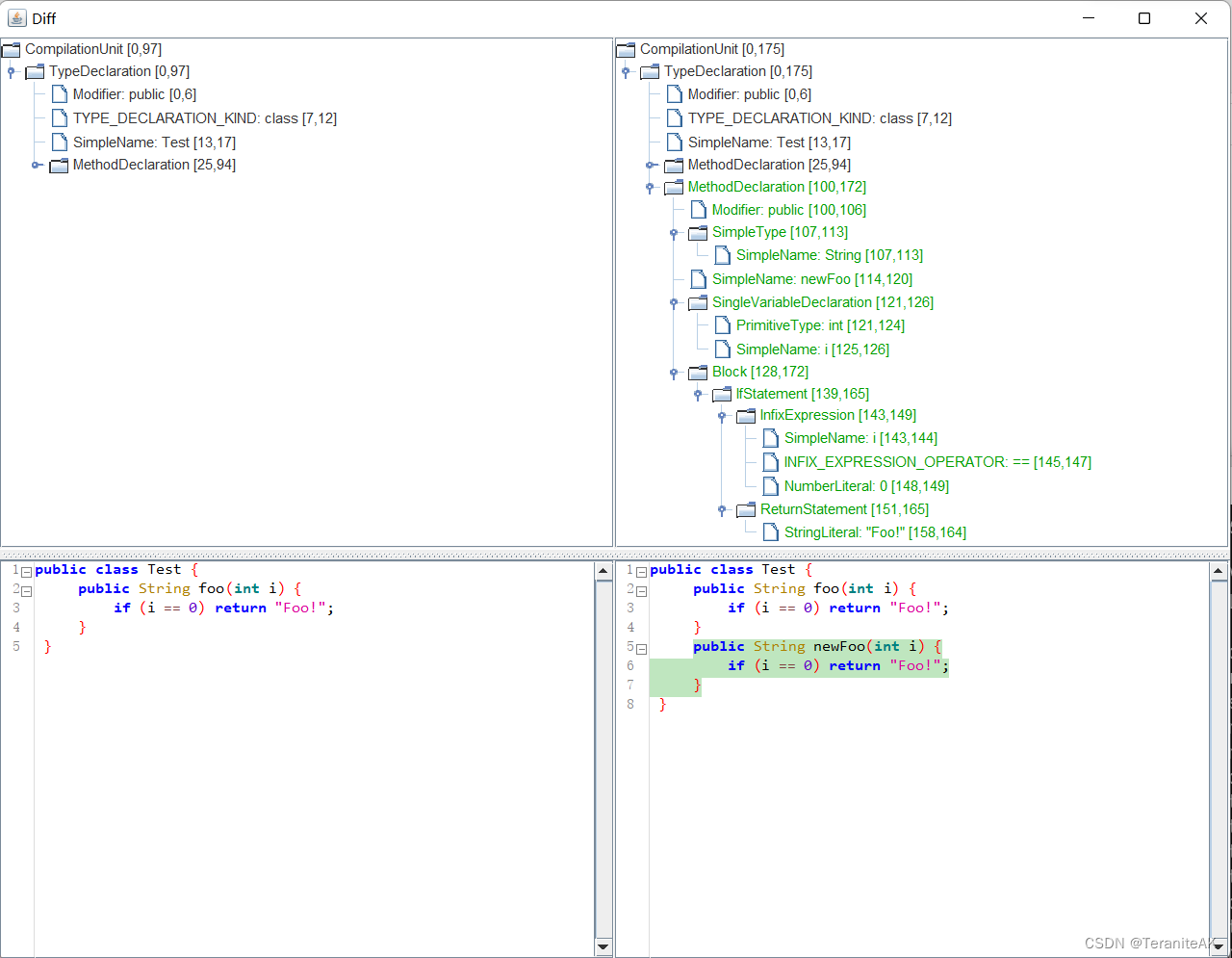
讯享网public class Test { public String foo(int i) { if (i == 0) return "Foo!"; } public String newFoo(int i) { if (i == 0) return "Foo!"; } }
原版gumtree效果:

gumtree-cp效果:
gumtree-cp不能用于python
版权声明:本文内容由互联网用户自发贡献,该文观点仅代表作者本人。本站仅提供信息存储空间服务,不拥有所有权,不承担相关法律责任。如发现本站有涉嫌侵权/违法违规的内容,请联系我们,一经查实,本站将立刻删除。
如需转载请保留出处:https://51itzy.com/kjqy/106440.html