
最近写了一个条形码生成工具的demo,拿出来分享给大家。首先贴一下最终效果
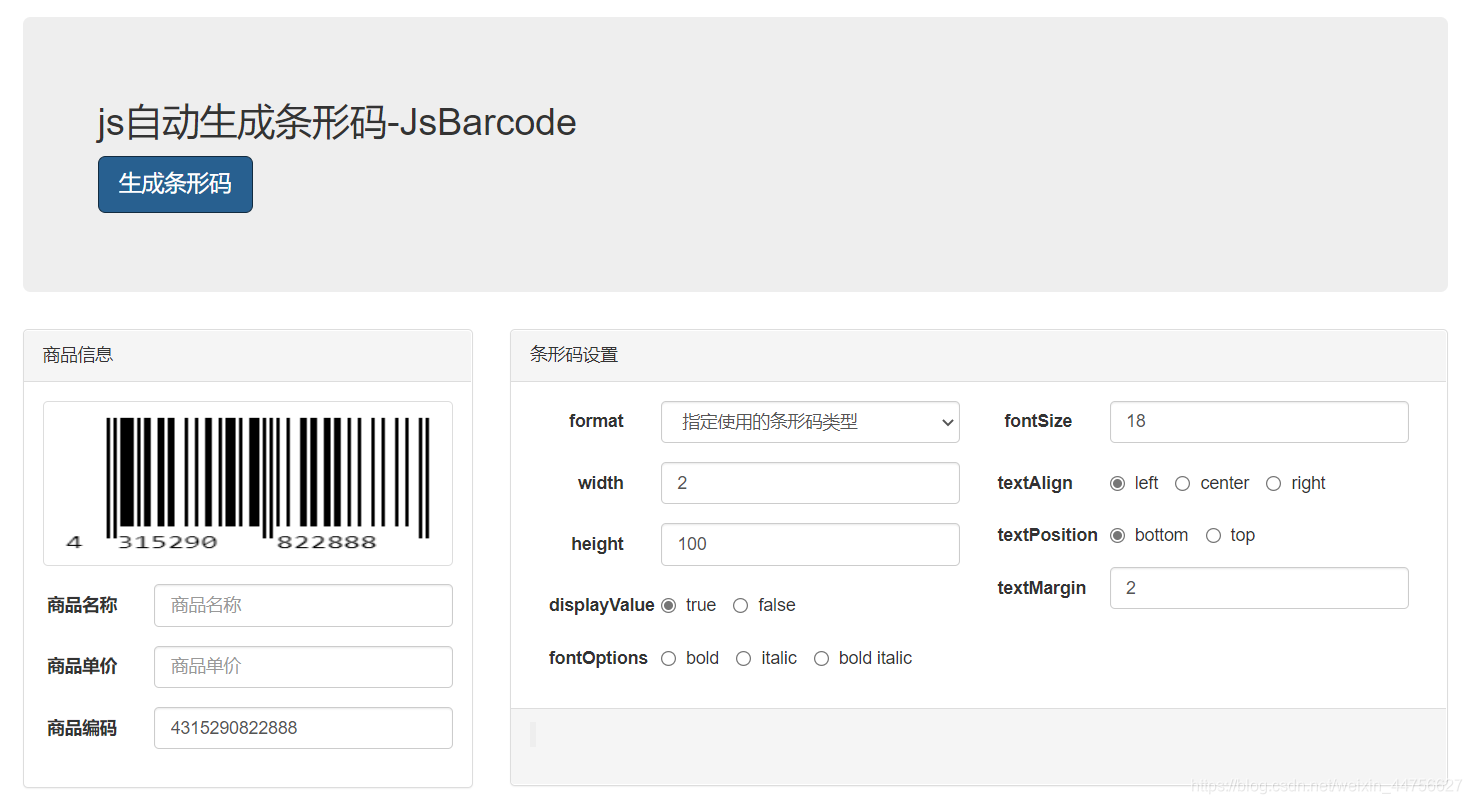
讯享网

<!doctype html> <html lang="zh-CN"> <head> <meta charset="utf-8"> <meta http-equiv="X-UA-Compatible" content="IE=edge"> <meta name="viewport" content="width=device-width, initial-scale=1"> <!-- 上述3个meta标签*必须*放在最前面,任何其他内容都*必须*跟随其后! --> <title>js自动生成条形码-JsBarcode</title> <link rel="icon" href="https://cdn.jsdelivr.net/npm/@bootcss/v3.bootcss.com@1.0.10/favicon.ico"> <!-- Bootstrap --> <!-- 最新版本的 Bootstrap 核心 CSS 文件 --> <link rel="stylesheet" href="https://stackpath.bootstrapcdn.com/bootstrap/3.4.1/css/bootstrap.min.css" integrity="sha384-HSMxcRTRxnN+Bdg0JdbxYKrThecOKuH5zCYotlSAcp1+c8xmyTe9GYg1l9a69psu" crossorigin="anonymous"> <!-- HTML5 shim 和 Respond.js 是为了让 IE8 支持 HTML5 元素和媒体查询(media queries)功能 --> <!-- 警告:通过 file:// 协议(就是直接将 html 页面拖拽到浏览器中)访问页面时 Respond.js 不起作用 --> <!--[if lt IE 9]> <script src="https://cdn.jsdelivr.net/npm/html5shiv@3.7.3/dist/html5shiv.min.js"></script> <script src="https://cdn.jsdelivr.net/npm/respond.js@1.4.2/dest/respond.min.js"></script> <![endif]--> </head> <body> <div class="container"> <br> <div class="jumbotron"> <h2>js自动生成条形码-JsBarcode</h2> <p><a class="btn btn-primary btn-lg" href="#" role="button" onclick="codeScan()">生成条形码</a></p> </div> <!-- Stack the columns on mobile by making one full-width and the other half-width --> <div class="row"> <div class="col-xs-12 col-md-4"> <div class="panel panel-default"> <div class="panel-heading">商品信息</div> <div class="panel-body"> <form class="form-horizontal"> <div class="form-group"> <div class="col-sm-12"> <img id="barcode" class="img-thumbnail" src="data:image/svg+xml;base64,PD94bWwgdmVyc2lvbj0iMS4wIiBlbmNvZGluZz0iVVRGLTgiIHN0YW5kYWxvbmU9InllcyI/PjxzdmcgeG1sbnM9Imh0dHA6Ly93d3cudzMub3JnLzIwMDAvc3ZnIiB3aWR0aD0iMTQwIiBoZWlnaHQ9IjE0MCIgdmlld0JveD0iMCAwIDE0MCAxNDAiIHByZXNlcnZlQXNwZWN0UmF0aW89Im5vbmUiPjwhLS0KU291cmNlIFVSTDogaG9sZGVyLmpzLzE0MHgxNDAKQ3JlYXRlZCB3aXRoIEhvbGRlci5qcyAyLjYuMC4KTGVhcm4gbW9yZSBhdCBodHRwOi8vaG9sZGVyanMuY29tCihjKSAyMDEyLTIwMTUgSXZhbiBNYWxvcGluc2t5IC0gaHR0cDovL2ltc2t5LmNvCi0tPjxkZWZzPjxzdHlsZSB0eXBlPSJ0ZXh0L2NzcyI+PCFbQ0RBVEFbI2hvbGRlcl8xN2ExODhmZDY5MCB0ZXh0IHsgZmlsbDojQUFBQUFBO2ZvbnQtd2VpZ2h0OmJvbGQ7Zm9udC1mYW1pbHk6QXJpYWwsIEhlbHZldGljYSwgT3BlbiBTYW5zLCBzYW5zLXNlcmlmLCBtb25vc3BhY2U7Zm9udC1zaXplOjEwcHQgfSBdXT48L3N0eWxlPjwvZGVmcz48ZyBpZD0iaG9sZGVyXzE3YTE4OGZkNjkwIj48cmVjdCB3aWR0aD0iMTQwIiBoZWlnaHQ9IjE0MCIgZmlsbD0iI0VFRUVFRSIvPjxnPjx0ZXh0IHg9IjQ0LjA1NDY4NzUiIHk9Ijc0LjU2MDkzNzUiPjE0MHgxNDA8L3RleHQ+PC9nPjwvZz48L3N2Zz4=" data-holder-rendered="true" style="width: 100%; height: 132px;"> </div> </div> <div class="form-group"> <label for="name" class="col-sm-3 control-label">商品名称</label> <div class="col-sm-9"> <input type="text" class="form-control" id="name" required placeholder="商品名称"> </div> </div> <div class="form-group"> <label for="price" class="col-sm-3 control-label">商品单价</label> <div class="col-sm-9"> <input type="text" class="form-control" id="price" required placeholder="商品单价"> </div> </div> <div class="form-group"> <label for="code" class="col-sm-3 control-label">商品编码</label> <div class="col-sm-9"> <input type="text" class="form-control" id="code" required placeholder="商品编码" value="88"> </div> </div> </form> </div> </div> </div> <div class="col-xs-12 col-md-8"> <div class="panel panel-default"> <div class="panel-heading">条形码设置</div> <div class="panel-body"> <div class="col-xs-6 col-md-6"> <form class="form-horizontal"> <div class="form-group"> <label for="format" class="col-sm-3 control-label">format</label> <div class="col-sm-9"> <select class="form-control" id="format" onchange="showDetail()"> <option value="">指定使用的条形码类型</option> </select> </div> </div> <div class="form-group"> <label for="width" class="col-sm-3 control-label">width</label> <div class="col-sm-9"> <input type="email" class="form-control" id="width" value="2" placeholder="指定条形码中单条竖线的宽度"> </div> </div> <div class="form-group"> <label for="height" class="col-sm-3 control-label">height</label> <div class="col-sm-9"> <input type="email" class="form-control" id="height" value="100" placeholder="指定条形码高度"> </div> </div> <div class="form-group"> <label for="displayValue" class="col-sm-3 control-label">displayValue</label> <div class="col-sm-9"> <label class="radio-inline"> <input type="radio" id="displayValue1" name="displayValue" value="true" checked>true </label> <label class="radio-inline"> <input type="radio" id="displayValue2" name="displayValue" value="false">false </label> </div> </div> <div class="form-group"> <label for="fontOptions" class="col-sm-3 control-label">fontOptions</label> <div class="col-sm-9"> <label class="radio-inline"> <input type="radio" id="fontOptions1" name="fontOptions" value="bold">bold </label> <label class="radio-inline"> <input type="radio" id="fontOptions2" name="fontOptions" value="italic">italic </label> <label class="radio-inline"> <input type="radio" id="fontOptions3" name="fontOptions" value="bold italic">bold italic </label> </div> </div> </form> </div> <div class="col-xs-6 col-md-6"> <form class="form-horizontal"> <div class="form-group"> <label for="fontSize" class="col-sm-3 control-label">fontSize</label> <div class="col-sm-9"> <input type="email" class="form-control" id="fontSize" value="18" placeholder="设置条形码文本的字体大小"> </div> </div> <div class="form-group"> <label for="textAlign" class="col-sm-3 control-label">textAlign</label> <div class="col-sm-9"> <label class="radio-inline"> <input type="radio" id="textAlign1" name="textAlign" value="left" checked>left </label> <label class="radio-inline"> <input type="radio" id="textAlign2" name="textAlign" value="center">center </label> <label class="radio-inline"> <input type="radio" id="textAlign3" name="textAlign" value="right">right </label> </div> </div> <div class="form-group"> <label for="textPosition" class="col-sm-3 control-label">textPosition</label> <div class="col-sm-9"> <label class="radio-inline"> <input type="radio" id="textPosition1" name="textPosition" checked value="bottom">bottom </label> <label class="radio-inline"> <input type="radio" id="textPosition2" name="textPosition" value="top">top </label> </div> </div> <div class="form-group"> <label for="textMargin" class="col-sm-3 control-label">textMargin</label> <div class="col-sm-9"> <input type="email" class="form-control" id="textMargin" value="2" placeholder="设置条形码文本和条形码间的距离"> </div> </div> </form> </div> </div> <div class="panel-footer"> <blockquote> <p id="details"></p> </blockquote> </div> </div> </div> </div> </div> <script src="https://cdn.bootcss.com/jsbarcode/3.8.0/JsBarcode.all.min.js"></script> <script type="text/javascript"> var encoding = [ "CODE128", "CODE128A", "CODE128B", "CODE128C", "EAN13", "EAN8", "EAN5", "EAN2", "UPC", "CODE39", "ITF14", "MSI", "MSI10", "MSI11", "MSI1010", "MSI1110", "pharmacode", "codabar"]; for (let index = 0; index < encoding.length; index++) {
      var temoption = document.createElement("option"); temoption.text = encoding[index]; document.getElementById("format").add(temoption); } function showDetail() {
      var formatSelect = document.getElementById("format"); var formatSelectValue = formatSelect.options[formatSelect.selectedIndex].value; var formatDetail = document.getElementById("details"); switch (formatSelectValue) {
      case encoding[0]: ; case encoding[1]: ; case encoding[2]: ; case encoding[3]: formatDetail.innerText = "CODE128 is one of the more versatile barcodes. It has support for all 128 ASCII characters but does also encode numbers efficiently. It has three modes (A/B/C) but can switch between them at any time. CODE128 is the default barcode that JsBarcode will choose if nothing else is specified."; break; case encoding[4]: ; case encoding[5]: ; case encoding[6]: ; case encoding[7]: ; case encoding[8]: formatDetail.innerText = "EAN comes in a variety of forms, most commonly used is EAN-13 (GTIN-13) that is used on world wide to marking the identity of products.JsBarcode supports the formats EAN-13, EAN-8 and UPC as well as the barcode addons EAN-5 and EAN-2."; break; case encoding[9]: formatDetail.innerText = "CODE39 is an old barcode type that can encode numbers, uppercase letters and a number of special characters (-, ., $, /, +, %, and space). It has been a common barcode type in the past but CODE128 is recommended if not for legacy reasons."; break; case encoding[10]: formatDetail.innerText = "ITF-14 (Interleaved Two of Five) is the GS1 implementation of an Interleaved 2 of 5 bar code to encode a Global Trade Item Number. ITF-14 symbols are generally used on packaging levels of a product, such as a case box of 24 cans of soup. The ITF-14 will always encode 14 digits.The last digit of an ITF-14 barcode is an checksum. It is normally included but JsBarcode can automatically calculate it for you if it is left out."; break; case encoding[11]: ; case encoding[12]: ; case encoding[13]: ; case encoding[14]: ; case encoding[15]: formatDetail.innerText = "MSI or Modified Plessey is a barcode developed by the MSI Data Corporation and is primarily used for inventory control, marking storage containers and shelves in warehouse environments. It supports digits 0-9. JsBarcode provides automatic checksum calculation of Mod 10, Mod 11, Mod 1010 and Mod 1110."; break; case encoding[16]: formatDetail.innerText = "Pharmacode is a barcode used in the pharmaceutical industry. It can encode numbers 3 to ."; break; case encoding[17]: formatDetail.innerText = "Codabar is an old barcode type that can encode numbers and a number of special characters (–, $, :, /, +, .).You can set start and stop characters to A, B, C or D but if no start and stop character is defined A will be used."; break; default: break; } } function getCheck() {
      var displayValue = document.getElementsByName("displayValue"); var displayValueSelectValue = "true"; for (var i = 0; i < displayValue.length; i++) {
      if (displayValue[i].checked) {
      displayValueSelectValue = displayValue[i].value; } } var fontOptions = document.getElementsByName("fontOptions"); var fontOptionsSelectValue = ""; for (var i = 0; i < fontOptions.length; i++) {
      if (fontOptions[i].checked) {
      fontOptionsSelectValue = fontOptions[i].value; } } var textAlign = document.getElementsByName("textAlign"); var textAlignSelectValue = "left"; for (var i = 0; i < textAlign.length; i++) {
      if (textAlign[i].checked) {
      textAlignSelectValue = textAlign[i].value; } } var textPosition = document.getElementsByName("textPosition"); var textPositionSelectValue = "bottom"; for (var i = 0; i < textPosition.length; i++) {
      if (textPosition[i].checked) {
      textPositionSelectValue = textPosition[i].value; } } var formatSelect = document.getElementById("format"); var formatSelectValue = "EAN13"; if (formatSelect.options[formatSelect.selectedIndex].value != "") {
      formatSelectValue = formatSelect.options[formatSelect.selectedIndex].value; } var widthValue = 2; if (document.getElementById("width").value != "") {
      widthValue = document.getElementById("width").value; } var textMarginValue = 2; if (document.getElementById("textMargin").value != "") {
      textMarginValue = document.getElementById("textMargin").value; } var heightValue = 100; if (document.getElementById("height").value != "") {
      heightValue = document.getElementById("height").value; } var fontSizeValue = 18; if (document.getElementById("fontSize").value != "") {
      fontSizeValue = document.getElementById("fontSize").value; } var data = {
      format: formatSelectValue, //指定使用的条形码类型 width: widthValue, //指定条形码中单条竖线的宽度 height: heightValue, //指定条形码高度 displayValue: displayValueSelectValue, //指定是否显示条形码文本 fontOptions: fontOptionsSelectValue, //设置条形码文本的粗体和斜体样式 bold / italic / bold italic font: "monospace", //设置条形码文本的字体 fontSize: fontSizeValue, //设置条形码文本的字体大小 textAlign: textAlignSelectValue, //设置条形码文本的水平对齐方向 left / center / right textPosition: textPositionSelectValue, //设置条形码文本的位置 bottom / top textMargin: textMarginValue, //设置条形码文本和条形码间的距离 存在bug:当textPosition设置为top时,如果textMargin设置过大会导致条形码文本超出边框而消失或部分显示 background: "#ffffff", //设置整个条形码容器的背景颜色 lineColor: "#000000",//设置条形码及其文本的颜色 margin: 10,//设置条形码和条形码文本组合体的外边距 设置的并不是整个条形码容器的外边距,反而可以理解成是整个条形码的内边距,也可以单独设置某一个边距,marginTop、marginRight、marginBottom、marginLeft // valid: function (valid) { }//执行生成条形码过程后的回调函数 接收一个参数valid,表示条形码生成是否成功,一般是指是否受支持的条形码文本,如果是因为传入不支持的条形码类型会直接报错 }; return data; } function codeScan() {
      var str = document.getElementById("code").value; // var str = document.getElementById("name").value + document.getElementById("price").value + document.getElementById("code").value; var data = getCheck(); var barcode = document.getElementById("barcode"); options = data; JsBarcode(barcode, str, options); }; </script> </body> </html>
讯享网
版权声明:本文内容由互联网用户自发贡献,该文观点仅代表作者本人。本站仅提供信息存储空间服务,不拥有所有权,不承担相关法律责任。如发现本站有涉嫌侵权/违法违规的内容,请联系我们,一经查实,本站将立刻删除。
如需转载请保留出处:https://51itzy.com/kjqy/106254.html