
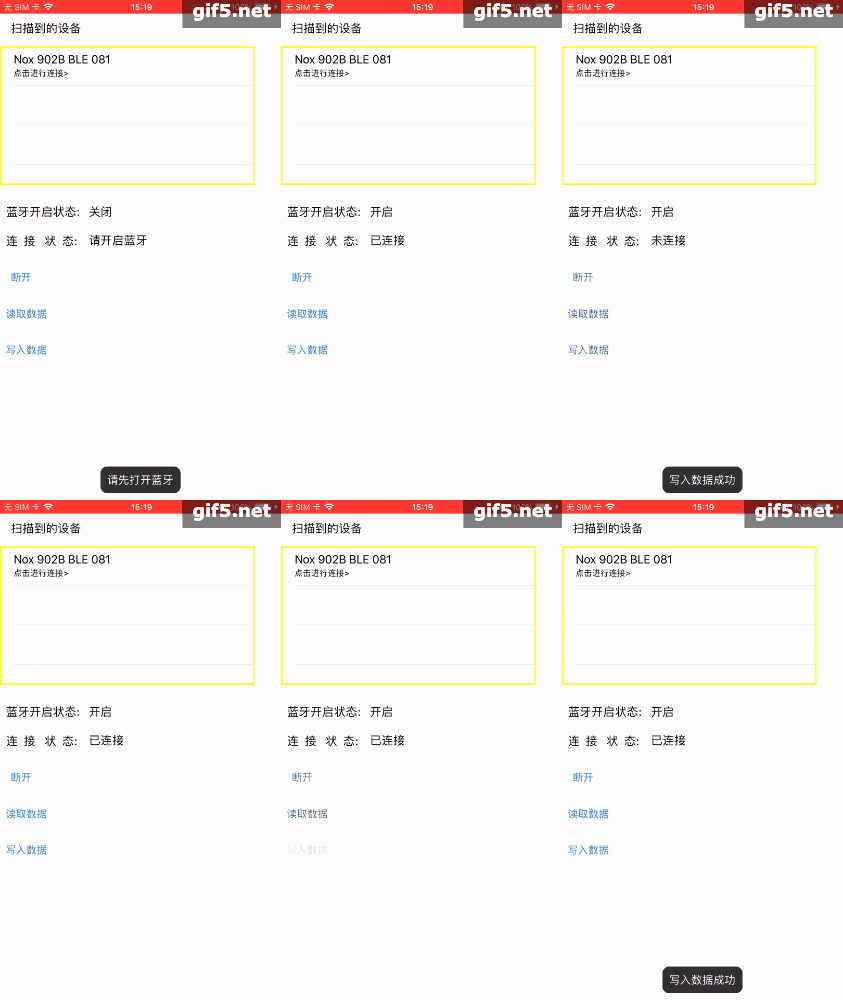
看图片
git地址
我的code4APP地址
讯享网
pod直接导入
pod 'NYLBluetooth'
介绍
IoT开发中需要使用到蓝牙与外设进行通讯, 我们新建一个NYLBuletoothManager类对蓝牙繁杂的操作进行封装。初始化的时候可以传入需要连接的设备名称、readUUID、writeUUID、是否自动连接参数。
利用block回调蓝牙开启状态、设备是否连接、获取外设数据、写数据。
使用方法
导入: #import <NYLBluetooth/NYLBuletoothManager.h>

初始化, 并接入回调
- (void)bluetoothTest {
    _bluetoothMgr = [[NYLBuletoothManager alloc] initWithPeripheralName:@"Nox 902B" readUUID:@"FFE4" writeUUID:@"FFE9" isAutoConnect:YES]; __weak typeof(self)weakSelf = self; _bluetoothMgr.bluetoothIsOpenedBlock = ^(BOOL isOpened) {
    weakSelf.isOpenStatusLB.text = [NSString stringWithFormat:@"%@", isOpened == YES ? @"开启" : @"关闭"]; [weakSelf.bluetoothMgr scanPeripherals]; // 扫描设备 if (!isOpened) {
    weakSelf.connectStatusLB.text = @"请开启蓝牙"; } NSLog(@"isOpened = %d", isOpened); }; // 扫描结果 _bluetoothMgr.bluetoothScanResultBlock = ^(NSArray<CBPeripheral *> * _Nonnull peripheralArr) {
    [weakSelf.tableView reloadData]; }; // 指定的外设是否连接成功 _bluetoothMgr.bluetoothIsConnectedBlock = ^(BOOL isConnected) {
    weakSelf.connectStatusLB.text = [NSString stringWithFormat:@"%@", isConnected == YES ? @"已连接" : @"未连接"]; }; // 收到数据的回调 _bluetoothMgr.bluetoothReceivedValueBlock = ^(NSData * _Nonnull value) {
    // TODO: 处理收到的数据, 自己业务处理 }; // 写数据的回调 _bluetoothMgr.bluetoothWriteValueBlock = ^(NSError * _Nonnull err, CBPeripheral * _Nonnull peripheral, CBCharacteristic * _Nonnull characteristic) {
    // TODO: 自己业务处理 if (!err) {
    [weakSelf.view makeToast:@"写入数据成功"]; } }; }
讯享网
封装详解
在NYLBuletoothManager提供了一个初始化方法, name就是你要连接设备的名称, 可以为前缀。
讯享网/// 初始化蓝牙 /// @param name 外设名称 (可以是前缀, 一般同一种设备前缀是一样的, 后面有区分) /// @param readUUID 写数据的标识 /// @param writeUUID 读取数据的标识 /// @param isAutoConnect 是否根据指定的设备名字主动连接(默认NO) - (instancetype)initWithPeripheralName:(NSString *)name readUUID:(NSString *)readUUID writeUUID:(NSString *)writeUUID isAutoConnect:(BOOL)isAutoConnect;
初始化完成, 利用block回调CBCentralManagerDelegate和CBPeripheralDelegate的相关方法
/* ------------------------------- block回调 ----------------------------------- */ /// 蓝牙是否开启, 实时回调 @property (nonatomic, copy) void(^bluetoothIsOpenedBlock)(BOOL isOpened); /// 蓝牙扫描到的外设, 实时回调 @property (nonatomic, copy) void(^bluetoothScanResultBlock)(NSArray <CBPeripheral *>* peripheralArr); /// 设备是否连接成功, 实时回调 @property (nonatomic, copy) void(^bluetoothIsConnectedBlock)(BOOL isConnected); /// 收到外设发来的数据回调, 实时回调 @property (nonatomic, copy) void(^bluetoothReceivedValueBlock)(NSData *value); /// 写入数据是否成功的回调 @property (nonatomic, copy) void(^bluetoothWriteValueBlock)(NSError *err, CBPeripheral *peripheral, CBCharacteristic *characteristic); ------以下是封装的源码--------git地址
NYLBuletoothManager.h
讯享网// // NYLBuletoothManager.h // NYLBluetooth_Example // // Created by 聂银龙 on 2019/12/9. // Copyright © 2019 Nieyinlong. All rights reserved. // #import <Foundation/Foundation.h> #import <CoreBluetooth/CoreBluetooth.h> NS_ASSUME_NONNULL_BEGIN @interface NYLBuletoothManager : NSObject /// 蓝牙是否开启 @property (nonatomic, assign, readonly) BOOL isBluetoothOpened; /// 设备是否连接 @property (nonatomic, assign, readonly) BOOL isConnected; /// 扫描到的外设数组 @property (nonatomic, strong, readonly) NSMutableArray <CBPeripheral *>* peripheralArr; /* ------------------------------- block回调 ----------------------------------- */ /// 蓝牙是否开启, 实时回调 @property (nonatomic, copy) void(^bluetoothIsOpenedBlock)(BOOL isOpened); /// 蓝牙扫描到的外设, 实时回调 @property (nonatomic, copy) void(^bluetoothScanResultBlock)(NSArray <CBPeripheral *>* peripheralArr); /// 设备是否连接成功, 实时回调 @property (nonatomic, copy) void(^bluetoothIsConnectedBlock)(BOOL isConnected); /// 收到外设发来的数据回调, 实时回调 @property (nonatomic, copy) void(^bluetoothReceivedValueBlock)(NSData *value); /// 写入数据是否成功的回调 @property (nonatomic, copy) void(^bluetoothWriteValueBlock)(NSError *err, CBPeripheral *peripheral, CBCharacteristic *characteristic); /* ------------------------------------------------------------------ */ /// 初始化蓝牙 /// @param name 外设名称 (可以是前缀, 一般同一种设备前缀是一样的, 后面有区分) /// @param readUUID 写数据的标识 /// @param writeUUID 读取数据的标识 /// @param isAutoConnect 是否根据指定的设备名字主动连接(默认NO) - (instancetype)initWithPeripheralName:(NSString *)name readUUID:(NSString *)readUUID writeUUID:(NSString *)writeUUID isAutoConnect:(BOOL)isAutoConnect; /// 扫描全部外设 - (void)scanPeripherals; /// 根据serviceUUIDs和options扫描外设 /// @param serviceUUIDs 服务UUIDs (可为空) /// @param options An optional dictionary specifying options for the scan. (可为空) - (void)scanForPeripheralsWithServices:(nullable NSArray<CBUUID *> *)serviceUUIDs options:(nullable NSDictionary<NSString *, id> *)options; /// 连接外设 - (void)connect; /// 连接外设 /// @param peripheral 根据指定的外设连接 - (void)connectWithPeripheral:(nonnull CBPeripheral *)peripheral; /// 主动断开连接 - (void)disConnectByManual; /// 写数据 (无回调) - (void)writeDataWithoutResponse:(NSData *)data; /// 写数据 (有回调) - (void)writeDataWithResponse:(NSData *)data; // 读数据 - (void)readDataFromPeripheral; @end NS_ASSUME_NONNULL_END
NYLBuletoothManager.m
// // NYLBuletoothManager.m // NYLBluetooth_Example // // Created by 聂银龙 on 2019/12/9. // Copyright © 2019 Nieyinlong. All rights reserved. // #import "NYLBuletoothManager.h" @interface NYLBuletoothManager()<CBCentralManagerDelegate, CBPeripheralDelegate> @property (nonatomic, strong) CBCentralManager *centralManager; @property (nonatomic, strong) CBPeripheral *peripheral; @property (nonatomic, strong, nullable) NSArray<CBUUID *> *serviceUUIDs; @property (nonatomic, copy) NSString *peripheralName; @property (nonatomic, strong) NSMutableArray <CBPeripheral *>* peripheralArr; @property (nonatomic, copy) NSString *readUUID; @property (nonatomic, copy) NSString *writeUUID; /// 是否自动连接 @property (nonatomic, assign) BOOL isAutoConnect; /// 写数据特征 @property (nonatomic, strong) CBCharacteristic *writeCharacteristic; /// 读数据特征 @property (nonatomic, strong) CBCharacteristic *readCharacteristic; // ------- // @end @implementation NYLBuletoothManager - (instancetype)init {
    return [self initWithQueue:nil]; } - (instancetype)initWithQueue:(dispatch_queue_t)queue {
    if (self = [super init]) {
    [self initBluetoothWithQueue:queue]; } return self; } - (instancetype)initWithPeripheralName:(NSString *)name readUUID:(NSString *)readUUID writeUUID:(NSString *)writeUUID isAutoConnect:(BOOL)isAutoConnect {
    _peripheralName = name; _readUUID = readUUID; _writeUUID = writeUUID; _isAutoConnect = isAutoConnect; return [self initWithQueue:nil]; } - (void)initBluetoothWithQueue:(dispatch_queue_t)queue {
    _centralManager = [[CBCentralManager alloc] initWithDelegate:self queue:queue]; } - (void)scanPeripherals {
    [self scanForPeripheralsWithServices:nil options:nil]; } - (void)scanForPeripheralsWithServices:(nullable NSArray<CBUUID *> *)serviceUUIDs options:(nullable NSDictionary<NSString *, id> *)options {
    [self stopScanPeripherals]; self.serviceUUIDs = serviceUUIDs; [_centralManager scanForPeripheralsWithServices:serviceUUIDs options:options]; } - (void)stopScanPeripherals{
    [_centralManager stopScan]; } - (void)connect {
    if (self.peripheral) {
    [self.centralManager connectPeripheral:self.peripheral options:nil]; } } - (void)connectWithPeripheral:(nonnull CBPeripheral *)peripheral {
    self.peripheral = peripheral; [self.centralManager connectPeripheral:peripheral options:nil]; } - (void)disConnectByManual {
    if (self.peripheral) {
    [self.centralManager cancelPeripheralConnection:self.peripheral]; } _isConnected = NO; self.peripheral = nil; } - (void)writeDataWithoutResponse:(NSData *)data {
    if (self.peripheral && self.readCharacteristic) {
    [self.peripheral writeValue:data forCharacteristic:self.writeCharacteristic type:CBCharacteristicWriteWithoutResponse]; } } - (void)writeDataWithResponse:(NSData *)data {
    if (self.peripheral && self.readCharacteristic) {
    [self.peripheral writeValue:data forCharacteristic:self.writeCharacteristic type:CBCharacteristicWriteWithResponse]; } } // 读数据 - (void)readDataFromPeripheral {
    if (self.peripheral && self.readCharacteristic) {
    [self.peripheral readValueForCharacteristic:self.readCharacteristic]; } } #pragma mark - CBCentralManagerDelegate /// 蓝牙开启状态更新 - (void)centralManagerDidUpdateState:(CBCentralManager *)central {
    if (central.state == CBCentralManagerStatePoweredOn) {
    // 蓝牙已经开启 _isBluetoothOpened = YES; } else {
    _isBluetoothOpened = NO; } if (self.bluetoothIsOpenedBlock) {
    self.bluetoothIsOpenedBlock(_isBluetoothOpened); } } / 扫描到外设 @param central 管理者 @param peripheral 外设 @param advertisementData 外设相关数据表示 @param RSSI 信号强度 */ - (void)centralManager:(CBCentralManager *)central didDiscoverPeripheral:(nonnull CBPeripheral *)peripheral advertisementData:(nonnull NSDictionary<NSString *,id> *)advertisementData RSSI:(nonnull NSNumber *)RSSI {
    if ([peripheral.name hasPrefix:self.peripheralName]) {
    __block BOOL isExist = NO; // 遍历数组, 防止重复add [self.peripheralArr enumerateObjectsUsingBlock:^(CBPeripheral *obj, NSUInteger idx, BOOL * _Nonnull stop) {
    if ([obj.name isEqualToString:peripheral.name]) {
    isExist = YES; *stop = YES; } }]; if (!isExist) {
    [self.peripheralArr addObject:peripheral]; } if (self.bluetoothScanResultBlock) {
    self.bluetoothScanResultBlock(self.peripheralArr); } // 处理是否自动连接 if (_isAutoConnect) {
    [self stopScanPeripherals]; [self connectWithPeripheral:peripheral]; } } } /// 连接到外设之后的回调 - (void)centralManager:(CBCentralManager *)central didConnectPeripheral:(nonnull CBPeripheral *)peripheral {
    self.peripheral = peripheral; // 引用 self.peripheral.delegate = self; [peripheral discoverServices:self.serviceUUIDs]; [self stopScanPeripherals]; _isConnected = YES; if (self.bluetoothIsConnectedBlock) {
    self.bluetoothIsConnectedBlock(YES); } } - (void)centralManager:(CBCentralManager *)central didFailToConnectPeripheral:(CBPeripheral *)peripheral error:(NSError *)error {
    _isConnected = NO; NSLog(@"didFailToConnectPeripheral : %@, error : %@", peripheral.name, [error description]); } - (void)centralManager:(CBCentralManager *)central didDisconnectPeripheral:(CBPeripheral *)peripheral error:(NSError *)error {
    NSLog(@"didDisconnectPeripheral : %@, error : %@", peripheral.name, [error description]); if (self.peripheral) {
    [self.centralManager cancelPeripheralConnection:self.peripheral]; } _isConnected = NO; self.peripheral = nil; if (self.bluetoothIsConnectedBlock) {
    self.bluetoothIsConnectedBlock(NO); } } #pragma mark - CBPeripheralDelegate /// 发现外设里面的服务 - (void)peripheral:(CBPeripheral *)peripheral didDiscoverServices:(NSError *)error {
    if (error) return; for (CBService *service in peripheral.services) {
    [peripheral discoverCharacteristics:nil forService:service]; } } //扫描到特征 - (void)peripheral:(CBPeripheral *)peripheral didDiscoverCharacteristicsForService:(CBService *)service error:(NSError *)error {
    if (error)return; NSLog(@"service.characteristics = %@",service.characteristics); // 获取Characteristic的值 for (CBCharacteristic *characteristic in service.characteristics){
    NSString *chaUUid = characteristic.UUID.UUIDString; if ([chaUUid hasPrefix:_readUUID]) {
    // 某外设读数据的uuid [peripheral readValueForCharacteristic:characteristic]; // 我订阅 [peripheral setNotifyValue:YES forCharacteristic:characteristic]; self.readCharacteristic = characteristic; } if ([chaUUid isEqualToString:_writeUUID]) {
    // 某外设写数据的uuid self.writeCharacteristic = characteristic; // 写数据的特征 } } } /// 获取外设发来的数据,不论是read和notify,获取数据都是从这个方法中读取。 - (void)peripheral:(CBPeripheral *)peripheral didUpdateValueForCharacteristic:(CBCharacteristic *)characteristic error:(NSError *)error {
    if (error) return; NSData *data = characteristic.value; if (self.bluetoothReceivedValueBlock) {
    self.bluetoothReceivedValueBlock(data); } } /// 写数据的回调 - (void)peripheral:(CBPeripheral *)peripheral didWriteValueForCharacteristic:(CBCharacteristic *)characteristic error:(NSError *)error {
    if (error) {
    NSLog(@"write failed : %@", [error description]); } else {
    NSLog(@"数据写入成功"); } if (self.bluetoothWriteValueBlock) {
    self.bluetoothWriteValueBlock(error, peripheral, characteristic); } } - (NSMutableArray *)peripheralArr {
    if (!_peripheralArr) {
    _peripheralArr = [NSMutableArray array]; } return _peripheralArr; } @end
版权声明:本文内容由互联网用户自发贡献,该文观点仅代表作者本人。本站仅提供信息存储空间服务,不拥有所有权,不承担相关法律责任。如发现本站有涉嫌侵权/违法违规的内容,请联系我们,一经查实,本站将立刻删除。
如需转载请保留出处:https://51itzy.com/kjqy/106168.html