
原文链接
摘要: 来一探Android虚拟化引擎VirtualApp的究竟!
介绍
首先需要说明的是,VirtualApp并不是前些阵子滴滴开源的插件化框架VirtualApk。
VirtualApp是一个更加黑科技的东西,他可以创建一个虚拟空间,你可以在虚拟空间内任意的安装、启动和卸载APK,这一切都与外部隔离,如同一个沙盒,APK无需在外部安装。
小试牛刀
启动VirtualApp后,界面是这样的。
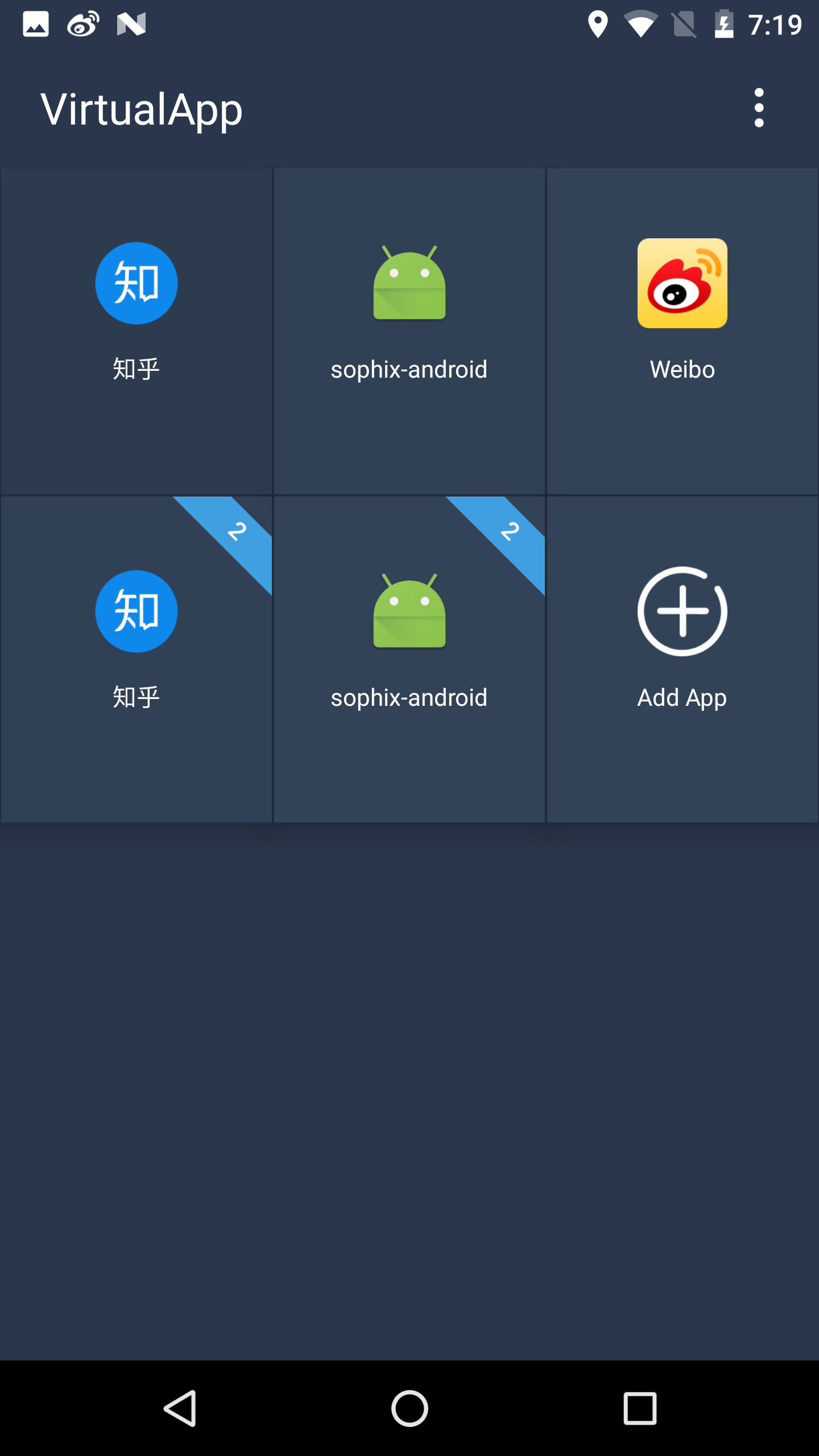
显示的是已经通过VirtualApp安装的APK,可以直接从SD卡或者系统中已有的APK中选择安装。安装后直接点开图标,就能跟安装在外部的应用一样打开APP。简单尝试了一下,Nexus 6P,Android 7.0,知乎和微博都能正常工作,并且运行速度跟外部安装的差异不大。而且还可以安装多个相同的应用,实现多开的效果。

粗略观察
首先,我们来看一下它在开启APP后的进程信息,
u0_a200 22932 494 84008 SyS_epoll_ 0000000000 S io.virtualapp u0_a200 22955 494 70408 SyS_epoll_ 0000000000 S io.virtualapp:x u0_a200 22983 494 0000000000 R com.zhihu.android u0_a200 23320 494 SyS_epoll_ 0000000000 S com.sina.weibo u0_a200 23387 494 76848 SyS_epoll_ 0000000000 S com.sina.weibo.image u0_a200 23415 494 81648 SyS_epoll_ 0000000000 S com.sina.weibo:remote u0_a200 23455 494 76572 SyS_epoll_ 0000000000 S com.sina.weibo.imageservant u0_a200 24028 494 74408 SyS_epoll_ 0000000000 S com.sina.weibo.servant u0_a200 24425 494 66116 SyS_epoll_ 0000000000 S com.taobao.sophix_android u0_a200 24492 494 SyS_epoll_ 0000000000 S com.zhihu.android讯享网
可以看到,所有被ViralApp打开的应用,都和VirtalApp属于同一个uid:u0_a200。其中,VirtualApp本身有两个进程:io.virtualapp 和 io.virtualapp:x
以这里安装的微博为例,查看一下它的进程的内存空间,可以看到相关路径全都被映射到了/data/data/io.virtualapp/virtual下面,
讯享网... ... b6d0f000-b r--p 00000000 fd:00 /data/data/io.virtualapp/virtual/data/user/0/com.sina.weibo/Plugin/com.weibo.app.movie/dalvik-cache/base-1.dex b-b71d4000 r-xp 00 fd:00 /data/data/io.virtualapp/virtual/data/user/0/com.sina.weibo/Plugin/com.weibo.app.movie/dalvik-cache/base-1.dex ... ... bb-bb r--p 00000000 fd:00 /data/data/io.virtualapp/virtual/data/user/0/com.sina.weibo/code_cache/secondary-dexes/composer1312fd1cbada0e5074c9f9961b16aefb.dex bb-bb8f0000 r-xp 000ec000 fd:00 /data/data/io.virtualapp/virtual/data/user/0/com.sina.weibo/code_cache/secondary-dexes/composer1312fd1cbada0e5074c9f9961b16aefb.dex ... ... bf-bf r-xp 00000000 fd:00 /data/data/io.virtualapp/virtual/data/app/com.sina.weibo/lib/libweiboffmpeg.so bf-bf ---p 00000000 00:00 0 bf-bf9ab000 r--p 00 fd:00 /data/data/io.virtualapp/virtual/data/app/com.sina.weibo/lib/libweiboffmpeg.so bf9ab000-bf9af000 rw-p 00 fd:00 /data/data/io.virtualapp/virtual/data/app/com.sina.weibo/lib/libweiboffmpeg.so ... ... c335a000-c33a9000 r-xp 00000000 fd:00 /data/data/io.virtualapp/virtual/data/app/com.sina.weibo/lib/libweiboplayer.so c33aa000-c33ad000 r--p 0004f000 fd:00 /data/data/io.virtualapp/virtual/data/app/com.sina.weibo/lib/libweiboplayer.so c33ad000-c33ae000 rw-p 00052000 fd:00 /data/data/io.virtualapp/virtual/data/app/com.sina.weibo/lib/libweiboplayer.so ... ...
可见,这里面对路径做过了重新映射。具体实现我们还是来看一下代码吧。
注入逻辑
要想实现对一个APP的虚拟化,就是不直接把APP安装进系统,同时又要提供APP运行过程中所需的一切,从而可以让它误以为自己是运行在正常系统中。这里就需要实现系统服务的虚拟化和相关路径的虚拟化。
其中,系统服务的虚拟化主要靠注入大量framework组件来实现的。
@VirtualApp/lib/src/main/java/com/lody/virtual/client/core/InvocationStubManager.java private void injectInternal() throws Throwable { if (VirtualCore.get().isMainProcess()) { return; } if (VirtualCore.get().isServerProcess()) { addInjector(new ActivityManagerStub()); addInjector(new PackageManagerStub()); return; } if (VirtualCore.get().isVAppProcess()) { addInjector(new LibCoreStub()); addInjector(new ActivityManagerStub()); addInjector(new PackageManagerStub()); addInjector(HCallbackStub.getDefault()); addInjector(new ISmsStub()); addInjector(new ISubStub()); addInjector(new DropBoxManagerStub()); addInjector(new NotificationManagerStub()); addInjector(new LocationManagerStub()); addInjector(new WindowManagerStub()); addInjector(new ClipBoardStub()); addInjector(new MountServiceStub()); addInjector(new BackupManagerStub()); addInjector(new TelephonyStub()); addInjector(new TelephonyRegistryStub()); addInjector(new PhoneSubInfoStub()); addInjector(new PowerManagerStub()); addInjector(new AppWidgetManagerStub()); addInjector(new AccountManagerStub()); addInjector(new AudioManagerStub()); addInjector(new SearchManagerStub()); addInjector(new ContentServiceStub()); addInjector(new ConnectivityStub()); if (Build.VERSION.SDK_INT >= JELLY_BEAN_MR2) { addInjector(new VibratorStub()); addInjector(new WifiManagerStub()); addInjector(new BluetoothStub()); addInjector(new ContextHubServiceStub()); } if (Build.VERSION.SDK_INT >= JELLY_BEAN_MR1) { addInjector(new UserManagerStub()); } if (Build.VERSION.SDK_INT >= JELLY_BEAN_MR1) { addInjector(new DisplayStub()); } if (Build.VERSION.SDK_INT >= LOLLIPOP) { addInjector(new PersistentDataBlockServiceStub()); addInjector(new InputMethodManagerStub()); addInjector(new MmsStub()); addInjector(new SessionManagerStub()); addInjector(new JobServiceStub()); addInjector(new RestrictionStub()); } if (Build.VERSION.SDK_INT >= KITKAT) { addInjector(new AlarmManagerStub()); addInjector(new AppOpsManagerStub()); addInjector(new MediaRouterServiceStub()); } if (Build.VERSION.SDK_INT >= LOLLIPOP_MR1) { addInjector(new GraphicsStatsStub()); } if (Build.VERSION.SDK_INT >= M) { addInjector(new NetworkManagementStub()); } if (Build.VERSION.SDK_INT >= N) { addInjector(new WifiScannerStub()); addInjector(new ShortcutServiceStub()); } } }这个注入过程是发生在io.virtualapp.VApp.attachBaseContext中,因此,每次启动一个子进程都会执行到这里,这会区分是isMainProcess(io.virtualapp)或者isServerProcess(io.virtualapp:x)或者isVAppProcess(被安装APP)来进行不同的注入,可以看到,注入最多的还是在被安装APP的进程中。
可以看到,之前在injectInternal 中addInjector的所有Stub都会调用它的inject方法。
讯享网VirtualApp/lib/src/main/java/com/lody/virtual/client/core/InvocationStubManager.java void injectAll() throws Throwable { for (IInjector injector : mInjectors.values()) { injector.inject(); } // XXX: Lazy inject the Instrumentation, addInjector(AppInstrumentation.getDefault()); }
由此实现对各个系统类的替换。
而在底层,VirtualApp还实现了对原本路径的替换,在java层传入需要重定向的所有路径。
private void startIOUniformer() { ApplicationInfo info = mBoundApplication.appInfo; int userId = VUserHandle.myUserId(); String wifiMacAddressFile = deviceInfo.getWifiFile(userId).getPath(); NativeEngine.redirectDirectory("/sys/class/net/wlan0/address", wifiMacAddressFile); NativeEngine.redirectDirectory("/sys/class/net/eth0/address", wifiMacAddressFile); NativeEngine.redirectDirectory("/sys/class/net/wifi/address", wifiMacAddressFile); NativeEngine.redirectDirectory("/data/data/" + info.packageName, info.dataDir); NativeEngine.redirectDirectory("/data/user/0/" + info.packageName, info.dataDir); if (Build.VERSION.SDK_INT >= Build.VERSION_CODES.N) { NativeEngine.redirectDirectory("/data/user_de/0/" + info.packageName, info.dataDir); } String libPath = new File(VEnvironment.getDataAppPackageDirectory(info.packageName), "lib").getAbsolutePath(); String userLibPath = new File(VEnvironment.getUserSystemDirectory(userId), "lib").getAbsolutePath(); NativeEngine.redirectDirectory(userLibPath, libPath); NativeEngine.redirectDirectory("/data/data/" + info.packageName + "/lib/", libPath); NativeEngine.redirectDirectory("/data/user/0/" + info.packageName + "/lib/", libPath); NativeEngine.readOnly(VEnvironment.getDataAppDirectory().getPath()); VirtualStorageManager vsManager = VirtualStorageManager.get(); String vsPath = vsManager.getVirtualStorage(info.packageName, userId); boolean enable = vsManager.isVirtualStorageEnable(info.packageName, userId); if (enable && vsPath != null) { File vsDirectory = new File(vsPath); if (vsDirectory.exists() || vsDirectory.mkdirs()) { HashSet<String> mountPoints = getMountPoints(); for (String mountPoint : mountPoints) { NativeEngine.redirectDirectory(mountPoint, vsPath); } } } NativeEngine.hook(); }这些路径最终会添加进JNI层的一个映射表中

讯享网void IOUniformer::redirect(const char *orig_path, const char *new_path) { LOGI("Start Java_nativeRedirect : from %s to %s", orig_path, new_path); add_pair(orig_path, new_path); } static void add_pair(const char *_orig_path, const char *_new_path) { std::string origPath = std::string(_orig_path); std::string newPath = std::string(_new_path); IORedirectMap.insert(std::pair<std::string, std::string>(origPath, newPath)); if (endWith(origPath, '/')) { RootIORedirectMap.insert( std::pair<std::string, std::string>( origPath.substr(0, origPath.length() - 1), newPath.substr(0, newPath.length() - 1)) ); } }
然后,会hook所有的c库函数,这些函数在调用的时候,就会替换路径为新路径。由于hook的是libc的函数,java层和虚拟机的文件访问最终也会调用到这里,从而受到影响。
void IOUniformer::startUniformer(int api_level, int preview_api_level) { gVars.hooked_process = true; HOOK_SYMBOL(RTLD_DEFAULT, vfork); HOOK_SYMBOL(RTLD_DEFAULT, kill); HOOK_SYMBOL(RTLD_DEFAULT, __getcwd); HOOK_SYMBOL(RTLD_DEFAULT, truncate); HOOK_SYMBOL(RTLD_DEFAULT, __statfs64); HOOK_SYMBOL(RTLD_DEFAULT, execve); HOOK_SYMBOL(RTLD_DEFAULT, __open); if ((api_level < 25) || (api_level == 25 && preview_api_level == 0)) { HOOK_SYMBOL(RTLD_DEFAULT, utimes); HOOK_SYMBOL(RTLD_DEFAULT, mkdir); HOOK_SYMBOL(RTLD_DEFAULT, chmod); HOOK_SYMBOL(RTLD_DEFAULT, lstat); HOOK_SYMBOL(RTLD_DEFAULT, link); HOOK_SYMBOL(RTLD_DEFAULT, symlink); HOOK_SYMBOL(RTLD_DEFAULT, mknod); HOOK_SYMBOL(RTLD_DEFAULT, rmdir); HOOK_SYMBOL(RTLD_DEFAULT, chown); HOOK_SYMBOL(RTLD_DEFAULT, rename); HOOK_SYMBOL(RTLD_DEFAULT, stat); HOOK_SYMBOL(RTLD_DEFAULT, chdir); HOOK_SYMBOL(RTLD_DEFAULT, access); HOOK_SYMBOL(RTLD_DEFAULT, readlink); HOOK_SYMBOL(RTLD_DEFAULT, unlink); } HOOK_SYMBOL(RTLD_DEFAULT, fstatat); HOOK_SYMBOL(RTLD_DEFAULT, fchmodat); HOOK_SYMBOL(RTLD_DEFAULT, symlinkat); HOOK_SYMBOL(RTLD_DEFAULT, readlinkat); HOOK_SYMBOL(RTLD_DEFAULT, unlinkat); HOOK_SYMBOL(RTLD_DEFAULT, linkat); HOOK_SYMBOL(RTLD_DEFAULT, utimensat); HOOK_SYMBOL(RTLD_DEFAULT, __openat); HOOK_SYMBOL(RTLD_DEFAULT, faccessat); HOOK_SYMBOL(RTLD_DEFAULT, mkdirat); HOOK_SYMBOL(RTLD_DEFAULT, renameat); HOOK_SYMBOL(RTLD_DEFAULT, fchownat); HOOK_SYMBOL(RTLD_DEFAULT, mknodat); // hook_dlopen(api_level); #if defined(__i386__) || defined(__x86_64__) // Do nothing #else GodinHook::NativeHook::hookAllRegistered(); #endif }以chmod函数为例,
讯享网// int chmod(const char *path, mode_t mode); HOOK_DEF(int, chmod, const char *pathname, mode_t mode) { const char *redirect_path = match_redirected_path(pathname); if (isReadOnlyPath(redirect_path)) { return -1; } int ret = syscall(__NR_chmod, redirect_path, mode); FREE(redirect_path, pathname); return ret; }
可以看到,它会把原先的pathname,通过match_redirected_path找到映射后的新路径,然后用syscall来调用它,这样就实现了所有路径的重定向。
启动原理
最后我们来看下,一个APP是如何在VirtualApp里启动的。
启动一个app是在LoadingActivity的launch方法
public static void launch(Context context, String packageName, int userId) { Intent intent = VirtualCore.get().getLaunchIntent(packageName, userId); if (intent != null) { Intent loadingPageIntent = new Intent(context, LoadingActivity.class); loadingPageIntent.putExtra(PKG_NAME_ARGUMENT, packageName); loadingPageIntent.addFlags(Intent.FLAG_ACTIVITY_NEW_TASK); loadingPageIntent.putExtra(KEY_INTENT, intent); loadingPageIntent.putExtra(KEY_USER, userId); context.startActivity(loadingPageIntent); } }然后会调用到VActivityManager的startActivity里
讯享网public int startActivity(Intent intent, ActivityInfo info, IBinder resultTo, Bundle options, String resultWho, int requestCode, int userId) { try { return getService().startActivity(intent, info, resultTo, options, resultWho, requestCode, userId); } catch (RemoteException e) { return VirtualRuntime.crash(e); } }
这里的service会通过binder最终找到io.virtualapp:x进程的VActivityManagerService。
@Override public int startActivity(Intent intent, ActivityInfo info, IBinder resultTo, Bundle options, String resultWho, int requestCode, int userId) { synchronized (this) { return mMainStack.startActivityLocked(userId, intent, info, resultTo, options, resultWho, requestCode); } } Service端的startActivity会调用ActivityStack的startActivityLocked,然后调用到startActivityInNewTaskLocked方法
讯享网private void startActivityInNewTaskLocked(int userId, Intent intent, ActivityInfo info, Bundle options) { Intent destIntent = startActivityProcess(userId, null, intent, info);// 换intent if (destIntent != null) { destIntent.addFlags(Intent.FLAG_ACTIVITY_NEW_TASK); destIntent.addFlags(Intent.FLAG_ACTIVITY_MULTIPLE_TASK); destIntent.addFlags(Intent.FLAG_ACTIVITY_RESET_TASK_IF_NEEDED); if (Build.VERSION.SDK_INT < Build.VERSION_CODES.LOLLIPOP) { // noinspection deprecation destIntent.addFlags(Intent.FLAG_ACTIVITY_CLEAR_WHEN_TASK_RESET); } else { destIntent.addFlags(Intent.FLAG_ACTIVITY_NEW_DOCUMENT); } if (Build.VERSION.SDK_INT >= Build.VERSION_CODES.JELLY_BEAN) { VirtualCore.get().getContext().startActivity(destIntent, options); } else { VirtualCore.get().getContext().startActivity(destIntent); } } }
这里的intent会在startActivityProcess的时候进行替换
private Intent startActivityProcess(int userId, ActivityRecord sourceRecord, Intent intent, ActivityInfo info) { intent = new Intent(intent); ProcessRecord targetApp = mService.startProcessIfNeedLocked(info.processName, userId, info.packageName); if (targetApp == null) { return null; } Intent targetIntent = new Intent(); => targetIntent.setClassName(VirtualCore.get().getHostPkg(), fetchStubActivity(targetApp.vpid, info)); ComponentName component = intent.getComponent(); if (component == null) { component = ComponentUtils.toComponentName(info); } targetIntent.setType(component.flattenToString()); StubActivityRecord saveInstance = new StubActivityRecord(intent, info, sourceRecord != null ? sourceRecord.component : null, userId); saveInstance.saveToIntent(targetIntent); return targetIntent; }targetIntent.setClassName会设置为VirtualApp的包名,同时fetchStubActivity用来获取插桩Activity
讯享网 private String fetchStubActivity(int vpid, ActivityInfo targetInfo) { boolean isFloating = false; boolean isTranslucent = false; boolean showWallpaper = false; try { int[] R_Styleable_Window = R_Hide.styleable.Window.get(); int R_Styleable_Window_windowIsTranslucent = R_Hide.styleable.Window_windowIsTranslucent.get(); int R_Styleable_Window_windowIsFloating = R_Hide.styleable.Window_windowIsFloating.get(); int R_Styleable_Window_windowShowWallpaper = R_Hide.styleable.Window_windowShowWallpaper.get(); AttributeCache.Entry ent = AttributeCache.instance().get(targetInfo.packageName, targetInfo.theme, R_Styleable_Window); if (ent != null && ent.array != null) { showWallpaper = ent.array.getBoolean(R_Styleable_Window_windowShowWallpaper, false); isTranslucent = ent.array.getBoolean(R_Styleable_Window_windowIsTranslucent, false); isFloating = ent.array.getBoolean(R_Styleable_Window_windowIsFloating, false); } } catch (Throwable e) { e.printStackTrace(); } boolean isDialogStyle = isFloating || isTranslucent || showWallpaper; if (isDialogStyle) { return VASettings.getStubDialogName(vpid); } else { return VASettings.getStubActivityName(vpid); } }
这里最终返回的是VASettings.getStubActivityName
public static String STUB_ACTIVITY = StubActivity.class.getName(); public static String getStubActivityName(int index) { return String.format(Locale.ENGLISH, "%s$C%d", STUB_ACTIVITY, index); }可见,最终返回的Activity名是com.lody.virtual.client.stub.StubActivity$C?,?表示具体数字。
而它们,是预先在AndroidManifest里面写好的。
讯享网 <activity android:name="com.lody.virtual.client.stub.StubActivity$C0" android:configChanges="mcc|mnc|locale|touchscreen|keyboard|keyboardHidden|navigation|orientation|screenLayout|uiMode|screenSize|smallestScreenSize|fontScale" android:process=":p0" android:taskAffinity="com.lody.virtual.vt" android:theme="@style/VATheme" /> <activity android:name="com.lody.virtual.client.stub.StubActivity$C1" android:configChanges="mcc|mnc|locale|touchscreen|keyboard|keyboardHidden|navigation|orientation|screenLayout|uiMode|screenSize|smallestScreenSize|fontScale" android:process=":p1" android:taskAffinity="com.lody.virtual.vt" android:theme="@style/VATheme" /> <activity android:name="com.lody.virtual.client.stub.StubActivity$C2" android:configChanges="mcc|mnc|locale|touchscreen|keyboard|keyboardHidden|navigation|orientation|screenLayout|uiMode|screenSize|smallestScreenSize|fontScale" android:process=":p2" android:taskAffinity="com.lody.virtual.vt" android:theme="@style/VATheme" /> <activity android:name="com.lody.virtual.client.stub.StubActivity$C3" android:configChanges="mcc|mnc|locale|touchscreen|keyboard|keyboardHidden|navigation|orientation|screenLayout|uiMode|screenSize|smallestScreenSize|fontScale" android:process=":p3" android:taskAffinity="com.lody.virtual.vt" android:theme="@style/VATheme" />
这么一来,startActivity最终会启动到这里的StubActivity中。
并且每次都会新建一个子进程p?,在开启一个进程时,都会先执行到io.virtualapp.VApp.attachBaseContext中,这样,就会走到刚才提到的injectInternal方法中,实现所有注入逻辑,把所有与系统交互的地方都进行替换。而StubActivity的onCreate的方法,虽然在代码里面有声明,却永远执行不到:
public abstract class StubActivity extends Activity { @Override protected void onCreate(Bundle savedInstanceState) { // The savedInstanceState's classLoader is not exist. super.onCreate(null); finish(); // It seems that we have conflict with the other Android-Plugin-Framework. Intent stubIntent = getIntent(); // Try to acquire the actually component information. StubActivityRecord r = new StubActivityRecord(stubIntent); if (r.intent != null) { if (TextUtils.equals(r.info.processName, VirtualRuntime.getProcessName()) && r.userId == VUserHandle.myUserId()) { // Retry to inject the HCallback to instead of the exist one. InvocationStubManager.getInstance().checkEnv(HCallbackStub.class); Intent intent = r.intent; startActivity(intent); } else { // Start the target Activity in other process. VActivityManager.get().startActivity(r.intent, r.userId); } } } public static class C0 extends StubActivity { } public static class C1 extends StubActivity { } public static class C2 extends StubActivity { } public static class C3 extends StubActivity { } ... ... }在替换后,执行流就被改变了,可以看到,在执行到APP的真正Application前,能发现被注入的代码:
讯享网com.taobao.sophix_app.MyApplication.onCreate(MyApplication.java:33) android.app.Instrumentation.callApplicationOnCreate(Instrumentation.java:1024) com.lody.virtual.client.hook.delegate.InstrumentationDelegate.callApplicationOnCreate(InstrumentationDelegate.java:225) com.lody.virtual.client.hook.delegate.AppInstrumentation.callApplicationOnCreate(AppInstrumentation.java:137) com.lody.virtual.client.VClientImpl.bindApplicationNoCheck(VClientImpl.java:312) com.lody.virtual.client.VClientImpl.bindApplication(VClientImpl.java:192) com.lody.virtual.client.hook.proxies.am.HCallbackStub.handleLaunchActivity(HCallbackStub.java:114) com.lody.virtual.client.hook.proxies.am.HCallbackStub.handleMessage(HCallbackStub.java:71) android.os.Handler.dispatchMessage(Handler.java:98) android.os.Looper.loop(Looper.java:154) android.app.ActivityThread.main(ActivityThread.java:6077) java.lang.reflect.Method.invoke(Native Method) com.android.internal.os.ZygoteInit$MethodAndArgsCaller.run(ZygoteInit.java:865) com.android.internal.os.ZygoteInit.main(ZygoteInit.java:755)
思考
我们已经大致分析了VirtualApp的工作原理,当然里面有非常多细节没有覆盖到,有兴趣的同学可以自己研究一下。
个人认为,VirtualApp可以加载外部APK的特性,能够引发无穷的想象。
比如一些简单的脱壳,就可以用VirtualApp先加载APK,然后在运行期间直接把内存中脱壳后的DEX文件dump出来。
另外,由于Sophix热修复方案也是非侵入的,如果把Sophix集成进VirtualApp中,就能够在启动APP前加载一个补丁,替换原有APP中的某些类,实现不重新打包原有APK的情况下对原先APP的逻辑的修改。
版权声明:本文内容由互联网用户自发贡献,该文观点仅代表作者本人。本站仅提供信息存储空间服务,不拥有所有权,不承担相关法律责任。如发现本站有涉嫌侵权/违法违规的内容,请联系我们,一经查实,本站将立刻删除。
如需转载请保留出处:https://51itzy.com/kjqy/106128.html