
cnocr 介绍
参考:
cnocr: 极简的中文OCR Python包
https://cnocr.readthedocs.io/zh/latest/
cnocr 主要针对的是排版简单的印刷体文字图片,如截图图片,扫描件等。目前内置的文字检测和分行模块无法处理复杂的文字排版定位。如果要用于场景文字图片的识别,需要结合其他的场景文字检测引擎使用,例如文字检测引擎 cnstd。
目前使用的识别模型是crnn,识别准确度约为 98.7%
安装
pip install cnocr 讯享网
讯享网import cnocr # 创建 cnocr 对象 ocr = cnocr.CnOcr() # 读取图像文件 image_path = './pic/img_2.png' result = ocr.ocr(image_path) print(result) text = ' '.join([x['text'] for x in result])
注意cnocr.CnOcr()可能报错网络失败,

huggingface_hub.utils._errors.LocalEntryNotFoundError: Connection error, and we cannot find the requested files in the disk cache. Please try again or make sure your Internet connection is on. OR
讯享网cnstd.utils.utils.ModelDownloadingError: Failed to download model: densenet_lite_136-fc-onnx.zip. Please open your VPN and try again. If this error persists, please follow the instruction at [CnSTD/CnOCR Doc](https://www.breezedeus.com/cnocr) to manually download the model files.
需要自己去下载模型 https://cnocr.readthedocs.io/zh/latest/models/
paddle2onnx --model_dir ./cn_PP-OCRv3_det_infer --model_filename inference.pdmodel --params_filename inference.pdiparams --save_file ./det_onnx/model.onnx --opset_version 10 --input_shape_dict="{'x':[-1,3,-1,-1]}" --enable_onnx_checker True paddle2onnx --model_dir ./ch_PP-OCRv3_rec_infer --model_filename inference.pdmodel --params_filename inference.pdiparams --save_file ./rec_onnx/model.onnx --opset_version 10 --input_shape_dict="{'x':[-1,3,-1,-1]}" --enable_onnx_checker True paddle2onnx --model_dir ./inference/ch_ppocr_mobile_v2.0_cls_infer \ --model_filename inference.pdmodel \ --params_filename inference.pdiparams \ --save_file ./inference/cls_onnx/model.onnx \ --opset_version 10 \ --input_shape_dict="{'x':[-1,3,-1,-1]}" \ --enable_onnx_checker True 使用paddle 识别模型报维度错误
讯享网import cnocr image_path = './pic/img_2.png' paddle_ocr = cnocr.CnOcr(rec_model_name='ch_PP-OCRv3') paddle_ocr.ocr(image_path)
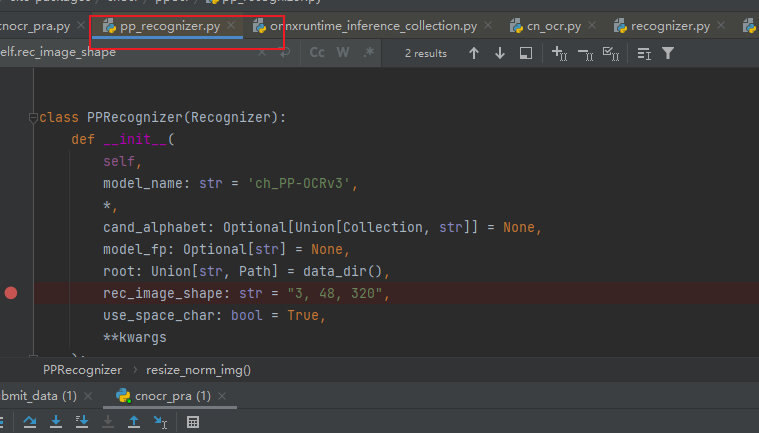
onnxruntime.capi.onnxruntime_pybind11_state.InvalidArgument: [ONNXRuntimeError] : 2 : INVALID_ARGUMENT : Got invalid dimensions for input: x for the following indices index: 2 Got: 32 Expected: 48 改源码rec_image_shape: str = “3, 32, 320”,改成rec_image_shape: str = “3, 48, 320”,
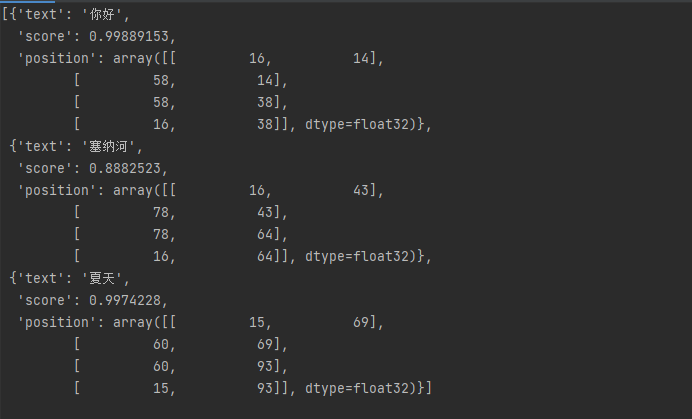
结果:
版权声明:本文内容由互联网用户自发贡献,该文观点仅代表作者本人。本站仅提供信息存储空间服务,不拥有所有权,不承担相关法律责任。如发现本站有涉嫌侵权/违法违规的内容,请联系我们,一经查实,本站将立刻删除。
如需转载请保留出处:https://51itzy.com/kjqy/103931.html