
前言
前段时间改造了公司的安全键盘,是基于Dialog和Button自定义的。也因此借机了解下 Android 平台提供的自定义键盘接口。主要有两个类:Keyboard和KeyboardView。很搞笑的是,百度出来自定义Android键盘(与自定义Android输入法不同)的文章千篇一律。
注:这里讲的自定义键盘同公司安全键盘是两种实现方式,不存在泄露公司内部技术的问题!!!
不去吐槽别人,楼主秉持只原创和翻译的作风,输出这第50篇博客。相关属性部分是对照官方文档和Demo实践翻译的,若有瑕疵,请见谅。楼主csdn主页请点击flueky专栏。
相关属性
Keyboard
| 序号 | 属性 | 类型 | 描述 |
|---|---|---|---|
| 1 | keyHeight | dimension/fractional | Key高度,区分精确值(dp、px等)和相对值(%、%p) |
| 2 | keyWidth | dimension/fractional | Key宽度,同上 |
| 3 | horizontalGap | dimension/fractional | Key水平间隙,同上 |
| 4 | verticalGap | dimension/fractional | Key按键间隙(垂直),同上 |
Row
| 序号 | 属性 | 类型 | 描述 |
|---|---|---|---|
| 1 | keyHeight | dimension/fractional | Key高度,区分精确值(dp、px等)和相对值(%、%p) |
| 2 | keyWidth | dimension/fractional | Key宽度,同上 |
| 3 | horizontalGap | dimension/fractional | Key水平间隙,同上 |
| 4 | verticalGap | dimension/fractional | Key按键间隙(垂直),同上 |
| 5 | keyboardMode | reference | 键盘类型,如果该行的类型不符合键盘的类型,将跳过该行。 |
| 6 | rowEdgeFlags | enum | 行边界标记,top/bottom,键盘顶(底)部锚点。 |
Key
| 序号 | 属性 | 类型 | 描述 |
|---|---|---|---|
| 1 | keyHeight | dimension/fractional | Key高度,区分精确值(dp、px等)和相对值(%、%p) |
| 2 | keyWidth | dimension/fractional | Key宽度,同上 |
| 3 | horizontalGap | dimension/fractional | Key水平间隙,同上 |
| 4 | verticalGap | dimension/fractional | Key按键间隙(垂直),同上 |
| 5 | codes | int | Key输出符号对应的Unicode值,官方还说支持字转义字符串,不明白。 |
| 6 | iconPreview | reference | 弹出回显的icon |
| 7 | isModifier | boolean | 是否功能修饰键,如:Alt/Shift |
| 8 | isSticky | boolean | 是否是开关键 |
| 9 | isRepeatable | boolean | 是否允许重复。true表示长按时重复执行。 |
| 10 | keyEdgeFlags | enum | Key边缘位置标记,left/right,键盘左(右)边锚点。 |
| 11 | keyIcon | reference | 替换label显示在按键上的icon。 |
| 12 | keyLabel | reference | 显示在Key上的标签。 |
| 13 | keyOutputText | string | Key按下时输出的字符或字符串。 |
| 14 | popupCharacters | string | 小键盘显示的字符,用于显示Key候选项。 |
| 15 | popupKeyboard | reference | 按键候选小键盘的keyboard布局 |
KeyboardView
| 序号 | 属性 | 类型 | 描述 |
|---|---|---|---|
| 1 | keyBackground | reference | 按键的图像背景,必须包含多个状态的drawable |
| 2 | verticalCorrection | dimension | 补充触摸y坐标的偏移,用于偏差矫正 |
| 3 | keyPreviewLayout | reference | 按键按下时预览框的布局 |
| 4 | keyPreviewOffset | dimension | 按键按下时预览框的偏移。>0 向下,<0 向上。 |
| 5 | keyPreviewHeight | dimension | 按键按下时预览框的高度。 |
| 6 | keyTextSize | dimension | 按键文字大小。 |
| 7 | keyTextColor | color | 按键文字颜色。 |
| 8 | labelTextSize | dimension | 标签文字大小,keylabel有多个字符且keycodes只有一个值时,该属性生效。 |
| 9 | popupLayout | reference | 按键候选小键盘的KeyboardView布局。 |
| 10 | shadowRadius | float | 按键文字阴影半径 |
| 11 | shadowColor | color | 按键文字阴影颜色 |
自定义键盘
布局
<android.inputmethodservice.KeyboardViewandroid:id="@+id/activity_main_keyboard"android:layout_width="match_parent"android:layout_height="wrap_content"android:background="#"android:keyBackground="@drawable/key_bg"android:keyTextColor="#dddddd"android:keyTextSize="18sp"android:labelTextSize="18sp"android:paddingBottom="2dp"android:paddingTop="2dp" />
讯享网
键盘容器视图,Demo中直接放在Activity布局。KeyboardView可以显示不同类型的Keyboard。请区分
background和keyBackground。keyBackground内容如下:
讯享网<?xml version="1.0" encoding="utf-8"?> <layer-list xmlns:android="http://schemas.android.com/apk/res/android"><!-- 此处设置•key边距 --><itemandroid:bottom="2dp"android:left="2dp"android:right="2dp"android:top="2dp"><selector><!-- 按压后图层 --><item android:state_pressed="true"><shape><solid android:color="#" /><corners android:radius="5dp" /></shape></item><!-- 正常状态图层 --><item><shape><solid android:color="#" /><corners android:radius="5dp" /></shape></item></selector></item> </layer-list>
字母键盘布局
<?xml version="1.0" encoding="utf-8"?> <Keyboard xmlns:android="http://schemas.android.com/apk/res/android"android:keyHeight="50dp"android:keyWidth="10%p"><Row android:rowEdgeFlags="top"><Keyandroid:keyEdgeFlags="left"android:keyLabel="q" /><Key android:keyLabel="w" /><Key android:keyLabel="e" /><Key android:keyLabel="r" /><Key android:keyLabel="t" /><Key android:keyLabel="y" /><Key android:keyLabel="u" /><Key android:keyLabel="i" /><Key android:keyLabel="o" /><Keyandroid:keyEdgeFlags="right"android:keyLabel="p" /></Row><Row><Keyandroid:codes="97"android:horizontalGap="5%p"android:keyEdgeFlags="left"android:keyLabel="a" /><Key android:keyLabel="s" /><Key android:keyLabel="d" /><Key android:keyLabel="f" /><Key android:keyLabel="g" /><Key android:keyLabel="h" /><Key android:keyLabel="j" /><Key android:keyLabel="k" /><Keyandroid:keyEdgeFlags="right"android:keyLabel="l" /></Row><Row><Keyandroid:codes="-1"android:isModifier="true"android:isSticky="true"android:keyEdgeFlags="left"android:keyIcon="@drawable/key_caps_lock_icon"android:keyWidth="15%p" /><Key android:keyLabel="z" /><Key android:keyLabel="x" /><Key android:keyLabel="c" /><Key android:keyLabel="v" /><Key android:keyLabel="b" /><Key android:keyLabel="n" /><Key android:keyLabel="m" /><Keyandroid:codes="-5"android:isModifier="true"android:isRepeatable="true"android:keyEdgeFlags="right"android:keyIcon="@drawable/key_delete_icon"android:keyWidth="15%p" /></Row><Row android:rowEdgeFlags="bottom"><Keyandroid:codes="-11"android:keyEdgeFlags="left"android:keyLabel="123"android:keyWidth="15%p" /><Keyandroid:codes="32"android:isRepeatable="true"android:keyLabel=" "android:keyWidth="70%p" /><Keyandroid:codes="-12"android:keyEdgeFlags="right"android:keyLabel="#+="android:keyWidth="15%p" /></Row> </Keyboard>
效果图如下:
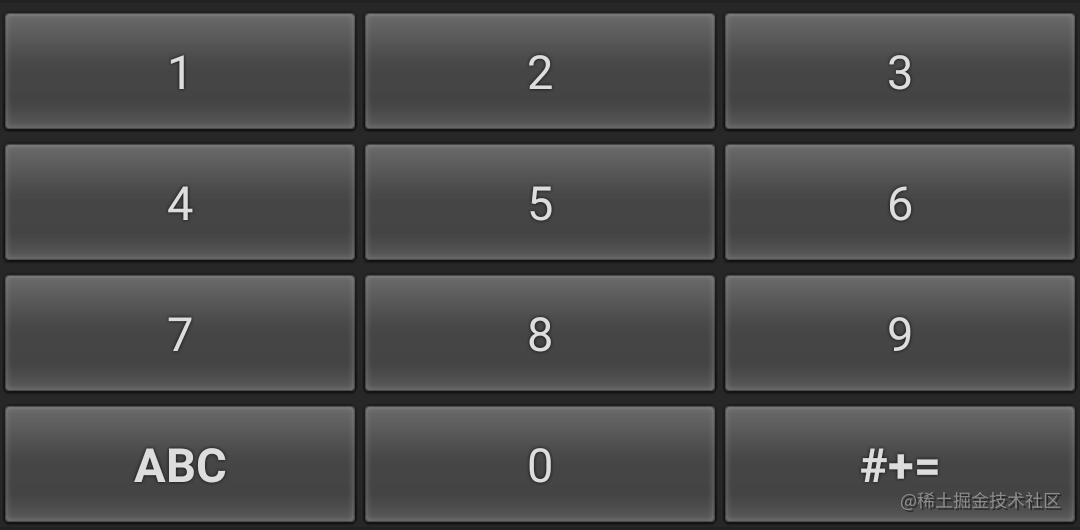
数字键盘布局
讯享网<?xml version="1.0" encoding="utf-8"?> <Keyboard xmlns:android="http://schemas.android.com/apk/res/android"android:keyHeight="50dp"android:keyWidth="33.3%p"><Row><Keyandroid:codes="49"android:keyLabel="1" /><Keyandroid:codes="50"android:keyLabel="2" /><Keyandroid:codes="51"android:keyLabel="3" /></Row><Row><Keyandroid:codes="52"android:keyLabel="4" /><Keyandroid:codes="53"android:keyLabel="5" /><Keyandroid:codes="54"android:keyLabel="6" /></Row><Row><Keyandroid:codes="55"android:keyLabel="7" /><Keyandroid:codes="56"android:keyLabel="8" /><Keyandroid:codes="57"android:keyLabel="9" /></Row><Row><Keyandroid:codes="-10"android:keyLabel="ABC" /><Keyandroid:codes="48"android:keyLabel="0" /><Keyandroid:codes="-12"android:keyLabel="#+=" /></Row> </Keyboard>
效果图如下:
1.Key之间的间隙不建议使用horizontalGap和verticalGap 设置。有兴趣可以尝试下,设置后会出现什么效果。此处采用drawable的padding属性。 2.keyLabel属性只有一个字符时,当做输入键,keyLabel有多个字符时,如果codes也有多个值,仍然当做输入键,keyTextSize 值有效;只有一个值时当做功能键。labelTextSize值有效。 3.codes 属性可以省略,默认使用keyLabel字符的Unicode值。功能键等其他自定义按键的 key code 建议设置为负数。 4.codes有多个值时,单击取第一个,双击取第二个,三连击取第三个。通常建议该属性值不要超过3个。多个值用逗号分隔。
逻辑
final Keyboard pinyin26KB = new Keyboard(this, R.xml.pinyin_26);// 字母键盘 final Keyboard numberKB = new Keyboard(this, R.xml.number); // 数字键盘 keyboardView.setKeyboard(pinyin26KB); // 设置默认显示字符键盘 keyboardView.setOnKeyboardActionListener(new KeyboardView.OnKeyboardActionListener() { // 按下 key 时执行 @Override public void onPress(int primaryCode) { Log.d(TAG, "onPress: "+primaryCode); } // 释放• key 时执行 @Override public void onRelease(int primaryCode) { Log.d(TAG, "onRelease: "+primaryCode); } // 点击• key 时执行 @Override public void onKey(int primaryCode, int[] keyCodes) { Editable editable = edtInput.getText(); int start = edtInput.getSelectionStart(); switch (primaryCode) { case Keyboard.KEYCODE_SHIFT:// 设置shift状态然后刷新页面 pinyin26KB.setShifted(!pinyin26KB.isShifted()); keyboardView.invalidateAllKeys(); break; case Keyboard.KEYCODE_DELETE:// 点击删除键,长按连续删除 if (editable != null && editable.length() > 0 && start > 0) { editable.delete(start - 1, start); } break; case -10:// 自定义code,切换到拼音键盘 keyboardView.setKeyboard(pinyin26KB); break; case -11:// 自定义code,切换到字母键盘 keyboardView.setKeyboard(numberKB); break; case -12:// 自定义code // 切换到符号键盘,待实现 break; default:// 数值code if (primaryCode >= 97 && primaryCode <= 97 + 26) {// 按下字母键 editable.insert(start, pinyin26KB.isShifted() ? Character.toString((char) (primaryCode - 32)) : Character.toString((char) (primaryCode))); } else {// 其他code值,转字符在输入框中显示 editable.insert(start, Character.toString((char) (primaryCode))); } break; } } // 设置了 keyOutputText 属性后执行。 @Override public void onText(CharSequence text) { Log.d(TAG, "onText: "+text); } });
已经定义的功能键code值,如下:
讯享网 public static final int KEYCODE_SHIFT = -1; public static final int KEYCODE_MODE_CHANGE = -2; public static final int KEYCODE_CANCEL = -3; public static final int KEYCODE_DONE = -4; public static final int KEYCODE_DELETE = -5; public static final int KEYCODE_ALT = -6;
1.Shift键需要设置 isSticky和isModifier 值为true, codes值为-1。2.Delete键需要设置isRepeatable和isModifier 值为true,codes值为-5。3.切换键盘的功能键需要自定义上述中未用到的code值,在onKey方法中做好对应的处理。
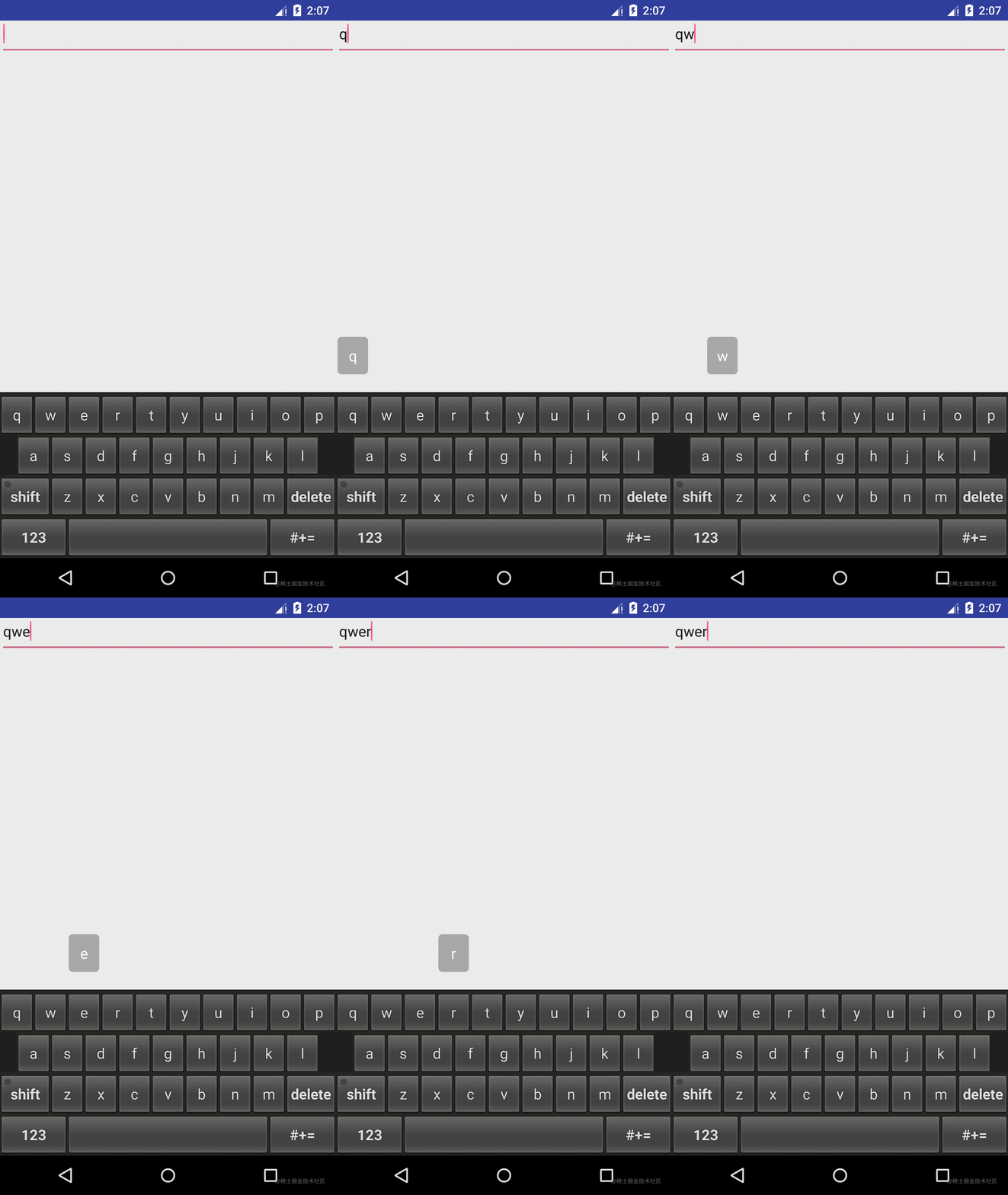
回显
keyboardView.setPreviewEnabled(true);
打开回显,默认是true。
讯享网android:keyPreviewLayout="@layout/preview" android:keyPreviewHeight="50dp" android:keyPreviewOffset="-20dp"
在键盘容器中声明以上属性。
备选小键盘
pupop_layout.xml 备选小键盘容器:
<?xml version="1.0" encoding="utf-8"?> <android.inputmethodservice.KeyboardView xmlns:android="http://schemas.android.com/apk/res/android"android:id="@android:id/keyboardView"android:layout_width="match_parent"android:layout_height="wrap_content"android:background="#"android:keyBackground="@drawable/popup_bg"android:keyPreviewHeight="60dp"android:keyPreviewLayout="@layout/preview"android:keyPreviewOffset="-10dp"android:keyTextColor="#dddddd"android:keyTextSize="18sp"android:labelTextSize="18sp" />
pupop.xml 备选小键盘视图:
讯享网<?xml version="1.0" encoding="utf-8"?> <Keyboard xmlns:android="http://schemas.android.com/apk/res/android"android:layout_width="match_parent"android:layout_height="wrap_content"android:background="@drawable/popup_bg"android:keyHeight="50dp"><Row><Key android:codes="97" /><Key android:codes="98" /><Key android:codes="99" /></Row> </Keyboard>
给w键添加备选功能:
<Keyandroid:keyLabel="w"android:popupCharacters="123"android:popupKeyboard="@layout/pupop" />
在键盘容器中,指定备选小键盘布局:
讯享网android:popupLayout="@layout/pupop_layout"

网络安全入门学习路线
其实入门网络安全要学的东西不算多,也就是网络基础+操作系统+中间件+数据库,四个流程下来就差不多了。
1.网络安全法和了解电脑基础
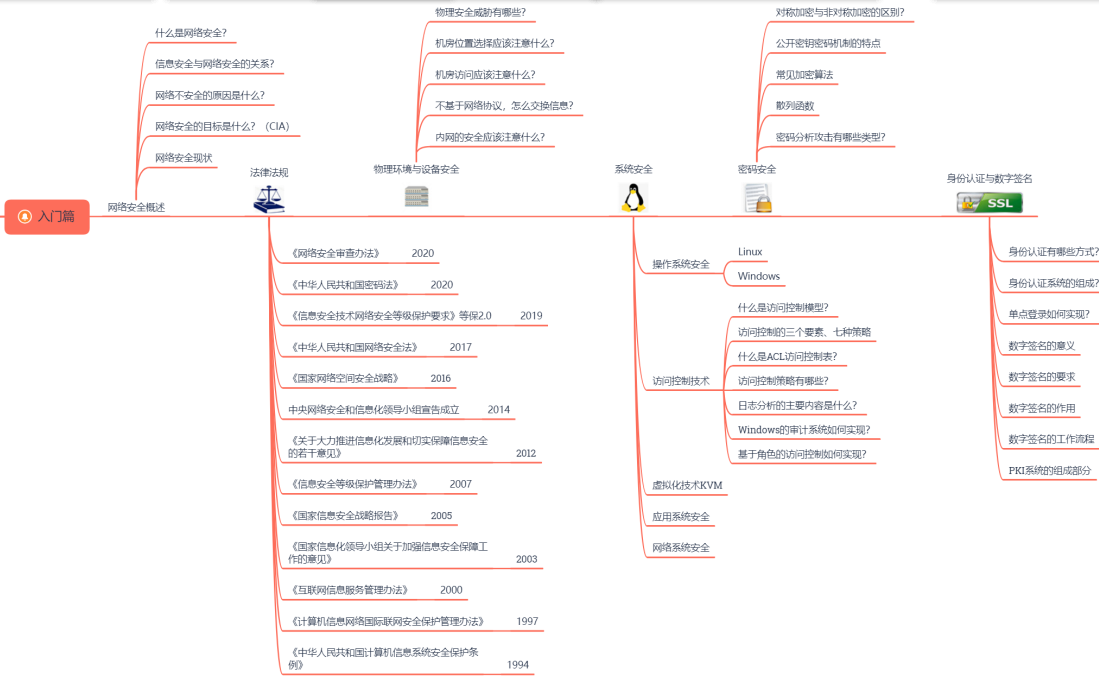 其中包括操作系统Windows基础和Linux基础,标记语言HTML基础和代码JS基础,以及网络基础、数据库基础和虚拟机使用等...
别被这些看上去很多的东西给吓到了,其实都是很简单的基础知识,同学们看完基本上都能掌握。计算机专业的同学都应该接触了解过,这部分可以直接略过。没学过的同学也不要慌,可以去B站搜索相关视频,你搜关键词网络安全工程师会出现很多相关的视频教程,我粗略的看了一下,排名第一的视频就讲的很详细。  当然你也可以看下面这个视频教程仅展示部分截图:
 学到http和https抓包后能读懂它在说什么就行。
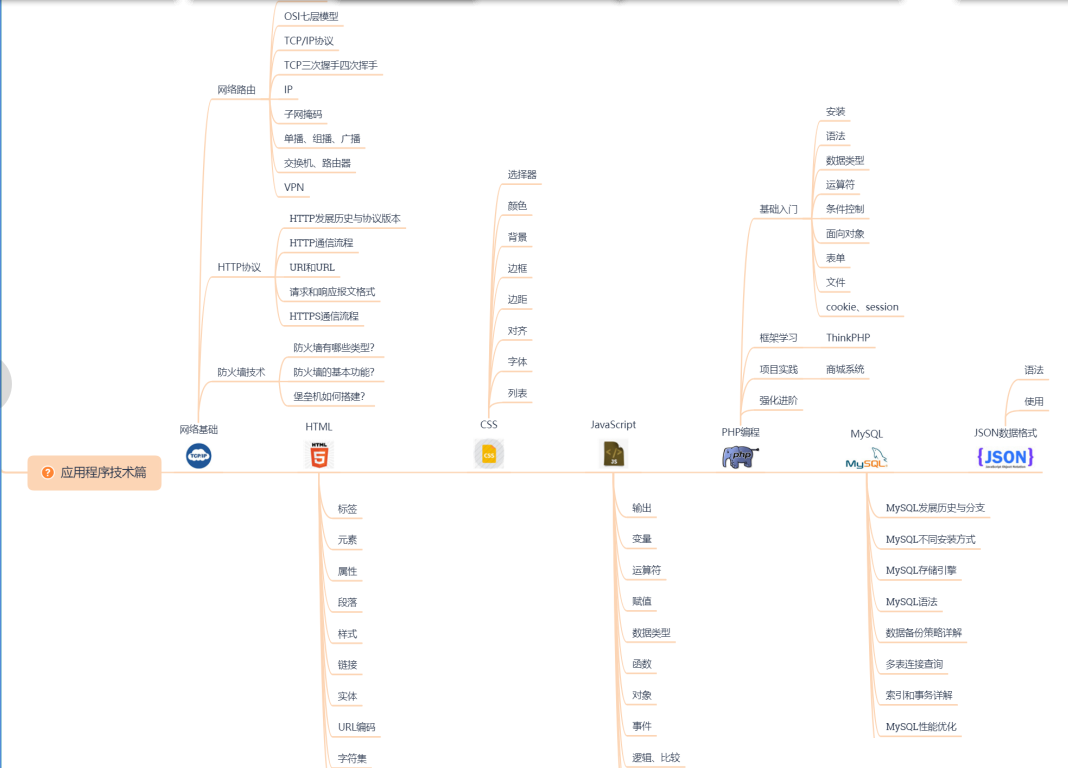
2.网络基础和编程语言
3.入手Web安全
web是对外开放的,自然成了的重点关照对象,有事没事就来入侵一波,你说不管能行吗! 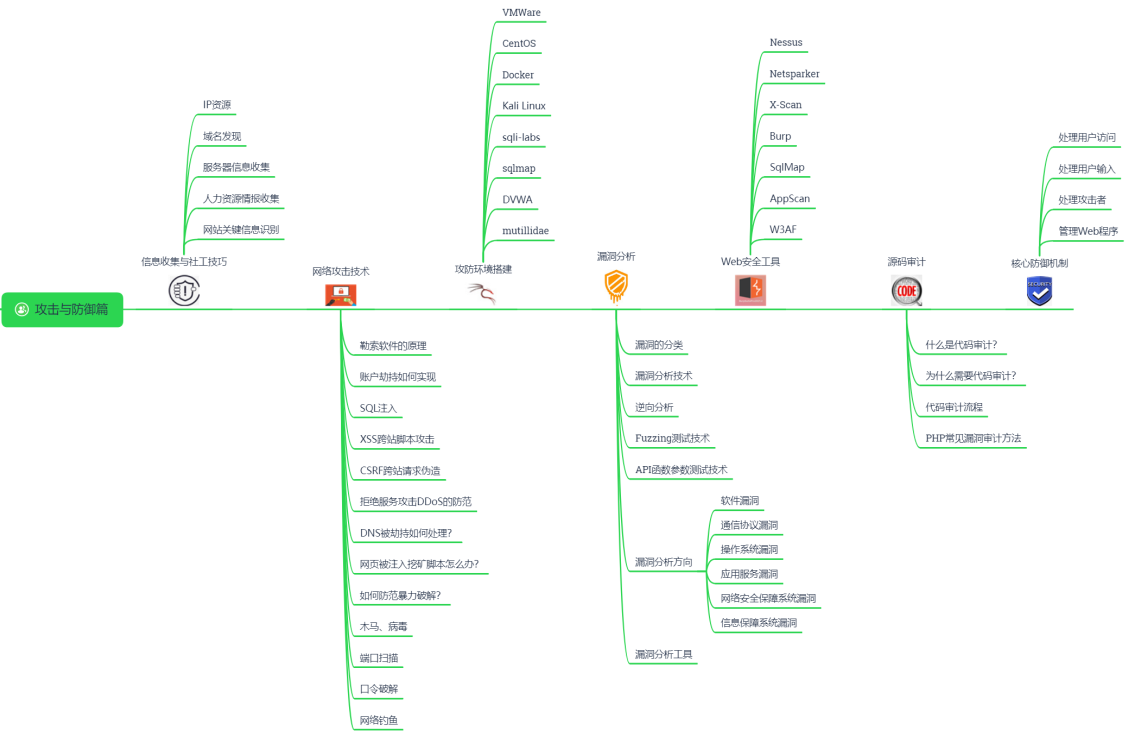 想学好Web安全,咱首先得先弄清web是怎么搭建的,知道它的构造才能精准打击。所以web前端和web后端的知识多少要了解点,然后再学点python,起码得看懂部分代码吧。
最后网站开发知识多少也要了解点,不过别紧张,只是学习基础知识。
等你用几周的时间学完这些,基本上算是具备了入门合格渗透工程师的资格,记得上述的重点要重点关注哦!  再就是,要正式进入web安全领域,得学会web渗透,OWASP TOP 10等常见Web漏洞原理与利用方式需要掌握,像SQL注入/XSS跨站脚本攻击/Webshell木马编写/命令执行等。
这个过程并不枯燥,一边打怪刷级一边成长岂不美哉,每个攻击手段都能让你玩得不亦乐乎,而且总有更猥琐的方法等着你去实践。
学完web渗透还不算完,还得掌握相关系统层面漏洞,像ms17-010永恒之蓝等各种微软ms漏洞,所以要学习后渗透。可能到这里大家已经不知所云了,不过不要紧,等你学会了web渗透再来看会发现很简单。
其实学会了这几步,你就正式从新手小白晋升为入门学员了,真的不算难,你上你也行。
4.安全体系
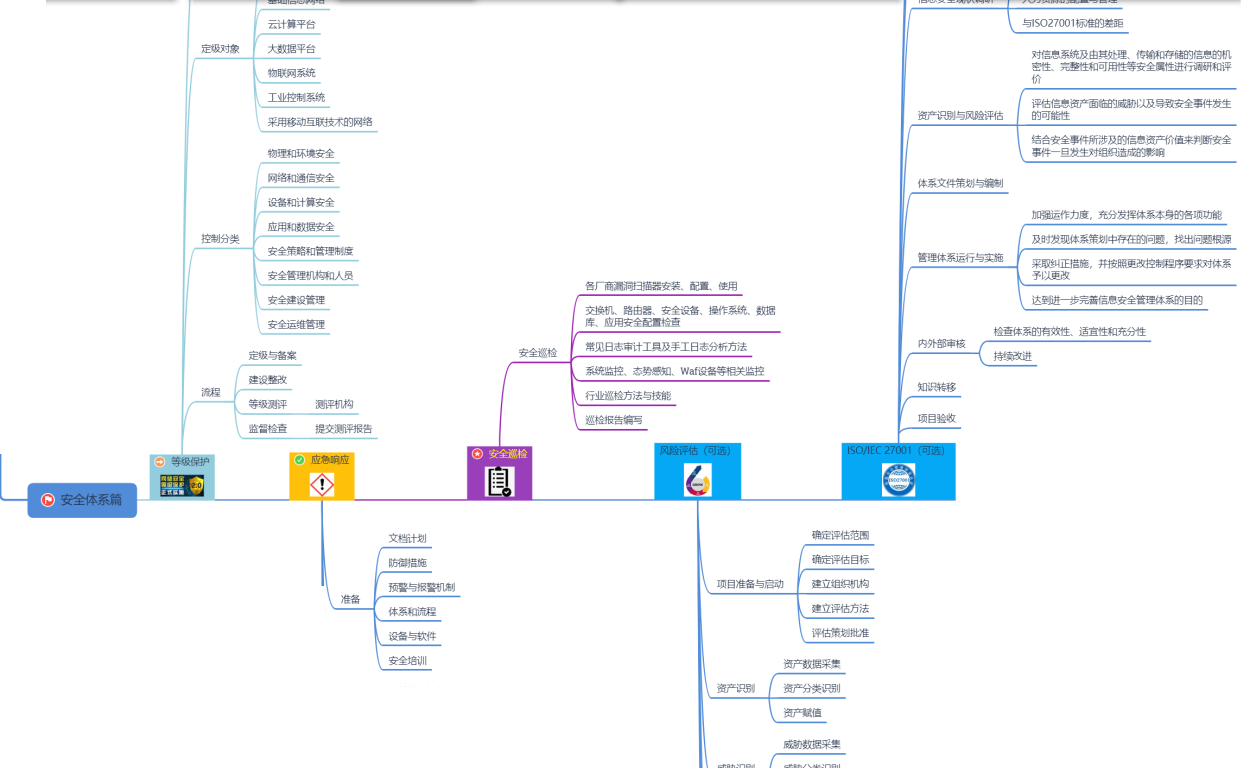 不过我们这个水平也就算个渗透测试工程师,也就只能做个基础的安全服务,而这个领域还有很多业务,像攻防演练、等保测评、风险评估等,我们的能力根本不够看。
所以想要成为一名合格的网络工程师,想要拿到安全公司的offer,还得再掌握更多的网络安全知识,能力再更上一层楼才行。即便以后进入企业,也需要学习很多新知识,不充实自己的技能就会被淘汰。
从时代发展的角度看,网络安全的知识是学不完的,而且以后要学的会更多,同学们要摆正心态,既然选择入门网络安全,就不能仅仅只是入门程度而已,能力越强机会才越多。
尾言
因为入门学习阶段知识点比较杂,所以我讲得比较笼统,最后联合CSDN整理了一套【282G】网络安全从入门到精通资料包,需要的小伙伴可以点击链接领取哦! 网络安全重磅福利:入门&进阶全套282G学习资源包免费分享!
版权声明:本文内容由互联网用户自发贡献,该文观点仅代表作者本人。本站仅提供信息存储空间服务,不拥有所有权,不承担相关法律责任。如发现本站有涉嫌侵权/违法违规的内容,请联系我们,一经查实,本站将立刻删除。
如需转载请保留出处:https://51itzy.com/kjqy/102592.html