
初始配置
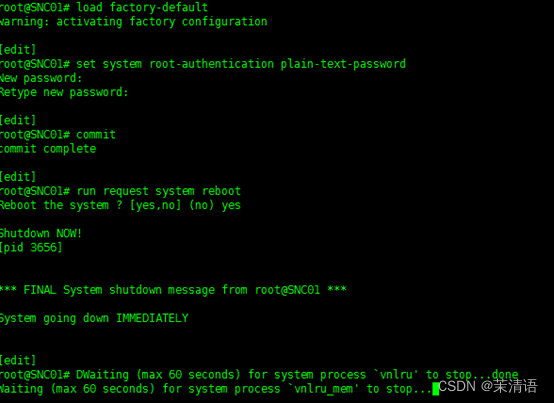
#shell模式进入到配置模式 cli #恢复出厂设置 load factory-default #设置root密码 set system root-authentication plain-text-password #提交生效 commit #重启 run request system reboot 讯享网
系统服务配置
讯享网#修改root密码并配置管理员用户 set system root-authentication plain-text-password juniper@123 juniper@123 set system login user admin uid 2001 set system login user admin class super-user set system login user super uid 100 set system login user super class super-user set system login user admin authentication plain-text-password juniper@789 juniper@789 set system login user super authentication plain-text-password juniper@456 juniper@456 #配置主机名和时区,时区使用默认的 上海 set system host-name SNC01 set system time-zone Asia/Shanghai #配置ntp服务器 set sys ntp boot pool.ntp.org set sys ntp server pool.ntp.org #配置设备的公网DNS服务器 set system name-server 202.106.0.20 #配置回滚 set system max-configurations-on-flash 5 set system max-configuration-rollbacks 49
接口配置
#配置公网接口,vlan id和irb后面的虚拟接口名称可以不进行变更 set vlans vlan-untrust vlan-id 4 set vlans vlan-untrust l3-interface irb.1 以上两行是创建一个和untrust安全区域对应的,名为irb.1的虚拟网络接口,它所属vlan是4,不用配trust的原因是出厂设置里已经定义了相关内容。
讯享网#删除设备出厂配置里默认的和g0/0/0口有关的配置 delete security zones security-zone untrust interfaces ge-0/0/0.0
set security zones security-zone trust interfaces irb.0 set security zones security-zone untrust interfaces irb.1 以上两行是重新定义irb.0和irb.1两个虚拟能给网络接口所属的安全区域,irb.0属于trust内网区域,irb.1属于untrust公网区域。

讯享网set interfaces irb unit 0 family inet set interfaces irb unit 1 family inet
以上两行是设置irb.0和irb.1的类型为三层口,“irb unit 0”等于irb.0,irb unit 1等于irb.1,如果要增加dmz接口,以此类推。
delete interfaces ge-0/0/0 unit 0 family inet set interfaces ge-0/0/0 unit 0 family ethernet-switching vlan members vlan-untrust delete interfaces ge-0/0/1 unit 0 family ethernet-switching vlan members vlan-trust set interfaces ge-0/0/1 unit 0 family ethernet-switching vlan members vlan-untrust 以上四行是把g0/0/0 和g0/0/1两个物理口设置成二层口,并且划到vlan-untrust区域。如果要新增dmz口,可以以此类推把其它口划到vlan-dmz区域(前提是已经新建了vlan-dmz区域并设置了对应的vlan id和irb虚拟接口),出厂设置默认已经把其它口都设置到vlan-trust区域。
讯享网#配置irb.1的公网口IP地址以及默认路由 set interfaces irb unit 1 family inet address 10.0.0.2/24 --公网ip set routing-options static route 0.0.0.0/0 next-hop 10.0.0.1 --公网网关
#配置内网信息(需先删除默认配置192.168.1.1/24) delete interfaces irb unit 0 family inet address 192.168.1.1/24 set interfaces irb unit 0 family inet address 192.168.2.1/24 DHCP配置
讯享网#删除默认的dhcp地址池 delete access address-assignment pool junosDHCPPool #配置dhcp地址池名称以及对应的ip段 set access address-assignment pool lanDHCPPool family inet network 192.168.2.0/24 #配置dhcp分配的起止ip段 set access address-assignment pool lanDHCPPool family inet range lanRange low 192.168.2.30 set access address-assignment pool lanDHCPPool family inet range lanRange high 192.168.2.200 #配置dhcp分配的网关 set access address-assignment pool lanDHCPPool family inet dhcp-attributes router 192.168.2.1 #配置dhcp分配的dns服务器,可以配置和公网dns一样 set access address-assignment pool lanDHCPPool family inet dhcp-attributes name-server 202.106.0.20 #把配置的dhcp地址池绑定到内网口irb.0 set access address-assignment pool lanDHCPPool family inet dhcp-attributes propagate-settings irb.0
开放协议配置
#配置设备的管理协议和端口 set system services ssh root-login allow set system services ssh protocol-version v2 set system services telnet set system services web-management http port 30000 set system services web-management http interfaceirb.0 set system services web-management https port 30001 讯享网#配置外网开放的管理协议 set security zones security-zone untrust interfaces irb.1 host-inbound-traffic system-services ping set security zones security-zone untrust interfaces irb.1 host-inbound-traffic system-services https set security zones security-zone untrust interfaces irb.1 host-inbound-traffic system-services ssh
#配置内网开放的协议 set security zones security-zone trust interfaces irb.0 host-inbound-traffic system-services dhcp set security zones security-zone trust interfaces irb.0 host-inbound-traffic system-services telnet set security zones security-zone trust interfaces irb.0 host-inbound-traffic system-services https set security zones security-zone trust interfaces irb.0 host-inbound-traffic system-services ping set security zones security-zone trust interfaces irb.0 host-inbound-traffic system-services snmp 安全策略配置
讯享网#配置从trust到untrust的策略(默认配置全部any,可根据需求更改) set security policies from-zone trust to-zone trust policy t-t match source-address any destination-address any application any set security policies from-zone trust to-zone trust policy t-t then permit set security policies from-zone trust to-zone untrust policy t-u match source-address any destination-address any application any set security policies from-zone trust to-zone untrust policy t-u then permit
小结
以上内容为juniper srx系列防火墙基础配置,均为实际项目真机配置,后续持续更新dmz区域相关配置详解。
版权声明:本文内容由互联网用户自发贡献,该文观点仅代表作者本人。本站仅提供信息存储空间服务,不拥有所有权,不承担相关法律责任。如发现本站有涉嫌侵权/违法违规的内容,请联系我们,一经查实,本站将立刻删除。
如需转载请保留出处:https://51itzy.com/kjqy/102117.html