
python - pygame图形界面 绘制爱心函数 r = 1-cos(θ)
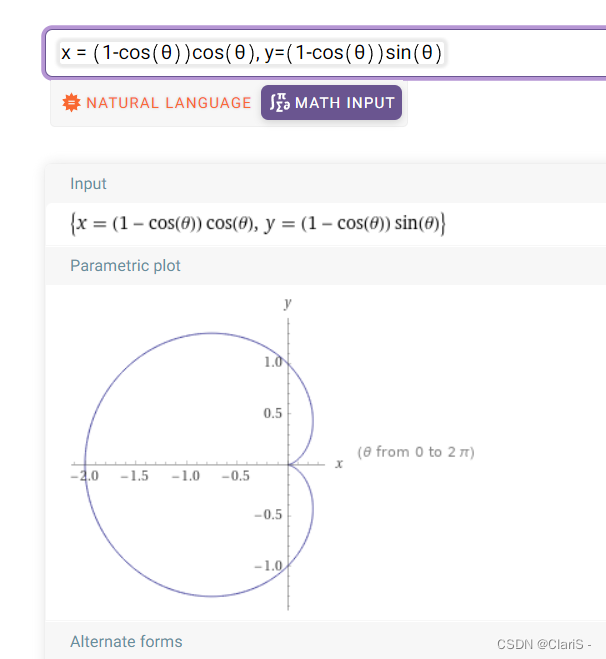
用参数方程表示即:
x = (1 - cos(θ)) * cos(θ)
y = (1 - cos(θ)) * sin(θ)
放个函数图像 函数详情点这里
讯享网

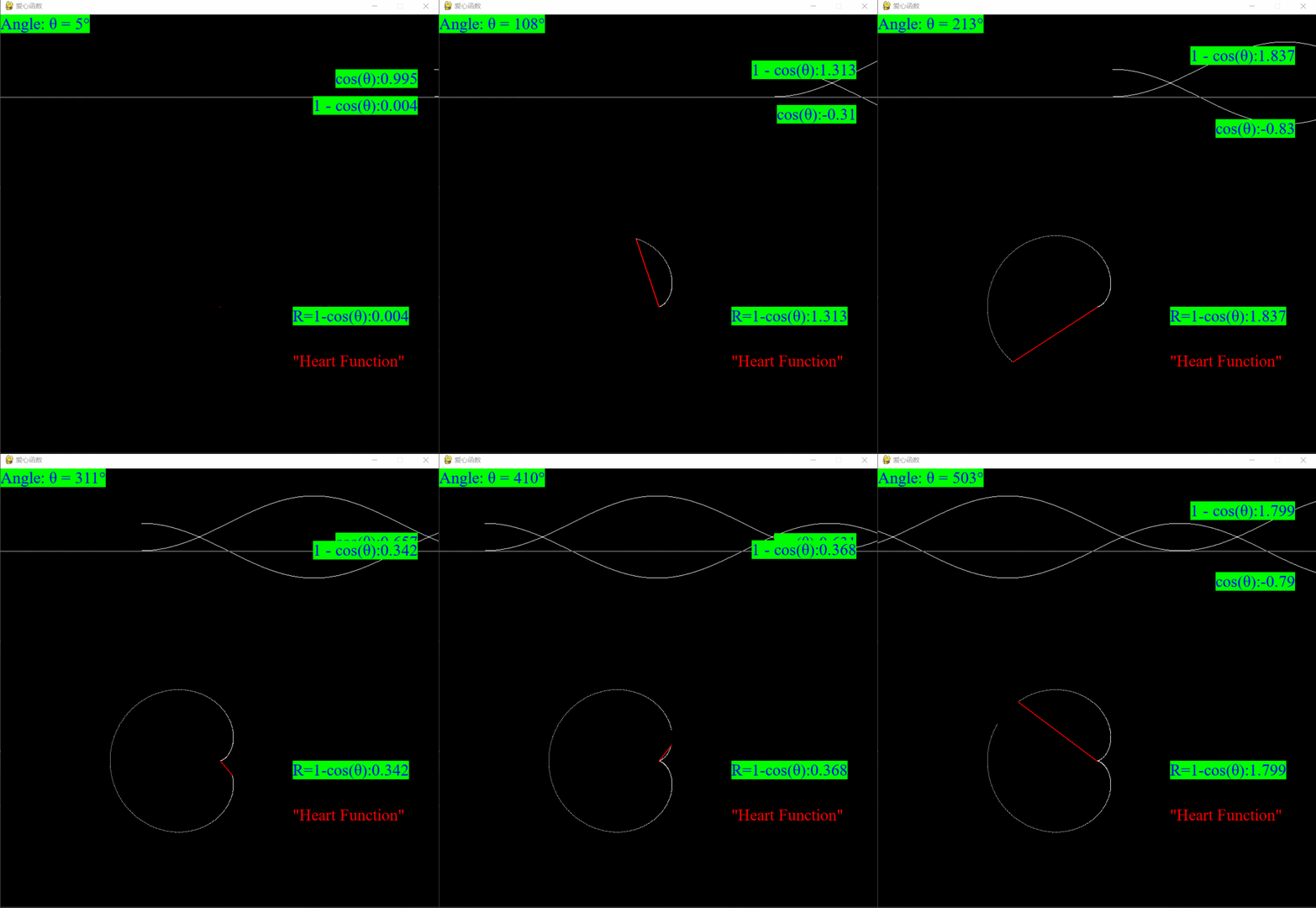
代码原理很简单,采用极坐标的方式,使用一个变量 t(即 θ ),每次循环自增(充当计时器/角度器), 用 t 来计算其他量即可。
使用修改屏幕每个像素的方式,绘制函数效果。
下面放张最终实现效果图
import time import pygame from pygame import * import math import time pygame.init() screen = (800, 800) window = pygame.display.set_mode(screen) pygame.display.set_caption("爱心函数") t = 0 # 角度计数器 r = 0 # 半径 # text render font = pygame.font.SysFont('Times', 30) note = font.render("\"Heart Function\"", True, (255, 0, 0), (0, 0, 0)) # list 存储函数 已绘制的点 heart_list = [] cos_list = [[0, 0]] _cos_list = [[0, 0]] # 爱心函数即 r = 1 - cos(θ) , 极坐标下函数表达式 def heart_fx(): global r r = 1 - math.cos(t) x = int(math.cos(t) * r * 100 + screen[0]/2) y = int((screen[1]/1.5 - math.sin(t) * r * 100)) # 添加新的函数值点 heart_list.append((x, y)) # 当存储了一定量的函数点时,就把最开始的点清除,减少计算量 if len(heart_list) > 600: heart_list.remove(heart_list[0]) # y = cos(x) def cos_fx(): # 将已绘制的函数点左移,达到滚动效果 for i in range(len(cos_list)): cos_list[i][0] -= 1 cos_list.append([screen[0], int(- math.cos(t) * 50 + 150)]) if len(cos_list) > 1000: cos_list.remove(cos_list[0]) # y = 1 - cos(x) def _cos_fx(): for i in range(len(_cos_list)): _cos_list[i][0] -= 1 _cos_list.append([screen[0], int(- (1 - math.cos(t)) * 50 + 150)]) if len(_cos_list) > 1000: _cos_list.remove(_cos_list[0]) while True: # init data heart_fx() cos_fx() _cos_fx() # render graphics 绘制函数 # heart hx, hy for hx, hy in heart_list: window.set_at((hx, hy), (255, 255, 255)) # cos cx, cy for cx, cy in cos_list: window.set_at((cx, cy), (255, 255, 255)) # 1 - cos for cx, cy in _cos_list: window.set_at((cx, cy), (255, 255, 255)) # line 绘制所需直线 # zero line (y=0 灰线) pygame.draw.line(window, (100, 100, 100), (0, 150), (screen[0], 150), 2) # R line 红色半径线 pygame.draw.line(window, (255, 0, 0), (screen[0] / 2, screen[1] / 1.5), (heart_list[-1][0], heart_list[-1][1]), 2) # render text 绘制文本 _t = font.render('Angle: θ = ' + str(int(t/math.pi*180)) + "°", True, (0, 0, 255), (0, 255, 0)) _r = font.render('R=1-cos(θ):' + str(r)[:5], True, (0, 0, 255), (0, 255, 0)) cos = font.render('cos(θ):' + str(math.cos(t))[:5], True, (0, 0, 255), (0, 255, 0)) _cos = font.render('1 - cos(θ):' + str(r)[:5], True, (0, 0, 255), (0, 255, 0)) cos_w, cos_h = cos.get_size() _cos_w, _cos_h = _cos.get_size() window.blit(note, (int(screen[0]/1.5), int(screen[1]/1.3))) window.blit(_t, (0, 0)) window.blit(cos, (screen[0]/1.05 - cos_w, cos_list[-1][1])) window.blit(_cos, (screen[0]/1.05 - _cos_w, _cos_list[-1][1])) window.blit(_r, (int(screen[0]/1.5), int(screen[1]/1.5))) # 更新画面 display.update() # 更新角度值 t += 0.01 time.sleep(0.015) # 将画面用黑色填充,下次 window.fill((0, 0, 0)) for event in pygame.event.get(): if event.type == pygame.QUIT: exit() break 讯享网
版权声明:本文内容由互联网用户自发贡献,该文观点仅代表作者本人。本站仅提供信息存储空间服务,不拥有所有权,不承担相关法律责任。如发现本站有涉嫌侵权/违法违规的内容,请联系我们,一经查实,本站将立刻删除。
如需转载请保留出处:https://51itzy.com/kjqy/101604.html