
UNIAPP实战项目笔记51 登录账号用户名和密码输入框的数据验证功能
实际案例图片
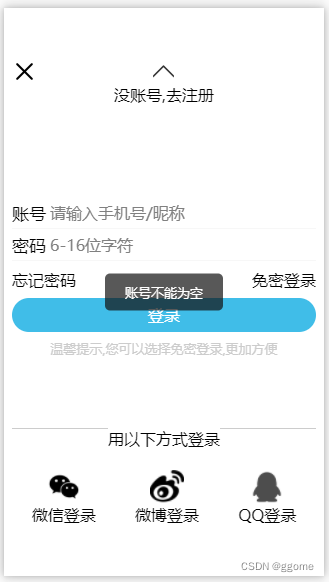
账号验证
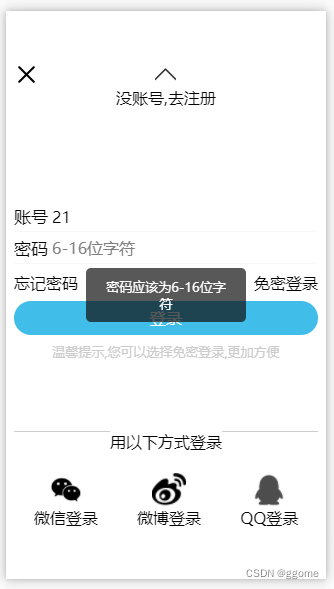
密码验证
登录成功跳转

显示登录和注册页面布局 账号密码的验证功能和登录验证提交
具体内容图片自己替换哈,随便找了个图片的做示例
具体位置见目录结构
完善布局页面和样式
代码 login.vue页面
<template> <view class="login"> <swiper vertical="true" style="height: 100vh;"> <swiper-item> <scroll-view> <view class="login-tel"> <view class="tel-main"> <view class="close" @tap="goBack"> <image class="close-img" src="../../static/img/close-bold.png" mode=""></image> </view> <view class="logo"> <image class="logo-img" src="../../static/logo.png" mode=""></image> </view> <view class="tel">手机号注册</view> <LoginOther></LoginOther> <view class="login-go"> <view class="">已有账号,去登录</view> <image src="../../static/img/arrow-down.png" mode=""></image> </view> </view> </view> </scroll-view> </swiper-item> <swiper-item> <scroll-view> <view class="login-tel"> <view class="tel-main"> <view class="close close-center"> <view class="" @tap="goBack"> <image class="close-img" src="../../static/img/close-bold.png" mode=""></image> </view> <view class="login-go"> <image class="close-img" src="../../static/img/up.png" mode=""></image> <view class="">没账号,去注册</view> </view> <view class=""></view> </view> <view class="login-form"> <view class="login-user"> <text class='user-text'>账号</text> <input type="text" v-model="userName" value="" placeholder="请输入手机号/昵称"/> </view> <view class="login-user"> <text class='user-text'>密码</text> <input type="safe-password" v-model="userPwd" value="" placeholder="6-16位字符"/> </view> </view> <view class="login-quick"> <view class="">忘记密码</view> <view class="">免密登录</view> </view> <view class="tel" @tap="submit">登录</view> <view class="reminder">温馨提示,您可以选择免密登录,更加方便</view> <LoginOther></LoginOther> </view> </view> </scroll-view> </swiper-item> </swiper> </view> </template> <script> import LoginOther from '@/components/login/login-other.vue' export default {
    data() {
    return {
    userName:"", userPwd:"", rules:{
    userName:{
    rule:/\S/, msg:"账号不能为空 " }, userPwd:{
    rule:/^[0-9a-zA-Z]{6,16}$/, msg:"密码应该为6-16位字符" } } }; }, components:{
    LoginOther }, methods:{
    goBack(){
    uni.navigateBack(); }, submit(){
    if( !this.validate('userName') ) return ; if( !this.validate('userPwd') ) return ; uni.showLoading({
    title:"登录中..." }); setTimeout(()=>{
    uni.hideLoading(); uni.navigateBack(); },2000) }, validate(key){
    let bool = true; if( !this.rules[key].rule.test(this[key]) ){
    uni.showToast({
    title:this.rules[key].msg, icon:'none' }); bool = false; return false; } return bool; } } } </script> <style lang="scss"> .login-tel{
    width: 100vw; height: 100vh; } .tel-main{
    padding: 0 20rpx; } .close{
    padding: 120rpx 0; } .close-img{
    width: 60rpx; height: 60rpx; } .logo{
    padding: 0 100rpx; padding-bottom: 100rpx; display: flex; justify-content: center; } .logo-img{
    width: 200rpx; height: 200rpx; } .tel{
    width: 100%; height: 80rpx; line-height: 80rpx; text-align: center; color: #fff; background-color: #40bde8; border-radius: 40rpx; } .login-go{
    display: flex; flex-direction: column; justify-content: center; align-items: center; } .login-go image{
    width: 60rpx; height: 60rpx; } // 第二屏 .close-center{
    display: flex; } .close-center >view{
    flex: 1; } .login-form{
    padding-top: 100rpx; } .login-user{
    font-size: 40rpx; padding: 10rpx 0 ; display: flex; align-items: center; border-bottom: 2rpx solid #f7f7f7; } .user-text{
    padding-right: 10rpx; } .login-quick{
    display: flex; padding: 20rpx 0; justify-content: space-between; } .reminder{
    color: #ccc; font-size: 32rpx; padding: 20rpx 0; text-align: center; } </style>
讯享网
目录结构
前端目录结构
- manifest.json 配置文件: appid、logo…

- pages.json 配置文件: 导航、 tabbar、 路由
- main.js vue初始化入口文件
- App.vue 全局配置:样式、全局监视
- static 静态资源:图片、字体图标
- page 页面
- index
- index.vue
- list
- list.vue
- my
- my.vue
- my-config
- my-config.vue
- my-config
- my-config.vue
- my-add-path
- my-add-path.vue
- my-path-list
- my-path-list.vue
- search
- search.vue
- search-list
- search-list.vue
- shopcart
- shopcart.vue
- details
- details.vue
- my-order
- my-order.vue
- confirm-order
- confirm-order.vue
- payment
- payment.vue
- payment-success
- payment-success.vue
- login
login.vue
- index
- components 组件
- index
- Banner.vue
- Hot.vue
- Icons.vue
- indexSwiper.vue
- Recommend.vue
- Shop.vue
- common
- Card.vue
- Commondity.vue
- CommondityList.vue
- Line.vue
- ShopList.vue
- order
- order-list.vue
- uni
- uni-number-box
- uni-number-box.vue
- uni-icons
- uni-icons.vue
- uni-nav-bar
- uni-nav-bar.vue
- mpvue-citypicker
- mpvueCityPicker.vue
- uni-number-box
- index
- common 公共文件:全局css文件 || 全局js文件
- api
- request.js
- common.css
- uni.css
- api
- store vuex状态机文件
- modules
- cart.js
- path.js
- index.js
- modules

版权声明:本文内容由互联网用户自发贡献,该文观点仅代表作者本人。本站仅提供信息存储空间服务,不拥有所有权,不承担相关法律责任。如发现本站有涉嫌侵权/违法违规的内容,请联系我们,一经查实,本站将立刻删除。
如需转载请保留出处:https://51itzy.com/kjqy/101130.html