
以下内容源于网络资源的学习与整理,如有其侵权请告知删除。
参考博客
(1)SD卡镜像制作脚本分析
(2)如何烧写u-boot到SD卡
(3)S5PV210 Uboot开发与移植
一、文件夹sd_fusing简介
1.1 文件夹的内容
这个文件夹在三星版本的uboot中,负责将uboot镜像文件烧写至SD卡,其包括文件如下:
root@ubuntu:/home/xjh/iot/embedded_basic/uboot/uboot_jiuding/sd_fusing# ls C110-EVT1-mkbl1.c Makefile sd_fusing2.sh c110.signedBL1_bin sd_fdisk.c sd_fusing.sh root@ubuntu:/home/xjh/iot/embedded_basic/uboot/uboot_jiuding/sd_fusing#讯享网
(1)C110-EVT1-mkbl1.c文件,负责将uboot前8K的分离出来形成BL1。
(2)c110.signedBL1_bin文件,在sd_fusing2.sh文件中被调用,由下面代码可知它属于某种情形下的BL1。
讯享网# #<BL1 fusing> signed_bl1_position=1 bl2_position=9 uboot_position=57 echo "BL1 fusing" dd iflag=dsync oflag=dsync if=c110.signedBL1_bin of=$1 seek=$signed_bl1_position
(3)Makefile文件,是编译文件。
(4)sd_fdisk.c文件,负责将sd卡进行分区。
(5)sd_fusing2.sh文件,很少使用这个文件,一般用sd_fusing.sh文件。
(6)sd_fusing.sh文件,将BL1、uboot.bin文件下载到sd卡。
1.2 文件夹的使用方法
(1)首先要正确完成uboot编译,在uboot源码顶层目录下生成一个名为u-boot.bin的文件。
(2)然后进入uboot源码顶层目录下的sd_fusing目录,先执行make clean,然后执行make。
(3)最后执行烧写,即在sd_fusing目录中执行“./sd_fusing.sh /dev/sdb”。
由此可知,$0="./sd_fusing.sh",$1="/dev/sdb",$#=1($#表示参数的个数)。
二、分析sd_fusing.sh文件
1.1 掌握基础知识
在分析这个文件前需要先掌握以下内容。
(1)理解dd命令
见博客:dd命令:用于读取、转换并输出数据_天糊土的博客-CSDN博客
(2)理解mount与umount命令
见博客:Linux mount命令详解:挂载Linux系统外的文件
(3)理解fopen函数
见博客:C语言fopen函数的用法,C语言打开文件详解
1.2 分析sd_fusing.sh文件
该文件内容见链接百度网盘。
该文件在SD卡内创建一个fat32分区,然后将uboot的BL1和整个uboot烧录进SD卡中。

(1)对SD卡进行分区
文件sd_fusing.sh中,通过调用sd_fdisk.c(这个文件编译生成sd_fdisk工具,执行这个工具时会创建sd_mbr.dat文件)对SD卡进行分区,并将分区信息(即MBR)存储在mmc的第0扇区。内核在初始化mmc设备时,通过读取MBR即可得知mmc设备的分区信息。
# # make partition echo "make sd card partition" echo "./sd_fdisk $1" ./sd_fdisk $1 #调用sd_fdisk工具对sd卡进行分区,并生成sd_mbr.dat文件 #将sd_mbr.dat文件(即MBR)写进sd卡0扇区 dd iflag=dsync oflag=dsync if=sd_mbr.dat of=$1 rm sd_mbr.dat(2)将BL1和uboot烧写到SD卡对应的位置
也就是利用dd命令进行对块设备的烧写。
讯享网# #<BL1 fusing> bl1_position=1 # 三星规定BL1存放SD卡中第1个扇区(这里扇区编号从0开始) uboot_position=49 # 整个uboot放在合适的位置即可,这里放在SD卡的第49扇区 echo "BL1 fusing" ./mkbl1 ../uboot_inand.bin SD-bl1-8k.bin 8192 dd iflag=dsync oflag=dsync if=SD-bl1-8k.bin of=$1 seek=$bl1_position rm SD-bl1-8k.bin # #<u-boot fusing> echo "u-boot fusing" dd iflag=dsync oflag=dsync if=../uboot_inand.bin of=$1 seek=$uboot_position
为什么BL1放在SD卡第1扇区开始的区域,而uboot放在SD卡第49扇区开始的区域?这是因为三星规定BL1必须放在SD卡第1个扇区开始的区域(由S5PV210这款SoC的特性决定的),而49可以变为其他合适的区域。
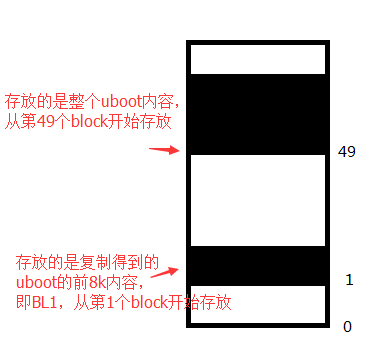
(3)完整代码分析
#定义SD卡设备,应该根据实际的设备信息进行修改 reader_type1="/dev/sdb" reader_type2="/dev/mmcblk0" #如果没有参数,则显示帮助信息 if [ -z $1 ] then echo "usage: ./sd_fusing.sh <SD Reader's device file>" exit 0 fi #判断SD卡的设备类型,然后定义四个分区 if [ $1 = $reader_type1 ] then partition1="$11" # $1=/dev/sdb,所以partition1=/dev/sdb1 partition2="$12" partition3="$13" partition4="$14" elif [ $1 = $reader_type2 ] then partition1="$1p1" partition2="$1p2" partition3="$1p3" partition4="$1p4" else #不能识别SD卡设备 echo "Unsupported SD reader" exit 0 fi #判断设备是否存在,且是否是块设备 if [ -b $1 ] then echo "$1 reader is identified." else echo "$1 is NOT identified." exit 0 fi # # make partition,开始进行SD卡分区 echo "make sd card partition" echo "./sd_fdisk $1" # $1=/dev/sdb #调用sd_fdisk工具对sd卡进行分区,并生成sd_mbr.dat文件 ./sd_fdisk $1 #将sd_mbr.dat文件(即MBR)写进sd卡0扇区 dd iflag=dsync oflag=dsync if=sd_mbr.dat of=$1 rm sd_mbr.dat # # format,以下是什么意思? umount $partition1 2> /dev/null umount $partition2 2> /dev/null umount $partition3 2> /dev/null umount $partition4 2> /dev/null echo "mkfs.vfat -F 32 $partition1" mkfs.vfat -F 32 $partition1 #建立一个fat32分区,即sdb1 #echo "mkfs.ext2 $partition2" #mkfs.ext2 $partition2 #echo "mkfs.ext2 $partition3" #mkfs.ext2 $partition3 #echo "mkfs.ext2 $partition4" #mkfs.ext2 $partition4 # # mount #umount /media/sd 2> /dev/null #mkdir -p /media/sd #echo "mount -t vfat $partition1 /media/sd" #mount -t vfat $partition1 /media/sd # #<BL1 fusing> bl1_position=1 #定义uboot的扇区位置 uboot_position=49 #将uboot的BL1(前8K)和uboot的校验和(uboot的前16字节)烧录进SD卡的1扇区 echo "BL1 fusing" ./mkbl1 ../uboot_inand.bin SD-bl1-8k.bin 8192 dd iflag=dsync oflag=dsync if=SD-bl1-8k.bin of=$1 seek=$bl1_position #烧录 rm SD-bl1-8k.bin #将整个uboot烧录进SD卡的uboot_position=49扇区 #<u-boot fusing> echo "u-boot fusing" dd iflag=dsync oflag=dsync if=../uboot_inand.bin of=$1 seek=$uboot_position #烧录成功信息提示 #<Message Display> echo "U-boot image is fused successfully." echo "Eject SD card and insert it again."三、分析sd_fdisk.c文件
sd_fdisk.c文件经过编译,得到sd_fdisk这个可执行程序,它主要用来生成分区表的?
讯享网# # make partition,开始进行SD卡分区 echo "make sd card partition" echo "./sd_fdisk $1" # $1=/dev/sdb #调用sd_fdisk工具对sd卡进行分区,并生成sd_mbr.dat文件 ./sd_fdisk $1 #将sd_mbr.dat文件(即MBR)写进sd卡0扇区 dd iflag=dsync oflag=dsync if=sd_mbr.dat of=$1 rm sd_mbr.dat #
对一个SD卡进行分区,只要将分区表写入SD卡0扇区即可?
关于sd_fdisk.c文件的分析,见博客一个格式化分区SD卡的c程序注释。
另外分析发现这个sd_fdisk.c文件里面,只是给SD卡制作了一个10M的fat32分区,导致后面缺少一些system.img等镜像时,还要在uboot里面执行“fdisk -c 0”来再次做一次分区。
这里都是操作扇区的,为何要制作fat32分区,是因为dd命令与分区有关联?
四、分析C110-EVT1-mkbl1.c文件
4.1 代码分析
该文件与mkv210_image.c功能类似,用于读取uboot.bin的前8KB并计算其校验和,构成BL1。
文件代码如下,代码分析参考mkv210_image.c文件详解。
/* * Copyright (c) 2010 Samsung Electronics Co., Ltd. * http://www.samsung.com/ * * This program is free software; you can redistribute it and/or modify * it under the terms of the GNU General Public License version 2 as * published by the Free Software Foundation. */ #include <stdio.h> #include <string.h> #include <stdlib.h> int main (int argc, char *argv[]) { FILE *fp; char *Buf, *a; int BufLen; int nbytes, fileLen; unsigned int checksum; int i; // if (argc != 4) { printf("Usage: mkbl1 <source file> <destination file> <size> \n"); return -1; } // BufLen = atoi(argv[3]); Buf = (char *)malloc(BufLen); memset(Buf, 0x00, BufLen); // fp = fopen(argv[1], "rb"); if( fp == NULL) { printf("source file open error\n"); free(Buf); return -1; } fseek(fp, 0L, SEEK_END); fileLen = ftell(fp); fseek(fp, 0L, SEEK_SET); if ( BufLen > fileLen ) { printf("Usage: unsupported size\n"); free(Buf); fclose(fp); return -1; } nbytes = fread(Buf, 1, BufLen, fp); if ( nbytes != BufLen ) { printf("source file read error\n"); free(Buf); fclose(fp); return -1; } fclose(fp); // a = Buf + 16; for(i = 0, checksum = 0; i < BufLen - 16; i++) checksum += (0x000000FF) & *a++; a = Buf + 8; *( (unsigned int *)a ) = checksum; // fp = fopen(argv[2], "wb"); if (fp == NULL) { printf("destination file open error\n"); free(Buf); return -1; } a = Buf; nbytes = fwrite( a, 1, BufLen, fp); if ( nbytes != BufLen ) { printf("destination file write error\n"); free(Buf); fclose(fp); return -1; } free(Buf); fclose(fp); return 0; }注意到上面代码中的语句:nbytes = fread(Buf, 1, BufLen, fp);
它表示把uboot前8K的内容读取到Buf[0]开始的地方,然后计算校验和并存储在Buf[8]~Buf[11]中。
而mkv210_image.c文件详解中是nbytes = fread(Buf + SPL_HEADER_SIZE, 1, count, fp);
它表示把led.bin的内容读取到Buf[16]开始的地方。
4.2 为何复制8K
复制8k,是因为8k的代码能够完成必要的工作了,尽管可以复制更多,但没必要。
4.3 前8K需完成什么任务
前8K代码需要完成uboot的重定位(之所以要重定位,是因为BL1和BL2的链接地址不同,比如BL1的链接地址为0xd0020010,BL2链接地址为0x23e00000),而完成重定位又需要初始化DDR。
4.4 如果start.S文件没有16字节的占位
上面的C110-EVT1-mkbl1.c文件适用于九鼎的uboot,因为九鼎的uboot的start.S文件开头有16字节的占位。如果你为X210开发板移植其他版本的uboot时,start.S文件中没有16字节的占位,而你又想继续使用三星提供的sd_fusing文件夹进行烧录,则你可以选择下面两个方法之一:
(1)方法1:在start.S文件中头文件包含下面添加16字节的占位
讯享网#include <asm-offsets.h> #include <config.h> #include <version.h> #include <asm/system.h> #include <linux/linkage.h> //添加16字节填充,第一个字必须是0x200=8KB,代表BL1的大小? .word 0x2000 .word 0x0 .word 0x0 .word 0x0 .globl _start _start: b reset ldr pc, _undefined_instruction ldr pc, _software_interrupt ldr pc, _prefetch_abort ldr pc, _data_abort ldr pc, _not_used ldr pc, _irq ldr pc, _fiq
(2)方法2:修改C110-EVT1-mkbl1.c文件
修改后的C110-EVT1-mkbl1.c文件如下所示:
#include <stdio.h> #include <string.h> #include <stdlib.h> int main (int argc, char *argv[]) { FILE *fp; char *Buf, *a, *b; int BufLen; int nbytes, fileLen; unsigned int checksum; int i; // if (argc != 4) { printf("Usage: mkbl1 <source file> <destination file> <size> \n"); return -1; } // BufLen = atoi(argv[3]); Buf = (char *)malloc(BufLen + 16); memset(Buf, 0x00, BufLen + 16); // fp = fopen(argv[1], "rb"); if( fp == NULL) { printf("source file open error\n"); free(Buf); return -1; } fseek(fp, 0L, SEEK_END); fileLen = ftell(fp); fseek(fp, 0L, SEEK_SET); if ( BufLen > fileLen ) { printf("Usage: unsupported size\n"); free(Buf); fclose(fp); return -1; } /* bhc add */ b = Buf + 16; nbytes = fread(b, 1, BufLen, fp); if ( nbytes != BufLen ) { printf("source file read error\n"); free(Buf); fclose(fp); return -1; } fclose(fp); // a = b; for(i = 0, checksum = 0; i < BufLen - 16; i++) checksum += (0x000000FF) & *a++; /* bhc add */ a = Buf; *( (unsigned int *)a ) = 0x2000; a = Buf + 8; *( (unsigned int *)a ) = checksum; // fp = fopen(argv[2], "wb"); if (fp == NULL) { printf("destination file open error\n"); free(Buf); return -1; } a = Buf; nbytes = fwrite( a, 1, BufLen, fp); if ( nbytes != BufLen ) { printf("destination file write error\n"); free(Buf); fclose(fp); return -1; } free(Buf); fclose(fp); return 0; }
版权声明:本文内容由互联网用户自发贡献,该文观点仅代表作者本人。本站仅提供信息存储空间服务,不拥有所有权,不承担相关法律责任。如发现本站有涉嫌侵权/违法违规的内容,请联系我们,一经查实,本站将立刻删除。
如需转载请保留出处:https://51itzy.com/kjqy/100876.html