
讯享网
When you block someone on Instagram, you no longer see that person’s posts, nor will he or she be able to interact with your profile. If you ever want to reverse this decision, though, you can unblock someone on Instagram at any time.
当您在Instagram上阻止某人时,您将不再看到该人的帖子,也将无法与您的个人资料进行交互。 但是,如果您想撤销此决定,则可以随时在Instagram上取消屏蔽某人。
从他或她的Instagram个人资料中取消屏蔽某人 (Unblock Someone From His or Her Instagram Profile)
The easiest way to unblock someone is by visiting that person’s Instagram profile. This works whether you’re using the Instagram app for iPhone or Android, or Instagram on the web.
取消屏蔽某人的最简单方法是访问该人的Instagram个人资料。 无论您是在iPhone或Android上使用Instagram应用程序,还是在网络上使用Instagram,此方法均有效 。

Even if you’ve blocked someone, you can still search for their profile and visit it at any time. So, first, open the profile you want to unblock.
即使您屏蔽了某人 ,您仍然可以搜索其个人资料并随时访问。 因此,首先,打开要取消阻止的配置文件。
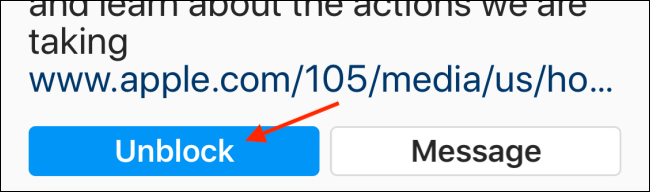
Instead of the “Follow” or “Following” button, you’ll see an “Unblock” button; tap it.
您会看到一个“取消阻止”按钮,而不是“关注”或“关注”按钮; 点击它。
版权声明:本文内容由互联网用户自发贡献,该文观点仅代表作者本人。本站仅提供信息存储空间服务,不拥有所有权,不承担相关法律责任。如发现本站有涉嫌侵权/违法违规的内容,请联系我们,一经查实,本站将立刻删除。
如需转载请保留出处:https://51itzy.com/kjqy/100712.html